Top 5 Personal Knowledge Management Software for Researchers for 2026 (Prices and Free Plans)
Best personal knowledge management software for researchers in 2026: 5 contenders with entry costs and free tiers. Every pick gets a straight assessment.

- Editor's choiceRoam Research
Networked thought and daily notes
Starts atSee websiteVisit roamresearch.comFull review - Great alternative
 Notion
All-in-one workspace and databases
Starts at$10 per member a monthVisit notion.soFull review - Also consider
 Evernote
Fast capture and organization
Starts atSee websiteVisit evernote.comFull review
Direct answer
Start with Roam Research if you need networked thought and daily notes. Listed starting prices: Notion from $10 per member a month and Obsidian from $4 per user per month. Look at Notion for all-in-one workspace and databases, and at Evernote for fast capture and organization. Prices, free plans and limits for all 5 tools follow.
TL;DR:
- Roam Research sits first on this list: networked thought and daily notes.
- What to know about Notion first: can feel heavy for simple notes.
- Notion, Evernote, Obsidian: these are the 3 tools out of 5 that offer a free plan.
- The cheapest monthly starting price in the list is $4 per user per month, offered by Obsidian.
Last checked November 2026. Prices and plan details were read from the vendors' own pages in November 2026; vendors change plans often, so confirm the current price on the vendor site before you buy.
Quick comparison
| Tool | Best for | Starts at | Free plan? | |
|---|---|---|---|---|
| Roam Research | Networked thought and daily notes | See website | Not stated | Visit |
| Notion | All-in-one workspace and databases | $10 per member a month | Yes | Visit |
| Evernote | Fast capture and organization | See website | Yes | Visit |
 Logseq | Open-source privacy-first knowledge base | See website | Not stated | Visit |
 Obsidian | Linked notes in local files | $4 per user per month | Yes | Visit |
Personal Knowledge Management Software for Researchers profiles
Choosing personal knowledge management software for researchers usually comes down to price, fit and limits. This LinkVetted guide sets 5 tools side by side on those three points, with the facts kept short and checkable.
Roam Research
Best for: Networked thought and daily notes
Roam Research is designed for networked thought and daily notes. Roam Research is a note-taking tool for networked thought, built to link related ideas as you write. For everyday use, if you prefer a more conventional editor or open-source tooling, Logseq or Obsidian may be simpler.
The main drawbacks: Not a reference manager.
Roam Research has a distinct workflow that may take time to learn, and it does not manage citations or PDF libraries. In practice, choose Roam when networked thinking is central to your process. This comparison lists no price for Roam Research; ask the vendor. Free plan details: Not stated.
- Local data storage choice
- Live collaboration
- Ramp-up time for newcomers
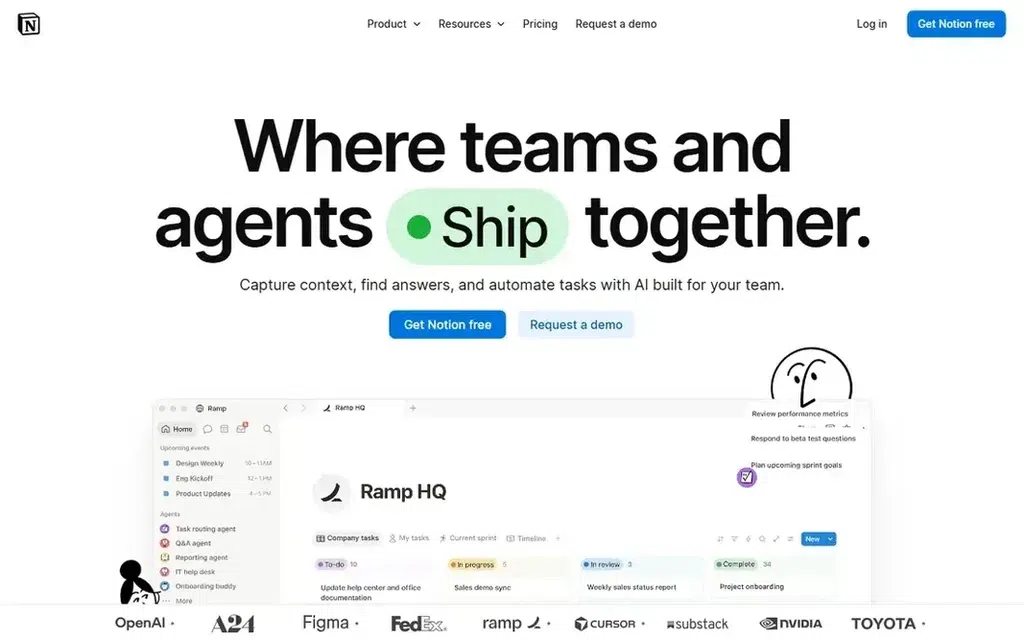
Notion is a good fit for all-in-one workspace and databases. Notion is an AI workspace for notes, databases, and project tracking.
Honest limits: Data lives in the cloud.
Notion keeps content in the cloud and can become complicated as databases multiply. Researchers can build literature databases, task boards, and writing hubs in one place, and the system supports collaboration with others. Entry price for Notion: $10 per member per month. Notion includes a free tier.
- Team collaboration
- AI search across apps
- Can feel heavy for straightforward notes
In short, Evernote is for fast capture and organization. Evernote is a note-taking app that helps capture and prioritize ideas, projects, and to-do lists.
Downsides: Cloud-dependent.
Beyond that, choose Evernote for straightforward, dependable capture and lists. Also, the app emphasizes capture and organization over networked thinking. Evernote does not show a starting price in this comparison, so check the vendor site for current pricing. You can start on Evernote without paying.
- To-do and project lists
- Quick note capture
- Less suited to linked thought
Choose Logseq for open-source privacy-first knowledge base. Logseq is a privacy-first, open-source product for knowledge management and collaboration.
Trade-offs to know: Fewer built-in research features.
The project is community-driven and focuses on knowledge management instead of citation handling. Its ecosystem is smaller than that of mainstream apps, which may matter if you depend on numerous integrations. Logseq does not show a starting price in this comparison, so check the vendor site for current pricing. Trial and free access: Not stated.
- Open-source and privacy-first
- Outliner-based notes
- Smaller ecosystem

Obsidian serves linked notes in local files. Choose Obsidian when file ownership and linking matter most. From a buyer's view, Obsidian does not run citations or PDF libraries on its own.
So you will likely pair it with a reference tool. Obsidian is a note-taking app that stores your notes as local files and emphasizes linking ideas together. Obsidian cost at the entry level: $4 per user per month. You can start on Obsidian without paying.
Limits to weigh: Sync needs setup.
- Adaptable for long projects
- Plain-text files you control
- No built-in citation manager
How the list was put together
Pricing pages, product documentation and feature lists were the main sources, and every entry carries at least one honest drawback. Where a price is missing, the vendor does not list one publicly or ties it to a quote. Always confirm before budgeting. Tools are placed by general fit for personal knowledge management software for researchers, with price clarity and free access as tie-breakers. A different team can reasonably rank them differently.
Pre-purchase checklist
- Ask Roam Research, Evernote and Logseq for a written quote, since no starting price is shown.
- Check what the free option really includes: Notion, Evernote and Obsidian offer a free plan, and usage caps differ.
- Before choosing Roam Research, weigh its main limit: ramp-up time for newcomers.
- Confirm you can export your data from Evernote, so leaving later does not mean losing records.
- Ask Logseq about contract length, onboarding fees and user minimums before you sign.
FAQ
Is Roam Research the right pick for everyone comparing personal knowledge management software for researchers?
No single tool suits every team. Roam Research comes first because it fits networked thought and daily notes, while Notion suits all-in-one workspace and databases and Evernote suits quick capture and organization. Match the tool to your own size, budget and workflow before deciding.
Which options for personal knowledge management software for researchers have a free plan?
Notion, Evernote and Obsidian offer a free plan in this list. Free plans usually cap users, projects or features, so check the limits on the vendor page.
Which tool is a good match for networked notes?
For most readers this guide would start with Roam Research, built for networked thought and daily notes. Notion is the alternative for all-in-one workspace and databases, and Evernote for fast capture and organization. The right answer depends on budget and workflow.
Can I try these tools before paying?
Often, yes. Notion, Evernote and Obsidian have a free plan. Use your own data and a real task during the test, and check what the free tier or trial limits before you rely on it. Each of the 5 options in this personal knowledge management software for researchers guide has its own card above with the price, free plan and limits.
How are the tools for personal knowledge management software for researchers ordered?
The order follows typical fit for personal knowledge management software for researchers, with Roam Research first and Obsidian last, then price clarity and free access. It is editorial judgement, not a score, so another team could rank the tools differently.
Sources
- https://roamresearch.com
- https://www.notion.so
- https://evernote.com
- https://logseq.com
- https://obsidian.md