Choosing SCORM Authoring Tools for Instructional Designers in 2026: 5 Options Compared
Searching for the best SCORM authoring tools for instructional designers? Here are 5 options with prices and free plans. Real limits included. No hype.
- Editor's choice
 Elucidat
Frontline training with AI-assisted authoring
Starts at$4 per user a monthVisit elucidat.comFull review - Great alternative
 iSpring Suite
PowerPoint-based SCORM course authoring
Starts atSee websiteVisit ispringsolutions.comFull review - Also consider
 DominKnow
Teams managing content in a LCMS
Starts atSee websiteVisit dominknow.comFull review
Direct answer
For frontline training with AI-assisted authoring, Elucidat is where this list starts. iSpring Suite fits PowerPoint-based SCORM course authoring; DominKnow fits teams managing content in a LCMS. Listed starting prices: Elucidat from $4 per user a month and Articulate Storyline from $1,749 per seat a year. All 5 tools are compared below on price, free plan and limits.
TL;DR:
- Elucidat is the opening pick, best for frontline training with AI-assisted authoring.
- The lowest published monthly entry price here is $4 per user per month, from Elucidat.
- For complicated, highly interactive custom courses, Articulate Storyline is worth a look.
- The main caution on iSpring Suite: tied to the PowerPoint workflow.
Last checked November 2026. Prices and plan details were read from the vendors' own pages in November 2026; vendors change plans often, so confirm the current price on the vendor site before you buy.
Quick comparison
| Tool | Best for | Starts at | Free plan? | |
|---|---|---|---|---|
| Elucidat | Frontline training with AI-assisted authoring | $4 per user a month | Not stated | Visit |
| iSpring Suite | PowerPoint-based SCORM course authoring | See website | Not stated | Visit |
| DominKnow | Teams managing content in a LCMS | See website | Free trial | Visit |
 H5P | Reusable interactive HTML5 content | See website | Not stated | Visit |
| Articulate Storyline | Complicated, highly interactive custom courses | $1,749 per seat a year | Free trial | Visit |
Tool-by-tool breakdown
Short on time? The summary and table above give the quick view of 5 SCORM authoring tools for instructional designers, and the profiles that follow give the detail behind each entry.
In short, Elucidat is for frontline training with AI-assisted authoring. Elucidat, now presented as Create, is a browser-based authoring product targeted at AI-powered training and course creation for frontline teams. Its strengths sit in structured, template-driven production, so designers wanting granular control over custom logic may prefer Storyline or Captivate.
Trade-offs to know: Narrower fit for academic course design.
Choose Elucidat when collaborative, AI-assisted creation for frontline audiences is the primary goal. More specifically, teams with heavy academic or simulation needs should weigh alternatives. Elucidat cost at the entry level: $4 per user per month. Free options: Not stated.
- Browser-based collaborative authoring
- Centred on frontline team training
- Less control over low-level interaction logic
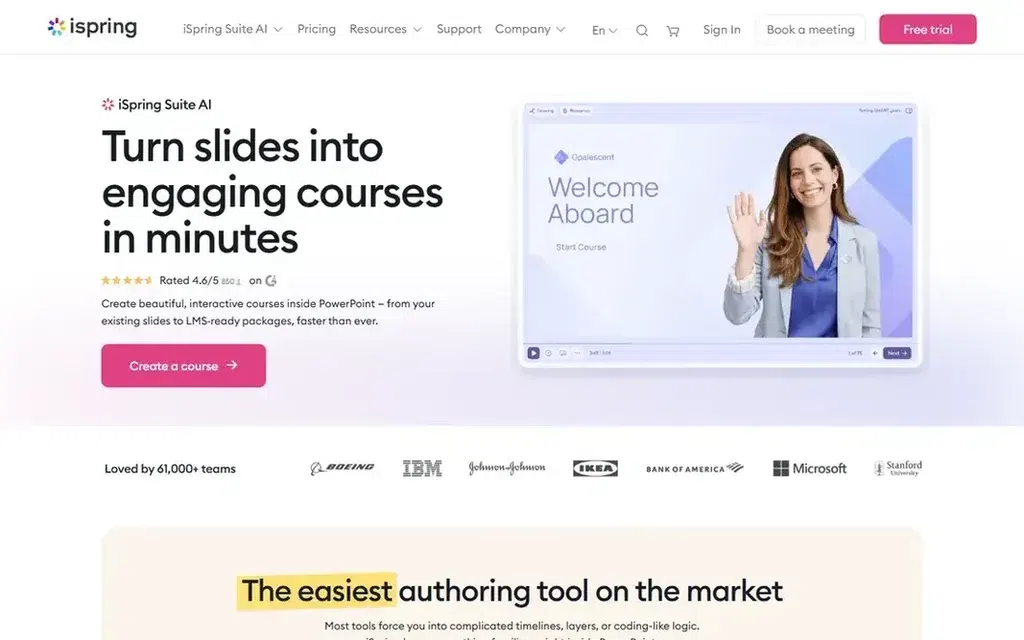
Think of iSpring Suite for PowerPoint-based SCORM course authoring. Pick iSpring Suite when speed, familiarity with PowerPoint and straightforward SCORM output are the priorities. iSpring Suite is an authoring toolkit that lets designers build professional-looking, SCORM-ready courses right in PowerPoint, adding quizzes, video tutorials and role-plays from a single tool.
Pricing for iSpring Suite is not stated here, so ask the vendor for current figures. Free options: Not stated.
Downsides: Less suited to elaborate custom interactions.
- Video tutorials and role-plays
- Builds quizzes
- Tied to the PowerPoint workflow
In short, DominKnow is for teams managing content in a LCMS. dominKnow is a LCMS and e-learning authoring tool, combining course creation with learning content management capabilities.
Downsides: Broader scope than single-author needs.
The platform orientation toward managed content makes it relevant for organizations scaling their learning operations. Solo designers with straightforward needs may find it heavier than necessary. DominKnow does not show a starting price in this comparison, so check the vendor site for current pricing. On free options: Free trial.
- Geared toward structured learning content operations
- Merges authoring with content management
- Setup demands more planning
H5P is aimed squarely at reusable interactive HTML5 content. H5P is not a full course-authoring suite, so designers needing complete SCORM-packaged course builds will generally combine it with another tool. It also relies on a hosting site that supports H5P.
H5P is an open framework for creating and sharing rich HTML5 interactive content. It works in a web browser on a site that supports it. Pick H5P when light, shareable interactive components are the goal instead of end-to-end course production. Pricing for H5P is not stated here, so ask the vendor for current figures. Free plan details: Not stated.
Downsides: Fewer full course-authoring features.
- Produces shareable interactive content
- Content can be reused across sites
- Needs a supporting website or system
Articulate Storyline
Best for: Complicated, highly interactive custom courses

Articulate Storyline is built with complicated, highly interactive custom courses in mind. Articulate Storyline is a desktop authoring application known for building richly interactive courses with triggers, variables and branching scenarios. Also, the tradeoff is complexity: Storyline rewards practice and may slow down designers who only need straightforward, linear content.
Pick Storyline when interaction depth and scenario design matter more than speed of assembly. Teams producing substantial workplace training commonly treat it as their primary authoring environment. Articulate Storyline pricing: $1,749 per seat per year. Free options: Free trial.
Highlights: layered course design. Limits to weigh: Heavier than straightforward slide-based tools.
- Suited to custom
- Part of the broader Articulate product
- Learning curve for newer designers
How we compared the tools
The comparison looks at four things: starting price, free access, how well the feature set matches SCORM authoring tools for instructional designers, and the main limit of each tool. Prices and plan limits come from vendor pages and can change, so confirm them on the vendor site before you buy. We ordered the tools by general fit, then by how clearly pricing is shown, then by free access. A buyer with unusual needs may reorder them.
Pre-purchase checklist
- Confirm the entry price on the vendor page. For iSpring Suite, DominKnow and H5P that means a quote rather than a fixed price.
- Use real work to test the free trial from DominKnow and Articulate Storyline, rather than a demo project.
- Read the limits listed for Elucidat first: narrower fit for academic course design.
- Total up the real monthly cost of iSpring Suite, including add-ons, extra users and usage-based fees.
- Run a one or two week pilot of Articulate Storyline with the people who will use it every day.
FAQ
Do these tools publish their prices?
Not all of them. iSpring Suite, DominKnow and H5P publish no starting price, so expect a quote request for those. The rest, Elucidat included, show a starting price, though seats and billing terms still change the final cost.
Is Elucidat the right pick for everyone comparing SCORM authoring tools for instructional designers?
No single tool suits every team. Elucidat comes first because it fits frontline training with AI-assisted authoring, while iSpring Suite suits PowerPoint-based SCORM course authoring and DominKnow suits teams managing content in an LCMS. Match the tool to your own size, budget and workflow before deciding.
Can I try these tools before paying?
Often, yes. DominKnow and Articulate Storyline offer a free trial. Use your own data and a real task during the test, and check what the free tier or trial limits before you rely on it. For the full picture, the cards above cover all 5 entries of this SCORM Authoring tools for Instructional designers list, including price, free plan and limits.
What should instructional designers check before buying?
Confirm SCORM version support, LMS import behavior, responsive output, collaboration features and how interactions are authored. Testing a sample course in your own LMS is a practical final check.
Which SCORM authoring tool is a good match for beginners?
For most readers this guide would start with Elucidat, built for frontline training with AI-assisted authoring. iSpring Suite is the alternative for PowerPoint-based SCORM course authoring, and DominKnow for teams managing content in a LCMS. The right answer depends on budget and workflow.
How are the tools for SCORM authoring tools for instructional designers ordered?
Elucidat sits first and Articulate Storyline last because the order follows typical fit for SCORM authoring tools for instructional designers, then price clarity and free access. It is a judgement call, so read each profile for fit and limits.
Sources
- https://www.elucidat.com
- https://www.ispringsolutions.com/ispring-suite
- https://www.dominknow.com
- https://h5p.org
- https://articulate.com