The 6 Best Yard Design Software in 2026, Ranked
Best yard design software: 6 contenders ranked by fit, with entry costs and free tiers. Price notes and drawbacks come with each one. Compare quickly.
- Editor's choice
 Home Designer
DIY floorplans with 3D visualization
Starts atSee websiteVisit homedesignersoftware.comFull review - Great alternative
 Chief Architect
Residential and remodeling design work
Starts atSee websiteVisit chiefarchitect.comFull review - Also consider
 Planner 5D
Simple DIY home and yard planning
Starts at$19.99 a monthVisit planner5d.comFull review
Direct answer
If you need DIY floorplans with 3D visualization, Home Designer is the first tool to look at here. Listed starting prices: Planner 5D from $19.99 a month, Structure Studios VIP3D from $84 per user per month and DynaSCAPE from $48 a month. If your case is different, Chief Architect suits residential and remodeling design work and Planner 5D suits simple DIY home and yard planning. The full list of 6 tools follows, with prices and free plan facts.
TL;DR:
- Top of the list is Home Designer, which targets DIY floorplans with 3D visualization.
- Planner 5D stands alone as the one tool in this list with a free plan.
- Planner 5D has the lowest monthly starting price in this list: $19.99 per month.
- DynaSCAPE fits design plus business management for firms.
Last checked November 2026. Prices and plan details were read from the vendors' own pages in November 2026; vendors change plans often, so confirm the current price on the vendor site before you buy.
Quick comparison
| Tool | Best for | Starts at | Free plan? | |
|---|---|---|---|---|
| Home Designer | DIY floorplans with 3D visualization | See website | Not stated | Visit |
| Chief Architect | Residential and remodeling design work | See website | Not stated | Visit |
| Planner 5D | Simple DIY home and yard planning | $19.99 a month | Yes | Visit |
 Vectorworks Landmark | Professional 3D landscape and documentation | See website | Not stated | Visit |
| Structure Studios VIP3D | Pools and outdoor living spaces | $84 per user per month | Free trial | Visit |
 DynaSCAPE | Design plus business management for businesses | $48 a month | Free trial | Visit |
Yard Design Software profiles
If you are comparing yard design software, this page covers 6 tools in one place: what each is best for, what it costs to start, whether it has a free plan, and the main limit to know about.
Choose Home Designer for DIY floorplans with 3D visualization. For homeowners planning a remodel that touches the yard, for example a new deck or patio door, it helps link indoor changes with outdoor space.
Its focus is the home rather than the landscape, so dedicated yard tools are restricted compared to landscape-specific products. As for the details, professional businesses needing site documentation should look elsewhere. Home Designer shows no starting price here, so confirm the cost on the vendor site. On free options: Not stated.
Where it falls short: DIY scope limits professional documentation.
- From the creators of Chief Architect
- DIY focus for home and remodeling
- Landscape features are secondary
For residential and remodeling design work, Chief Architect is a natural candidate. Yard planning commonly links to the house itself, and this tool is handy when outdoor spaces must coordinate with the building, additions or remodels. For a pure garden or patio layout, a landscape-oriented tool may be more direct.
For everyday use, choose Chief Architect when the home and its surroundings have to be designed together. Also, designers handling whole-property projects can keep home and site work in a professional environment. It is not a dedicated landscape product, so yard-specific features like plant libraries or irrigation planning are not its focus. No starting price is listed for Chief Architect here; confirm pricing on the vendor site. On free options: Not stated.
What to check first: Professional depth may overwhelm casual users.
- Handles interiors and remodeling
- Professional home design software
- Not landscape-specific
Planner 5D is built with easy DIY home and yard planning in mind. Planner 5D is described as an advanced yet easy-to-use 2D and 3D house design tool for creating home designs. Its simplicity makes it approachable for homeowners who want to sketch a yard layout, test furniture or patio placement, and see the lead to 3D without a steep ramp-up time.
It is a general design tool instead of a professional landscape system, so in-depth planting, irrigation and construction documents are not its strength. Beyond that, if you have to hand plans to a contractor for a complicated build, a professional product is a better fit. Planner 5D pricing: $19.99 per month. Planner 5D offers a free plan.
Points against: Not designed for construction documentation.
- Deals with home design alongside outdoor space
- Approachable for beginners
- Less depth for professional landscape work
For professional 3D landscape and documentation, Vectorworks Landmark is a natural candidate. Vectorworks Landmark is a 3D landscape design product aimed at professional projects. That makes it a solid fit for landscape architects and design businesses that require to move from concept through construction documents inside one environment instead of stitching multiple tools together.
Worth adding: the trade-off is complexity. A tool including modeling, irrigation and documentation asks more of new users than a straightforward planner, so expect time to learn the interface. As for the details, if you only need a fast visual sketch of a backyard, a lighter DIY choice may serve you better. Choose Landmark when professional deliverables and coordinated documentation matter. Vectorworks Landmark shows no starting price here, so confirm the cost on the vendor site. Trial and free access: Not stated.
Trade-offs to know: Pitched at professionals, not casual DIY.
- All-in-one 3D landscape workflow
- Aimed at presentation-quality output
- Deeper ramp-up time for beginners
Structure Studios VIP3D
Best for: Pools and outdoor living spaces
Structure Studios VIP3D targets pools and outdoor living spaces. For contractors and designers whose projects center on pools, patios and outdoor living areas, the tool matches the shape of that work closely.
Points against: Professional output needs learning time.
On top of that, the pool and outdoor-living emphasis means a plain garden layout may not justify the tool. The starting price for Structure Studios VIP3D: $84 per user per month. Free options: Free trial.
- Produces 2D plans and photoreal presentations
- Aims at build-ready designs
- Emphasis on pools may not fit every yard
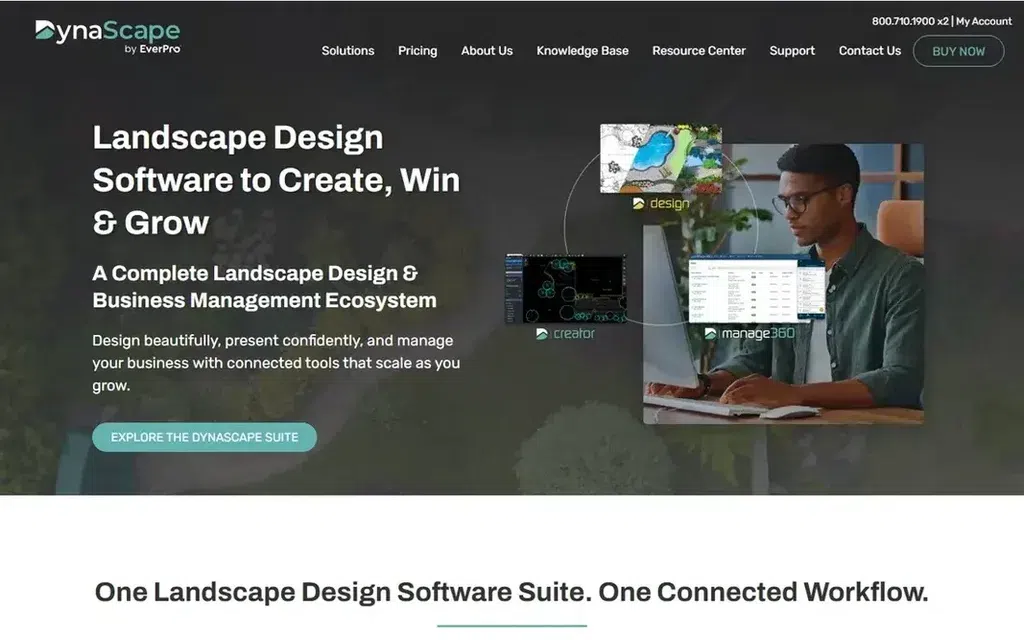
DynaSCAPE targets design plus business management for businesses. DynaSCAPE gives you landscape software for both design and business management, pitched at the professional landscape industry. Its vendor positions it as a way for landscape businesses to scale.
For businesses that want design work and daily business organization handled in related tools, this combination can cut the number of separate systems a team juggles. Since it leans toward professional businesses, homeowners planning a single yard project may find it more than needed. Beyond that, if you only need drawing tools, a design-focused product may be more straightforward. DynaSCAPE pricing: $48 per month. Trial and free access: Free trial.
Points against: Professional focus narrows the audience.
- Aimed at the professional landscape industry
- Merges design with business management
- Business features may be excess for hobbyists
How we chose
Selection started from tools commonly considered for yard design software, then narrowed to 6 that have clear pricing information or a clear quote process. Where a price is missing, the vendor does not list one publicly or ties it to a quote. Always confirm before budgeting. Position on the page reflects fit for a typical buyer first, with price clarity and free access breaking ties. Treat it as a guide, not a ruling.
What to check before you buy
- Get a written quote from Home Designer, Chief Architect and Vectorworks Landmark; the list shows no starting price for them.
- Test the free plan from Planner 5D against your real workload before relying on it.
- Use real work to test the free trial from Structure Studios VIP3D and DynaSCAPE, rather than a demo project.
- Read the limits listed for Home Designer first: Landscape features are secondary.
- Price Structure Studios VIP3D for your actual team size; headline prices rarely include add-ons or overage.
- Ask whether Home Designer integrates with your current software, and whether that comes standard or as an add-on.
FAQ
Do these tools publish their prices?
Not all of them. Home Designer, Chief Architect and Vectorworks Landmark publish no starting price, so expect a quote request for those. The rest, Planner 5D included, show a starting price, though seats and billing terms still change the final cost.
Which tool is a good match for pool and outdoor living design?
For most readers this guide would start with Home Designer, built for DIY floorplans with 3D visualization. Chief Architect is the alternative for residential and remodeling design work, and Planner 5D for simple DIY home and yard planning. The right answer depends on budget and workflow.
What is the cheapest option for yard design software in this list?
On published monthly entry prices, Planner 5D is the lowest here at $19.99 per month. Entry price is only part of the cost, because seats, add-ons and billing terms can change the total.
Can I try these options before paying?
Often, yes. Planner 5D has a free plan and Structure Studios VIP3D and DynaSCAPE offer a free trial. Use your own data and a real task during the test, and check what the free tier or trial limits before you rely on it.
Which options for yard design software have a free plan?
Planner 5D is the only tool in this list with a free plan. Free plans usually cap users, projects or features, so check the limits on the vendor page. Several others offer a trial instead.
Sources
- https://www.homedesignersoftware.com
- https://www.chiefarchitect.com
- https://planner5d.com
- https://www.vectorworks.net/en-US/landmark
- https://www.structurestudios.com
- https://www.dynascape.com