The 6 Best Web Font Marketplaces Software for Startups in 2026, Ranked
6 products for the best web font marketplaces software for startups, ranked by fit, with starting costs and free tiers. Every tool lists pros and cons. No hype.
- Editor's choiceFont Squirrel
Legitimately free fonts on a tight budget
Starts atSee websiteVisit fontsquirrel.comFull review - Great alternative
 Envato Elements
Bundling fonts with other creative assets
Starts at$16.50 a monthVisit elements.envato.comFull review - Also considerMonotype
Centralized licensing and global deployment
Starts atSee websiteVisit monotype.comFull review
Direct answer
This list puts Font Squirrel first for legitimately free fonts on a tight budget. Listed starting prices: Envato Elements from $16.50 a month. If your case is different, Envato Elements suits bundling fonts with other creative assets and Monotype suits centralized licensing and global deployment. All 6 tools are compared below on price, free plan and limits.
TL;DR:
- Font Squirrel is the opening pick, best for legitimately free fonts on a tight budget.
- Neither Font Squirrel nor YouWorkForThem, nor any of the other 4 tools, has a permanent free plan; trials and quotes are the norm.
- YouWorkForThem fits teams comparing choices in this category.
- For the cheapest start, look at Envato Elements: $16.50 per month.
Last checked November 2026. Prices and plan details were read from the vendors' own pages in November 2026; vendors change plans often, so confirm the current price on the vendor site before you buy.
Quick comparison
| Tool | Best for | Starts at | Free plan? | |
|---|---|---|---|---|
| Font Squirrel | Legitimately free fonts on a tight budget | See website | Not stated | Visit |
| Envato Elements | Bundling fonts with other creative assets | $16.50 a month | Not stated | Visit |
| Monotype | Centralized licensing and global deployment | See website | Not stated | Visit |
| Adobe Fonts | Teams already inside Adobe workflows | See website | Not stated | Visit |
| MyFonts | Buying specific webfonts and classics | See website | Not stated | Visit |
| YouWorkForThem | Teams comparing choices in this category | See website | Not stated | Visit |
Web Font Marketplaces Software for Startups profiles
This LinkVetted guide covers 6 web font marketplaces software for startups. Each profile lists a starting price, free plan details, strengths and drawbacks, so you can drop poor fits quickly.
Font Squirrel
Best for: Legitimately free fonts on a tight budget
In short, Font Squirrel is for legitimately free fonts on a tight budget. Font Squirrel scours the internet for high-quality, legitimately free fonts and gives you thousands of them for download. It cuts the licensing risk that includes grabbing fonts from random sources.
Trade-offs to know: Fewer premium and custom faces.
Startups ready to invest in a signature typeface should move to a premium marketplace whereas keeping Font Squirrel for utility and supporting text. The free catalog is naturally smaller and less distinctive than premium marketplaces, so branding may feel less unique. This comparison lists no price for Font Squirrel; ask the vendor. Free options: Not stated.
- Quality-checked free fonts
- Straightforward downloads
- Smaller selection than premium shops
Envato Elements serves bundling fonts with other creative assets. Startups building a distinctive brand identity around custom or high-craft typefaces should supplement it with a dedicated font marketplace.
Reasons to shortlist it: AI tools for content creation.
Watch-outs: Font depth varies by category. Also, Envato Elements positions itself around AI tools and unlimited creative assets for professional and commercial use, with fonts sitting alongside graphics, templates and other design resources. It is not a dedicated type foundry marketplace, so the depth of serious typography is narrower than specialist font sources. Envato Elements starts at: $16.50 per month. Trial and free access: Not stated.
- Fonts alongside graphics and templates
- Commercial use covered for assets
- Not a typography specialist
Monotype
Best for: Centralized licensing and global deployment
Monotype targets centralized licensing and global deployment. The enterprise focus can feel heavier than a two-person startup needs, and the breadth may be more than early teams can use.
Drawbacks to consider: Setup can feel heavy for tiny teams.
As for the details, smaller teams wanting fast, straightforward font purchases may prefer lighter marketplaces, then move to a managed licensing system as they grow. Pricing for Monotype is not stated here, so ask the vendor for current figures. Free plan details: Not stated.
- Very large searchable font catalog
- Licensing management tools
- Pitched at bigger organizations
Adobe Fonts
Best for: Teams already inside Adobe workflows
Think of Adobe Fonts for teams already inside Adobe workflows. The primary limit is dependence on the Adobe ecosystem, so teams that avoid Adobe products may find it awkward.
Adobe Fonts shows no starting price here, so confirm the cost on the vendor site. As for free access: Not stated.
Drawbacks to consider: Less control over individual font purchases.
- Large library from leading foundries
- Works across Adobe design tools
- Tied to an Adobe relationship
MyFonts
Best for: Buying specific webfonts and classics
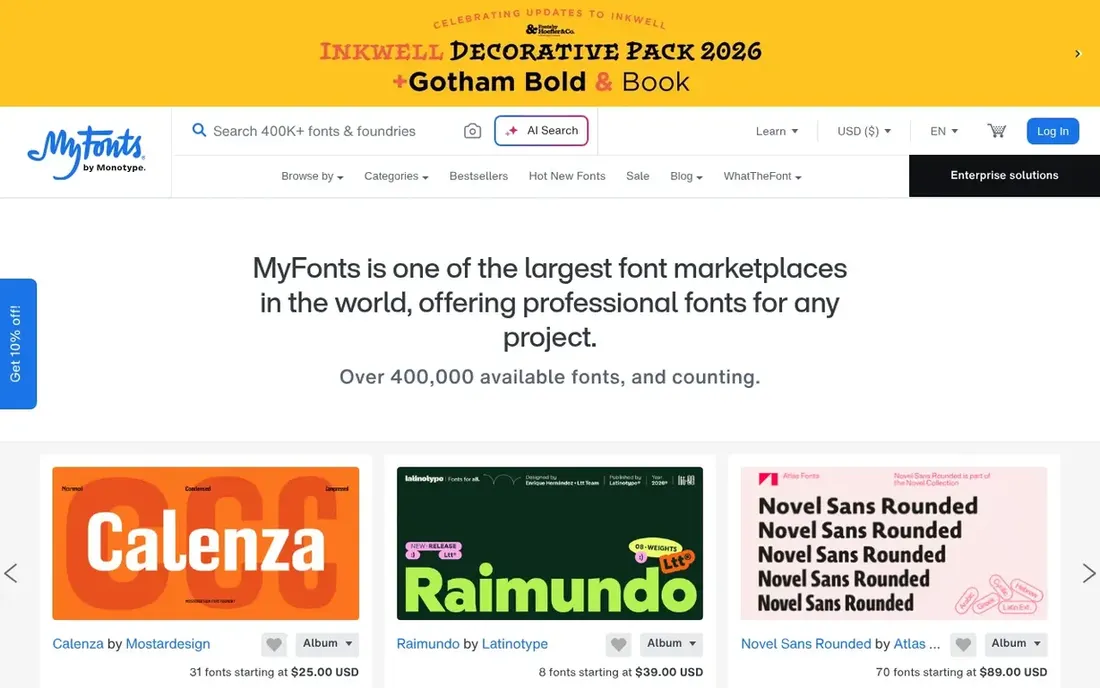
MyFonts is designed for buying specific webfonts and classics. MyFonts is a long-running marketplace for downloading webfonts and desktop fonts, mixing classics for example Baskerville, Futura and Garamond with newer releases.
Trade-offs to know: Licenses purchased per font.
Since licenses are bought per font, costs accumulate rapidly when a startup needs multiple weights or families across web and desktop. As for the details, the breadth makes it handy for brand work where a distinctive face matters. Pricing for MyFonts is not stated here, so ask the vendor for current figures. On free options: Not stated.
- Webfont and desktop choices
- Wide catalog across foundries
- Costs add up across a family
YouWorkForThem
Best for: Teams comparing choices in this category
YouWorkForThem is aimed squarely at teams comparing choices in this category. YouWorkForThem gives you a large shop of fonts alongside graphics, stock photos and videos, with a one-time purchase model and no subscription.
YouWorkForThem shows no starting price here, so confirm the cost on the vendor site. On free options: Not stated.
Limits to weigh: No subscription-style library.
- Large font and graphics catalog
- One-time purchase model
- Quality varies across sellers
How we built this list
LinkVetted looked at what each vendor publishes: pricing, plan limits, feature coverage for web font marketplaces software for startups and stated drawbacks. No hands-on testing is claimed. Plan names, prices and limits change often. Treat the figures here as a starting point and verify them with the vendor. The ranking is editorial: typical fit first, then clear pricing, then free access. If your needs are unusual, read the profiles rather than relying on position.
What to confirm before you sign up
- Confirm the entry price on the vendor page. For Font Squirrel, Monotype, Adobe Fonts and others that means a quote rather than a fixed price.
- Read the limits listed for Font Squirrel first: smaller selection than premium shops.
- Ask the daily users to test Envato Elements on a live task before you roll it out to everyone.
- Check how data leaves Font Squirrel: formats, limits and whether exports are available on every plan.
- Ask MyFonts which support channels and response times come with the plan you would buy.
FAQ
Is Font Squirrel the right pick for everyone comparing web font marketplaces software for startups?
No single tool suits every team. Font Squirrel comes first because it fits legitimately free fonts on a tight budget, while Envato Elements suits bundling fonts with other creative assets and Monotype suits centralized licensing and global deployment. Match the tool to your own size, budget and workflow before deciding.
Do startups need premium fonts at all?
Legitimately free sources like Font Squirrel can handle an early website, and licensing risk is low when the source verifies rights. Premium marketplaces become worthwhile when brand differentiation and broader weight ranges matter.
Can I try these tools before paying?
Not by default. None of the tools, from Font Squirrel to YouWorkForThem, lists a free plan or a free trial here, so ask each vendor for a demo before committing.
What is the cheapest option for web font marketplaces software for startups in this list?
On published monthly entry prices, Envato Elements is the lowest here at $16.50 per month. Entry price is only part of the cost, because seats, add-ons and billing terms can change the total. Prices, free plan details and limits for all 6 tools in this web Font marketplaces software for startups roundup sit on the individual cards above.
Do these tools publish their prices?
Not all of them. Font Squirrel, Monotype, Adobe Fonts and others publish no starting price, so expect a quote request for those. The rest, Envato Elements included, show a starting price, though seats and billing terms still change the final cost.
Sources
- https://www.fontsquirrel.com
- https://elements.envato.com
- https://www.monotype.com
- https://fonts.adobe.com
- https://www.myfonts.com
- https://www.youworkforthem.com