Other Process Automation Software in 2026: The 6 Best Options Side by Side
6 tools for the best other process automation software, compared on pricing, free plans and best-fit use. Each listing flags where it falls short. Start here.
- Editor's choice
 Nintex
End-to-end process and workflow automation
Starts atSee websiteVisit nintex.comFull review - Great alternativeBlue Prism
Agentic automation with tested readiness
Starts atSee websiteVisit blueprism.comFull review - Also consider
 Kissflow
Low-code custom enterprise apps
Starts atSee websiteVisit kissflow.comFull review
Direct answer
Nintex is the first pick on this list for end-to-end process and workflow automation. Listed starting prices: UiPath from $25 per month. For a different need, Blue Prism covers agentic automation with tested readiness and Kissflow covers low-code custom enterprise apps. The other 3 tools in the list cover narrower or pricier cases.
TL;DR:
- Nintex sits first on this list: end-to-end process and workflow automation.
- A fair warning about Nintex: feature set may be broad for straightforward tasks.
- For the cheapest start, look at UiPath: $25 per month.
- Only 2 of the 6 tools have a free plan (UiPath, Make), so check the caps.
Last checked November 2026. Prices and plan details were read from the vendors' own pages in November 2026; vendors change plans often, so confirm the current price on the vendor site before you buy.
Quick comparison
| Tool | Best for | Starts at | Free plan? | |
|---|---|---|---|---|
| Nintex | End-to-end process and workflow automation | See website | Free trial | Visit |
| Blue Prism | Agentic automation with tested readiness | See website | Not stated | Visit |
| Kissflow | Low-code custom enterprise apps | See website | Not stated | Visit |
 UiPath | Enterprise business orchestration and automation | $25 per month | Yes | Visit |
 Make | Visual no-code AI workflow automation | See website | Yes | Visit |
 Pega Platform | Enterprise transformation and workflow automation | See website | Not stated | Visit |
Our 6 picks for other process automation software
LinkVetted compared 6 tools for other process automation software. The goal is a practical shortlist: published prices, free plan facts, best-fit use cases and honest limits for every entry.
Nintex was built for end-to-end process and workflow automation. Consider other options when you chiefly need visual integration flows or enterprise-scale orchestration across numerous systems.
As for the details, more straightforward tools may handle single workflows with less setup. No starting price is listed for Nintex here; confirm pricing on the vendor site. As for free access: Free trial.
Watch-outs: Feature set may be wide for straightforward tasks.
- Comes with custom app development
- Includes process management and workflow automation
- Process design can need planning
Blue Prism
Best for: Agentic automation with tested readiness
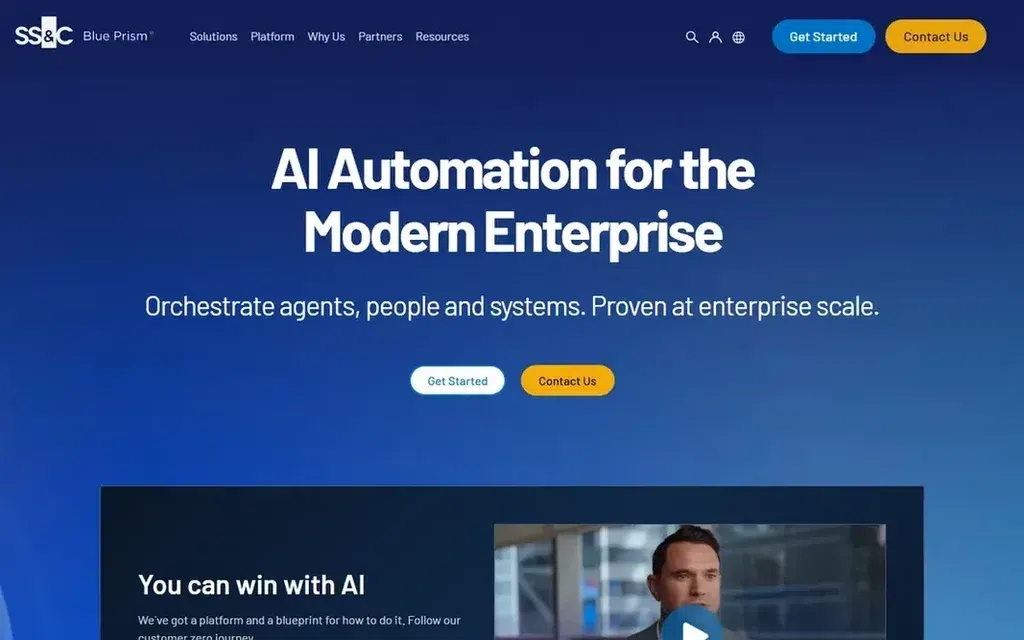
Where Blue Prism fits: agentic automation with tested readiness. Planning and specialist skills can matter when adopting its full range.
What works well: Geared toward business-critical automation.
The product is oriented toward enterprise deployments, so smaller teams may prefer a more straightforward tool. This comparison lists no price for Blue Prism; ask the vendor. Free access: Not stated.
Honest limits: Enterprise orientation may suit larger teams.
- Includes RPA
- Positions agentic automation as trusted and tested
- Feature depth can need specialist skills
In short, Kissflow is for low-code custom enterprise apps. Its homepage concentrates on building custom enterprise apps, automating workflows and improving enterprise efficiency.
The main drawbacks: App building can need some structure.
Kissflow is oriented toward app building and workflow automation, so teams needing deep robotic process automation may look at other systems. Kissflow shows no starting price here, so confirm the cost on the vendor site. Trial and free access: Not stated.
- Automates workflows and builds apps
- No-code choices for business leaders
- May be less suited to deep RPA needs

In short, UiPath is for enterprise business orchestration and automation. The breadth of the system can mean more configuration and governance work at the start.
Where it is weaker: Wide system may need setup effort.
Highlights: Supports AI agents. Its homepage flags secure, compliant outcomes at scale, which recommends a focus on governed automation across enterprise operations. Teams seeking a light, single-purpose workflow tool may find it heavier than needed. Entry price for UiPath: $25 per month. UiPath includes a free tier.
- System spans orchestration and automation
- Emphasizes secure
- Most useful for bigger operations
In short, Make is for visual no-code AI workflow automation. Its homepage describes it as an approachable no-code integration tool.
Trade-offs to know: Complicated flows can need careful design.
Make concentrates on workflow automation and integration, so organizations needing deep process management or enterprise orchestration may prefer other systems. Very complicated flows can call for careful planning. No starting price is listed for Make here; confirm pricing on the vendor site. A free plan is available with Make.
- Supports AI and agentic workflows
- Visually build and scale workflows
- May be less suited to heavy BPM needs
Pick Pega Platform if this describes you: enterprise transformation and workflow automation. The product's enterprise scope can mean a steeper setup and more planning than a focused workflow tool. Look elsewhere if you want a no-code integration builder or a fast low-code app product.
What to check first: Enterprise focus may suit bigger organizations.
In practice, Pega Platform is presented as an AI-powered platform for enterprise transformation. Its homepage says organizations use it to reimagine work by automating workflows, personalizing customer experiences and modernizing legacy systems. This comparison lists no price for Pega Platform; ask the vendor. As for free access: Not stated.
- Pitched at enterprise transformation
- Automates workflows and personalizes experiences
- Wide scope can need dedicated effort
How we compared the tools
The comparison looks at four things: starting price, free access, how well the feature set matches other process automation software, and the main limit of each tool. Plan names, prices and limits change often. Treat the figures here as a starting point and verify them with the vendor. The ranking is editorial: typical fit first, then clear pricing, then free access. If your needs are unusual, read the profiles rather than relying on position.
Before you commit
- Get a written quote from Nintex, Blue Prism, Kissflow and others; the list shows no starting price for them.
- Look at free plan limits closely: UiPath and Make have one, and the caps decide whether it is usable for real work.
- Use real work to test the free trial from Nintex, rather than a demo project.
- Before choosing Nintex, weigh its main limit: feature set may be wide for straightforward tasks.
- Ask UiPath which support channels and response times come with the plan you would buy.
- Confirm you can export your data from Make, so leaving later does not mean losing records.
FAQ
What is the cheapest option for other process automation software in this list?
On published monthly entry prices, UiPath is the lowest here at $25 per month. Entry price is only part of the cost, because seats, add-ons and billing terms can change the total. All 6 picks in this other process automation software comparison list a starting price, free plan details and the main limits on their cards above.
How are the tools for other process automation software ordered?
The order follows typical fit for other process automation software, with Nintex first and Pega Platform last, then price clarity and free access. It is editorial judgement, not a score, so another team could rank the tools differently.
Is Nintex the right pick for everyone comparing other process automation software?
No single tool suits every team. Nintex comes first because it fits end-to-end process and workflow automation, while Blue Prism suits agentic automation with tested readiness and Kissflow suits low-code custom enterprise apps. Match the tool to your own size, budget and workflow before deciding.
How should I choose among enterprise automation platforms?
Start with the process you want to automate and the systems it touches, then match the system's strengths to that require. Request a technical review with each vendor to confirm compatibility before committing.
Can I try these options before paying?
Often, yes. UiPath and Make have a free plan and Nintex offers a free trial. Use your own data and a real task during the test, and check what the free tier or trial limits before you rely on it. For the full picture, the cards above cover all 6 entries of this other process automation software list, including price, free plan and limits.
Which tool is a good match for no-code workflow automation?
The first pick on this list is Nintex, because it suits end-to-end process and workflow automation. Blue Prism is better for agentic automation with tested readiness, and Kissflow for low-code custom enterprise apps. Check price and limits against your own needs before choosing.
Sources
- https://www.nintex.com
- https://www.blueprism.com
- https://kissflow.com
- https://www.uipath.com
- https://www.make.com
- https://www.pega.com