Choosing Landscaping Design Software for Small Studios in 2026: 5 Options Compared
5 best landscaping design software for small studios, with entry costs, free tiers and the buyer each one serves. Short verdicts, no fluff. See which fits.
- Editor's choice
 Lumion
Live rendering and visualization
Starts at$96 named user a monthVisit lumion.comFull review - Great alternative
 Chief Architect
Residential design with landscape context
Starts atSee websiteVisit chiefarchitect.comFull review - Also considerStructure Studios VIP3D
3D outdoor living and pool visualization
Starts at$84 per user per monthVisit structurestudios.comFull review
Direct answer
Lumion is the first pick on this list for live rendering and visualization. Listed starting prices: Lumion from $96 named user a month, Structure Studios VIP3D from $84 per user per month and DynaSCAPE Design from $48 per month. Chief Architect is the stronger choice for residential design with landscape context, while Structure Studios VIP3D suits 3D outdoor living and pool visualization. The remaining 2 options are covered below with prices and limits.
TL;DR:
- Lumion sits first on this list: live rendering and visualization.
- The cheapest monthly starting price in the list is $48 per month, offered by DynaSCAPE Design.
- What to know about Lumion first: rendering only, not a design tool.
- Vectorworks Landmark fits all-in-one landscape design and documentation.
- A permanent free plan is missing from all 5 tools, Lumion and Vectorworks Landmark included; plan for a trial or a premium start.
Last checked November 2026. Prices and plan details were read from the vendors' own pages in November 2026; vendors change plans often, so confirm the current price on the vendor site before you buy.
Quick comparison
| Tool | Best for | Starts at | Free plan? | |
|---|---|---|---|---|
| Lumion | Live rendering and visualization | $96 named user a month | Free trial | Visit |
| Chief Architect | Residential design with landscape context | See website | Not stated | Visit |
| Structure Studios VIP3D | 3D outdoor living and pool visualization | $84 per user per month | Free trial | Visit |
| DynaSCAPE Design | Design plus landscape business management | $48 per month | Free trial | Visit |
 Vectorworks Landmark | All-in-one landscape design and documentation | See website | Not stated | Visit |
The 5 tools in detail
Choosing landscaping design software for small studios usually comes down to price, fit and limits. This LinkVetted guide sets 5 tools side by side on those three points, with the facts kept short and checkable.
Lumion works best for live rendering and visualization. Lumion does not design or draft, so it is a companion instead of a replacement for a landscape system.
More specifically, add it when presentation quality is the bottleneck, not before. Lumion pricing: $96 named user per month. On free options: Free trial.
Drawbacks to consider: not a design tool.
- Suits a concept-to-final-render workflow
- Live rendering speed
- Needs a separate modeling program
Chief Architect targets residential design with landscape context. Chief Architect is professional home design software for residential design, interior design and remodeling. Beyond that, small studios that landscape around houses benefit from modeling the building accurately, since decks, additions and site context shape the planting and hardscape plan.
It is not a dedicated landscape tool, so in-depth planting schedules, irrigation design and terrain-heavy work are weaker than in landscape-specific systems. As for the details, pick it when the house is the center of the project, and pair it with a landscape tool for planting and site detail. No starting price is listed for Chief Architect here; confirm pricing on the vendor site. Free access: Not stated.
Drawbacks to consider: Plant and irrigation tools are restricted.
- Handy when landscapes tie to homes
- Handles interiors and remodeling
- Not landscape-specific
Structure Studios VIP3D
Best for: 3D outdoor living and pool visualization
Structure Studios VIP3D targets 3D outdoor living and pool visualization. Structure Studios VIP3D is 3D pool and landscape design software for creating outdoor living spaces.
Where it falls short: Pool and outdoor living focus may not suit pure planting work.
Structure Studios VIP3D starts at: $84 per user per month. As for free access: Free trial.
- Photoreal visuals for client approval
- Capable 3D outdoor living presentation
- Rich visuals can slow down simple projects
DynaSCAPE Design
Best for: Design plus landscape business management
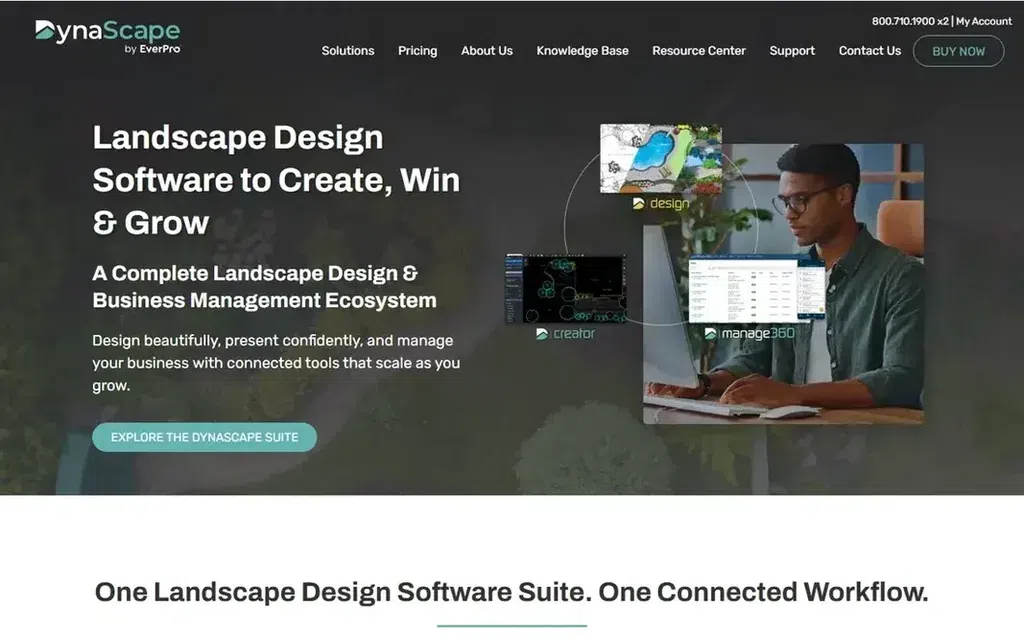
For Design plus landscape business management, DynaSCAPE Design is a natural candidate. For a small studio that wants drawings and daily business organization in one place, that combination cuts the number of systems to maintain and keeps project information closer to the design work. Beyond that, consider it when organization matters as much as drawing speed.
On top of that, the management side brings value primarily as a studio grows. So a very small team may not use all of it. Also, DynaSCAPE Design is landscape software that pairs design tools with business management capabilities, positioned for the professional landscape industry. What you pay to start with DynaSCAPE Design: $48 per month. Free options: Free trial.
Downsides: Business features may be surplus for tiny teams.
- Supports scaling studio operations
- Merges design with business management
- Less emphasis on photoreal rendering
Think of Vectorworks Landmark for all-in-one landscape design and documentation. Because it handles so much ground, the interface and feature depth can overwhelm a solo designer handling straightforward residential work.
Where it is weaker: Wide feature set can feel heavy for straightforward jobs.
Budget time for training. Pricing for Vectorworks Landmark is not stated here, so ask the vendor for current figures. Free options: Not stated.
Where it shines: Made for landscape professionals.
- Capable 3D and 2D workflow in one file
- Includes design, presentation
- Ramp-up time for new users
How we compared the tools
LinkVetted used vendor pricing pages and product documentation as the base, then compared plans, free access and documented limits for 5 tools. Where a vendor does not publish a price, the entry says quote. Where a price depends on seats or billing term, the entry says so. The order reflects how well each tool fits the most common buying scenario for landscaping design software for small studios, then price clarity, then free plan access. It is a starting point, not a verdict.
Questions to settle before buying
- Ask Chief Architect and Vectorworks Landmark for a written quote, since no starting price is shown.
- Take the trial from Lumion, Structure Studios VIP3D and DynaSCAPE Design and push a live task through it before you pay.
- Before choosing Lumion, weigh its main limit: rendering only, not a design tool.
- A short pilot of Vectorworks Landmark with your real workflow tells you more than a feature table.
- Find out what support Structure Studios VIP3D includes on your plan, and whether onboarding help costs extra.
FAQ
Which choice is a good match for landscape design tied to residential architecture?
For most readers this guide would start with Lumion, built for live rendering and visualization. Chief Architect is the alternative for residential design with landscape context, and Structure Studios VIP3D for 3D outdoor living and pool visualization. The right answer depends on budget and workflow.
What is the cheapest option for landscaping design software for small studios in this list?
On published monthly entry prices, DynaSCAPE Design is the lowest here at $48 per month. Entry price is only part of the cost, because seats, add-ons and billing terms can change the total.
Can I try these tools before paying?
Often, yes. Lumion, Structure Studios VIP3D and DynaSCAPE Design offer a free trial. Use your own data and a real task during the test, and check what the free tier or trial limits before you rely on it.
Do these tools publish their prices?
Not all of them. Chief Architect and Vectorworks Landmark publish no starting price, so expect a quote request for those. The rest, Lumion included, show a starting price, though seats and billing terms still change the final cost.
How are the tools for landscaping design software for small studios ordered?
The order follows typical fit for landscaping design software for small studios, with Lumion first and Vectorworks Landmark last, then price clarity and free access. It is editorial judgement, not a score, so another team could rank the tools differently.
Sources
- https://lumion.com
- https://www.chiefarchitect.com
- https://www.structurestudios.com
- https://www.dynascape.com
- https://www.vectorworks.net/en-US/landmark