Best Imposition Software for Digital Printing (2026): 6 Picks Checked on Vendor Pages
6 options for the best imposition software for digital printing, with entry costs, free tiers and the buyer each one serves. Short verdicts, no fluff.
- Editor's choiceHeidelberg Prinect
Press-connected production workflows
Starts atPricing on requestVisit heidelberg.comFull review - Great alternativeKodak Prinergy
Integrated commercial print workflow
Starts atPricing on requestVisit kodak.comFull review - Also considerQuite Imposing Plus
Acrobat-based PDF imposition
Starts atPricing on requestVisit quite.comFull review
Direct answer
Our first pick is Heidelberg Prinect, best for Press-connected production workflows. Alternatives: Kodak Prinergy for integrated commercial print workflow, and Quite Imposing Plus for Acrobat-based PDF imposition. The full list of 6 tools follows, with free plan facts. None of these vendors publish plan prices, so pricing is on request for every option.
TL;DR:
- Heidelberg Prinect sits first on this list: Press-connected production workflows.
- Neither Heidelberg Prinect nor OneVision Speedflow, nor any of the other 4 tools, has a permanent free plan; trials and quotes are the norm.
- For PDF automation across print workflows, OneVision Speedflow is worth a look.
- Every tool from Heidelberg Prinect to OneVision Speedflow works by quote, with no list price shown.
Last checked November 2026. Pricing on request: vendors did not publish plan prices when this guide was last checked (November 2026), so ask each vendor for a written quote.
Quick comparison
| Tool | Best for | Starts at | Free plan? | |
|---|---|---|---|---|
| Heidelberg Prinect | Press-connected production workflows | Pricing on request | Not stated | Visit |
| Kodak Prinergy | Integrated commercial print workflow | Pricing on request | Not stated | Visit |
| Quite Imposing Plus | Acrobat-based PDF imposition | Pricing on request | Not stated | Visit |
| Esko Automation Engine | Packaging prepress automation | Pricing on request | Not stated | Visit |
| Agfa Apogee | Prepress workflow with imposition | Pricing on request | Not stated | Visit |
| OneVision Speedflow | PDF automation across print workflows | Pricing on request | Not stated | Visit |
The 6 tools in detail
Short on time? The summary and table above give the quick view of 6 tools for imposition software for digital printing, and the profiles that follow give the detail behind each entry.
Heidelberg Prinect
Best for: Press-connected production workflows
Heidelberg Prinect targets Press-connected production workflows. Imposition sits within a wider production environment that links planning, job data and output.
It suits print shops already working with Heidelberg equipment or those seeking an integrated production chain instead of a single-purpose imposition utility. Check the vendor site for Heidelberg Prinect pricing; none is listed in this comparison. On free options: Not stated.
Watch-outs: Wide system that needs configuration.
- Links prepress with press and post-press
- Supports smart print shop integration
- Best value within Heidelberg environments
Kodak Prinergy
Best for: Integrated commercial print workflow
Kodak Prinergy works best for integrated commercial print workflow. Kodak Prinergy is a production workflow product for commercial print, packaging and publishing operations.
It spans prepress tasks including imposition alongside job management and output control, making it a fit for bigger shops that want imposition inside a managed workflow instead of as a standalone utility. Pricing for Kodak Prinergy is not stated here, so ask the vendor for current figures. Free options: Not stated.
What to check first: Bigger footprint than a straightforward imposition tool.
- Designed for commercial print and packaging environments
- Supports automatic production steps
- Setup and administration need planning
Quite Imposing Plus
Best for: Acrobat-based PDF imposition
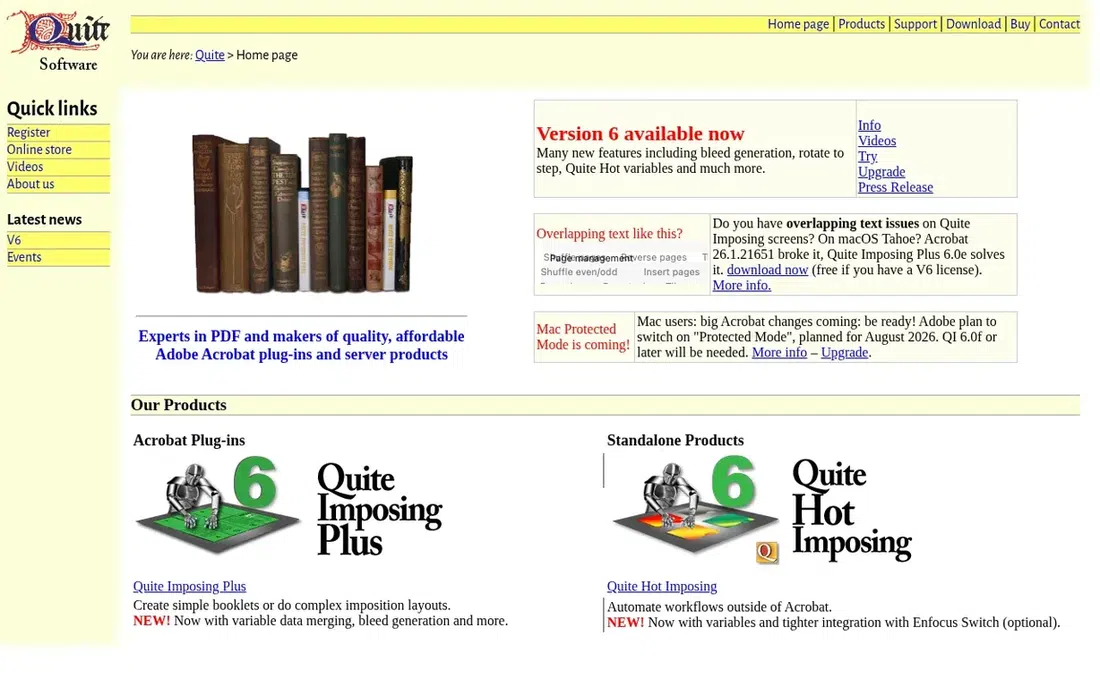
For Acrobat-based PDF imposition, Quite Imposing Plus is a natural candidate. Since it lives inside Acrobat, it relies on that application and is not designed for unattended, high-volume automation across plenty of jobs.
Quite Imposing Plus is a PDF imposition plug-in that layers on imposition, page arrangement and booklet tools straight inside Adobe Acrobat. Operators who already work in Acrobat can apply common layouts rapidly. No starting price is listed for Quite Imposing Plus here; confirm pricing on the vendor site. Free access: Not stated.
What to check first: Tied to the Acrobat environment.
- Familiar to prepress operators already using Acrobat
- Manages typical booklet and step-and-repeat layouts
- Less suited to completely automatic production workflows
Esko Automation Engine
Best for: Packaging prepress automation
Esko Automation Engine targets packaging prepress automation. Esko Automation Engine is a prepress automation system within Esko's portfolio for packaging, labels and related production.
Where it falls short: Needs workflow design and administration.
It connects with Esko's broader packaging toolset. No starting price is listed for Esko Automation Engine here; confirm pricing on the vendor site. On free options: Not stated.
- Capable fit for packaging and label production
- Automates prepress steps across plenty of jobs
- Packaging-oriented focus
Agfa Apogee
Best for: Prepress workflow with imposition
Agfa Apogee is aimed squarely at Prepress workflow with imposition. Agfa Apogee is a prepress and production workflow product within Agfa's digital printing portfolio.
Where it falls short: Needs workflow planning to deploy.
It suits operations already using Agfa systems or seeking an integrated prepress environment. This comparison lists no price for Agfa Apogee; ask the vendor. Free plan details: Not stated.
- Supports automatic job processing
- Spans prepress and production workflow tasks
- Not a light standalone utility
OneVision Speedflow
Best for: PDF automation across print workflows
OneVision Speedflow makes the most sense for PDF automation across print workflows. The product spans more than imposition, so teams should map their processes before adopting it.
Watch-outs: Broader automation scope than imposition alone.
On top of that, a shop needing only straightforward sheet layouts may find a dedicated imposition utility more direct. Also, OneVision Speedflow is a software suite for automatic PDF processes in printing, publishing and media. No starting price is listed for OneVision Speedflow here; confirm pricing on the vendor site. On free options: Not stated.
- Can contain imposition within automation
- Serves printing
- Needs process design to use well
How the list was put together
What to check before you buy
- Confirm the entry price with every vendor: no tool from Heidelberg Prinect to OneVision Speedflow shows a fixed starting price.
- Read the limits listed for Heidelberg Prinect first: best value within Heidelberg environments.
- See whether Kodak Prinergy offers onboarding or training, and whether it is included in the price.
- Compare total cost, not headline price: for Quite Imposing Plus, add extra seats, add-ons and any usage-based charges.
- Ask Heidelberg Prinect how an export works before you move any records in; an easy exit lowers the risk.
FAQ
Is Heidelberg Prinect the right pick for everyone comparing imposition software for digital printing?
No single tool suits every team. Heidelberg Prinect comes first because it fits Press-connected production workflows, while Kodak Prinergy suits integrated commercial print workflow and Quite Imposing Plus suits Acrobat-based PDF imposition. Match the tool to your own size, budget and workflow before deciding.
How are the tools for imposition software for digital printing ordered?
The order follows typical fit for imposition software for digital printing, with Heidelberg Prinect first and OneVision Speedflow last, then price clarity and free access. It is editorial judgement, not a score, so another team could rank the tools differently.
Do these tools publish their prices?
No. None of the tools, from Heidelberg Prinect to OneVision Speedflow, shows a fixed starting price here, so budget time for quotes.
Can I try these tools before paying?
Not by default. None of the tools, from Heidelberg Prinect to OneVision Speedflow, lists a free plan or a free trial here, so ask each vendor for a demo before committing.
Sources
- https://www.heidelberg.com
- https://www.kodak.com
- https://www.quite.com
- https://www.esko.com
- https://www.agfa.com
- https://www.onevision.com