Demo Software for Virtual Presentations in 2026: The 5 Best Options Side by Side
Best demo software for virtual presentations: 5 tools compared on price, free plans and fit. Each pick lists its main limit. Reviewed in November 2026.
- Editor's choice
 Microsoft Teams
Teams inside the Microsoft ecosystem
Starts atSee websiteVisit microsoft.comFull review - Great alternativeAnyMeeting
Interactive meetings with content sharing
Starts at$27.99 per user a monthVisit anymeeting.comFull review - Also consider
 Zoom Workplace
All-around live demo meetings
Starts atSee websiteVisit zoom.comFull review
Direct answer
Microsoft Teams leads the list, best for Teams inside the Microsoft ecosystem. Listed starting prices: AnyMeeting from $27.99 per user a month and Livestorm from €2.50 per attendee. AnyMeeting is better for interactive meetings with content sharing, and Zoom Workplace is better for all-around live demo meetings. The remaining 2 options are covered below with prices and limits.
TL;DR:
- Number one here is Microsoft Teams, a fit for Teams inside the Microsoft ecosystem.
- For AI-assisted collaboration and device integration, Cisco Webex is worth a look.
- The lowest published monthly entry price here is $27.99 per user per month, from AnyMeeting.
- Only Cisco Webex offers a free plan among these 5 tools.
- Before buying AnyMeeting, weigh this: less emphasis on large webinar formats.
Last checked November 2026. Prices and plan details were read from the vendors' own pages in November 2026; vendors change plans often, so confirm the current price on the vendor site before you buy.
Quick comparison
| Tool | Best for | Starts at | Free plan? | |
|---|---|---|---|---|
| Microsoft Teams | Teams inside the Microsoft ecosystem | See website | Not stated | Visit |
| AnyMeeting | Interactive meetings with content sharing | $27.99 per user a month | Not stated | Visit |
| Zoom Workplace | All-around live demo meetings | See website | Not stated | Visit |
 Livestorm | Marketing-led branded webinar demos | €2.50 per attendee | Not stated | Visit |
 Cisco Webex | AI-assisted collaboration and device integration | See website | Yes | Visit |
Demo Software for Virtual Presentations profiles
Choosing demo software for virtual presentations usually comes down to price, fit and limits. This LinkVetted guide sets 5 tools side by side on those three points, with the facts kept short and checkable.
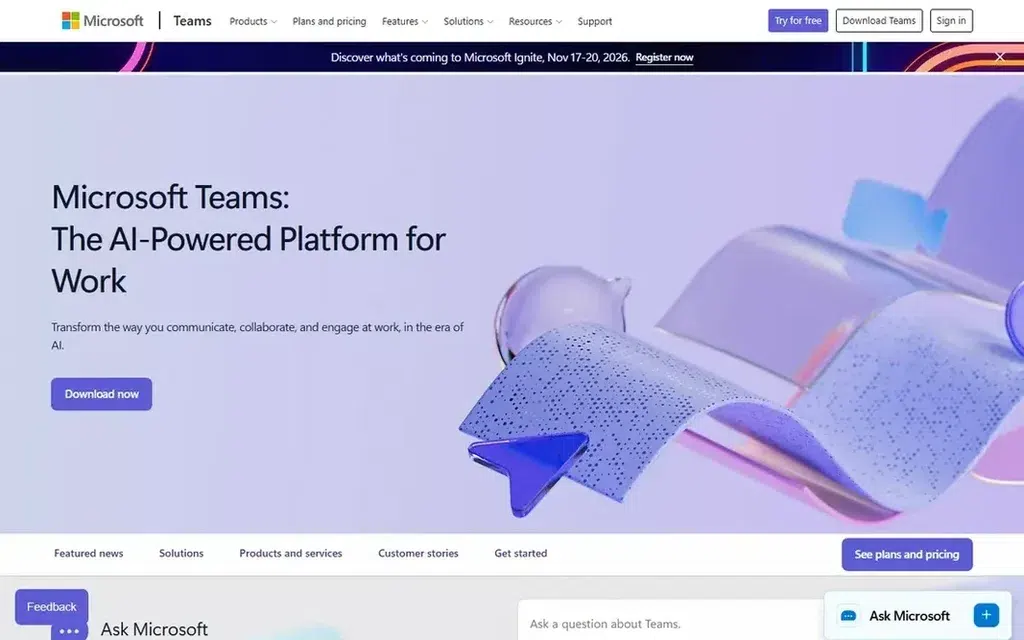
Microsoft Teams was built for Teams inside the Microsoft ecosystem. For virtual presentations, that means presenters can move between meetings, shared files and conversation without leaving the workspace.
Points against: Value relies on Microsoft environment fit.
On top of that, presenters who only need occasional demo calls may prefer a more straightforward meeting tool. No starting price is listed for Microsoft Teams here; confirm pricing on the vendor site. Free options: Not stated.
- Aimed at natural connection and organization
- Meetings and calling in a single workspace
- Feature depth can overwhelm casual presenters
AnyMeeting
Best for: Interactive meetings with content sharing
AnyMeeting serves interactive meetings with content sharing. AnyMeeting is a video conferencing option from Intermedia with built-in collaboration tools that make it simple for participants to share content for interactive meetings. Its orientation is interactive meetings, so large-scale webinar production is not the focus.
Teams planning heavily branded events may prefer a dedicated webinar system. In daily use, choose AnyMeeting when your virtual presentations are collaborative sessions instead of one-way broadcasts. The starting price for AnyMeeting: $27.99 per user per month. As for free access: Not stated.
Downsides: Feature set is meeting-centric.
- Built-in collaboration tools
- Simple content sharing for participants
- Less emphasis on large webinar formats

Think of Zoom Workplace for all-around live demo meetings. Zoom Workplace is a collaboration product that brings video meetings, chat, phone, webinars, whiteboard, contact center and events together in one place.
Honest limits: Plenty of features may overlap for smaller teams.
From a buyer's view, choose Zoom Workplace when breadth and meeting familiarity matter more than a narrowly focused webinar workflow. If your organization already standardizes on another meeting suite, consolidating there can cut tool sprawl. Zoom Workplace does not show a starting price in this comparison, so check the vendor site for current pricing. As for free access: Not stated.
- Wide feature set for presenting to varied audiences
- Well suited to recurring demo sessions
- Best results rely on stable connections
Livestorm makes the most sense for marketing-led branded webinar demos. Livestorm is an all-in-one webinar product designed for marketing teams, handling branded events, engagement insights and CRM data sync, enhanced with AI.
For everyday use, the system is oriented toward marketing webinars, so internal or informal demo calls may be better served by a general meeting tool. Pick Livestorm when branded events and engagement data are central to your presentation strategy. Livestorm starts at: €2.50 per attendee. Free options: Not stated.
Honest limits: Less suited to informal demo calls.
- All-in-one webinar product for marketing teams
- Branded events with engagement insights
- Pitched at marketing events instead of internal meetings

Cisco Webex works best for AI-assisted collaboration and device integration. The breadth of the product can mean more setup than a small team needs for straightforward demo calls.
Honest limits: Wide offering can feel complicated to configure.
- AI-powered collaboration features
- Customer experience and device options
- May be more than straightforward demos need
Our selection method
The comparison looks at four things: starting price, free access, how well the feature set matches demo software for virtual presentations, and the main limit of each tool. Prices and plan limits come from vendor pages and can change, so confirm them on the vendor site before you buy. The ranking is editorial: typical fit first, then clear pricing, then free access. If your needs are unusual, read the profiles rather than relying on position.
Before you commit
- Get a written quote from Microsoft Teams, Zoom Workplace and Cisco Webex; the list shows no starting price for them.
- Look at the free plan from Cisco Webex closely: its caps decide whether it is usable for real work.
- Read the limits listed for Microsoft Teams first: value relies on Microsoft environment fit.
- Involve the people who will use Cisco Webex daily; a short pilot beats a long feature checklist.
- The entry price of Microsoft Teams is only the starting point; model the full cost with seats and extras.
FAQ
What should I look for in demo software for virtual presentations?
Focus on dependable screen sharing, audience interaction controls and the capacity to present to the audience sizes you expect. On top of that, match the tool to whether your sessions are interactive meetings or broadcast-style events.
Which options for demo software for virtual presentations have a free plan?
Cisco Webex is the only tool in this list with a free plan. Free plans usually cap users, projects or features, so check the limits on the vendor page. Each of the 5 options in this demo software for virtual Presentations guide has its own card above with the price, free plan and limits.
What is the cheapest option for demo software for virtual presentations in this list?
On published monthly entry prices, AnyMeeting is the lowest here at $27.99 per user per month. Entry price is only part of the cost, because seats, add-ons and billing terms can change the total.
Can I run virtual presentations inside a collaboration suite I already use?
Yes. Microsoft Teams and Cisco Webex are designed as broader collaboration systems, so presentations can happen alongside files, chat and devices you already use.
How are the tools for demo software for virtual presentations ordered?
The order follows typical fit for demo software for virtual presentations, with Microsoft Teams first and Cisco Webex last, then price clarity and free access. It is editorial judgement, not a score, so another team could rank the tools differently.
Is Microsoft Teams the right pick for everyone comparing demo software for virtual presentations?
No single tool suits every team. Microsoft Teams comes first because it fits Teams inside the Microsoft ecosystem, while AnyMeeting suits interactive meetings with content sharing and Zoom Workplace suits all-around live demo meetings. Match the tool to your own size, budget and workflow before deciding.
Sources
- https://www.microsoft.com/en-us/microsoft-teams/group-chat-software
- https://www.anymeeting.com
- https://www.zoom.com
- https://livestorm.co
- https://www.webex.com