Top 8 Calendar Creator Software Options for 2026, Compared
Compare 8 picks for the best calendar creator software, with prices, free plans and who each fits. Weak spots flagged for every entry. See the full list.

- Editor's choice
 PrintableCal
Printing Outlook and Google calendars
Starts atSee websiteVisit printablecal.comFull review - Great alternative
 Adobe Express
Fast designed calendars
Starts atSee websiteVisit adobe.comFull review - Also consider
 Mixbook
Premium printed photo calendars
Starts atSee websiteVisit mixbook.comFull review
Direct answer
Start with PrintableCal if you need printing Outlook and Google calendars. Adobe Express fits fast designed calendars; Mixbook fits premium printed photo calendars. The full list of 8 tools follows, with prices and free plan facts.
TL;DR:
- PrintableCal is the opening pick, best for printing Outlook and Google calendars.
- For free printable planners, 101 Planners is worth a look.
- Pricing across the list, from PrintableCal to 101 Planners, is by quote only.
- Only 5 of the 8 tools have a free plan (Adobe Express, Canva, WinCalendar, Vertex42, 101 Planners), so check the caps.
Quick comparison
| Tool | Best for | Starts at | Free plan? | |
|---|---|---|---|---|
| PrintableCal | Printing Outlook and Google calendars | See website | Free trial | Visit |
| Adobe Express | Fast designed calendars | See website | Yes | Visit |
| Mixbook | Premium printed photo calendars | See website | No | Visit |
 Photo Calendar Creator | Desktop photo calendars | See website | Free trial | Visit |
 Canva | Designed calendars with templates | See website | Yes | Visit |
 WinCalendar | Calendar maker inside Word and Excel | See website | Yes | Visit |
 Vertex42 | Free Excel calendar templates | See website | Yes | Visit |
 101 Planners | Free printable planners | See website | Yes | Visit |
The best calendar creator software
This LinkVetted guide covers 8 options for calendar creator software. Each profile lists a starting price, free plan details, strengths and drawbacks, so you can drop poor fits quickly.
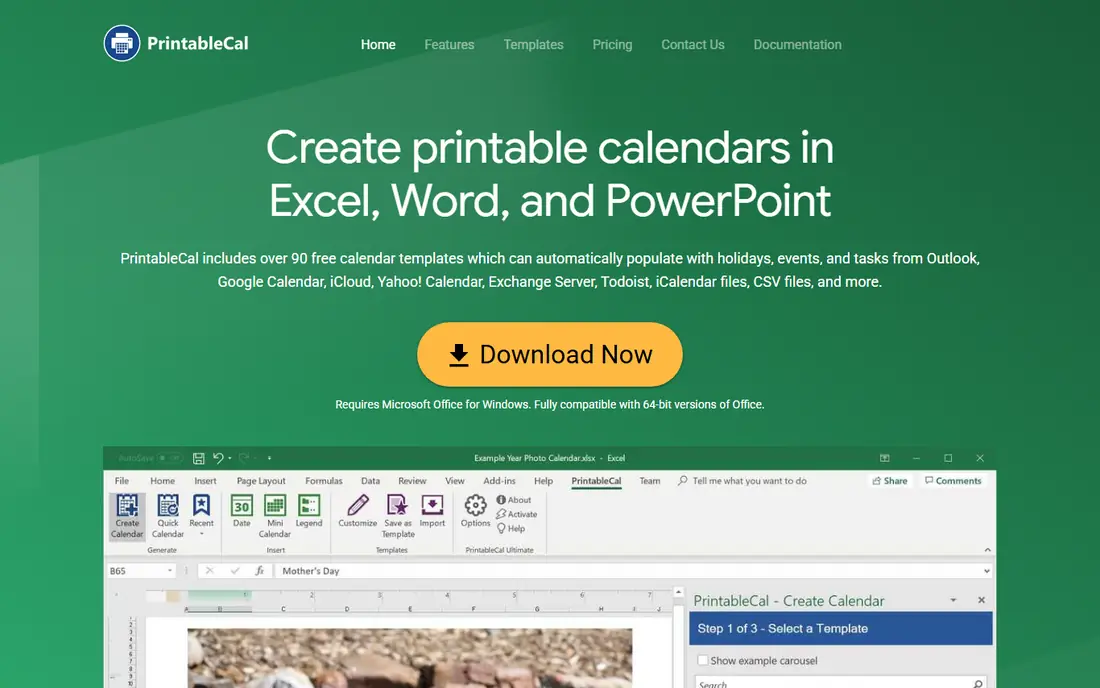
Think of PrintableCal for printing Outlook and Google calendars. PrintableCal solves a specific frustration: Outlook and Google Calendar print terribly. It acts as an add-in for Excel, Word, and PowerPoint, pulling in your events, tasks, and holidays and laying them out across more than 90 templates.
What users get: Over 90 templates for Word; Templates are completely editable in Office.
Beyond that, the 15-day trial converts to a free Lite version, so you can keep entry-level functions without paying. Also, the limitation is the system: you need Office on Windows, and this is a data calendar tool, not a photo design studio. From a buyer's view, if you know Excel, you already know how to customize the output. PrintableCal shows no starting price here, so confirm the cost on the vendor site. As for free access: Free trial.
Watch-outs: Photo-calendar design is not its strength.
- ICloud and more
- Google Calendar
- Needs Microsoft Office on Windows

Where Adobe Express fits: fast designed calendars. Making a branded desk calendar for clients takes minutes.
Limits to weigh: Event-data import is manual.
In practice, Adobe Express plays the same game as Canva with an Adobe flavor. Check the vendor site for Adobe Express pricing; none is listed in this comparison. Free access exists with Adobe Express.
- Free plan handles entry-level calendar creation
- Decent brand-kit features for business calendars
- Template depth for calendars is thinner than Canva

In short, Mixbook is for premium printed photo calendars. For a single keepsake calendar it is worth it; for 200 office giveaways, a desktop tool plus a local print shop is less expensive.
Where it falls short: Per-calendar cost layers on up for bulk orders.
Mixbook sits at the quality end of the print-service market. Mixbook shows no starting price here, so confirm the cost on the vendor site. Mixbook has no permanent free option.
- Solid reputation for print and color quality
- Well suited to keepsake and gift calendars
- Premium pricing compared with Shutterfly
Photo Calendar Creator works best for desktop photo calendars. The trade is that it lives on Windows and the interface displays its age. If you want modern web-based design, Canva or Adobe Express will feel better.
The template library spans the formats people actually want, from wall calendars to pocket planners. In practice, Photo Calendar Creator is designed for exactly one job: making photo calendars on your own computer. Since it is a one-time purchase instead of a subscription, the math favors anyone who makes calendars every year. You pick a format, drop in photos, add holidays and personal events, and print or export the result. Pricing for Photo Calendar Creator is not stated here, so ask the vendor for current figures. On free options: Free trial.
Drawbacks to consider: Interface looks dated next to Canva.
- Desk and pocket formats
- Full control over photos
- Windows-only desktop software
For designed calendars with templates, Canva is a natural candidate. For photo calendars and decorative wall calendars, it is quicker than any desktop program.
Where it falls short: Print quality relies on your printer or their print service.
It is not a data tool. Pricing for Canva is not stated here, so ask the vendor for current figures. Canva has a free plan.
- Simple photo uploads and typography
- Huge template library with genuinely decent design
- Weak at importing real event data
WinCalendar makes the most sense for calendar maker inside Word and Excel. You can produce monthly and weekly calendars, agendas, schedules, and Gantt charts from your Outlook or Google data.
Points against: 64-bit Office compatibility is restricted.
The free version limits the calendar maker in holidays, size, and format choices. No starting price is listed for WinCalendar here; confirm pricing on the vendor site. Free access exists with WinCalendar.
- Imports Google and Outlook calendar data
- Produces calendars straight inside Word and Excel
- Calendar maker features are restricted in the free version
In short, Vertex42 is for free Excel calendar templates. The yearly and monthly calendars use formulas to lay out dates automatically. You can extend them into project trackers, shift schedules, and budget planners.
Downsides: Manual setup for holidays and events.
Everything is free for personal use. As for the details, nobody will mistake the output for a designed product. This is a working calendar for planning and tracking, not something you frame or provide away. Pricing for Vertex42 is not stated here, so ask the vendor for current figures. Vertex42 offers a free plan.
- Well-built Excel calendars with automatic date formulas
- Free for personal use
- Spreadsheet aesthetics, not gift quality
In short, 101 Planners is for free printable planners. 101 Planners is a library of free printable calendars, planners, and organizers. As for the details, you browse, download the PDF, and print.
As for the details, the range handles everything from straightforward monthly grids to detailed daily planners. There is no account or payment involved. No starting price is listed for 101 Planners here; confirm pricing on the vendor site. 101 Planners includes a free tier.
Downsides: Fixed designs with restricted customization.
Upsides: No account needed.
- Handles daily, weekly
- Large collection of free printable calendars and planners
- Print-it-yourself only
Calendar Creator Software: more detail
Picture an office manager who needs 200 branded wall calendars before December, a parent making a photo calendar as a gift, and a teacher who wants a classroom planner with the school holidays filled in. Also, the calendar software market splits the same way: desktop programs for control, online designers for looks, print services for finished products, and free template libraries for the budget-conscious. Decide first whether your calendar carries appointments, photos, or both, and whether you will print it yourself or have it printed for you.
Selection criteria
The comparison looks at four things: starting price, free access, how well the feature set matches calendar creator software, and the main limit of each tool. Prices and plan limits come from vendor pages and can change, so confirm them on the vendor site before you buy. Position on the page reflects fit for a typical buyer first, with price clarity and free access breaking ties. Treat it as a guide, not a ruling.
Pre-purchase checklist
- Request quotes from PrintableCal, 101 Planners and the others; the list shows no fixed prices.
- Look at free plan limits closely: Adobe Express, Canva, WinCalendar and others have one, and the caps decide whether it is usable for real work.
- Use real work to test the free trial from PrintableCal and Photo Calendar Creator, rather than a demo project.
- Before choosing PrintableCal, weigh its main limit: needs Microsoft Office on Windows.
- Ask Canva which support channels and response times come with the plan you would buy.
- Involve the people who will use WinCalendar daily; a short pilot beats a long feature checklist.
FAQ
Are there really decent free calendar makers?
Canva's free plan, Adobe Express's free plan, Vertex42's Excel templates, and 101 Planners' printables all cost nothing and handle most personal needs. The premium tools add photo-calendar design depth, event-data printing, and print fulfillment.
How are the tools for calendar creator software ordered?
PrintableCal sits first and 101 Planners last because the order follows typical fit for calendar creator software, then price clarity and free access. It is a judgement call, so read each profile for fit and limits.
Which options for calendar creator software have a free plan?
On this list, Adobe Express, Canva, WinCalendar, Vertex42 and 101 Planners include a free plan. Caps on seats, usage or features are common, so test the free plan against your real workload. Several others offer a trial instead.
Which tool is best for photo calendars?
The first pick on this list is PrintableCal, because it suits printing Outlook and Google calendars. Adobe Express is better for fast designed calendars, and Mixbook for premium printed photo calendars. Check price and limits against your own needs before choosing.
Can I try these options before paying?
Often, yes. Adobe Express, Canva, WinCalendar and others have a free plan and PrintableCal and Photo Calendar Creator offer a free trial. Use your own data and a real task during the test, and check what the free tier or trial limits before you rely on it.
Do these tools publish their prices?
No. None of the tools, from PrintableCal to 101 Planners, shows a fixed starting price here, so budget time for quotes.