Best Automotive Wiring Diagram Software for 2026: Our 6 Vetted Picks
Shortlisting the best automotive wiring diagram software? 6 products compared on cost, free access and ideal buyer. Every entry states what it lacks. No hype.

- Editor's choiceWireViz
Text-based cable and harness docs
Starts at$4 per user a monthVisit github.comFull review - Great alternativeAltium Designer
PCB design with schematics and simulation
Starts atSee websiteVisit altium.comFull review - Also considerQElectroTech
Free open-source electrical diagrams
Starts atSee websiteVisit qelectrotech.orgFull review
Direct answer
For text-based cable and harness docs, WireViz is where this list starts. Listed starting prices: WireViz from $4 per user a month. Alternatives: Altium Designer for PCB design with schematics and simulation, and QElectroTech for free open-source electrical diagrams. The full list of 6 tools follows, with prices and free plan facts.
TL;DR:
- This list starts with WireViz, which is built for text-based cable and harness docs.
- Only WireViz offers a free plan among these 6 tools.
- WireViz is the lowest-priced starter here at $4 per user per month.
- One limit worth knowing about Altium Designer: primarily PCB-oriented, not harness-focused.
- KiCad suits open-source schematic capture and PCB.
Last checked November 2026. Prices and plan details were read from the vendors' own pages in November 2026; vendors change plans often, so confirm the current price on the vendor site before you buy.
Quick comparison
| Tool | Best for | Starts at | Free plan? | |
|---|---|---|---|---|
| WireViz | Text-based cable and harness docs | $4 per user a month | Yes | Visit |
| Altium Designer | PCB design with schematics and simulation | See website | Not stated | Visit |
| QElectroTech | Free open-source electrical diagrams | See website | Not stated | Visit |
 AutoCAD Electrical | In-depth electrical control system design | See website | Not stated | Visit |
| Zuken E3.series | Electrical wiring and control systems | See website | Not stated | Visit |
| KiCad | Open-source schematic capture and PCB | See website | Not stated | Visit |
The 6 tools in detail
Short on time? The summary and table above give the quick view of 6 tools for automotive wiring diagram software, and the profiles that follow give the detail behind each entry.
WireViz
Best for: Text-based cable and harness docs
Pick WireViz if this describes you: text-based cable and harness docs. Teams needing interactive drawing tools may prefer AutoCAD Electrical or QElectroTech. WireViz is an open-source tool hosted on GitHub for easily documenting cables and wiring harnesses.
It is not a full graphical electrical CAD package, so complicated control system design may be out of scope. Also, pick WireViz when clear, repeatable harness documentation matters more than graphical editing. The starting price for WireViz: $4 per user per month. WireViz has a free plan.
Trade-offs to know: Needs comfort with text files.
- Documents cables and wiring harnesses
- Plain-text input workflow
- Restricted graphical editing
Altium Designer
Best for: PCB design with schematics and simulation

Altium Designer is aimed squarely at PCB design with schematics and simulation. Altium Designer is a PCB design tool that spans schematics, simulation, layout, and manufacturing. It is not a dedicated automotive wiring harness tool.
So it may not handle cable and harness documentation as directly as WireViz or E3.series. As for the details, for board-level electronics work it is a good fit; for full-vehicle wiring diagrams, consider a dedicated electrical CAD tool. Altium Designer shows no starting price here, so confirm the cost on the vendor site. Free options: Not stated.
Where it is weaker: Primarily PCB-oriented, not harness-focused.
- Spans schematics, simulation, layout, manufacturing
- Integrated design environment
- Not intended for full vehicle wiring diagrams
QElectroTech
Best for: Free open-source electrical diagrams
QElectroTech works best for free open-source electrical diagrams. It is general-purpose instead of automotive-specific, so some vehicle-focused features may be missing.
In daily use, teams needing advanced harness documentation or PCB integration may prefer Zuken E3.series or Altium Designer. QElectroTech does not show a starting price in this comparison, so check the vendor site for current pricing. Free options: Not stated.
What to check first: Less specialized automotive features.
- Comes with a large symbol library
- Runs on Windows, Mac, Linux
- Community-driven support
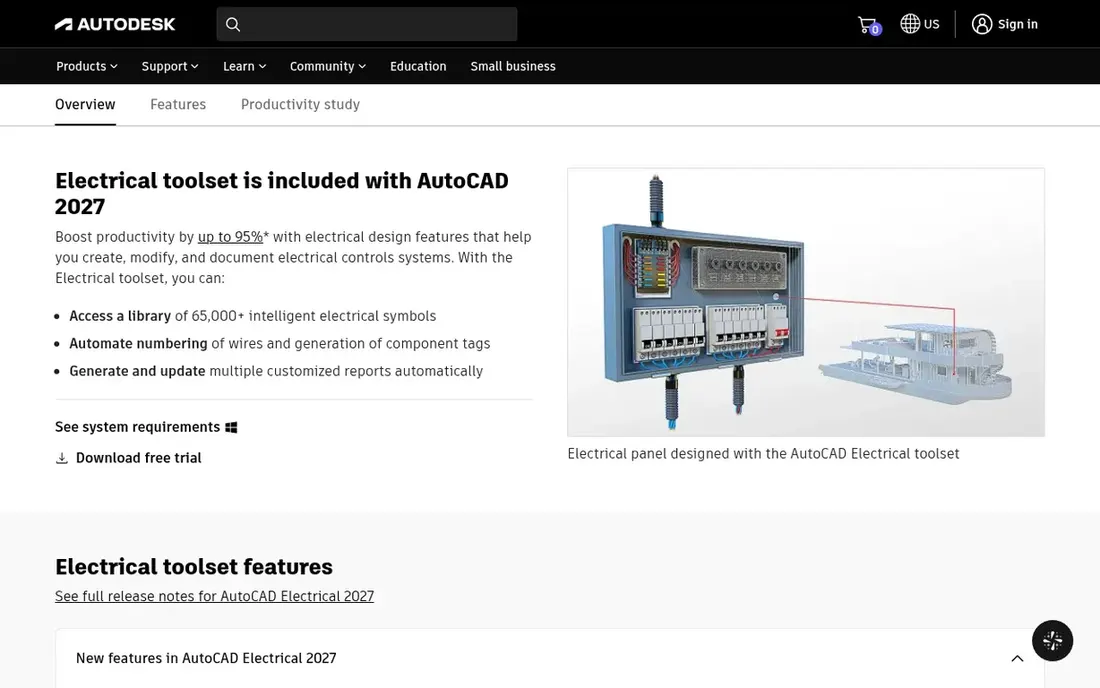
AutoCAD Electrical targets in-depth electrical control system design. AutoCAD Electrical is an electrical toolset within Autodesk AutoCAD for creating, modifying, and documenting electrical control systems.
What to check first: Needs AutoCAD knowledge.
From a buyer's view, for fast cable lists or text-based harness documentation, a lighter choice for example WireViz may be more efficient. Pricing for AutoCAD Electrical is not stated here, so ask the vendor for current figures. Free access: Not stated.
- Efficient creation and modification of electrical control systems
- Capable documentation focus
- Can be heavy for straightforward harness sketches
Zuken E3.series
Best for: Electrical wiring and control systems

Zuken E3.series targets Electrical wiring and control systems. Zuken E3.series is electrical CAD software geared toward electrical engineering, including electrical wiring, control systems, and fluid engineering.
What to check first: May be more than straightforward diagrams need.
Teams focused only on PCB schematics might prefer Altium Designer, whereas straightforward harness documentation could go to WireViz. As for the details, choose E3.series when electrical wiring and control design are central. Zuken E3.series does not show a starting price in this comparison, so check the vendor site for current pricing. Free access: Not stated.
- Dedicated electrical CAD focus
- Also supports fluid engineering
- Specialized tool with a ramp-up time
KiCad
Best for: Open-source schematic capture and PCB
KiCad was built for open-source schematic capture and PCB. For cable and harness work, WireViz or Zuken E3.series may be more suitable.
On top of that, KiCad is open-source electronics CAD software for Windows, macOS, and Linux, offering schematic capture, PCB design, and 3D viewing. Pricing for KiCad is not stated here, so ask the vendor for current figures. Free access: Not stated.
Trade-offs to know: Needs electronics design knowledge.
- Schematic capture and PCB design
- Cross-platform support
- Not geared toward vehicle wiring harnesses
Selection criteria
A buyer's checklist
- Confirm the entry price on the vendor page. For Altium Designer, QElectroTech, AutoCAD Electrical and others that means a quote rather than a fixed price.
- Look at the free plan from WireViz closely: its caps decide whether it is usable for real work.
- Before choosing WireViz, weigh its main limit: restricted graphical editing.
- Ask Altium Designer how an export works before you move any records in; an easy exit lowers the risk.
- Before rolling out KiCad, verify the integrations your workflow depends on.
FAQ
Do these tools publish their prices?
Not all of them. Altium Designer, QElectroTech, AutoCAD Electrical and others publish no starting price, so expect a quote request for those. The rest, WireViz included, show a starting price, though seats and billing terms still change the final cost.
What is the best free option for automotive wiring diagrams?
For most readers this guide would start with WireViz, built for text-based cable and harness docs. Altium Designer is the alternative for PCB design with schematics and simulation, and QElectroTech for free open-source electrical diagrams. The right answer depends on budget and workflow.
Is WireViz the right pick for everyone comparing automotive wiring diagram software?
No single tool suits every team. WireViz comes first because it fits text-based cable and harness docs, while Altium Designer suits PCB design with schematics and simulation and QElectroTech suits free open-source electrical diagrams. Match the tool to your own size, budget and workflow before deciding.
Which options for automotive wiring diagram software have a free plan?
WireViz is the only tool in this list with a free plan. Free plans usually cap users, projects or features, so check the limits on the vendor page.
Can I try these options before paying?
Often, yes. WireViz has a free plan. Use your own data and a real task during the test, and check what the free tier or trial limits before you rely on it.
Which tool is a good match for documenting wiring harnesses?
WireViz comes first here and is built for text-based cable and harness docs. Buyers with other needs may prefer Altium Designer (for PCB design with schematics and simulation) or QElectroTech (for free open-source electrical diagrams). Compare costs and limits first.
Sources
- https://github.com/formatc1702/WireViz
- https://www.altium.com/altium-designer
- https://qelectrotech.org
- https://www.autodesk.com/products/autocad-electrical/overview
- https://www.zuken.com/en/product/e3series
- https://www.kicad.org