Top E3.series Alternatives in 2026: 5 Picks Ranked
E3.series alternatives: 5 tools compared on price, free plans and fit. We put KiCad first for open-source schematic and PCB design. Checked this month.

- Editor's choiceKiCad
Open-source schematic and PCB design
Starts atPricing on requestVisit kicad.orgFull review - Great alternativeQElectroTech
Free open-source electrical diagrams
Starts atPricing on requestVisit qelectrotech.orgFull review - Also consider
 SEE Electrical
Quick electrical diagram drawing
Starts atPricing on requestVisit see-electrical.comFull review
Direct answer
Our first pick is KiCad, best for open-source schematic and PCB design. QElectroTech fits free open-source electrical diagrams; SEE Electrical fits quick electrical diagram drawing. The full list of 5 tools follows, with free plan facts. None of these vendors publish plan prices, so pricing is on request for every option.
TL;DR:
- KiCad takes the first slot, best suited to open-source schematic and PCB design.
- A fair warning about Altium Designer: broader scope than electrical panel design.
- EPLAN Electric P8 fits machine and plant electrical engineering.
- Every tool from KiCad to EPLAN Electric P8 works by quote, with no list price shown.
- KiCad, EPLAN Electric P8 and the 3 others all need a premium plan or a trial, since no free plan is listed.
Last checked November 2026. Pricing on request: vendors did not publish plan prices when this guide was last checked (November 2026), so ask each vendor for a written quote.
Quick comparison
| Tool | Best for | Starts at | Free plan? | |
|---|---|---|---|---|
| KiCad | Open-source schematic and PCB design | Pricing on request | Not stated | Visit |
| QElectroTech | Free open-source electrical diagrams | Pricing on request | Not stated | Visit |
| SEE Electrical | Quick electrical diagram drawing | Pricing on request | Not stated | Visit |
| Altium Designer | Integrated schematic and PCB design | Pricing on request | Not stated | Visit |
 EPLAN Electric P8 | Machine and plant electrical engineering | Pricing on request | Not stated | Visit |
The full E3.series list
If you are comparing E3.series, this page covers 5 tools in one place: what each is best for, what it costs to start, whether it has a free plan, and the main limit to know about.
KiCad
Best for: Open-source schematic and PCB design
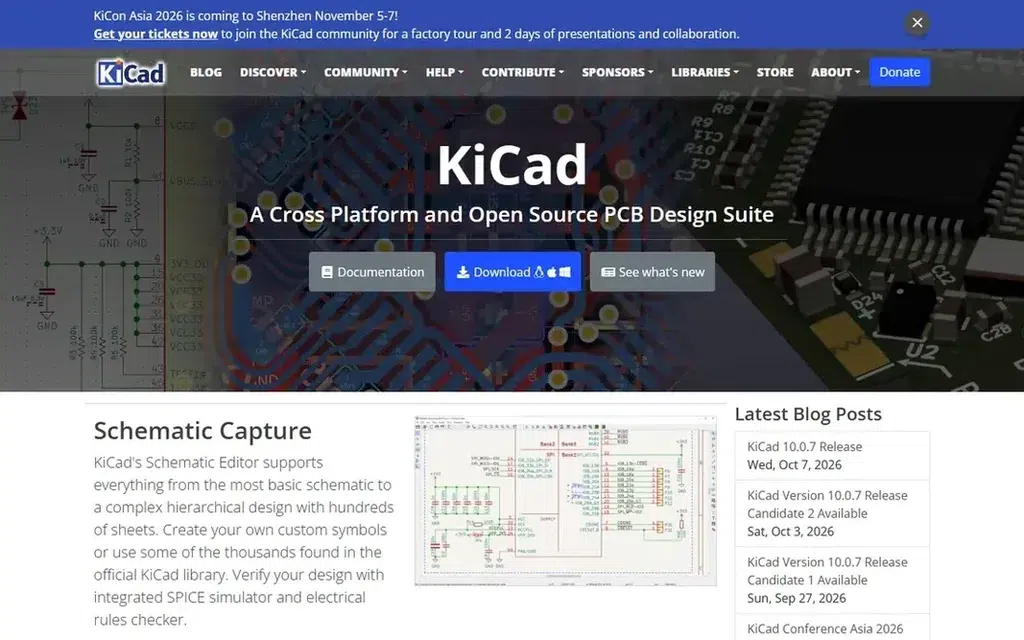
KiCad serves open-source schematic and PCB design. KiCad is open-source electronics CAD software for Windows, macOS, and Linux. It offers schematic capture, PCB design, and 3D viewing, making it a practical choice for individuals, educators.
Watch-outs: Less centred on panel layout.
Teams that want a no-cost, community-driven tool for electronic design work. In daily use, KiCad is built around board-level electronics rather than industrial electrical documentation. As for the details, when projects need broad panel schematics or plant engineering, a specialized electrical CAD system may be more appropriate. KiCad shows no starting price here, so confirm the cost on the vendor site. Free access: Not stated.
- Open source and cross-platform
- Includes schematic capture and 3D viewing
- Ramp-up time for advanced features
QElectroTech
Best for: Free open-source electrical diagrams
Think of QElectroTech for free open-source electrical diagrams. QElectroTech is free, open-source software for creating complicated industrial electrical diagrams on Windows, Mac, and Linux. It comes with a large built-in symbol library, which makes it handy for schools, hobbyists, and small businesses that require capable diagramming without licensing overhead.
Watch-outs: Restricted advanced automation.
It is less suited to highly automatic or integrated engineering workflows than commercial products. Beyond that, if your projects demand broad data management or plant-wide consistency, a commercial electrical CAD system may be worth considering. Pricing for QElectroTech is not stated here, so ask the vendor for current figures. Free plan details: Not stated.
- Free and open source
- Cross-platform with large symbol library
- Smaller ecosystem than commercial tools
SEE Electrical is aimed squarely at quick electrical diagram drawing. SEE Electrical is electrical CAD software aimed at rapidly drawing electrical diagrams.
Its easy-to-learn approach fits engineers and technicians who want to produce electrical drawings efficiently without a steep ramp-up time, especially for standard control and wiring documentation. No starting price is listed for SEE Electrical here; confirm pricing on the vendor site. Free access: Not stated.
The main drawbacks: May lack advanced simulation.
- Concentrated on electrical drawing
- Easy-to-learn for fast diagrams
- Less emphasis on PCB design
Altium Designer
Best for: Integrated schematic and PCB design

Altium Designer is built with integrated schematic and PCB design in mind. Its focus on PCB engineering means teams that chiefly produce electrical schematics for machines may find it broader than needed.
Where it falls short: Broader scope than electrical panel design.
For everyday use, if your priority is panel or plant documentation, a dedicated electrical CAD package could be a better match. This comparison lists no price for Altium Designer; ask the vendor. On free options: Not stated.
- Merges schematic, simulation, layout
- Suited to high-performance product teams
- May need training for full use

EPLAN Electric P8 was built for machine and plant electrical engineering. If your work is restricted to straightforward electrical drawings, a lighter CAD tool could be simpler to adopt.
Downsides: Targeted at bigger engineering workflows.
EPLAN Electric P8 is an integrated engineering system for planning and designing electrical engineering in machines and plant systems. Check the vendor site for EPLAN Electric P8 pricing; none is listed in this comparison. Free options: Not stated.
- Quick schematic design for plants
- Consistent engineering system
- May be complicated for straightforward diagrams
Our selection method
Each tool was reviewed on what its vendor publishes: price, plan limits, core features and stated drawbacks. We did not run hands-on tests. Where a price is missing, the vendor does not list one publicly or ties it to a quote. Always confirm before budgeting. The order reflects how well each tool fits the most common buying scenario for E3.series, then price clarity, then free plan access. It is a starting point, not a verdict.
Questions to settle before buying
- Confirm the entry price with every vendor: no tool from KiCad to EPLAN Electric P8 shows a fixed starting price.
- Before choosing KiCad, weigh its main limit: less centred on panel layout.
- Confirm you can export your data from QElectroTech, so leaving later does not mean losing records.
- Add up seats, add-ons and usage charges for KiCad before comparing it with cheaper entries.
- Ask the daily users to test EPLAN Electric P8 on a live task before you roll it out to everyone.
FAQ
What is the best free alternative to E3.series?
For most readers this guide would start with KiCad, built for open-source schematic and PCB design. QElectroTech is the alternative for free open-source electrical diagrams, and SEE Electrical for quick electrical diagram drawing. The right answer depends on budget and workflow.
Do these tools publish their prices?
No. None of the tools, from KiCad to EPLAN Electric P8, shows a fixed starting price here, so budget time for quotes.
Which alternative is a good match for plant engineering?
For most readers this guide would start with KiCad, built for open-source schematic and PCB design. QElectroTech is the alternative for free open-source electrical diagrams, and SEE Electrical for quick electrical diagram drawing. The right answer depends on budget and workflow.
How are the tools for E3.series ordered?
KiCad sits first and EPLAN Electric P8 last because the order follows typical fit for E3.series, then price clarity and free access. It is a judgement call, so read each profile for fit and limits.
Is KiCad the right pick for everyone comparing E3.series?
No single tool suits every team. KiCad comes first because it fits open-source schematic and PCB design, while QElectroTech suits free open-source electrical diagrams and SEE Electrical suits fast electrical diagram drawing. Match the tool to your own size, budget and workflow before deciding.
Does any tool for E3.series here have a free plan?
No tool in this list, KiCad and EPLAN Electric P8 included, has a permanent free plan. Trials and quotes are the usual route, so plan a short evaluation period.
Sources
- https://www.kicad.org
- https://qelectrotech.org
- https://www.see-electrical.com
- https://www.altium.com/altium-designer
- https://www.eplan-software.com/solutions/eplan-electric-p8