6 Software for Legal Process Management Worth Shortlisting in 2026
Compare 6 picks for best-rated software for legal process management, with prices, free plans and who each fits. Caveats come with every verdict. Easy to scan.

- Editor's choice
 MyCase
Running cases, clients, billing and payments together
Starts at$50 per user a monthVisit mycase.comFull review - Great alternative
 Actionstep
Workflow control and client experience
Starts atSee websiteVisit actionstep.comFull review - Also consider
 PracticePanther
Automating firm processes and billing
Starts at$49 per user a monthVisit practicepanther.comFull review
Direct answer
MyCase comes first here, mainly for running cases, clients, billing and payments together. Listed starting prices: MyCase from $50 per user a month, PracticePanther from $49 per user a month and Rocket Matter from $39 a month per user billed annually. Alternatives: Actionstep for workflow control and client experience, and PracticePanther for automating firm processes and billing. The other 3 tools in the list cover narrower or pricier cases.
TL;DR:
- This list starts with MyCase, which is built for running cases, clients, billing and payments together.
- MyCase, Rocket Matter and the 4 others all need a premium plan or a trial, since no free plan is listed.
- Actionstep comes with a trade-off: customization can add complexity.
- For a single source of truth for firm management, Rocket Matter is worth a look.
Last checked November 2026. Prices and plan details were read from the vendors' own pages in November 2026; vendors change plans often, so confirm the current price on the vendor site before you buy.
Quick comparison
| Tool | Best for | Starts at | Free plan? | |
|---|---|---|---|---|
| MyCase | Running cases, clients, billing and payments together | $50 per user a month | Free trial | Visit |
| Actionstep | Workflow control and client experience | See website | Not stated | Visit |
| PracticePanther | Automating firm processes and billing | $49 per user a month | Free trial | Visit |
 Filevine | AI-assisted case and legal team management | See website | Free trial | Visit |
 Smokeball | Automatic time tracking and document automation | See website | Not stated | Visit |
 Rocket Matter | A single source of truth for firm management | $39 a month per user billed annually | Free trial | Visit |
Tool-by-tool breakdown
LinkVetted compared 6 tools for best-rated software for legal process management. The goal is a practical shortlist: published prices, free plan facts, best-fit use cases and honest limits for every entry.
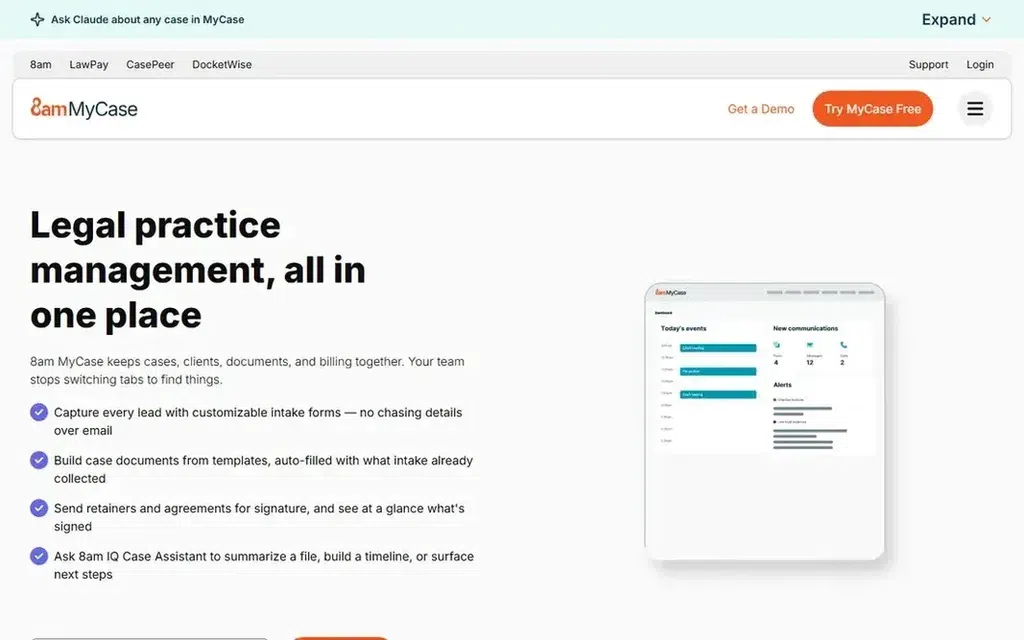
Choose MyCase for running cases, clients, billing and payments together. MyCase is legal practice management software built to run a profitable firm, bringing cases, clients, billing and payments together in one place.
Highlights: Cases.
From a buyer's view, businesses that only need case tracking or document storage may prefer a narrower tool, and anyone with specialized accounting requirements should verify support on the vendor site. For everyday use, since it handles so much ground, initial setup and configuration take real effort. Entry price for MyCase: $50 per user per month. Free plan details: Free trial. Watch-outs: Configuration takes time.
- Clients and billing in one place
- Firm profitability focus
- Wide scope can feel heavy for solo work
Actionstep targets workflow control and client experience. Actionstep is law firm management software that emphasizes full control over success, helping businesses perfect legal workflows and build better client experiences.
Actionstep shows no starting price here, so confirm the cost on the vendor site. As for free access: Not stated.
Where it is weaker: Customization can add complexity.
- Full firm management
- Workflow customization
- Requires process discipline
Think of PracticePanther for automating firm processes and billing. Businesses with complicated multi-office structures or unusual billing arrangements should check the documented limits and confirm fit with the vendor.
More specifically, PracticePanther is positioned as legal practice management software that automates firm processes, billing and time tracking. PracticePanther starts at: $49 per user per month. Free access: Free trial.
Trade-offs to know: Advanced needs may need review.
- Practice management breadth
- Process automation features
- Automation setup varies by firm

Filevine was built for AI-assisted case and legal team management. Filevine presents itself as a legal AI product for law businesses and legal teams, with its LOIS offering as the centerpiece.
Honest limits: Feature depth may suit bigger teams.
Businesses that mainly need straightforward billing and matter tracking may find a lighter practice management tool simpler to adopt. For everyday use, as with any AI-centered platform, the value relies on how well your existing processes map to the tool, so review the documented capabilities carefully. Filevine does not show a starting price in this comparison, so check the vendor site for current pricing. Free options: Free trial.
- Legal AI system positioning
- Designed for law businesses and legal teams
- Setup needs planning

Smokeball makes the most sense for automatic time tracking and document automation. The emphasis on automation means the tool performs best when staff follow shared templates and processes.
It suits small and mid-size businesses that lose billable hours to manual time entry and want documents generated consistently from matter data. Pricing for Smokeball is not stated here, so ask the vendor for current figures. Trial and free access: Not stated.
The main drawbacks: Needs consistent staff adoption.
- Document automation features
- Trust and billing tools
- Productivity focus may not suit every workflow
In short, Rocket Matter is for a single source of truth for firm management. Businesses with specialized needs outside the documented feature set should verify coverage on the vendor site and compare against more configurable systems.
Watch-outs: Adoption relies on staff training.
Also, Rocket Matter presents itself as legal practice management for modern businesses, positioning the product as a single source of truth for managing and expanding a firm. What you pay to start with Rocket Matter: $39 per month per user billed annually. Free access: Free trial.
- Practice management breadth
- Centralized firm management
- Feature fit varies by practice area
How we chose
Each tool was reviewed on what its vendor publishes: price, plan limits, core features and stated drawbacks. We did not run hands-on tests. Where a price is missing, the vendor does not list one publicly or ties it to a quote. Always confirm before budgeting. The order reflects how well each tool fits the most common buying scenario for best-rated software for legal process management, then price clarity, then free plan access. It is a starting point, not a verdict.
Questions to settle before buying
- Get a written quote from Actionstep, Filevine and Smokeball; the list shows no starting price for them.
- Run a trial of MyCase, PracticePanther, Filevine and Rocket Matter with real work before paying for a year; your own workflow is the best test.
- Before choosing MyCase, weigh its main limit: broad scope can feel heavy for solo work.
- Involve the people who will use Actionstep daily; a short pilot beats a long feature checklist.
- Total up the real monthly cost of PracticePanther, including add-ons, extra users and usage-based fees.
FAQ
Do these tools publish their prices?
Not all of them. Actionstep, Filevine and Smokeball publish no starting price, so expect a quote request for those. The rest, MyCase included, show a starting price, though seats and billing terms still change the final cost.
What should legal process management software cover?
The right mix relies on whether your priority is automation, billing accuracy or workflow control. Compare documented features against your firm's daily routines.
How are the tools for best-rated software for legal process management ordered?
MyCase sits first and Rocket Matter last because the order follows typical fit for best-rated software for legal process management, then price clarity and free access. It is a judgement call, so read each profile for fit and limits.
Is MyCase the right pick for everyone comparing best-rated software for legal process management?
No single tool suits every team. MyCase comes first because it fits running cases, clients, billing and payments together, while Actionstep suits workflow control and client experience and PracticePanther suits automating firm processes and billing. Match the tool to your own size, budget and workflow before deciding.
Can I try these tools before paying?
Often, yes. MyCase, PracticePanther, Filevine and Rocket Matter offer a free trial. Use your own data and a real task during the test, and check what the free tier or trial limits before you rely on it.
Sources
- https://www.mycase.com
- https://www.actionstep.com
- https://www.practicepanther.com
- https://www.filevine.com
- https://www.smokeball.com
- https://www.rocketmatter.com