The 5 Best Public Policy Monitoring Software in 2026, Ranked
Compare 5 picks for the best public policy monitoring software, with prices, free plans and who each fits. Real limits included. Reviewed in November 2026.
- Editor's choiceLegiStorm
Congressional contacts and staff data
Starts at$199 per monthVisit legistorm.comFull review - Great alternativeBloomberg Government
Policy news plus legislative tracking
Starts atSee websiteVisit about.bgov.comFull review - Also considerCiviCRM
Open source constituent management
Starts atSee websiteVisit civicrm.orgFull review
Direct answer
LegiStorm leads the list, best for congressional contacts and staff data. Listed starting prices: LegiStorm from $199 per month. Bloomberg Government fits policy news plus legislative tracking; CiviCRM fits open source constituent management. The full list of 5 tools follows, with prices and free plan facts.
TL;DR:
- LegiStorm takes the first slot, best suited to congressional contacts and staff data.
- FiscalNote suits wide legislative and regulatory monitoring.
- For the cheapest start, look at LegiStorm: $199 per month.
- The main caution on LegiStorm: narrower than full policy products.
- None of the 5 tools, from LegiStorm to FiscalNote, has a free plan, so budget for a subscription or use a trial.
Last checked November 2026. Prices and plan details were read from the vendors' own pages in November 2026; vendors change plans often, so confirm the current price on the vendor site before you buy.
Quick comparison
| Tool | Best for | Starts at | Free plan? | |
|---|---|---|---|---|
| LegiStorm | Congressional contacts and staff data | $199 per month | No | Visit |
| Bloomberg Government | Policy news plus legislative tracking | See website | Not stated | Visit |
| CiviCRM | Open source constituent management | See website | Not stated | Visit |
 Quorum | AI-assisted public affairs and grassroots | See website | Not stated | Visit |
 FiscalNote | Wide legislative and regulatory monitoring | See website | Not stated | Visit |
Every option for public policy monitoring software explained
Choosing public policy monitoring software usually comes down to price, fit and limits. This LinkVetted guide sets 5 tools side by side on those three points, with the facts kept short and checkable.
LegiStorm
Best for: Congressional contacts and staff data
LegiStorm is designed for congressional contacts and staff data. The directory approach makes it a handy companion to a broader legislative tracking system.
Trade-offs to know: Narrower than full policy systems.
It is not a full policy monitoring product, so teams needing bill tracking, regulatory alerts or grassroots tools will want another product alongside it. What you pay to start with LegiStorm: $199 per month. LegiStorm has no free tier.
- Up-to-date directory focus
- In-depth congressional contact data
- Restricted advocacy workflow features
Bloomberg Government
Best for: Policy news plus legislative tracking

Bloomberg Government is aimed squarely at policy news plus legislative tracking. Bloomberg Government presents itself as an all-in-one public affairs and government relations product, combining federal and state policy news with legislative tracking and stakeholder intelligence.
Points against: Full value relies on team workflow.
On top of that, pricing is arranged through the vendor. If your priority is raw congressional contact data instead of news and tracking, a specialized directory may serve you better. Bloomberg Government does not show a starting price in this comparison, so check the vendor site for current pricing. Free options: Not stated.
- Federal and state policy news
- Stakeholder intelligence features
- News-heavy interface may suit analysts more than lobbyists
CiviCRM
Best for: Open source constituent management
CiviCRM makes the most sense for open source constituent management. CiviCRM is open source constituent relationship management software for nonprofits, NGOs and advocacy organizations. It helps teams run contacts, members and supporter relationships in a system they can host and extend themselves.
Limits to weigh: Needs technical administration.
Teams without in-house technical support may prefer a hosted public affairs system that comes with monitoring from day one. As for the details, running it well takes technical staff or a partner for updates and customization. Organizations with technical capacity frequently choose it to avoid vendor lock-in and to tailor the database to their advocacy or membership workflow. It is not a policy monitoring product by design, so legislative tracking requires integrations or separate tools. CiviCRM shows no starting price here, so confirm the cost on the vendor site. Free access: Not stated.
- Open source and extensible
- Aimed at nonprofits and advocacy groups
- Policy monitoring needs extras
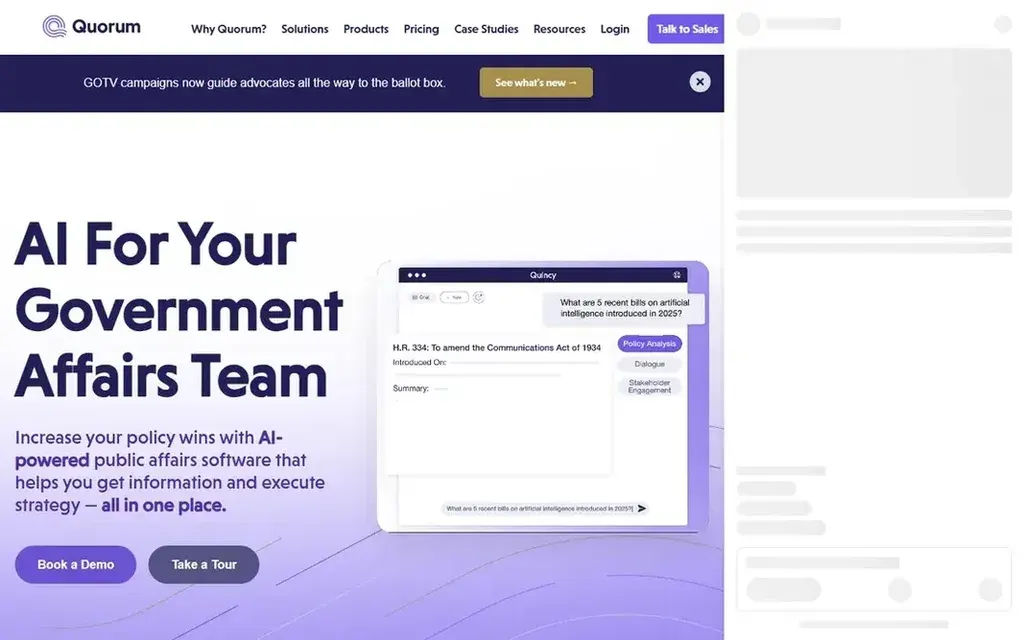
Quorum is built with AI-assisted public affairs and grassroots in mind. Because pricing is not shown on the homepage, budget discussions start with the vendor. More specifically, Quorum describes itself as AI-powered public affairs software that tracks legislation, runs stakeholder relationships and runs grassroots campaigns.
Limits to weigh: Wide suite may overwhelm small teams.
For everyday use, the breadth of the suite means onboarding and configuration take effort. Teams with narrow monitoring needs may pay for capability they do not use. Check the vendor site for Quorum pricing; none is listed in this comparison. Free access: Not stated.
- AI-powered tracking features
- Stakeholder relationship management
- Pricing needs a vendor conversation
Where FiscalNote fits: wide legislative and regulatory monitoring. Pricing is not published on the homepage, so buyers should request details straight.
Consider a more straightforward legislative tracker if your needs are restricted to one chamber or a single issue area. For everyday use, since the system spans multiple modules, the experience can feel wide instead of specialized, and smaller teams may find more focused tools simpler to adopt. No starting price is listed for FiscalNote here; confirm pricing on the vendor site. Trial and free access: Not stated.
Points against: Setup can take time for large teams.
- Widely used across government affairs teams
- Includes several jurisdictions
- Feature depth varies by module
How the list was put together
For each of the 5 tools we noted price, free plan or trial, fit for public policy monitoring software and the main limit, using vendor pages and documentation. Treat prices as a snapshot: vendors change plans often, so check the vendor site for the figure that applies today. The ranking is editorial: typical fit first, then clear pricing, then free access. If your needs are unusual, read the profiles rather than relying on position.
Questions to settle before buying
- Ask Bloomberg Government, CiviCRM, Quorum and FiscalNote for a written quote, since no starting price is shown.
- Read the limits listed for LegiStorm first: narrower than full policy systems.
- Pick one real project and run it in FiscalNote first; a small pilot shows fit faster than a checklist.
- Test the integrations you rely on with CiviCRM before committing; some connectors sit on upper tiers.
- See whether Bloomberg Government offers onboarding or training, and whether it is included in the price.
FAQ
What is the cheapest option for public policy monitoring software in this list?
On published monthly entry prices, LegiStorm is the lowest here at $199 per month. Entry price is only part of the cost, because seats, add-ons and billing terms can change the total.
What is public policy monitoring software used for?
It helps teams track legislation, regulation and government activity so they can respond to changes that affect their organization. Government affairs, compliance and advocacy teams use it to follow bills, monitor hearings and coordinate outreach to policymakers.
Do these tools publish their prices?
Not all of them. Bloomberg Government, CiviCRM, Quorum and FiscalNote publish no starting price, so expect a quote request for those. The rest, LegiStorm included, show a starting price, though seats and billing terms still change the final cost.
Is LegiStorm the right pick for everyone comparing public policy monitoring software?
No single tool suits every team. LegiStorm comes first because it fits congressional contacts and staff data, while Bloomberg Government suits policy news plus legislative tracking and CiviCRM suits open source constituent management. Match the tool to your own size, budget and workflow before deciding.
How are the tools for public policy monitoring software ordered?
LegiStorm sits first and FiscalNote last because the order follows typical fit for public policy monitoring software, then price clarity and free access. It is a judgement call, so read each profile for fit and limits.
Sources
- https://www.legistorm.com
- https://about.bgov.com
- https://civicrm.org
- https://www.quorum.us
- https://fiscalnote.com