Legal Document Management Software for Startups in 2026: The 6 Best Options Side by Side
6 best legal document management software for startups, with entry costs, free tiers and the buyer each one serves. Real limits included. Prices checked.
- Editor's choice
 Filevine
Legal teams exploring AI-assisted case work
Starts atSee websiteVisit filevine.comFull review - Great alternative
 MyCase
Small teams running cases and billing together
Starts at$50 per user a monthVisit mycase.comFull review - Also consider
 NetDocuments
Secure document and email management
Starts atSee websiteVisit netdocuments.comFull review
Direct answer
Filevine comes first here, mainly for legal teams exploring AI-assisted case work. Listed starting prices: MyCase from $50 per user a month, PracticePanther from $49 per user a month and DocuSign from $45 per user a month. For a different need, MyCase covers small teams running cases and billing together and NetDocuments covers secure document and email management. All 6 tools are compared below on price, free plan and limits.
TL;DR:
- Number one here is Filevine, a fit for legal teams exploring AI-assisted case work.
- Check the limits for MyCase before you commit: positioned around practice management, not deep document archiving.
- A permanent free plan is missing from all 6 tools, Filevine and Smokeball included; plan for a trial or a premium start.
- Smokeball is the one to check for document automation with billing in one system.
Last checked November 2026. Prices and plan details were read from the vendors' own pages in November 2026; vendors change plans often, so confirm the current price on the vendor site before you buy.
Quick comparison
| Tool | Best for | Starts at | Free plan? | |
|---|---|---|---|---|
| Filevine | Legal teams exploring AI-assisted case work | See website | Free trial | Visit |
| MyCase | Small teams running cases and billing together | $50 per user a month | Free trial | Visit |
| NetDocuments | Secure document and email management | See website | Not stated | Visit |
 PracticePanther | Automating routine firm processes | $49 per user a month | Free trial | Visit |
 DocuSign | Agreements and electronic signatures | $45 per user a month | Not stated | Visit |
 Smokeball | Document automation with billing in one system | See website | Not stated | Visit |
Our 6 legal document management software for startups
If you are comparing legal document management software for startups, this page covers 6 tools in one place: what each is best for, what it costs to start, whether it has a free plan, and the main limit to know about.
Pick Filevine if this describes you: legal teams exploring AI-assisted case work. Since product details evolve rapidly, confirm current document capabilities on the vendor site.
From a buyer's view, Filevine presents itself as a legal AI system for law businesses and legal teams, with LOIS as part of its offering. Check the vendor site for Filevine pricing; none is listed in this comparison. On free options: Free trial.
Honest limits: Feature details should be confirmed straight.
- Includes LOIS as part of its platform
- AI product positioning for legal teams
- Document management is one part of a larger case product
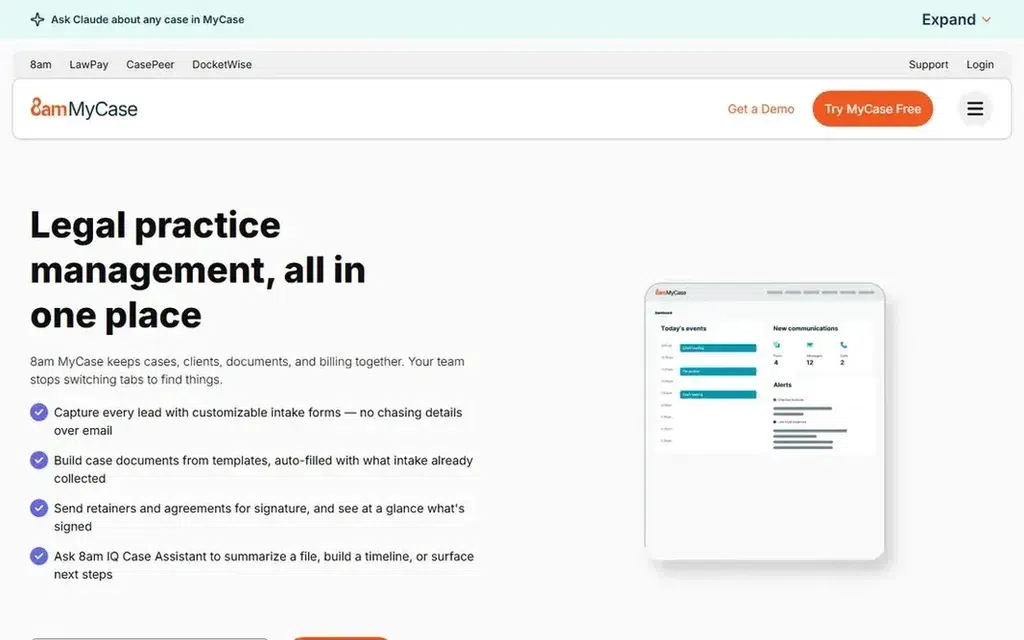
MyCase serves small teams running cases and billing together. MyCase is legal practice management software built to run a profitable firm, handling cases, clients, billing and payments in one place. Its strength for startups is consolidation: matter records and related documents sit with the client and billing data rather than being scattered.
Upsides: Made for running a profitable firm.
MyCase is most solid when you want case and billing context around your documents. Verify current capabilities on the vendor site. MyCase cost at the entry level: $50 per user per month. As for free access: Free trial.
Where it falls short: not deep document archiving.
- Cases, clients
- Consolidates client and matter records
- Positioned around practice management
NetDocuments is designed for secure document and email management. It is most solid for organizations centred on secure document control.
Points against: May be more than a very small team needs.
NetDocuments shows no starting price here, so confirm the cost on the vendor site. On free options: Not stated.
- Automates document and email management
- Secure and compliant product
- Centred on document management instead of billing

Think of PracticePanther for automating routine firm processes. PracticePanther works best as an operational hub for an expanding firm.
Drawbacks to consider: Document handling is part of a broader practice suite.
In practice, startups needing specialized document and email management at scale may find a dedicated system more appropriate. The starting price for PracticePanther: $49 per user per month. Free plan details: Free trial.
- Aimed at simplifying daily operations
- Process automation for firm workflows
- Automation setup may take planning
DocuSign works best for agreements and electronic signatures. For startups, it is the piece that deals with signing and agreement workflow, which frequently sits alongside a document repository. Confirm current agreement features on the vendor site.
Upsides: Electronic signature capability.
Where it is weaker: Not a full document management system.
DocuSign is not a complete document management system, so it fits best combined with a system like NetDocuments or a practice suite. If you need organized storage and matter-linked files, start there and add signing. On cost, DocuSign starts like this: $45 per user per month. Trial and free access: Not stated.
- Agreement management in one product
- Widely used for contract workflows
- Best paired with a storage or matter product

Smokeball is designed for document automation with billing in one system. For a startup law firm or legal team, that means documents are generated and stored alongside the matters they belong to rather than in a separate system.
On top of that, Smokeball is legal practice management software that merges automatic time tracking, document automation, and trust and billing tools. Teams with an existing billing or case system may prefer a dedicated document product like NetDocuments. Check the vendor site for Smokeball pricing; none is listed in this comparison. Free plan details: Not stated.
The main drawbacks: Centred on legal practice management instead of pure document storage.
- Document automation built in
- Trust and billing features
- Wide suite may feel heavy for very small teams
How we compared the tools
LinkVetted looked at what each vendor publishes: pricing, plan limits, feature coverage for legal document management software for startups and stated drawbacks. No hands-on testing is claimed. Treat prices as a snapshot: vendors change plans often, so check the vendor site for the figure that applies today. Order on the page follows fit for the typical buyer first, then price transparency and free access. Your own requirements should decide the final pick.
Questions to settle before buying
- Get a written quote from Filevine, NetDocuments and Smokeball; the list shows no starting price for them.
- Take the trial from Filevine, MyCase and PracticePanther and push a live task through it before you pay.
- Before choosing Filevine, weigh its main limit: document management is one part of a bigger case system.
- Read the plan comparison for PracticePanther carefully; key features often start on a higher tier.
- Run a one or two week pilot of MyCase with the people who will use it every day.
FAQ
Can I try these tools before paying?
Often, yes. Filevine, MyCase and PracticePanther offer a free trial. Use your own data and a real task during the test, and check what the free tier or trial limits before you rely on it.
Do these tools publish their prices?
Not all of them. Filevine, NetDocuments and Smokeball publish no starting price, so expect a quote request for those. The rest, MyCase included, show a starting price, though seats and billing terms still change the final cost.
How are the tools for legal document management software for startups ordered?
The order follows typical fit for legal document management software for startups, with Filevine first and Smokeball last, then price clarity and free access. It is editorial judgement, not a score, so another team could rank the tools differently.
Is Filevine the right pick for everyone comparing legal document management software for startups?
No single tool suits every team. Filevine comes first because it fits legal teams exploring AI-assisted case work, while MyCase suits small teams running cases and billing together and NetDocuments suits secure document and email management. Match the tool to your own size, budget and workflow before deciding.
Sources
- https://www.filevine.com
- https://www.mycase.com
- https://www.netdocuments.com
- https://www.practicepanther.com
- https://www.docusign.com
- https://www.smokeball.com