The 5 Best Interactive Product Tour Software in 2026, Ranked
Best interactive product tour software in 2026: 5 tools with starting prices, free plans and limits. Each profile ends with a plain caveat. Quick to scan.

- Editor's choice
 WalkMe
Enterprise digital adoption and automation
Starts atSee websiteVisit walkme.comFull review - Great alternative
 Chameleon
Personalized in-app guidance
Starts at$279 for 2,000 MTUsVisit chameleon.ioFull review - Also consider
 Userpilot
No-code product growth and onboarding
Starts at$299 a monthVisit userpilot.comFull review
Direct answer
For enterprise digital adoption and automation, WalkMe is where this list starts. Listed starting prices: Chameleon from $279 for 2,000 MTUs, Userpilot from $299 a month and UserGuiding from $249 per month. Chameleon is the stronger choice for personalized in-app guidance, while Userpilot suits no-code product growth and onboarding. All 5 tools are compared below on price, free plan and limits.
TL;DR:
- WalkMe is the opening pick, best for enterprise digital adoption and automation.
- Pendo suits product analytics and AI context.
- For the cheapest start, look at UserGuiding: $249 per month.
- The main caution on Userpilot: may need ramp-up time.
Last checked November 2026. Prices and plan details were read from the vendors' own pages in November 2026; vendors change plans often, so confirm the current price on the vendor site before you buy.
Quick comparison
| Tool | Best for | Starts at | Free plan? | |
|---|---|---|---|---|
| WalkMe | Enterprise digital adoption and automation | See website | Not stated | Visit |
| Chameleon | Personalized in-app guidance | $279 for 2,000 MTUs | Free trial | Visit |
| Userpilot | No-code product growth and onboarding | $299 a month | Free trial | Visit |
 UserGuiding | No-code onboarding and feedback | $249 per month | Yes | Visit |
 Pendo | Product analytics and AI context | See website | Not stated | Visit |
The 5 tools in detail
LinkVetted compared 5 tools for interactive product tour software. The goal is a practical shortlist: published prices, free plan facts, best-fit use cases and honest limits for every entry.
WalkMe targets enterprise digital adoption and automation. WalkMe makes enterprise AI work by overlaying every application with live context, cross-app workflows, and automation.
Points against: Enterprise-focused complexity.
More specifically, implementation frequently involves IT and change management. WalkMe does not show a starting price in this comparison, so check the vendor site for current pricing. Free plan details: Not stated.
- Real-time context overlay
- Automation capabilities
- May need IT involvement
Pick Chameleon if this describes you: personalized in-app guidance. Chameleon's personalization relies on sufficient user behavior data, so new products may see restricted benefits initially.
Where it falls short: May need behavior data.
For everyday use, consider other tools if you need email or push notifications alongside tours. The starting price for Chameleon: $279 for 2,000 MTUs. Trial and free access: Free trial.
- Learns user behavior
- Personalized guidance
- Restricted to in-app

Userpilot is a good fit for no-code product growth and onboarding. Whereas Userpilot gives you a wide feature set, teams with very straightforward needs might find it more than necessary.
Honest limits: Advanced features need setup.
From a buyer's view, Userpilot is an AI-powered, no-code product growth product that helps teams onboard users, drive feature adoption, and boost retention across web and mobile. Starting cost for Userpilot: $299 per month. Free plan details: Free trial.
- AI-powered personalization
- Cross-platform support
- May need ramp-up time
UserGuiding is built with no-code onboarding and feedback in mind. It supports onboarding, engagement, feedback collection, and behavior analysis without coding. More specifically, teams with complicated enterprise needs might outgrow it.
It is a solid choice for small to midsize products seeking an easy-to-use tour builder. In daily use, the system is made for teams that want a straightforward, no-code option. Starting cost for UserGuiding: $249 per month. UserGuiding has a free plan.
Where it falls short: Entry-level compared with suites.
- No-code builder
- Feedback collection
- May lack advanced AI
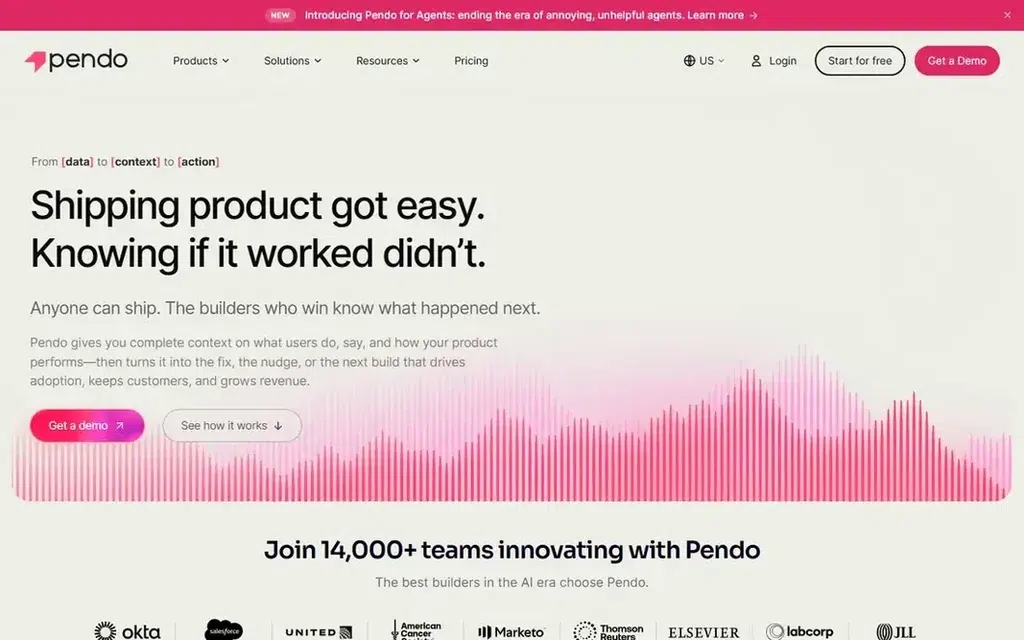
Pendo is designed for product analytics and AI context. Consider more straightforward tools if you do not need deep analytics or AI integration.
Setting up product context can need technical resources. Check the vendor site for Pendo pricing; none is listed in this comparison. On free options: Not stated.
Honest limits: Complicated for straightforward tours.
- Adoption and revenue focus
- Rich product context
- May require dedicated setup
Selection criteria
Pricing pages, product documentation and feature lists were the main sources, and every entry carries at least one honest drawback. Treat prices as a snapshot: vendors change plans often, so check the vendor site for the figure that applies today. Tools are placed by general fit for interactive product tour software, with price clarity and free access as tie-breakers. A different team can reasonably rank them differently.
Pre-purchase checklist
- Get a written quote from WalkMe and Pendo; the list shows no starting price for them.
- Test the free plan from UserGuiding against your real workload before relying on it.
- Use real work to test the free trial from Chameleon and Userpilot, rather than a demo project.
- Before choosing WalkMe, weigh its main limit: enterprise-focused complexity.
- Test how quickly UserGuiding answers a pre-sales question; it hints at how support will feel later.
- Pick one real project and run it in WalkMe first; a small pilot shows fit faster than a checklist.
FAQ
Can I use these tools for mobile apps?
Some tools, like Userpilot, explicitly support web and mobile. Others may focus on web applications. Confirm product compatibility on the vendor's site before making a decision.
What is the cheapest option for interactive product tour software in this list?
On published monthly entry prices, UserGuiding is the lowest here at $249 per month. Entry price is only part of the cost, because seats, add-ons and billing terms can change the total. Each of the 5 options in this interactive product tour software guide has its own card above with the price, free plan and limits.
What is interactive product tour software?
Interactive product tour software helps you produce in-app guides, tooltips, and walkthroughs that present users how to use your product. These tools commonly bundle no-code builders, targeting choices, and analytics to measure tour effectiveness.
Which options for interactive product tour software have a free plan?
UserGuiding is the only tool in this list with a free plan. Free plans usually cap users, projects or features, so check the limits on the vendor page. Several others offer a trial instead. All 5 picks in this interactive product tour software comparison list a starting price, free plan details and the main limits on their cards above.
Is WalkMe the right pick for everyone comparing interactive product tour software?
No single tool suits every team. WalkMe comes first because it fits enterprise digital adoption and automation, while Chameleon suits personalized in-app guidance and Userpilot suits no-code product growth and onboarding. Match the tool to your own size, budget and workflow before deciding.
Can I try these options before paying?
Often, yes. UserGuiding has a free plan and Chameleon and Userpilot offer a free trial. Use your own data and a real task during the test, and check what the free tier or trial limits before you rely on it. For the full picture, the cards above cover all 5 entries of this interactive product tour software list, including price, free plan and limits.
Sources
- https://www.walkme.com
- https://www.chameleon.io
- https://userpilot.com
- https://userguiding.com
- https://www.pendo.io
Related guides
- Best Interactive Product Demo Software in 2026: 8 Tools Compared
- Best Color Correction Software for Product Shots in 2026: Prices, Free Plans and 6 Picks
- Best Demo Platform Software for Product Demos in 2026: 8 Tools Compared
- Best Ecommerce Platforms for Product Listings in 2026: 9 Platforms Compared