Best File Transfer Software in 2026: 8 Services Compared
Compare the best file transfer software for large files, with free limits, link expiry, passwords and encryption, for personal and team use in 2026 today.
- Editor's choice
 WeTransfer
Simple one-off sends
Starts atFreeVisit wetransfer.comFull review - Great alternative
 SwissTransfer
Large free transfers
Starts atFreeVisit swisstransfer.comFull review - Also consider
 Smash
Very large files
Starts atFreeVisit fromsmash.comFull review
TL;DR:
- WeTransfer is our pick for most one-off sends because it is simple, widely known and free for smaller transfers.
- SwissTransfer stands out for free large transfers, with up to 50 GB at no cost and no account required in published comparisons.
- Smash suits very large files, since paid plans remove size limits and free transfers queue above 2 GB rather than failing.
- Google Drive and Dropbox Transfer are better when files need to stay available, be edited or be shared repeatedly.
- For sensitive client files, choose a service with password protection, link expiry and encryption, and check where files are stored.
Quick comparison
| Tool | Best for | Starts at | Free plan? | |
|---|---|---|---|---|
| WeTransfer | Simple one-off sends | Free | Yes | Visit |
| SwissTransfer | Large free transfers | Free | Yes | Visit |
| Smash | Very large files | Free | Yes | Visit |
 Google Drive | Files that stay and sync | Free | Yes | Visit |
 Dropbox Transfer | Sending alongside Dropbox storage | Free | Yes | Visit |
 TransferNow | Free password-protected sends | Free | Yes | Visit |
 Filemail | Budget paid upgrades | Free | Yes | Visit |
 Send Anywhere | Device-to-device and link sharing | Free | Yes | Visit |
The best file transfer software
File transfer tools solve a simple problem in different ways. Some send a file once through a link that expires. Others store the file so you can share it again, edit it and control access over time. The right choice depends on file size, how long the link must live, and how sensitive the contents are. We compared official pricing and help pages and published 2026 comparisons to build this list.
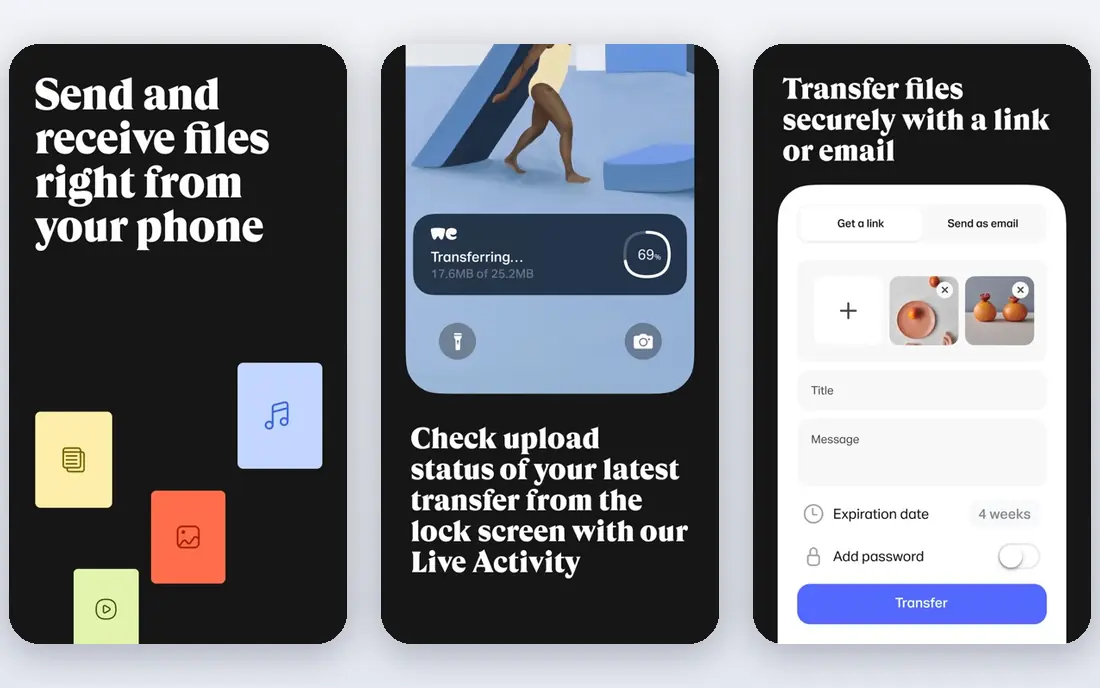
WeTransfer is the tool most clients already know, which means fewer instructions and fewer failed downloads. Upload files, add an email or copy a link, and the recipient downloads from a clean page. Paid Starter and Ultimate plans, listed around 8 and 23 dollars per month in published comparisons, raise limits and extend storage, with Ultimate supporting very large transfers.
The free plan is best for occasional sends, not for a permanent file library. Links expire, and monthly transfer limits apply, so a recipient who misses the window will need a resend. If you send files weekly to the same clients, a storage-based tool such as Dropbox or Google Drive may save repeated uploads.
- Very easy to use with no learning curve
- Widely recognized by clients
- Paid plans add larger transfers and longer storage
- Free transfers expire after a few days
- Free monthly limits apply in current plans
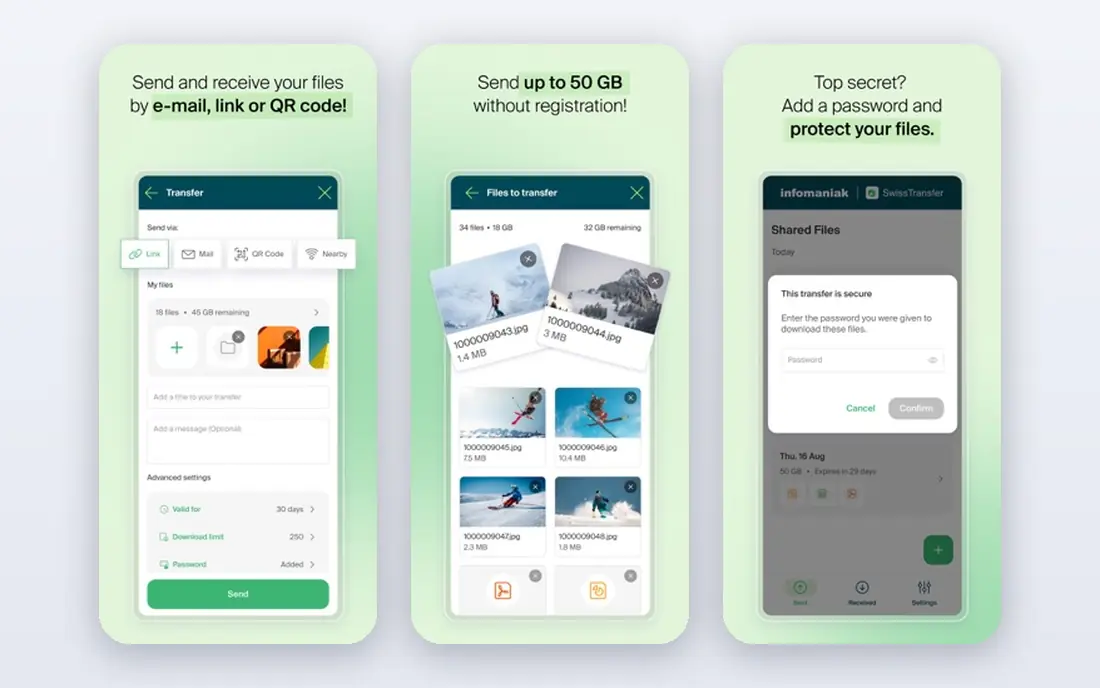
SwissTransfer, from Infomaniak, is the strongest free option for large files. It allows transfers up to 50 GB without an account, with link lifetimes up to 30 days, according to published 2026 comparisons. That combination beats most free tiers by a wide margin, and it makes SwissTransfer a good first try for a large video, backup or design file.
The trade is features. SwissTransfer is a transfer tool, not a workspace. You do not get document editing, version history or team folders in the same way as Google Drive. For a one-off large send, that simplicity is a plus. For ongoing client work, pair it with a storage tool or choose a paid transfer service with branding and history.
- Free transfers up to 50 GB in published comparisons
- No account required
- Links last up to 30 days
- No paid upgrade path for branding or history in some listings
- Fewer collaboration features than Drive or Dropbox

Smash is built for files that are too large for most free tiers. Free transfers have priority up to 2 GB, with larger files queued behind paid users, while paid plans offer priority on any size and longer link lifetimes. That design means a 20 GB video project can still be sent free, though it may take longer to process than a paid send.
Paid plans also add branding, previews and longer availability, which helps creative teams sending work to clients. Smash encrypts files in transit and at rest and deletes them when links expire, according to its own descriptions. If you regularly send very large files and want a dedicated transfer service, Smash is a strong choice.
- No hard size limit on paid plans
- Free transfers with priority up to 2 GB
- Customizable pages on paid plans
- Large free transfers queue behind paid users
- Paid plans cost more than basic WeTransfer tiers
Google Drive is not just a transfer tool, and that is why many people prefer it for ongoing work. Upload a file once, share a link with chosen people, and the file stays available until you remove it. Recipients can preview, comment and, for Docs and Sheets, edit without downloading. Paid Google One plans start around 1.99 dollars per month for 100 GB in published comparisons.
The limit is quota. A 15 GB free allowance sounds generous until video files and photo backups share it with Gmail. Drive also rewards careful sharing settings, since a link set to anyone with the link can spread further than intended. For files that need to live, be revised and be shared repeatedly, Drive is still our top storage-based pick.
- 15 GB free storage shared with Gmail and Photos
- Easy sharing and editing
- Files do not expire by default
- Large files count against storage quota
- Sharing controls need care to avoid public links
Dropbox Transfer lets you send a copy of a file without giving access to your whole Dropbox folder. You can set a password, set an expiry date and track downloads on paid plans, which is useful for client deliveries. Free Basic users can send up to 2 GB per transfer in published comparisons, while paid plans raise that limit to 100 GB or more.
If you already store work in Dropbox, Transfer is a natural add-on. If you do not use Dropbox for storage, a dedicated free tool such as SwissTransfer may be cheaper for large one-off sends. Dropbox Transfer shines for professionals who want a branded, trackable delivery page without moving files to a separate service.
- Clean transfer pages with passwords and expiry controls
- Works with existing Dropbox files
- Larger transfers on paid plans
- Free transfer size is limited to 2 GB on Basic
- Full value needs a paid Dropbox plan
TransferNow is a good free alternative to WeTransfer for users who want password protection without paying. Free sends go up to 5 GB, with no sign-up required, and paid Premium plans raise limits to 250 GB per transfer with longer storage, listed around 10 to 15 dollars per month in comparisons. That makes it easy to test before committing.
The 7-day free expiry is the main limit, so warn recipients to download promptly. TransferNow also offers team plans for businesses that send often. If you send files a few times a month and want a password on every send, TransferNow is a practical, low-cost choice.
- Free sending up to 5 GB without sign-up
- Password protection on free sends in comparisons
- Simple link sharing
- Free files expire after 7 days
- Larger transfers and longer storage need a paid plan
Filemail suits users who want a cheap paid upgrade path. Free sends cover up to 5 GB, and paid Personal and Pro plans, listed from around 6 dollars per month in comparisons, raise transfer size and storage, with Pro offering up to 1 TB in some listings. Desktop apps help with large uploads that browsers sometimes struggle with.
The free tier caps daily transfers, so heavy users will hit it quickly. Filemail also lacks the deep collaboration features of Drive or Dropbox, since it focuses on sending. For a freelancer who sends large files a few times a week and wants a low monthly cost, Filemail is a strong value pick.
- Free sending up to 5 GB without registration
- Paid plans offer large transfers and storage
- Desktop and mobile apps
- Free sends limited to a few transfers per day in comparisons
- Interface is plainer than WeTransfer
Send Anywhere works differently from most tools here. For device-to-device transfers, you enter a short code on the receiving device and the file moves directly, which is handy when two phones or computers are nearby. Link sharing covers up to 10 GB per link in published comparisons, with a monthly download allowance for free link use.
Link expiry is short, at 48 hours in comparisons, so Send Anywhere is best for immediate sends, not for files a client may open next week. Paid add-ons raise limits and remove some caps. If you often move files between your own devices or send a file to someone sitting nearby, Send Anywhere is fast and simple.
- Fast device-to-device transfers with a short code
- Link sharing up to 10 GB
- No account needed for basic sends
- Link downloads expire after 48 hours in comparisons
- Monthly link download allowance applies
How we picked these
We compared official pricing, help and feature pages and published 2026 transfer comparisons, and we favored services that are live, clearly state free limits, and support common file types without a forced install. We weighted free size limits, link expiry, password and encryption options, and ease of use for recipients. We left out services that had closed, such as Firefox Send, and tools that only sync between your own devices with no recipient link option.
How to choose a file transfer service
Start with size and lifespan. If the file is under 5 GB and the recipient will download it today, almost any free tool here works. If it is over 20 GB, SwissTransfer or Smash are better starting points than a 2 GB free tier. If the file must stay available for weeks, choose Drive, Dropbox or a paid transfer plan with longer storage, and tell the recipient the expiry date in your message.
Protect sensitive files
For client work, contracts or personal documents, use a password on the transfer, set the shortest expiry that still works, and share the password through a separate channel from the link. Check whether the service encrypts files in transit and at rest, and whether it stores files in a region that meets your client requirements. Avoid public links for sensitive files, and confirm the download with the recipient before deleting your local copy.
Test before a deadline
Upload speeds vary by file size, browser and connection, and large transfers can fail near the end if the connection drops. Test a large transfer a day before a client deadline, use a desktop app where offered for very large files, and keep the original file until the recipient confirms a complete download. A second link from a different service is a cheap backup for critical deliveries.
FAQ
What is the best free file transfer service?
SwissTransfer is our pick for large free transfers, with up to 50 GB at no cost in published comparisons. WeTransfer and TransferNow are better for smaller, familiar sends, with free limits around 3 to 5 GB.
What is the best file transfer app for large files?
Smash and SwissTransfer handle large files best among dedicated transfer tools, while Google Drive and Dropbox handle large files best when you also need storage. For files over 50 GB, check paid Smash or MASV-style pay-per-GB options and test upload speed first.
How long do file transfer links last?
It varies. WeTransfer free links last a few days, TransferNow free links last 7 days, SwissTransfer links last up to 30 days, and Drive links last until you remove them. Always tell the recipient the expiry date and send a fresh link if they miss it.
Is WeTransfer safe for sensitive files?
WeTransfer offers password protection and expiry controls on paid plans, and it encrypts files in transit. For highly sensitive files, add your own password, use the shortest expiry that works, and consider a service with end-to-end encryption or a storage tool with strict sharing controls.
Can I send files without creating an account?
Yes. SwissTransfer, TransferNow, Filemail and Smash all allow basic sends without an account in published comparisons. Storage tools such as Google Drive and Dropbox require an account, since they keep files for you over time.
What is the best file transfer software for teams?
Google Drive and Dropbox Transfer suit teams that share, edit and revisit files, while Smash and Filemail suit teams that deliver finished files to clients. Choose a storage tool for ongoing work and a transfer tool for one-off deliveries, and set clear rules for passwords and link expiry.