Best Enterprise Patch Management Software in 2026: 9 Tools Compared
Compare the best enterprise patch management software in 2026, with automated patching, third-party apps, compliance, and remote device coverage today.
- Editor's choice
 ManageEngine Patch Manager Plus
Dedicated multi-OS patching
Starts at$245 per yearVisit manageengine.comFull review - Great alternative
 Automox
Cloud-native remote fleets
Starts at$3 per endpoint per monthVisit automox.comFull review - Also consider
 NinjaOne
MSP and internal IT teams
Starts atSee websiteVisit ninjaone.comFull review
TL;DR:
- ManageEngine Patch Manager Plus and Automox suit teams that want dedicated patching at a clear price, while NinjaOne and Atera suit teams that also need remote management.
- Third-party application coverage matters as much as operating system patching, because browsers, office tools, and utilities are common attack paths.
- Test rings and rollback options reduce the risk of a bad patch breaking business systems, especially for servers and shared workstations.
- Compliance reporting should show patch status by device, application, and severity, not just a total percentage.
Quick comparison
| Tool | Best for | Starts at | Free plan? | |
|---|---|---|---|---|
| ManageEngine Patch Manager Plus | Dedicated multi-OS patching | $245 per year | Yes | Visit |
| Automox | Cloud-native remote fleets | $3 per endpoint per month | Free trial | Visit |
| NinjaOne | MSP and internal IT teams | See website | Free trial | Visit |
 PDQ Connect | Windows-heavy small teams | $12 per device per year | Free trial | Visit |
 Action1 | Free patching up to 100 endpoints | Free | Yes | Visit |
 Ivanti Neurons for Patch Management | Vulnerability-led patching | See website | No | Visit |
 Qualys Patch Management | Vulnerability plus patching | See website | Free trial | Visit |
 Atera | High device-to-technician ratios | $129 per month | Free trial | Visit |
 Microsoft Intune | Microsoft 365 environments | See website | Free trial | Visit |
The best enterprise patch management software
Enterprise patch management software, including automated patch management software for IT teams, keeps operating systems and third-party applications updated across hundreds or thousands of devices. Good tools automate detection, testing, deployment, and reporting, so security teams can close vulnerabilities without breaking business systems. The nine tools below cover that range for small IT teams through global enterprises.
ManageEngine Patch Manager Plus is a dedicated patching product that covers Windows, macOS, and Linux, plus more than 1,000 third-party applications according to vendor documentation. It offers automated patch detection, approval workflows, test rings, maintenance windows, and rollback options, with detailed compliance and audit reporting. A free edition covers up to 25 computers, while Professional starts at $245 per year for 50 computers on premises, and cloud pricing starts higher, which makes it easy for small teams to test before scaling.
The interface is functional rather than modern, and new admins need time to learn policy structure and reporting. Licensing across Patch Manager Plus, Endpoint Central, and related modules can also be confusing at scale. For IT teams that want dedicated patching depth, including on-premises deployment for data residency, Patch Manager Plus remains a strong value choice with transparent published pricing.
- Broad third-party coverage
- On-premises and cloud options
- Free edition for small fleets
- Interface takes learning
- Licensing across modules can be complex
Automox is a cloud-native patching platform built for distributed and remote fleets that rarely connect to an office network. Policies automate operating system and application patching for Windows, macOS, and Linux, with real-time visibility into device compliance and custom rules for different device groups. Setup is fast compared with on-premises tools, and the console gives IT teams a clear view of which devices are patched, pending, or offline.
Starting prices around $3 per endpoint per month are quoted for some tiers, with list pricing varying by volume and features, so teams should confirm the rate for their endpoint count. Advanced third-party application coverage and automation features sit in higher tiers, which raises the total for teams that need full coverage. For remote-first companies, Automox offers a practical balance of speed, visibility, and automation without VPN-dependent patching.
- Cloud-native control without VPN
- Policy-based automation
- Fast setup
- Advanced third-party coverage needs higher tiers
- Pricing varies by volume
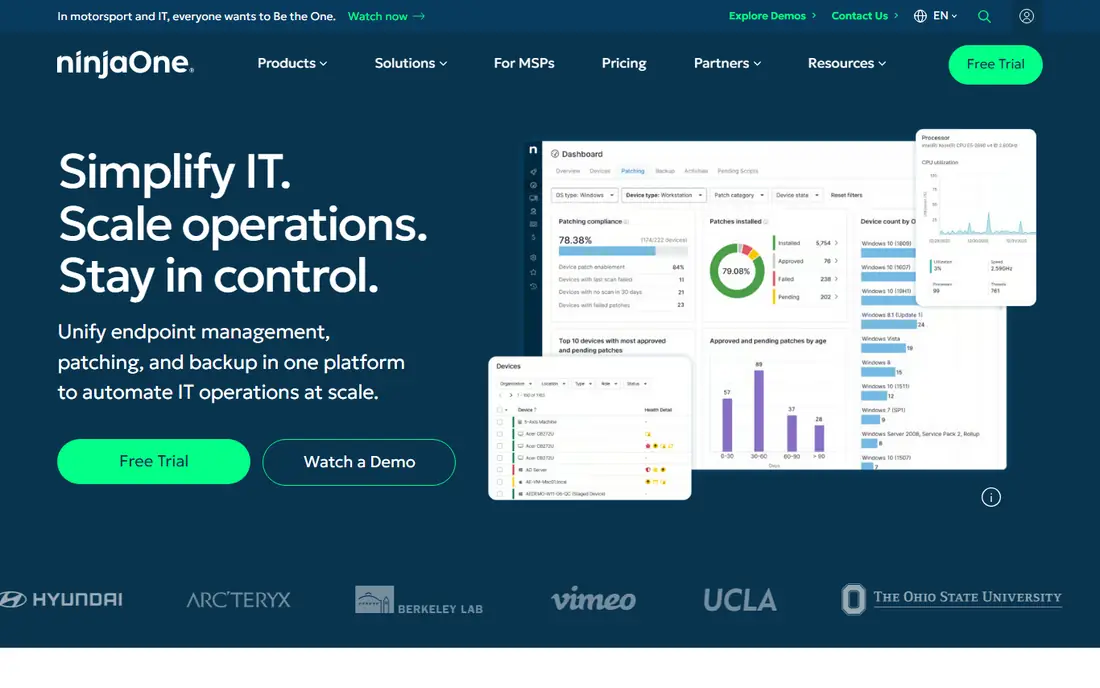
NinjaOne combines patch management with remote monitoring and management, remote access, backup, and ticketing in one platform for internal IT teams and managed service providers. Patching covers operating systems and third-party applications, with policies, scheduling, and reporting that fit teams managing 200 to 5,000 endpoints. Automation and scripting help teams handle repetitive tasks, while the multi-tenant console suits MSPs that manage many clients from one login.
Pricing is quote-based and varies by volume, with published volume ranges often cited per endpoint per month, so budgeting requires a sales conversation. Teams that only need patching may find the broader platform larger than necessary, but teams that also need remote management will get more value from the bundle. For MSPs and mid-sized IT teams, NinjaOne is a strong all-round endpoint platform with solid patching at its core.
- Patching plus remote monitoring
- Strong automation
- Multi-tenant console
- Quote-based pricing
- Patching is part of a broader platform
PDQ Connect, formerly PDQ Deploy and Inventory for on-premises use, offers cloud-based patching and software deployment for Windows-heavy fleets. It includes a package library for common third-party applications, scheduled deployments, and reporting on patch status, with pricing starting at $12 per device per year for the Basic tier in review listings, and higher tiers adding features. Small IT teams like the straightforward deployment model and the ability to push packages quickly without complex policy design.
Windows remains the strongest platform, while macOS and Linux coverage is lighter than ManageEngine or Automox. Teams with mixed operating systems should confirm coverage before committing. For Windows-focused small teams and MSPs that want affordable, simple patching and deployment, PDQ Connect is a strong value option.
- Low per-device price
- Simple deployment
- Strong Windows package library
- Windows focus is strongest
- MacOS and Linux coverage is lighter
Action1 stands out because its full patch management platform is free for the first 100 endpoints, with no functional limits in that tier according to vendor listings. It covers Windows patching for operating systems and third-party applications, with cloud-based management, reporting, and remote deployment. That model suits small businesses, startups, and IT teams that want real patch management without a budget approval process, and it lets larger teams test the platform on a subset of devices before paying.
Paid plans for more than 100 endpoints are quote-based, so larger enterprises should confirm pricing for their full fleet. Enterprise depth, including advanced vulnerability workflows and large-scale orchestration, is lighter than Ivanti or Qualys. For teams under 100 endpoints, Action1 is the clear budget pick, and it often beats paying for a basic tier elsewhere.
- Full platform free for first 100 endpoints
- Cloud-based
- No functional limits in free tier
- Paid pricing is quote-based
- Enterprise features are lighter
Ivanti Neurons for Patch Management takes a vulnerability-led approach, prioritizing patches by risk, exploitability, and business impact rather than by release date alone. It covers operating systems and third-party applications across Windows, macOS, and Linux, with automation, test groups, maintenance windows, and rollback options. Integration with vulnerability data helps security and IT teams agree on what to patch first, which matters when patch volume exceeds available maintenance windows.
Pricing is quote-based and aimed at mid-market and enterprise teams, so small teams may find it costly. Implementation also benefits from planning around risk scoring, groups, and change control. For organizations that need to defend patch priorities to auditors and leadership with risk data, Ivanti offers a mature, enterprise-grade workflow that goes beyond simple deployment.
- Risk-based prioritization
- Broad application coverage
- Automation and rollback
- Quote-based pricing
- Implementation needs planning
Qualys Patch Management pairs with Qualys Vulnerability Management, Detection and Response, so teams can find vulnerabilities and patch them from one cloud platform. It covers operating systems and third-party applications, with automated deployment, maintenance windows, and compliance reporting. That single workflow reduces handoffs between security teams that find issues and IT teams that fix them, which often delays patching in larger organizations.
Pricing is per-asset and quote-based, with third-party sources citing VMDR plus patch management costs that add up for large fleets. Teams that do not already use Qualys for vulnerability management should compare the combined cost against a standalone patching tool plus a separate scanner. For security-mature organizations already on Qualys, adding patch management is a natural step that closes the loop from detection to remediation.
- Single workflow for vulnerability and patching
- Strong reporting
- Cloud platform
- Quote-based pricing
- Best value when paired with Qualys VMDR
Atera is an all-in-one IT management platform for MSPs and internal IT teams, with patch management, remote monitoring, remote access, ticketing, and automation in one subscription. Pricing is per technician rather than per endpoint, starting at $129 per month per technician on annual billing for the Pro tier, which suits teams that manage many devices with few technicians. Patching covers operating systems and third-party applications, with policies and reporting built into the same console as monitoring and tickets.
Per-technician pricing means costs grow as staff grows, even if device count stays flat, so compare the total against per-endpoint tools for your team size. Patching depth is solid but sits inside a broader suite, rather than as a dedicated specialist product. For MSPs and IT teams with high device-to-technician ratios, Atera offers a cost-effective bundle that reduces tool switching.
- Per-technician pricing
- Patching plus RMM and ticketing
- AI assistance features
- Per-technician cost grows with staff
- Patch depth is part of a broader suite
Microsoft Intune manages devices, applications, and updates for organizations already invested in Microsoft 365 and Entra ID. It handles Windows Update policies, feature updates, and application deployment, with compliance policies that flag devices that fall behind. For Windows-heavy, Microsoft-centric environments, Intune avoids a separate patching vendor and keeps device management in the same admin center as identity and security policies.
Pricing depends on whether Intune is standalone or bundled with Microsoft 365 plans, and third-party application patching requires additional tooling or workflows compared with dedicated patching products. Teams with many Mac, Linux, or third-party apps may need a specialist tool alongside Intune. For Microsoft 365 shops that want one device management system, Intune is the natural starting point, and it pairs well with Windows Autopatch for update management.
- Tight Microsoft 365 integration
- Device management plus patching
- Policy control
- Pricing mixes Intune and Microsoft 365 plans
- Third-party patching needs care
How we picked these
We compared official product pages, pricing information, and public documentation for established patch management platforms, and we favored tools with current automated patching for operating systems and third-party applications, plus reporting and scheduling features. We excluded manual update tools without central management and consumer-only updaters. Prices shown are vendor-published starting prices where available, and we used See website where pricing is quote-based or bundled.
How to run enterprise patching without breaking systems
Start with asset inventory, because you cannot patch devices you do not know about. Include servers, remote laptops, and shared workstations, and confirm that offline devices are flagged rather than silently skipped. Next, build test rings: pilot patches on a small group, then IT staff, then a broader group, then production servers, with a pause between each ring to catch problems. That staged approach reduces the blast radius of a bad patch.
Set maintenance windows that fit business hours and change freezes, and use rollback plans for servers and critical workstations. Report patch status by severity, application, and device group, and track mean time to patch for critical vulnerabilities. Finally, coordinate with security teams on risk priorities, so limited windows are spent on patches that matter most, rather than on low-risk updates that consume the same downtime.
Third-party patching checklist
List your most common third-party applications, including browsers, office suites, PDF readers, and remote access tools, and confirm each patching tool covers them. Check whether patches are tested by the vendor, how quickly new releases appear in the catalog, and whether custom packages can be added for internal apps. Gaps in third-party coverage are a common blind spot, even when operating system patching looks healthy.
Compliance and audit tips
Keep patch history, approval records, and exception notes for devices that cannot be patched on schedule, such as medical or industrial systems. Auditors want to see why an exception exists, who approved it, and what compensating controls apply. Export reports regularly, because a patching console that only shows current status may not prove historical compliance at audit time.
FAQ
What is the best enterprise patch management software for a large company?
ManageEngine Patch Manager Plus, Ivanti Neurons, and Qualys Patch Management suit large companies well, with ManageEngine offering dedicated patching depth, Ivanti offering risk-based prioritization, and Qualys offering a combined vulnerability and patching workflow. Choose based on whether you already use a vulnerability platform.
What is the best automated patch management software for IT teams?
Automox and NinjaOne suit IT teams that want automation for remote fleets, with Automox offering cloud-native policy automation and NinjaOne offering patching plus remote management. Action1 suits smaller teams that want free patching up to 100 endpoints.
How much does enterprise patch management cost?
Costs range from free for Action1 up to 100 endpoints and $12 per device per year for PDQ Connect, to $3 per endpoint per month for Automox, $245 per year for ManageEngine for 50 computers, and quote-based enterprise pricing for Ivanti, Qualys, and NinjaOne. Compare per-endpoint, per-technician, and per-asset models for your fleet size.
Can patch management tools patch third-party applications?
Yes, most tools on this list patch third-party applications in addition to operating systems, but catalog size and update speed vary. Confirm that your key applications, including browsers and office tools, are covered, and check how custom internal applications are handled.
What happens if a patch breaks a system?
Good patching tools offer test rings, maintenance windows, and rollback options that let IT teams revert a patch or restore a system to a prior state. Test patches on a pilot group first, keep backups for servers, and document rollback steps before deploying to production.
Do I need patch management if I already use Microsoft Intune?
Intune covers Windows updates and device management well for Microsoft 365 shops, but third-party application patching and cross-platform depth may still need a specialist tool. Many Microsoft shops pair Intune with ManageEngine, Automox, or PDQ for broader application coverage.