Best Data Democratization Tools in 2026: 8 Platforms Compared
We compared the best data democratization tools for giving business teams safe self-service access to governed data, with pricing and governance notes.
- Editor's choice
 ThoughtSpot
Search-first analytics for business users
Starts at$25 per user per monthVisit thoughtspot.comFull review - Great alternative
 Sigma
Spreadsheet-style analysis on the warehouse
Starts atSee websiteVisit sigmacomputing.comFull review - Also consider
 Tableau
Deep visualization for analyst-led teams
Starts at$15 per user per monthVisit tableau.comFull review
TL;DR:
- ThoughtSpot and Sigma lead for business users who want plain-language questions and spreadsheet-style work.
- Looker and Power BI suit organizations that need a governed metric layer before wider access.
- Free and low-cost options such as Metabase work for small teams, but governance features sit in paid tiers.
- Every tool here needs a clean, modeled data source behind it, since no interface fixes messy definitions on its own.
Quick comparison
| Tool | Best for | Starts at | Free plan? | |
|---|---|---|---|---|
| ThoughtSpot | Search-first analytics for business users | $25 per user per month | Free trial | Visit |
| Sigma | Spreadsheet-style analysis on the warehouse | See website | Free trial | Visit |
| Tableau | Deep visualization for analyst-led teams | $15 per user per month | Free trial | Visit |
 Microsoft Power BI | Microsoft-centered organizations | $14 per user per month | Yes | Visit |
 Domo | All-in-one data, dashboards and apps | See website | Free trial | Visit |
 Looker | Governed metrics for larger data teams | See website | No | Visit |
 Metabase | Small teams and open source fans | Free | Yes | Visit |
 Qlik Sense | Associative exploration for business teams | See website | Free trial | Visit |
The best data democratization tools
Data democratization means letting people outside the data team ask questions and get trusted answers without waiting weeks for a report. The tools below differ in how much governance they provide, and that difference decides whether self-service stays accurate as it grows.

ThoughtSpot is built around a simple idea: type a question, get a chart. Business users who dislike dashboard builders often take to it faster than to traditional BI, since the search bar feels familiar. Models defined by the data team keep answers tied to approved metrics, which helps self-service stay consistent as more people start asking questions.
The catch is pricing structure. Entry pricing starts at $25 per user per month, and the AI assistant features sit in the higher Pro tier, so the price for a full rollout is higher than the headline suggests. Teams should model viewer and author counts carefully. If search-first access is the main goal, ThoughtSpot is still our top pick for most business teams.
- Natural-language search
- Governed models
- Liveboard dashboards
- AI search features sit in higher tiers
- Cost grows with user count
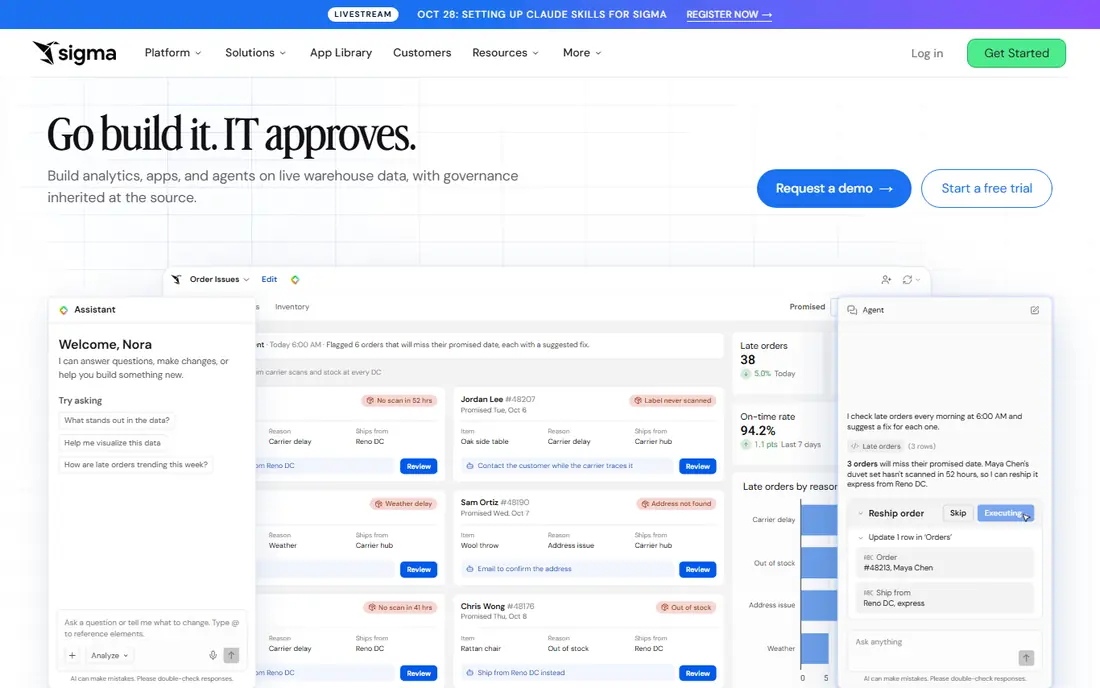
Sigma looks like a spreadsheet and queries the warehouse directly, which makes it easy for analysts and business users who already think in rows and formulas. There is no separate extract to refresh, so answers reflect current warehouse data. That live connection also keeps governance in one place, since access rules can follow warehouse permissions.
The weakness is pricing transparency. Sigma is quote-based, so small teams cannot easily compare it against published-price rivals without a sales conversation. It also assumes you already run a cloud warehouse such as Snowflake or BigQuery. If you do, Sigma is one of the easiest paths to wider access. If you do not, the warehouse project comes first.
- Familiar spreadsheet interface
- Live warehouse queries
- No data extraction needed
- Quote-based pricing
- Needs a cloud warehouse behind it
Tableau remains the strongest choice when visual depth matters most. Analysts can build detailed dashboards, explore data interactively and publish work that business teams can filter and drill into. The community, training material and connector range are large, which helps teams find answers and hire people who already know the tool.
Tableau is less of a natural self-service tool for casual users than ThoughtSpot or Sigma. Someone still needs to build and maintain the published data sources, or business users can wander into misleading views. Pricing starts at $15 per user per month for viewers, with higher tiers for authors. For analyst-led organizations, it remains a safe and capable pick.
- Best-in-class visual analysis
- Large community
- Broad connector support
- Steeper learning curve for casual users
- Metric governance needs care
Power BI is the practical default for companies already on Microsoft 365. At $14 per user per month for Pro, it is cheaper than most rivals, and sharing inside Teams and SharePoint feels natural to staff. The connector range is broad, and the desktop app is free for building reports before you publish them.
The honest catch is modeling. Power BI rewards teams that build clean datasets with proper relationships and measures, and it punishes teams that point it at raw tables and hope for the best. AI Copilot features also need Fabric capacity, which adds cost. If your team will invest in modeling, Power BI gives strong value. If not, a search-first tool may get faster adoption.
- Low entry price
- Deep Microsoft 365 links
- Large user base
- Modeling skill needed
- AI features need Fabric capacity
Domo suits companies that want one platform for connectors, data prep, dashboards and alerts without assembling several tools. Its connector library covers common business apps, and its card-based dashboards are easy to share on mobile. Teams without a warehouse can start faster here than with warehouse-native tools.
The pricing model is the main risk. Domo is quote-based and consumption-driven, so costs can be hard to forecast before you sign. Smaller teams should ask for a clear credit model and a cap scenario in writing. For mid-size and larger companies that want breadth in one contract, Domo is a capable choice.
- Over 1,000 connectors
- Built-in data prep
- Mobile-friendly dashboards
- Quote and credit-based pricing
- Can get costly at scale
Looker, now part of Google Cloud, is the governance-first option in this list. Its LookML modeling layer defines metrics once, so every dashboard and question uses the same definition. That discipline is exactly what data democratization needs at scale, and version control through Git gives data teams a familiar workflow for changes.
The trade-off is expertise. LookML takes time to learn, and Looker pricing is quote-based, so it suits organizations with a data team ready to own the model. Casual users benefit from the governed explores, but they depend on that team doing the modeling work well. If metric consistency is your top worry, Looker deserves a close look.
- LookML metric layer
- Strong governance
- Git-based version control
- Quote-based pricing
- Needs modeling expertise
Metabase is the friendliest low-cost entry point for data democratization. The open source version is free, the visual question builder lets non-technical users ask questions without SQL, and cloud pricing starts at a level small teams can afford. For a startup with one database, it can deliver real self-service in days.
The limits show as needs grow. Sandboxing and advanced permissions sit in paid tiers, and AI assistance is thinner than in ThoughtSpot or Sigma. Teams should also plan who maintains the server or cloud instance. For small teams and for companies testing self-service before a larger purchase, Metabase is a smart first step.
- Open source option
- Visual question builder
- Low starting cost
- Governance features in paid tiers
- Less AI depth than leaders
Qlik Sense uses an associative engine that shows how selections relate across the whole dataset, which helps users spot connections they did not think to ask about. Data prep tools are built in, and Qlik publishes tiered pricing for its cloud plans, which makes comparison easier than with quote-only rivals. It suits teams that explore data rather than just reading fixed dashboards.
The interface can feel less modern than newer rivals, and some advanced AI features sit in higher tiers. Qlik also works best when someone prepares clean data apps for business users. For companies that value exploration and a published price list, Qlik is a solid alternative to the search-first leaders.
- Associative engine shows related data
- Strong data prep
- Published tiers
- Interface feels dated to some users
- Pricing varies by edition
How we picked these
We compared official pricing pages, product documentation and public reviews for each platform. We looked for governed metrics, row-level access controls, natural-language or visual querying, and a clear path from a single dashboard to wider self-service use. We treated vendor pricing as current only where the vendor published it, and we used See website where pricing is quote-based. We did not run production data through these tools.
How to choose a data democratization tool that stays trustworthy
Start with governance, not charts. A tool that lets anyone build a metric will soon produce three versions of revenue, and each team will defend its own. Look for a shared metric layer, approval workflows and access controls that hide rows a person should not see. The prettiest dashboard is worth little if finance and sales cannot agree on the number behind it.
Match the interface to the audience
Analysts may want SQL and a modeling language, while sales managers want to type a question and get an answer. Some tools serve both groups, but many lean one way. Run a trial with real questions from non-technical staff, not just a vendor demo dataset. If those users cannot get an answer alone in the trial, they will not do it after purchase either.
Price for viewers, not just authors
Many teams buy for a handful of analysts and then discover viewer pricing changes the total fast. Ask how viewers, explorers and authors are billed, and model the cost at twice your expected user count. A quote-based tool can still be good value, but only if you know what wider rollout will cost before you promise access to the whole company.
FAQ
What are the best data democratization platforms for non-technical teams?
ThoughtSpot, Domo and Metabase are strong starting points for non-technical teams, since they lead with search or visual question builders rather than code. The best tool for data democratization in your company still depends on your warehouse and your governance needs, so trial each one with your own data.
What is the best tool for data democratization in a Microsoft shop?
Power BI is the natural fit when your company already uses Microsoft 365 and Azure, since identity, licensing and Fabric capacity line up with tools staff already know. The trade-off is modeling skill: someone still needs to build clean datasets before self-service works well.
Do data democratization tools replace data analysts?
No. They change what analysts spend time on, moving them from building one-off reports to modeling trusted datasets and teaching teams to use them. Companies that cut analyst roles and expect a tool to fill the gap usually end up with conflicting metrics.
How do these tools keep sensitive data safe?
Good platforms use row-level and column-level controls, approved metric definitions and audit logs. Access should follow the same identity rules as your warehouse. Before rollout, test that a restricted user truly cannot see rows outside their scope, including through search and AI answers.
Is a free BI tool enough for data democratization?
For a small team with one database and simple questions, Metabase open source or Power BI Desktop can be enough. As user count, data sources and compliance needs grow, paid governance, scheduling and support features become harder to skip.