Best Data Collection Software in 2026: 8 Tools Compared
Compare the best data collection software, from Jotform and Typeform to Fulcrum and KoboToolbox, on price, offline use, and survey features, updated for 2026.
- Editor's choice
 Jotform
All-purpose online forms
Starts at$34 per monthVisit jotform.comFull review - Great alternative
 Typeform
Conversational surveys
Starts at$39 per monthVisit typeform.comFull review - Also consider
 SurveyMonkey
Enterprise survey research
Starts at$39 per monthVisit surveymonkey.comFull review
TL;DR:
- Jotform is the most versatile starting point for online forms, while Typeform suits surveys where completion rates matter more than volume.
- Field teams need a different tool than survey teams: Fulcrum, GoCanvas, and FastField work offline with GPS, photos, and signatures.
- Google Forms is the best free option for simple surveys, and KoboToolbox is the best free option for nonprofit and research fieldwork.
- Model your response volume before you pay, since free plans cap submissions and paid plans charge very differently at scale.
Quick comparison
| Tool | Best for | Starts at | Free plan? | |
|---|---|---|---|---|
| Jotform | All-purpose online forms | $34 per month | Yes | Visit |
| Typeform | Conversational surveys | $39 per month | Yes | Visit |
| SurveyMonkey | Enterprise survey research | $39 per month | Yes | Visit |
 Google Forms | Simple free surveys | Free | Yes | Visit |
 Fulcrum | Field data with maps | $43 per user per month | Free trial | Visit |
 GoCanvas | Replacing paper field forms | See website | Free trial | Visit |
 FastField | Mobile field forms | $35 per user per month | Free trial | Visit |
 KoboToolbox | Nonprofit field surveys | See website | Yes | Visit |
The best data collection software
Data collection splits into two jobs that need different tools: asking people questions online, and capturing structured data in the field. We compared tools that teams can actually use in October 2026, with prices from vendor and comparison pages checked that month. Online survey tools below focus on forms, logic, and analysis, while field tools focus on offline mobile forms, GPS, photos, and signatures. Pick by environment first, then by price.
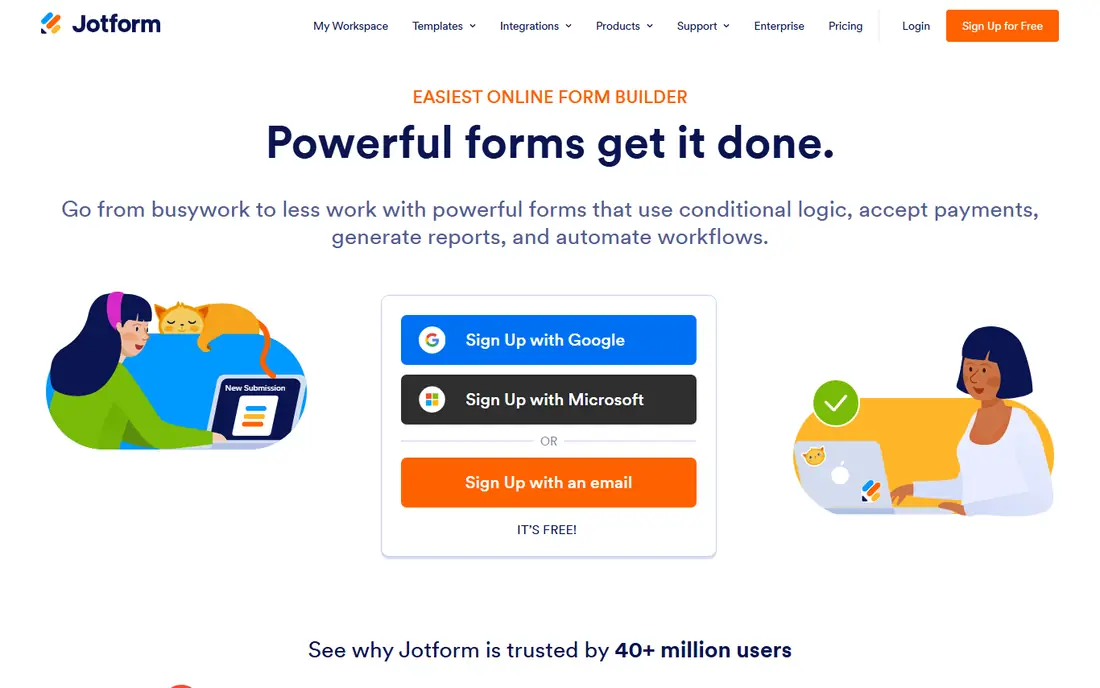
Jotform is our pick for most teams because it covers the widest range of data collection jobs in one tool: contact forms, registration, applications, payments, e-signatures, approvals, and surveys. The drag-and-drop builder, conditional logic, and template library of over 20,000 forms mean most teams can start from a close match rather than a blank page. Submissions flow into tables, reports, and integrations with tools such as Google Sheets, Slack, and Salesforce, so collected data does not sit in an inbox. AI agents and workflow tools add approvals and follow-ups for teams that need more than a simple form.
The free Starter plan covers 5 forms and 100 submissions per month, which suits small teams and trials, while paid plans start at $34 per month billed annually for Bronze. High-volume teams will need a higher tier, and the interface can feel crowded once you add many fields, conditions, and integrations. For a team that needs one form tool for many jobs, though, Jotform is the safest default, and its free plan lets you test the fit before paying.
- Huge template library
- Payments and e-signatures built in
- Strong workflows
- Paid plans needed for volume
- Interface can feel busy
Typeform asks one question at a time in a clean, conversational flow, and that design choice is why it often gets more completions than a long, dense form. Logic jumps, scoring, and integrations with tools such as HubSpot and Slack make it useful for lead capture, customer feedback, quizzes, and research surveys where respondent experience matters. The builder is pleasant to use, templates are strong, and results are easy to read without exporting to a spreadsheet first. For brands that care about how a survey feels, Typeform is hard to beat.
The trade-off is volume. Paid plans start at $39 per month, or $28 per month billed annually on Basic in some listings, and response limits are strict on cheaper tiers, so a survey that goes viral can hit its cap quickly. Typeform is also less suited to offline fieldwork or complex inspection forms, where Fulcrum or GoCanvas fit better. Choose Typeform when response quality and completion matter more than raw volume, and choose Jotform when you need payments, approvals, and high submission counts in one tool.
- One-question-at-a-time format
- High completion rates
- Polished design
- Strict response limits on cheaper plans
- Less suited to long field forms

SurveyMonkey remains the safe enterprise survey choice, with mature question types, logic, analysis, and reporting that research teams know well. It supports NPS, CSAT, and custom surveys, offers demographic filtering and significance testing on higher plans, and can reach respondents through its panel when you lack your own audience. Integrations with Salesforce, Microsoft Teams, and other business tools make it fit into larger research workflows, and its survey method guidance helps teams avoid common design mistakes.
The free Basic plan limits questions and viewable responses per survey, so serious work needs a paid plan starting at $39 per month billed annually for Advantage, based on vendor and comparison pages. That price is justified for research teams that need analysis depth and panel access, but it is overkill for a small team that only runs occasional feedback forms. Pick SurveyMonkey when research rigour, benchmarking, or panel access matters, and pick Google Forms or Jotform when you only need simple, occasional surveys.
- Mature survey tools
- Strong analysis and benchmarking
- Panel access
- Serious features sit on paid plans
- Free plan limits responses
Google Forms is the best free data collection tool for simple surveys, quizzes, and sign-ups, and it is the tool we suggest when budget is zero and the job is straightforward. It is free with a Google account, offers unlimited forms and responses, and stores results in Google Sheets automatically for sorting, filtering, and charting. Sharing is a link, an email, or an embed, and respondents need no account to answer most forms. For schools, clubs, small businesses, and internal polls, Google Forms is often all you need.
The limits are design and depth. Themes are basic, logic is limited to simple section jumps, and analysis stays at summary charts unless you work in Sheets. There are no payments, e-signatures, or advanced workflows, and offline field collection is not its job. Use Google Forms when the survey is simple and free matters most, and move to Jotform or Typeform when you need design control, logic, payments, or deeper analysis.
- Completely free
- Unlimited surveys and responses
- Easy sharing
- Minimal design control
- Basic analysis only
Fulcrum is built for field teams that collect data where there is no reliable connection: inspections, environmental surveys, asset checks, and utility work. Its mobile app works offline, captures GPS location, photos, barcodes, and signatures, and syncs when connectivity returns. The drag-and-drop builder supports conditional logic, repeatable sections, and calculations, and the web dashboard maps every record, so managers can see where work happened and spot gaps. Integrations and an API connect Fulcrum to GIS systems and back-office tools.
Pricing is per user, starting around $43 per user per month for Professional, based on comparison pages, with a free trial but no permanent free tier. That per-user cost adds up for large crews, and advanced mapping setups benefit from GIS experience. For teams that need location-rich field data rather than online surveys, Fulcrum is our pick, and its mapping strength sets it apart from generic form tools that treat location as an afterthought.
- Offline mobile forms
- GPS and mapping
- Photo and signature capture
- Price per user adds up
- Advanced setup needs GIS comfort
GoCanvas helps field service, construction, inspection, and logistics teams replace paper forms with mobile forms that crews actually use. The builder converts existing paper forms into digital versions with fields, photos, signatures, barcodes, and calculations, and the mobile app works offline and syncs later. Dispatch tools assign forms to workers, and completed submissions can generate branded PDF reports for customers or regulators. That workflow focus, from assignment to report, is why GoCanvas suits operations teams rather than survey researchers.
Pricing is quote-based and varies by team size and features, so we list it as See website, with a free trial for testing. GoCanvas is less suited to public online surveys, where Jotform or Typeform are stronger, and its strength is internal field operations. Choose GoCanvas when your goal is to retire paper forms across a crew, and when dispatch, PDF reports, and offline use matter more than survey design.
- Fast paper-form replacement
- Offline mobile app
- Dispatch and workflow tools
- Pricing is quote-based
- Less suited to pure online surveys
FastField is a mobile-first field data tool for teams that need complex forms in harsh conditions: inspections, audits, safety checks, and compliance work. Its form builder supports advanced logic, calculations, and scripting for forms that change based on earlier answers, and the offline-first app keeps working without a signal, syncing when it returns. Reporting exports to PDF and Excel, and audit trails and encryption support compliance needs in regulated industries. For mission-critical fieldwork, that depth matters more than a pretty survey interface.
Pricing starts around $35 per user per month for Core, based on comparison pages, with a free trial but no permanent free tier. Scripting and advanced logic take time to learn, and the design interface is less intuitive than consumer form tools. FastField suits teams that already know their forms are complex and need them to work offline every time. Simpler field jobs may be cheaper and faster in GoCanvas or Fulcrum, so test FastField only when your forms truly need its logic depth.
- Offline-first mobile forms
- Strong logic and calculations
- PDF and Excel reporting
- Learning curve for scripting
- Pricing aimed at teams, not individuals
KoboToolbox is the default for humanitarian, research, and nonprofit field surveys, and it is free for nonprofit users with generous submission limits. Built on open standards, it supports offline mobile collection through KoboCollect, complex skip logic, multiple languages, and data validation that research teams need. Submissions flow into a web dashboard for review, mapping, and export, and the tool is widely used by aid organisations, universities, and public health teams in low-connectivity settings. That track record in the field is its strongest credential.
The interface is research-focused rather than polished, and support depends on community forums and paid plans for larger deployments. Commercial teams that need payments, branding, or sales integrations should look at Jotform instead. For nonprofits, researchers, and field teams with tight budgets, KoboToolbox offers capability that would cost hundreds per month elsewhere, and its free community plan makes it the easiest recommendation in this list for that audience.
- Free for nonprofit users
- Offline field collection
- Strong research features
- Interface is research-focused
- Support depends on community and plans
How we picked these
We compared official pricing pages, product documentation, and comparison guides checked in October 2026, and we kept tools that are still maintained and that cover both online surveys and offline fieldwork. We favoured tools with a clear environment fit, honest free or trial terms, and exports that let you own your data. Prices and submission limits change, so model your volume and confirm the current plan on the vendor site before you commit.
How to choose a data collection tool
Start with where data is collected. If respondents answer online from their own devices, shortlist Jotform, Typeform, SurveyMonkey, and Google Forms, and judge them on logic, design, and analysis. If staff collect data in the field, shortlist Fulcrum, GoCanvas, FastField, and KoboToolbox, and judge them on offline use, GPS, photos, signatures, and reporting. A tool that works well online but fails offline will cost a field team far more than a higher monthly price.
Check volume, exports, and privacy before you pay
Count your expected submissions per month, including spikes from a popular survey, and compare that against each plan's cap. Confirm that you can export full data in CSV or Excel without paying extra, and check where data is stored and how long it is kept, especially for health, education, or personal data. A short pilot with real respondents or a real field crew will reveal logic errors, confusing questions, and sync problems before a full rollout.
FAQ
What is the best data collection tool for small teams?
Jotform is the best all-purpose pick for small teams, with a free plan, templates, and payments and workflows in one tool. Google Forms suits teams with no budget and simple surveys, while Typeform suits teams that prioritise survey experience. Field teams should shortlist Fulcrum or GoCanvas instead.
What is the best free data collection software?
Google Forms is the best free option for simple online surveys, with unlimited forms and responses. KoboToolbox is the best free option for nonprofit and research fieldwork, with offline collection and generous limits. Jotform and Typeform also have free plans, but both cap submissions or responses.
What is the difference between a survey tool and a field data collection tool?
Survey tools such as Typeform and SurveyMonkey focus on asking respondents questions online and analysing answers. Field tools such as Fulcrum and FastField focus on staff collecting structured data on mobile devices, often offline, with GPS, photos, and signatures. Many teams need one of each, not a single tool for both jobs.
Can data collection software work offline?
Yes, field tools such as Fulcrum, GoCanvas, FastField, and KoboToolbox are built to work offline and sync when connectivity returns. Online survey tools such as Google Forms and Typeform generally need a connection, though some support limited offline use. Test offline mode on the actual devices your team uses before a field deployment.
How much does data collection software cost?
Simple tools are free, while paid online form plans start around $34 to $39 per month, and field tools start around $35 to $43 per user per month, based on pricing checked in October 2026. Enterprise survey platforms such as Qualtrics use custom pricing. Model your submission volume and team size before choosing, since per-user and per-response costs scale very differently.
Is my collected data private and secure?
Reputable tools encrypt data in transit and at rest, offer access controls, and publish privacy and security pages, but details vary by plan and region. Check where data is stored, who can access it, and how exports and deletion work, especially for personal or health data. For sensitive fieldwork, prefer tools with audit trails and clear data ownership terms.