Best Construction Software for Geofencing (2026): 5 Picks Checked on Vendor Pages
5 tools for the best construction software for geofencing, compared on pricing, free plans and best-fit use. Weak spots flagged for every entry. Numbers first.
- Editor's choice
 Motive
Fleet safety and productivity
Starts atSee websiteVisit gomotive.comFull review - Great alternative
 Autodesk Construction Cloud
Collaborative project teams
Starts atSee websiteVisit construction.autodesk.comFull review - Also consider
 Procore
Geofence-linked project management
Starts atSee websiteVisit procore.comFull review
Direct answer
Our first pick is Motive, best for fleet safety and productivity. Listed starting prices: Fieldwire from $39 per user per month. Look at Autodesk Construction Cloud for collaborative project teams, and at Procore for Geofence-linked project management. The full list of 5 tools follows, with prices and free plan facts.
TL;DR:
- Motive sits first on this list: fleet safety and productivity.
- Just one of the 5 tools, Fieldwire, has a free plan.
- The main caution on Autodesk Construction Cloud: Geofencing is not the headline feature.
- For the cheapest start, look at Fieldwire: $39 per user per month.
- CoConstruct is the one to check for home builders and remodelers.
Last checked November 2026. Prices and plan details were read from the vendors' own pages in November 2026; vendors change plans often, so confirm the current price on the vendor site before you buy.
Quick comparison
| Tool | Best for | Starts at | Free plan? | |
|---|---|---|---|---|
| Motive | Fleet safety and productivity | See website | Not stated | Visit |
| Autodesk Construction Cloud | Collaborative project teams | See website | Not stated | Visit |
| Procore | Geofence-linked project management | See website | Not stated | Visit |
 Fieldwire | Live jobsite task tracking | $39 per user per month | Yes | Visit |
 CoConstruct | Home builders and remodelers | See website | Not stated | Visit |
Construction Software for Geofencing compared in detail
Short on time? The summary and table above give the quick view of 5 tools for construction software for geofencing, and the profiles that follow give the detail behind each entry.
Motive is a good fit for fleet safety and productivity. Motive is designed for fleet operations instead of construction workflows, so project scheduling and job costing live elsewhere.
Motive is an all-in-one fleet management and driver safety product that helps boost safety, productivity, and profitability for fleet operations. No starting price is listed for Motive here; confirm pricing on the vendor site. Free options: Not stated.
Drawbacks to consider: Restricted construction project features.
- Driver safety focus
- Integrated fleet system
- Geofencing tied to fleet use
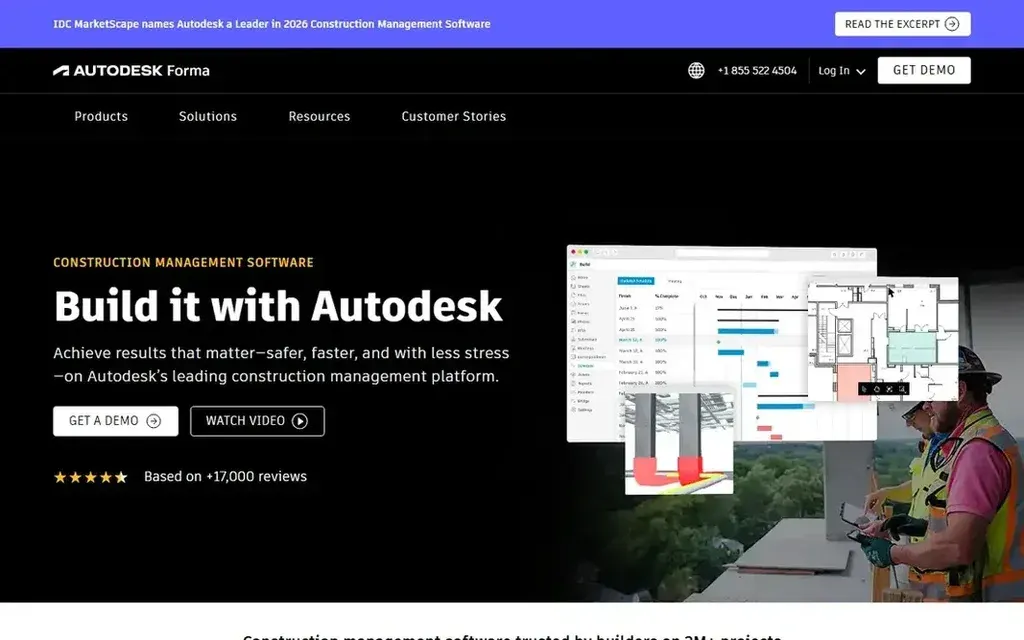
In short, Autodesk Construction Cloud is for collaborative project teams. Autodesk Construction Cloud, now offered as Autodesk Forma, is construction management software built so project teams can collaborate securely and rapidly.
Trade-offs to know: Needs team onboarding.
Worth adding: if your priority is straightforward, fleet-centric location tracking, a telematics system may be a better fit. On top of that, the product emphasizes collaboration and project delivery instead of geofence administration. Check the vendor site for Autodesk Construction Cloud pricing; none is listed in this comparison. Free plan details: Not stated.
- On-budget delivery
- Secure team collaboration
- Geofencing is not the headline feature

Procore is aimed squarely at Geofence-linked project management. Teams whose primary need is vehicle tracking and driver safety should look at fleet-focused products instead.
Worth adding: since Procore is built around project management, geofencing is one part of a wider system instead of the core product. For everyday use, for geofencing, it suits general contractors and owners who want location-aware tracking connected to project records, schedules, and daily site activity instead of a standalone map. Procore shows no starting price here, so confirm the cost on the vendor site. As for free access: Not stated.
Trade-offs to know: Not a dedicated fleet telematics tool.
- Live project visibility
- Links site and office data
- Setup may need coordination across teams
Fieldwire is designed for live jobsite task tracking. Fieldwire by Hilti is live jobsite management software for tracking tasks and updating drawings.
Worth adding: location features support field coordination instead of vehicle or equipment geofencing. Starting cost for Fieldwire: $39 per user per month. Fieldwire offers a free plan.
The main drawbacks: Not a fleet management system.
- Cuts expensive rework
- Used by owners, GCs, subcontractors
- Geofencing is secondary to field tasks
CoConstruct serves home builders and remodelers. CoConstruct is construction management software now unified with Buildertrend under one brand.
Trade-offs to know: Less suited to large fleet operations.
Its strength is residential project management instead of geofence tracking for vehicles or equipment. Teams needing fleet telematics should pair it with a dedicated product. CoConstruct shows no starting price here, so confirm the cost on the vendor site. Free plan details: Not stated.
- Suited to client-facing projects
- Unified with Buildertrend
- Geofencing is not the core focus
How these tools were picked
Pre-purchase checklist
- Get a written quote from Motive, Autodesk Construction Cloud, Procore and CoConstruct; the list shows no starting price for them.
- Look at the free plan from Fieldwire closely: its caps decide whether it is usable for real work.
- Before choosing Motive, weigh its main limit: restricted construction project features.
- The entry price of CoConstruct is only the starting point; model the full cost with seats and extras.
- Involve the people who will use Autodesk Construction Cloud daily; a short pilot beats a long feature checklist.
FAQ
How should I evaluate geofencing features before buying?
Confirm whether geofencing is native, what devices are supported, and how location events reach your project or cost records. Also check alert setup and integration with your existing systems.
What is the cheapest option for construction software for geofencing in this list?
On published monthly entry prices, Fieldwire is the lowest here at $39 per user per month. Entry price is only part of the cost, because seats, add-ons and billing terms can change the total. For the full picture, the cards above cover all 5 entries of this construction software for Geofencing list, including price, free plan and limits.
Which options for construction software for geofencing have a free plan?
Fieldwire is the only tool in this list with a free plan. Free plans usually cap users, projects or features, so check the limits on the vendor page. Prices, free plan details and limits for all 5 tools in this construction software for Geofencing roundup sit on the individual cards above.
Can I try these tools before paying?
Often, yes. Fieldwire has a free plan. Use your own data and a real task during the test, and check what the free tier or trial limits before you rely on it. Each of the 5 options in this construction software for Geofencing guide has its own card above with the price, free plan and limits.
Do these tools publish their prices?
Not all of them. Motive, Autodesk Construction Cloud, Procore and CoConstruct publish no starting price, so expect a quote request for those. The rest, Fieldwire included, show a starting price, though seats and billing terms still change the final cost.
Sources
- https://gomotive.com
- https://construction.autodesk.com
- https://www.procore.com
- https://www.fieldwire.com
- https://www.coConstruct.com