Best Construction Management Softwares for 2026: Our 6 Vetted Picks
Need the best construction management softwares? We compare 6 tools on cost, free access and who each suits. Prices and drawbacks included. Plain facts.
- Editor's choice
 CMiC
Accounting, projects and people in one system
Starts atPricing on requestVisit cmicglobal.comFull review - Great alternativeTrimble Viewpoint
Construction ERP with job costing
Starts atPricing on requestVisit viewpoint.comFull review - Also consider
 Autodesk Construction Cloud
Secure collaboration across project teams
Starts atPricing on requestVisit construction.autodesk.comFull review
Direct answer
This list puts CMiC first for accounting, projects and people in one product. Trimble Viewpoint is better for Construction ERP with job costing, and Autodesk Construction Cloud is better for secure collaboration across project teams. Free plan facts and limits for all 6 tools follow. None of these vendors publish plan prices, so pricing is on request for every option.
TL;DR:
- CMiC is the opening pick, best for accounting, projects and people in one system.
- The main caution on Procore: wide scope may feel heavy for small businesses.
- Jonas Construction Software suits Construction software within a broader suite.
- No starting price is shown for any of the 6 tools, CMiC and Jonas Construction Software included, so plan time for sales calls.
- None of the 6 tools, from CMiC to Jonas Construction Software, has a free plan, so budget for a subscription or use a trial.
Last checked November 2026. Pricing on request: vendors did not publish plan prices when this guide was last checked (November 2026), so ask each vendor for a written quote.
Quick comparison
| Tool | Best for | Starts at | Free plan? | |
|---|---|---|---|---|
| CMiC | Accounting, projects and people in one system | Pricing on request | Not stated | Visit |
| Trimble Viewpoint | Construction ERP with job costing | Pricing on request | Not stated | Visit |
| Autodesk Construction Cloud | Secure collaboration across project teams | Pricing on request | Not stated | Visit |
 Procore | Site-to-office project visibility | Pricing on request | Not stated | Visit |
 CoConstruct | Custom home builders and remodelers | Pricing on request | Not stated | Visit |
| Jonas Construction Software | Construction software within a broader suite | Pricing on request | Not stated | Visit |
The full construction management softwares list
Short on time? The summary and table above give the quick view of 6 construction management softwares, and the profiles that follow give the detail behind each entry.
CMiC is built with accounting, projects and people in one product in mind. The product leans toward established construction firms with complicated accounting needs, so very small businesses may find it more than required.
Watch-outs: Enterprise orientation may suit bigger businesses.
CMiC shows no starting price here, so confirm the cost on the vendor site. Free access: Not stated.
- Simplified single product
- Made for construction firms
- Longer setup for complicated needs
Trimble Viewpoint
Best for: Construction ERP with job costing
Think of Trimble Viewpoint for Construction ERP with job costing. Firms seeking only light task tracking may do better with a more straightforward project tool.
Also, as an ERP-centered system, it carries more structure than a small builder may need, and adoption needs planning. This comparison lists no price for Trimble Viewpoint; ask the vendor. Free plan details: Not stated.
Points against: ERP focus may overwhelm small crews.
- Job costing built in
- Reporting for contractors
- Implementation takes planning
Autodesk Construction Cloud
Best for: Secure collaboration across project teams
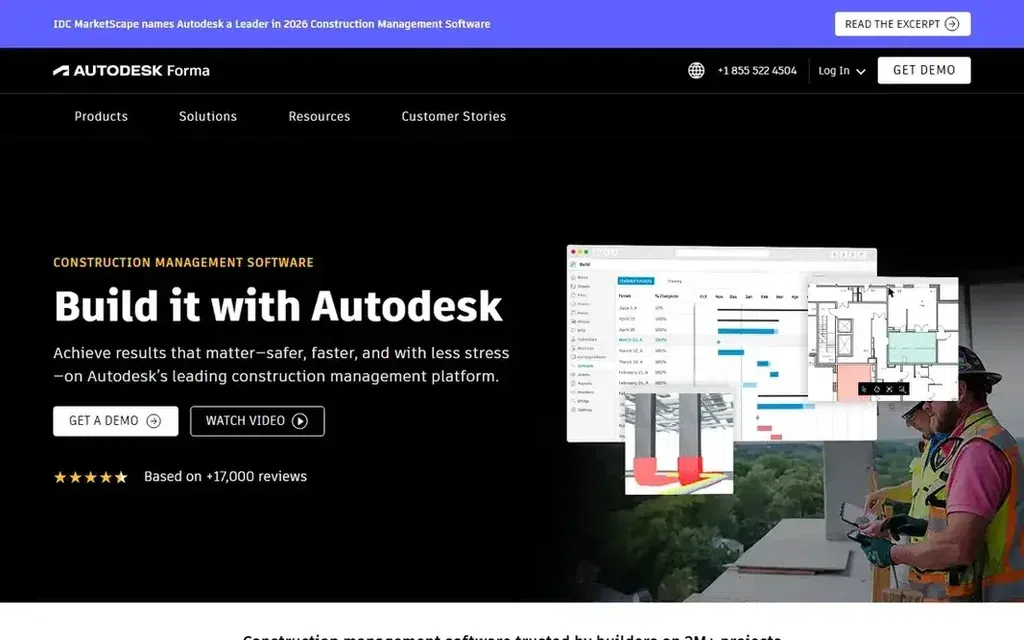
Autodesk Construction Cloud was built for secure collaboration across project teams. The rebranding to Autodesk Forma means buyers should confirm current product naming and scope on the vendor site.
More specifically, Autodesk Construction Cloud, now presented as Autodesk Forma, is positioned around project teams collaborating securely and rapidly so projects finish on time and on budget. Beyond that, organizations needing heavy job costing or accounting depth may pair it with a dedicated construction ERP instead. Check the vendor site for Autodesk Construction Cloud pricing; none is listed in this comparison. As for free access: Not stated.
Drawbacks to consider: Collaboration focus may not handle deep accounting.
- Secure team collaboration
- Now part of Autodesk Forma
- Brand transition may confuse buyers

Procore works best for site-to-office project visibility. Procore is a construction management product built to link the jobsite with the office. Its homepage emphasizes live visibility so teams can deliver quality projects on time.
Downsides: Wide scope may feel heavy for small businesses.
Beyond that, businesses wanting a narrow tool for a single task, for example estimating alone, may prefer a more focused choice. Since the platform spans plenty of functions, smaller crews may find the scope larger than they need and should weigh onboarding effort. Procore does not show a starting price in this comparison, so check the vendor site for current pricing. Free options: Not stated.
- Live project visibility
- Wide construction management scope
- Setup needs planning
Think of CoConstruct for custom home builders and remodelers. Large commercial or infrastructure contractors will likely need a product designed for heavier project controls. Since the brand is unifying with Buildertrend, product naming and features may shift, so confirm details before committing.
What to check first: Less suited to heavy civil work.
Also, CoConstruct is construction management software associated with custom home builders and remodelers, including client communication and project coordination. Its homepage notes that CoConstruct and Buildertrend are now a unified brand committed to a smooth experience, so buyers should check the current product lineup on the vendor site. CoConstruct shows no starting price here, so confirm the cost on the vendor site. Trial and free access: Not stated.
- Designed for builder workflows
- Unified with Buildertrend brand
- Brand transition needs confirmation
Jonas Construction Software
Best for: Construction software within a broader suite
Jonas Construction Software serves Construction software within a broader suite. Jonas Construction Software sits within Jonas Software, which invests in products and services that help build organizations. In daily use, confirm the specific construction modules and fit on the vendor site.
In daily use, for construction businesses, it is worth considering when you want a vendor with a broader software portfolio and construction-oriented business tools. The homepage provides restricted construction-specific detail, so buyers should request a walkthrough of the construction features that matter to them. No starting price is listed for Jonas Construction Software here; confirm pricing on the vendor site. Free plan details: Not stated.
Downsides: Buyers must confirm construction modules.
- Focus on construction business needs
- Part of a wider software portfolio
- Restricted detail on the homepage
How we built this list
For each of the 6 tools we noted price, free plan or trial, fit for construction management softwares and the main limit, using vendor pages and documentation. Seat minimums, billing terms and add-ons can move the real cost, so the starting prices here are a guide and not a quote. Order on the page follows fit for the typical buyer first, then price transparency and free access. Your own requirements should decide the final pick.
A buyer's checklist
- Ask each vendor, from CMiC to Jonas Construction Software, for a written quote; none of them publishes a starting price.
- Read the limits listed for CMiC first: enterprise orientation may suit bigger firms.
- Confirm you can export your data from CoConstruct, so leaving later does not mean losing records.
- Pick one real project and run it in Procore first; a small pilot shows fit faster than a checklist.
- Total up the real monthly cost of Trimble Viewpoint, including add-ons, extra users and usage-based fees.
FAQ
Do these tools publish their prices?
No. None of the tools, from CMiC to Jonas Construction Software, shows a fixed starting price here, so budget time for quotes.
Can I try these tools before paying?
Not by default. None of the tools, from CMiC to Jonas Construction Software, lists a free plan or a free trial here, so ask each vendor for a demo before committing.
How are the construction management softwares ordered?
CMiC sits first and Jonas Construction Software last because the order follows typical fit for construction management softwares, then price clarity and free access. It is a judgement call, so read each profile for fit and limits.
Is CMiC the right pick for everyone comparing construction management softwares?
No single tool suits every team. CMiC comes first because it fits accounting, projects and people in one platform, while Trimble Viewpoint suits Construction ERP with job costing and Autodesk Construction Cloud suits secure collaboration across project teams. Match the tool to your own size, budget and workflow before deciding.
Sources
- https://www.cmicglobal.com
- https://www.viewpoint.com
- https://construction.autodesk.com
- https://www.procore.com
- https://www.co-construct.com
- https://jonassoftware.com