Choosing Construction Drawing Management Software in 2026: 5 Options Compared
Searching for the best construction drawing management software? Here are 5 options with prices and free plans. Pros and cons for every tool. See the full list.

- Editor's choice
 Bluebeam Revu
Live document collaboration and markup
Starts atSee websiteVisit bluebeam.comFull review - Great alternative
 Fieldwire
Jobsite task tracking with drawing updates
Starts at$39 per user a monthVisit fieldwire.comFull review - Also considerTrimble Viewpoint
Construction ERP with project management
Starts atSee websiteVisit viewpoint.comFull review
Direct answer
Start with Bluebeam Revu if you need live document collaboration and markup. Listed starting prices: Fieldwire from $39 per user a month. Fieldwire fits Jobsite task tracking with drawing updates; Trimble Viewpoint fits Construction ERP with project management. All 5 tools are compared below on price, free plan and limits.
TL;DR:
- Bluebeam Revu takes the first slot, best suited to live document collaboration and markup.
- Fieldwire is the only tool of the 5 with a free plan.
- Procore suits drawing management with full project controls.
- Check the limits for Bluebeam Revu before you commit: narrower than full project products.
- Fieldwire is the lowest-priced starter here at $39 per user per month.
Last checked November 2026. Prices and plan details were read from the vendors' own pages in November 2026; vendors change plans often, so confirm the current price on the vendor site before you buy.
Quick comparison
| Tool | Best for | Starts at | Free plan? | |
|---|---|---|---|---|
| Bluebeam Revu | Live document collaboration and markup | See website | Free trial | Visit |
| Fieldwire | Jobsite task tracking with drawing updates | $39 per user a month | Yes | Visit |
| Trimble Viewpoint | Construction ERP with project management | See website | Not stated | Visit |
 PlanGrid | Teams already using Autodesk Forma | See website | Not stated | Visit |
 Procore | Drawing management with full project controls | See website | Not stated | Visit |
Construction Drawing Management Software compared in detail
LinkVetted compared 5 tools for construction drawing management software. The goal is a practical shortlist: published prices, free plan facts, best-fit use cases and honest limits for every entry.
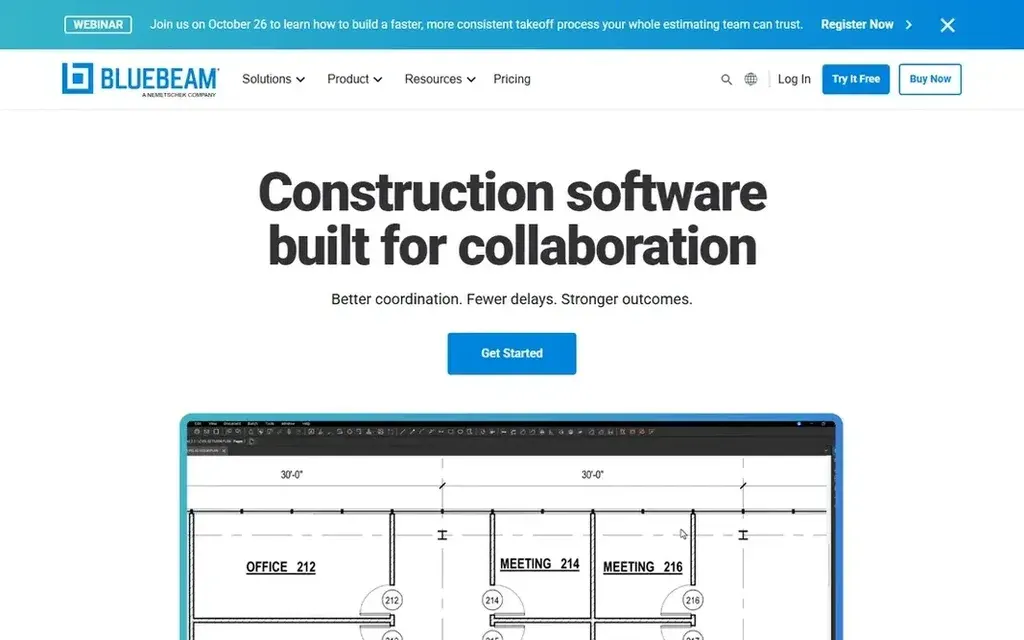
In short, Bluebeam Revu is for live document collaboration and markup. Bluebeam Revu is construction collaboration and document management software that lets teams collaborate in live and run projects from design to completion, anywhere. It is widely used for drawing review, markup and document-based collaboration.
Honest limits: Narrower than full project products.
From a buyer's view, Revu is more concentrated on documents than on running the full project, so task tracking and job costing sit outside it. Choose Bluebeam Revu when document markup and review are the core need. Bluebeam Revu shows no starting price here, so confirm the cost on the vendor site. As for free access: Free trial.
- Works from design to completion
- Live collaboration
- Drawing workflows depend on team setup
Pick Fieldwire if this describes you: Jobsite task tracking with drawing updates. Fieldwire by Hilti is live jobsite management software that helps teams track tasks, update drawings and cut expensive rework. It is built around field execution, so drawing access and task tracking sit close together for crews on site.
Highlights: GCs and subcontractors.
Worth adding: Fieldwire centers on jobsite execution instead of accounting or enterprise resource planning, so back-office needs sit elsewhere. Beyond that, teams wanting a single system for costing and drawings may prefer a broader system. For everyday use, choose Fieldwire when field productivity and current drawings are the priority. What you pay to start with Fieldwire: $39 per user per month. Fieldwire includes a free tier.
Where it is weaker: May need pairing for back-office work.
- Track tasks and update drawings
- Used by owners
- Field-focused instead of full ERP
Trimble Viewpoint
Best for: Construction ERP with project management
Choose Trimble Viewpoint for Construction ERP with project management. Trimble Viewpoint provides construction ERP and project management software made for contractors to handle projects, people and profits, with job costing, workflows and reporting. For everyday use, as an ERP-centered suite, Viewpoint involves implementation effort and is pitched at organizations ready for company-wide systems.
Beyond that, choose Trimble Viewpoint when drawings should link to job costing and reporting across the business. As for the details, teams needing only drawing markup will find it heavier than necessary. No starting price is listed for Trimble Viewpoint here; confirm pricing on the vendor site. Free options: Not stated.
Where it falls short: Drawing tools are one part of the suite.
- Construction ERP and project management
- Aimed at contractors
- ERP-scale implementation effort
PlanGrid was built for teams already using Autodesk Forma. Teams that used PlanGrid for drawings and field documents will find its capabilities continuing within the Autodesk environment.
The main drawbacks: Not a standalone path for new buyers.
It suits existing users who want continuity and access to support and answers to typical questions as they work inside the broader Autodesk product. Check the vendor site for PlanGrid pricing; none is listed in this comparison. Trial and free access: Not stated.
- Now part of Autodesk Forma
- Support and login resources available
- Folded into the Autodesk ecosystem

Procore is built with drawing management with full project controls in mind. Choose Procore when drawings have to link to wider project management workflows.
Where it falls short: Large system to configure.
Procore is a construction management product that links the site and the office, giving teams live visibility to deliver quality projects on time. The breadth of the product means setup and configuration take effort, and smaller teams may find more capability than they need. Procore does not show a starting price in this comparison, so check the vendor site for current pricing. On free options: Not stated.
- Wide construction management system
- Live project visibility
- May be more than small teams need
How these tools were picked
The comparison looks at four things: starting price, free access, how well the feature set matches construction drawing management software, and the main limit of each tool. Where a price is missing, the vendor does not list one publicly or ties it to a quote. Always confirm before budgeting. We ordered the tools by general fit, then by how clearly pricing is shown, then by free access. A buyer with unusual needs may reorder them.
Things to verify first
- Confirm the entry price on the vendor page. For Bluebeam Revu, Trimble Viewpoint, PlanGrid and Procore that means a quote rather than a fixed price.
- Test the free plan from Fieldwire against your real workload before relying on it.
- Run a trial of Bluebeam Revu with real work before paying for a year; your own workflow is the best test.
- Read the limits listed for Bluebeam Revu first: narrower than full project products.
- Price Trimble Viewpoint for your actual team size; headline prices rarely include add-ons or overage.
- Look at the renewal terms for Bluebeam Revu: auto-renewal, notice periods and price changes can matter more than the first-year price.
FAQ
What should I look for in construction drawing management software?
Focus on version control, field access to current drawings, and how markups and tasks link to the drawing set. Also check integration with the design and business systems your team already uses so drawings stay part of one workflow.
Can I try these options before paying?
Often, yes. Fieldwire has a free plan and Bluebeam Revu offers a free trial. Use your own data and a real task during the test, and check what the free tier or trial limits before you rely on it. Prices, free plan details and limits for all 5 tools in this construction drawing management software roundup sit on the individual cards above.
Which options for construction drawing management software have a free plan?
Fieldwire is the only tool in this list with a free plan. Free plans usually cap users, projects or features, so check the limits on the vendor page. One other tool offers a trial instead. Each of the 5 options in this construction drawing management software guide has its own card above with the price, free plan and limits.
Is Bluebeam Revu the right pick for everyone comparing construction drawing management software?
No single tool suits every team. Bluebeam Revu comes first because it fits real-time document collaboration and markup, while Fieldwire suits Jobsite task tracking with drawing updates and Trimble Viewpoint suits Construction ERP with project management. Match the tool to your own size, budget and workflow before deciding.
How are the tools for construction drawing management software ordered?
The order follows typical fit for construction drawing management software, with Bluebeam Revu first and Procore last, then price clarity and free access. It is editorial judgement, not a score, so another team could rank the tools differently.
Sources
- https://www.bluebeam.com
- https://www.fieldwire.com
- https://www.viewpoint.com
- https://www.plangrid.com
- https://www.procore.com