Best Apps for Tracking Flights in 2026: 8 Apps Compared
Compare the best apps for tracking flights in 2026, with live maps, delay alerts, gate information and pricing for Flightradar24, FlightAware and more.

- Editor's choice
 FlightAware
Practical trip tracking
Starts atFreeVisit flightaware.comFull review - Great alternative
 Flightradar24
Live map and spotting
Starts atFreeVisit flightradar24.comFull review - Also consider
 Flighty
Frequent flyers
Starts atSee websiteVisit flightyapp.comFull review
TL;DR:
- FlightAware is our pick for practical trip tracking, thanks to inbound aircraft tracking and clear delay alerts.
- Flightradar24 is best for the live map, aircraft detail, and plane spotting, with a strong free tier.
- Flighty suits frequent flyers who want fast, accurate delay predictions and a clean trip timeline.
- Most travellers only need a free tracker, while paid tiers mainly add history, weather layers, and fewer ads.
- Always cross-check gate and boarding info with the airline app, since airport changes can arrive there first.
Quick comparison
| Tool | Best for | Starts at | Free plan? | |
|---|---|---|---|---|
| FlightAware | Practical trip tracking | Free | Yes | Visit |
| Flightradar24 | Live map and spotting | Free | Yes | Visit |
| Flighty | Frequent flyers | See website | Free trial | Visit |
 Plane Finder | Simple map tracking | Free | Yes | Visit |
 FlightStats | Clean status data | Free | Yes | Visit |
 TripIt | Full trip organisation | Free | Yes | Visit |
 App in the Air | Airport and trip help | Free | Yes | Visit |
 RadarBox | Aviation detail | Free | Yes | Visit |
The best apps for tracking flights
A good flight tracker does two jobs well: it tells you what is happening right now, and it warns you early when plans change. The apps below cover both jobs, with different strengths for families waiting at arrivals, frequent flyers, and aviation fans.

FlightAware stands out because it follows the inbound aircraft that will become your flight, not just your flight number. That detail often flags a delay before the airline updates its own status, which gives you time to change ground transport or rebook. Push alerts cover departures, arrivals, gate changes, and cancellations.
The app can feel busy, with maps, weather, and airport boards competing for attention. For a family pickup or a business trip, that density is useful, but casual users may prefer a simpler map app for a quick check. Premium removes ads and adds more history, though most travellers will manage fine on the free tier.
- Inbound aircraft tracking
- Delay and gate alerts
- Airport delay maps
- Free app includes ads
- Interface is data-heavy for casual users
Flightradar24 is the most visual tracker on this list. Tap any plane on the map to see its type, altitude, speed, route, and photos of that exact airframe, and point your phone at the sky to identify overhead flights. That makes it a favourite for aviation fans and curious travellers alike.
For pure trip management, it is slightly less focused than FlightAware or Flighty. Status, delays, and gates are covered, but the app shines when you want to see where a plane is and what it is doing. Paid Silver and Gold tiers add longer history, weather layers, and more filters.
- Detailed live map
- Aircraft photos and history
- Augmented reality view
- Paid tiers needed for long history
- Alerts are less trip-focused
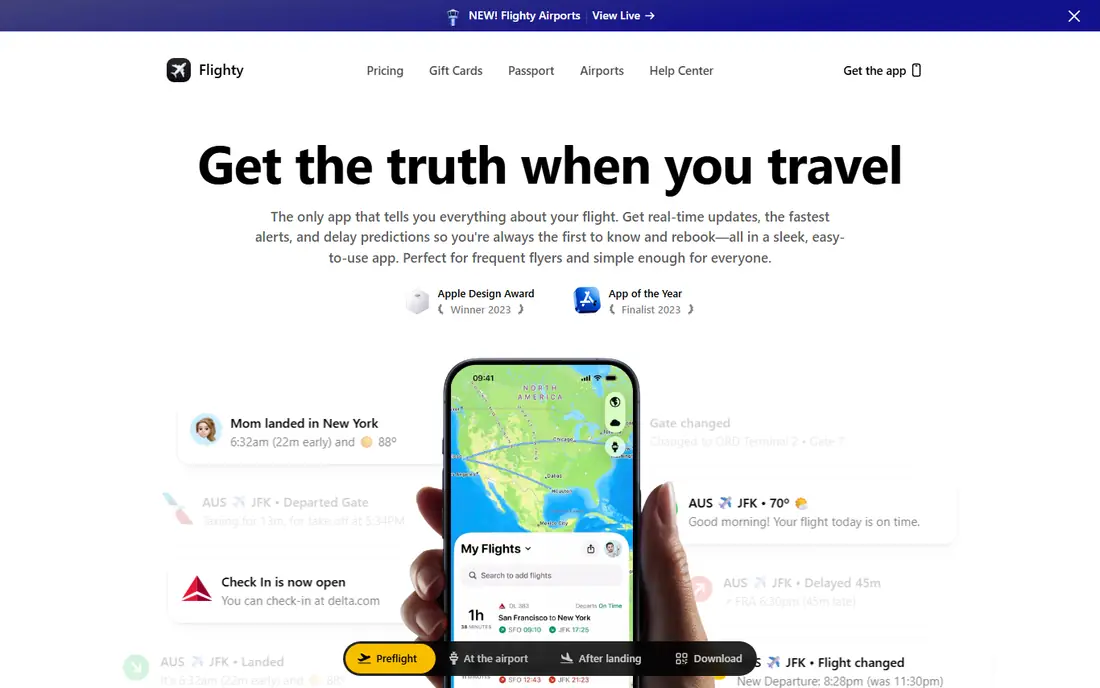
Flighty is built for people who fly often and want one clean timeline per trip. It pulls flight details from email or calendar, shows a clear sequence from departure to arrival, and predicts delays with notable speed. Sharing a live trip link with family or colleagues is simple, which helps with pickups.
The catch is price. The free version tracks basic flights, but the predictive alerts and full history that make Flighty special sit behind a subscription. If you fly a few times a year, a free tracker may be enough, but frequent flyers often find the subscription pays for itself in saved stress.
- Fast delay predictions
- Clean timeline
- Calendar and sharing tools
- Best features need a paid plan
- Less map detail than rivals
Plane Finder keeps the experience simple: open the map, find a plane, and follow it. The interface is less cluttered than larger rivals, which suits casual users and families who just want to watch a flight land. Augmented reality and playback add fun without adding complexity.
Trip-focused users may miss deeper alert options and airport delay boards. Premium adds more filters and history, but the free tier already covers the core job of watching a flight in real time. Think of it as the calm alternative to data-heavy trackers.
- Clean map-first design
- Augmented reality mode
- Playback features
- Fewer trip tools
- Advanced filters need paid plan
FlightStats focuses on the facts: scheduled times, actual times, delays, and gates, presented in a clean timeline. Business travellers who check status many times a day often prefer this no-frills style, since it answers the key question fast. Historical on-time data also helps when choosing between similar flights.
It is not the best choice for plane spotting or live map browsing, where Flightradar24 leads. Use FlightStats when you want status first and visuals second, and pair it with an airline app for boarding and baggage details.
- Clear status timelines
- On-time data
- Airport boards
- Less visual map appeal
- App features vary by region
TripIt is different from the other apps here, because flight tracking sits inside a full trip plan. Forward a booking email and TripIt builds an itinerary with flights, hotels, cars, and activities in order. That single timeline is handy for multi-leg trips and family travel.
Flight tracking itself is solid but not as map-rich as Flightradar24, and the fastest alerts sit on the paid Pro plan. Choose TripIt if you want one place for the whole trip, and add a dedicated tracker only if live map detail matters to you.
- Auto-builds itineraries from email
- Flight plus hotel in one place
- Sharing
- Flight tracking is part of a wider tool
- Best alerts need Pro
App in the Air blends flight tracking with practical airport help, including terminal tips, offline access to trip details, and a place to store boarding passes. For travellers who want guidance through an unfamiliar airport as well as status updates, that mix is useful.
Coverage and detail vary more by airport than with FlightAware or Flightradar24, so check your usual airports during the free trial period. For frequent international travellers, it can still earn a place alongside a main tracker.
- Airport tips and offline access
- Trip sharing
- Boarding pass storage
- Smaller user base
- Some features vary by airport
RadarBox offers deep aircraft, airport, and fleet data, with playback and filters that appeal to enthusiasts and aviation professionals. It tracks commercial and many private flights, and its airport views help when checking congestion or delays at a hub.
Casual travellers may find the interface more technical than needed for a simple pickup. If you enjoy aircraft detail, fleet movements, or historical playback, RadarBox is a strong second app to keep beside a simpler trip tracker.
- Detailed aircraft and airport data
- Fleet tracking
- Playback
- Interface suits enthusiasts more than casual travellers
- Paid tiers for depth
How we picked these
We compared official app pages, pricing, and app store listings, plus public reviews, in October 2026. We kept only apps that still track live flights for US travellers, and we favoured apps with a usable free tier, reliable alerts, and a clear strength. Where pricing was not published clearly, we wrote See website rather than guessing.
How to get the most from a flight tracker
Set alerts before you leave home, not at the airport. Add the flight by number, turn on departure, delay, gate, and arrival alerts, and share the trip with anyone meeting you. That way, a delay reaches everyone at once, and no one waits at arrivals for a flight that has not left yet.
Also, keep the airline app installed. Trackers are excellent for live position and delay signals, but boarding passes, rebooking, and baggage claims live with the airline. Use both: the tracker for early warning, and the airline app for action.
Tips for families and pickups
Share a live link rather than screenshots, since screenshots go stale in minutes. Agree on a meeting point inside the terminal, and check the inbound aircraft status if a delay seems likely. For international arrivals, allow extra time for immigration and baggage, even when the flight lands on time.
Before you pay for a premium tracker, test the free tier on a real trip. Add your next flight, turn on every alert type, and see how quickly updates arrive compared with the airline app. That single test tells you more than any feature list, because alert speed and accuracy vary by airline, airport, and route. If the free tier already warns you early and stays accurate, keep your money and use the paid plan only when you need longer history or ad-free use.
FAQ
What is the best free flight tracking app?
FlightAware and Flightradar24 both offer strong free tiers. FlightAware is better for practical status and alerts, while Flightradar24 is better for the live map. Most travellers can use either free version without paying.
Which flight tracker is most accurate for delays?
FlightAware and Flighty are often praised for early delay signals, with FlightAware tracking inbound aircraft and Flighty using prediction models. No tracker is perfect, so cross-check with the airline app before changing plans.
Can I track a flight without knowing the flight number?
Yes, in most apps you can search by route, airport, or airline, or tap a plane on the live map. Flight number search is still the most reliable method, especially when several flights share a route.
Do flight trackers work for private flights?
Many private and charter flights appear on Flightradar24, FlightAware, and RadarBox, but some operators request that tracking details be restricted. Coverage varies, so check a specific tail number before relying on it.
Is Flightradar24 or FlightAware better?
Flightradar24 wins for visual tracking and aircraft detail, while FlightAware wins for trip alerts and inbound tracking. Many travellers keep both, using FlightAware for status and Flightradar24 for the live view.