Best Sales Compensation Software for Remote Teams in 2026: Prices, Free Plans and 6 Picks
Best sales compensation software for remote teams in 2026: 6 tools with starting prices, free plans and limits. The catches are listed up front. Decide faster.
- Editor's choice
 Performio
Plans, calculations, payouts and reporting
Starts atSee websiteVisit performio.coFull review - Great alternative
 Anaplan
Scenario planning and analysis
Starts atSee websiteVisit anaplan.comFull review - Also considerSpiff
Automatic commissions with earnings visibility
Starts atSee websiteVisit spiff.comFull review
Direct answer
Performio is the first pick on this list for plans, calculations, payouts and reporting. Listed starting prices: NICE from $110 per agent a month. Anaplan is better for scenario planning and analysis, and Spiff is better for automatic commissions with earnings visibility. All 6 tools are compared below on price, free plan and limits.
TL;DR:
- Performio sits first on this list: plans, calculations, payouts and reporting.
- What to know about Spiff first: tied closely to Salesforce context.
- NICE suits customer experience and service automation.
- NICE has the lowest monthly starting price in this list: $110 per agent per month.
- Performio, NICE and the 4 others all need a premium plan or a trial, since no free plan is listed.
Last checked November 2026. Prices and plan details were read from the vendors' own pages in November 2026; vendors change plans often, so confirm the current price on the vendor site before you buy.
Quick comparison
| Tool | Best for | Starts at | Free plan? | |
|---|---|---|---|---|
| Performio | Plans, calculations, payouts and reporting | See website | Not stated | Visit |
| Anaplan | Scenario planning and analysis | See website | Not stated | Visit |
| Spiff | Automatic commissions with earnings visibility | See website | Free trial | Visit |
 Xactly Incent | Incentive compensation tied to quota planning | See website | No | Visit |
 CaptivateIQ | Commission management as a business driver | See website | Not stated | Visit |
 NICE | Customer experience and service automation | $110 per agent a month | Not stated | Visit |
Sales Compensation Software for Remote Teams profiles
LinkVetted compared 6 sales compensation software for remote teams. The goal is a practical shortlist: published prices, free plan facts, best-fit use cases and honest limits for every entry.
Performio is aimed squarely at plans, calculations, payouts and reporting. For remote teams, consolidating these steps cuts back-and-forth between finance and sales.
Teams with highly unusual plan structures should confirm support against documented features. Performio does not show a starting price in this comparison, so check the vendor site for current pricing. Trial and free access: Not stated.
Watch-outs: Requires clean compensation data.
- Handles plans and calculations
- Single system for commission work
- Reporting needs may vary by team
Anaplan targets scenario planning and analysis. Compensation for remote teams can be modeled within wider planning scenarios, which helps finance leaders test plan changes before rolling them out.
Honest limits: Planning model setup takes effort.
Choose Anaplan when compensation modeling is one part of a broader planning practice. Building planning models needs time and ownership. Anaplan does not show a starting price in this comparison, so check the vendor site for current pricing. As for free access: Not stated.
- Links AI
- Data and planning
- Broader than commissions alone
Spiff
Best for: Automatic commissions with earnings visibility
Spiff is built with automatic commissions with earnings visibility in mind. That visibility matters for remote teams, where sellers cannot just ask a manager in person. Choose Spiff when automation and seller-facing earnings transparency are the central goals.
Limits to weigh: Tied closely to Salesforce context.
Beyond that, organizations already working within the Salesforce ecosystem may find the fit natural for connecting sales activity and compensation. Teams outside Salesforce should weigh whether the ecosystem alignment fits their stack. Those wanting a vendor-neutral commission product may look elsewhere. Pricing for Spiff is not stated here, so ask the vendor for current figures. Trial and free access: Free trial.
- Automates commission calculations
- Live earnings visibility for sellers
- May overlap with other Salesforce tools
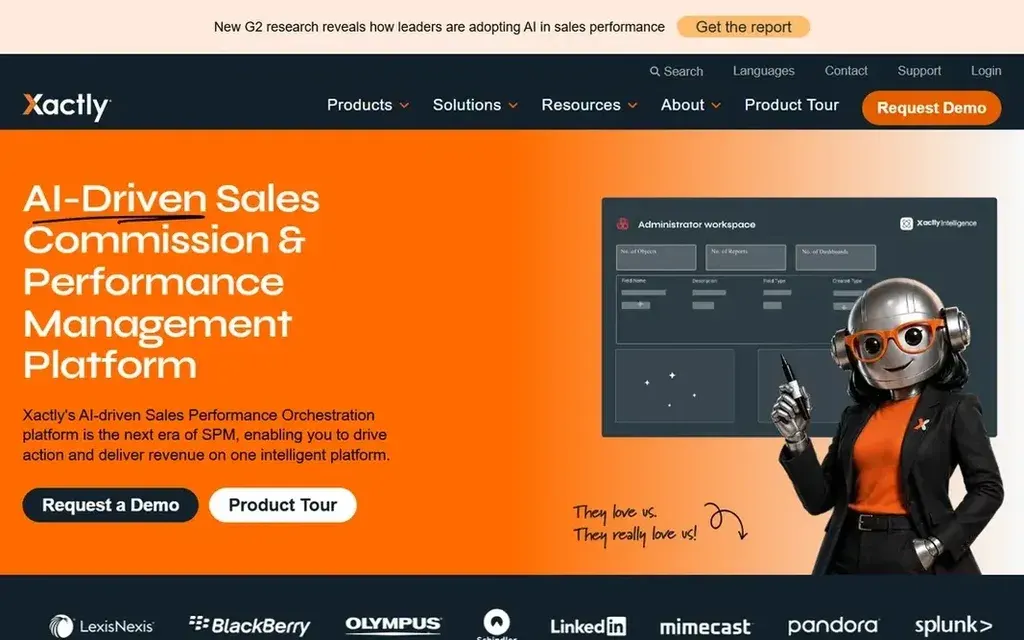
Think of Xactly Incent for incentive compensation tied to quota planning. Xactly Incent is part of the Xactly Intelligent Revenue Platform, which the vendor describes as sales performance management software for sales, finance and RevOps teams. It centres on aligning incentive compensation with quota planning and performance.
Where it falls short: Wide product may suit bigger operations.
More specifically, organizations seeking a narrow commission calculator may prefer a more straightforward choice. In daily use, remote teams that want compensation connected to planning and revenue processes are the natural fit, especially where finance and sales operations work across locations. Check the vendor site for Xactly Incent pricing; none is listed in this comparison. Xactly Incent does not include a free plan.
- Made for sales
- Finance and RevOps
- Setup likely needs dedicated admin

Where CaptivateIQ fits: commission management as a business driver. Finance and sales operations teams looking for a dedicated commission system are the core audience. Its focus is commission administration, which fits remote teams that require a dependable system for calculating and managing commissions across distributed sellers.
Pick CaptivateIQ when commission management is the priority and you want a focused product. Since the product centers on commissions, teams needing wide financial planning may pair it with another tool. Pricing for CaptivateIQ is not stated here, so ask the vendor for current figures. On free options: Not stated.
Limits to weigh: Complicated plan logic may need review.
- Aims to turn expenses into drivers
- Dedicated sales commission software
- Narrower than full planning suites
NICE is designed for customer experience and service automation. Remote teams may encounter NICE in service or contact center contexts, but compensation management is not the stated purpose of the system as described on its homepage.
Limits to weigh: Compensation use needs evaluation.
Its documented focus is CX and service efficiency instead of sales compensation. Consider NICE when customer experience automation, not incentive pay, is the requirement. NICE starts at: $110 per agent per month. Free plan details: Not stated.
- Customer service automation focus
- Wide interaction coverage
- Not positioned as commission software
How we built this list
What to check before you buy
- Get a written quote from Performio, Anaplan, Spiff and others; the list shows no starting price for them.
- Take the trial from Spiff and push a live task through it before you pay.
- Read the limits listed for Performio first: needs clean compensation data.
- Add up seats, add-ons and usage charges for Anaplan before comparing it with cheaper entries.
- Test how quickly Xactly Incent answers a pre-sales question; it hints at how support will feel later.
FAQ
How are the tools for sales compensation software for remote teams ordered?
Performio sits first and NICE last because the order follows typical fit for sales compensation software for remote teams, then price clarity and free access. It is a judgement call, so read each profile for fit and limits.
Do these tools publish their prices?
Not all of them. Performio, Anaplan, Spiff and others publish no starting price, so expect a quote request for those. The rest, NICE included, show a starting price, though seats and billing terms still change the final cost.
What should remote teams look for in sales compensation software?
Look for accurate commission calculation, clear seller-facing earnings visibility and reporting that finance can trust. Remote teams also benefit from permissions and access controls that work across locations.
How does Spiff differ from other commission tools?
Spiff, part of Salesforce, emphasizes automatic commission calculations and live earnings visibility for sellers. Teams already using Salesforce may find that alignment handy, whereas others may prefer a vendor-neutral choice.
Is Performio the right pick for everyone comparing sales compensation software for remote teams?
No single tool suits every team. Performio comes first because it fits plans, calculations, payouts and reporting, while Anaplan suits scenario planning and analysis and Spiff suits automated commissions with earnings visibility. Match the tool to your own size, budget and workflow before deciding.
Can I try these tools before paying?
Often, yes. Spiff offers a free trial. Use your own data and a real task during the test, and check what the free tier or trial limits before you rely on it. All 6 picks in this sales compensation software for remote teams comparison list a starting price, free plan details and the main limits on their cards above.
Sources
- https://www.performio.co
- https://www.anaplan.com
- https://www.spiff.com
- https://www.xactlycorp.com
- https://www.captivateiq.com
- https://www.nice.com