Platform Engineering Tools in 2026: The 7 Best Options Side by Side
7 products for the best platform engineering tools, ranked by fit, with starting costs and free tiers. The weak spots sit next to the strengths. Facts only.
- Editor's choice
 Humanitec
Enterprise orchestration
Starts atPricing on requestVisit humanitec.comFull review - Great alternative
 Qovery
Deployments in your own cloud
Starts atPricing on requestVisit qovery.comFull review - Also consider
 OpsLevel
Service ownership and maturity
Starts atPricing on requestVisit opslevel.comFull review
Direct answer
For enterprise orchestration, Humanitec is where this list starts. Qovery fits deployments in your own cloud; OpsLevel fits service ownership and maturity. The full list of 7 tools follows, with prices and free plan facts. None of these vendors publish plan prices, so pricing is on request for every option.
TL;DR:
- The list opens with Humanitec, aimed at enterprise orchestration.
- Humanitec, Qovery, OpsLevel and others: pricing is by quote only, so plan time for a sales conversation.
- Atlassian Compass is the one to check for Atlassian centered teams.
- Only Backstage offers a free plan among these 7 tools.
Last checked November 2026. Pricing on request: vendors did not publish plan prices when this guide was last checked (November 2026), so ask each vendor for a written quote.
Quick comparison
| Tool | Best for | Starts at | Free plan? | |
|---|---|---|---|---|
| Humanitec | Enterprise orchestration | Pricing on request | No | Visit |
| Qovery | Deployments in your own cloud | Pricing on request | Free trial | Visit |
| OpsLevel | Service ownership and maturity | Pricing on request | No | Visit |
 Backstage | Custom open source portals | Free | Yes | Visit |
 Cortex | Scorecards and standards | Pricing on request | No | Visit |
 Port | Managed portal with self service | Pricing on request | Free trial | Visit |
 Atlassian Compass | Atlassian centered teams | Pricing on request | No | Visit |
Platform Engineering Tools profiles
If you are comparing platform engineering tools, this page covers 7 tools in one place: what each is best for, what it costs to start, whether it has a free plan, and the main limit to know about.
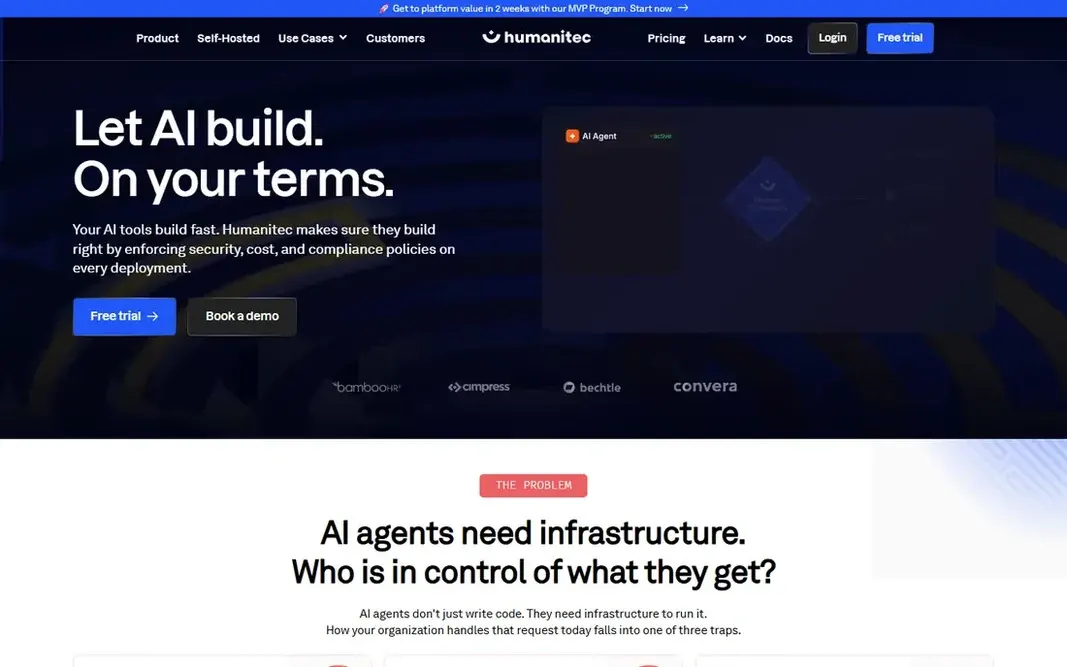
Humanitec is built with enterprise orchestration in mind. Humanitec solves the execution half of system engineering. It links to existing Terraform or OpenTofu modules instead of replacing them.
In practice, the current positioning centers on AI agents, and it is a genuine fit. From a buyer's view, agents that can write code still need infrastructure, and Humanitec enforces security, cost, and compliance policy on every deployment request, human or agent, with progressive rollouts, drift detection, and rollback. In practice, Humanitec is an enterprise product with enterprise pricing and a sales led evaluation, including a sandbox for hands on testing. It is not a portal replacement: teams normally pair it with Backstage or Port for the catalog and developer interface. No starting price is listed for Humanitec here; confirm pricing on the vendor site. Humanitec has no free plan.
Honest limits: Enterprise pricing and sales cycle.
- Governance for human and AI requests alike
- Score based workload specs
- Portal features are thinner than Port or Backstage
Qovery is aimed squarely at deployments in your own cloud. Qovery is an infrastructure platform that deploys applications into your own cloud account, which is a meaningful distinction. In practice, the 14 day free trial needs no credit card, which makes evaluation simple.
In practice, your data and compute stay inside your AWS, GCP, or Azure account or your own Kubernetes cluster, whereas Qovery offers the deployment pipeline, environments, and guardrails. Beyond that, AI agents get scoped access through policy tokens and a MCP server, so agent deployments follow the same rules as human ones. Qovery does not show a starting price in this comparison, so check the vendor site for current pricing. On free options: Free trial.
Points against: Not a full developer portal.
- Runs in your own AWS, GCP
- 14 day free trial
- Smaller community than Backstage
OpsLevel makes the most sense for service ownership and maturity. Self service workflows let teams package repeated work, from scaffolding a service to running maintenance upgrades, and the system now brings agent guardrails that decide which agents can act end to end and which require human review. OpsLevel positions itself as the single pane of glass for engineering teams and their agents.
On top of that, the ecosystem is smaller than Backstage, and buyers choosing between OpsLevel and Cortex should compare scorecard depth against catalog automation, since the two overlap heavily. Rollout is quick for a tool in this class, with the vendor citing days to full deployment for usual customers. Checks then measure each service against team and organization standards, with historical reporting that shows maturity improving or slipping over time. On top of that, OpsLevel wins for teams that want ownership clarity rapidly. This comparison lists no price for OpsLevel; ask the vendor. OpsLevel has no permanent free option.
Drawbacks to consider: Smaller ecosystem than Backstage.
- Self service workflows and agent guardrails
- Checks and maturity reporting
- Quote based pricing
Backstage was built for custom open source portals. Its software catalog hands every service an owner, dependencies, and documentation in one place, and software templates let engineers spin up a new service with organizational standards already baked in. The cost is staffing, not licensing.
For everyday use, Lighthouse, Tech Radar, Kubernetes views, and hundreds of community plugins extend the portal without forking it, and teams can build internal plugins for company specific needs. In daily use, the plugin model is the real strength. From a buyer's view, for large organizations with a system team, no commercial portal matches that flexibility. In daily use, TechDocs treats documentation like code, stored in Markdown beside the service it describes. Backstage starts at: Free. You can start on Backstage without paying.
Points against: Needs dedicated staff to run well.
- Software templates and TechDocs built in
- Open source under CNCF
- Upgrades and plugin maintenance fall on your team
Pick Cortex if this describes you: scorecards and standards. Cortex is built around engineering standards. Its scorecards measure every service against production readiness, security, and reliability rules, and its initiatives feature drives company broad migrations, like upgrading a framework version across hundreds of services, from one dashboard.
Watch-outs: Portal catalog is secondary to scorecards.
The DRIVE framework brings a governance layer for AI driven development, measuring whether AI adoption is actually paying off. Beyond that, pricing is quote based and the product is geared toward bigger engineering organizations. Pricing for Cortex is not stated here, so ask the vendor for current figures. No free plan comes with Cortex.
- Self service through golden paths
- Production readiness tracking
- Quote based pricing
Port works best for managed portal with self service. Port is a managed developer portal that has grown into what it now calls an agentic software development lifecycle product. As for the details, workflow automation links the portal to existing tools.
So a developer action can trigger a pipeline, open a ticket, or update a record without leaving the portal. As for the details, for teams that want portal value without system staff, Port is the most direct Backstage alternative. On top of that, the core remains familiar: a software catalog with an adaptable data model, scorecards that measure service health, and self service actions that let developers provision resources through low code blueprints rather than tickets. As for the details, teams can stand up a catalog, define scorecards, and wire self service actions in days or weeks instead of the months a custom Backstage build can take. As for the details, buyers should trial the catalog, scorecards, and self service actions specifically, and confirm which agentic features are included in their plan. Port does not show a starting price in this comparison, so check the vendor site for current pricing. Free plan details: Free trial.
Honest limits: Newer agentic positioning may confuse portal buyers.
- Self service actions and scorecards
- Fast implementation
- Deep customization needs learning time
Choose Atlassian Compass for Atlassian centered teams. Its component catalog tracks software and the teams building it, links repositories, libraries, and APIs, and measures software health through scorecards. Also, the important caveat sits at the top of the Compass homepage: as Atlassian concentrates on a next generation option for tracking developer productivity and experience, Compass scorecards and catalog functionality will transition into DX.
That means new buyers should talk to an account manager about migration choices and timelines before committing, since the product they buy today may be folded into a different product. For teams outside the Atlassian ecosystem, Compass supplies less than Port or OpsLevel. For Atlassian customers, the native integration removes the sync work that other portals need. Atlassian Compass does not show a starting price in this comparison, so check the vendor site for current pricing. Atlassian Compass does not include a free plan.
Trade-offs to know: Scorecards and catalog are transitioning into Atlassian DX.
- Native Jira and Bitbucket integration
- Component catalog and scorecards
- Premium features gated
How these tools were picked
LinkVetted looked at what each vendor publishes: pricing, plan limits, feature coverage for platform engineering tools and stated drawbacks. No hands-on testing is claimed. Where a vendor does not publish a price, the entry says quote. Where a price depends on seats or billing term, the entry says so. Order on the page follows fit for the typical buyer first, then price transparency and free access. Your own requirements should decide the final pick.
Things to verify first
- Get a written quote from Humanitec, Qovery, OpsLevel and others; the list shows no starting price for them.
- Look at the free plan from Backstage closely: its caps decide whether it is usable for real work.
- Run a trial of Qovery and Port with real work before paying for a year; your own workflow is the best test.
- Before choosing Humanitec, weigh its main limit: enterprise pricing and sales cycle.
- Ask the daily users to test OpsLevel on a live task before you roll it out to everyone.
- Look at the renewal terms for Port: auto-renewal, notice periods and price changes can matter more than the first-year price.
FAQ
Is Humanitec the right pick for everyone comparing platform engineering tools?
No single tool suits every team. Humanitec comes first because it fits enterprise orchestration, while Qovery suits deployments in your own cloud and OpsLevel suits service ownership and maturity. Match the tool to your own size, budget and workflow before deciding.
Should I worry about Compass moving to DX?
The Compass homepage states that scorecards and catalog functionality will transition into DX, so confirm migration timelines, pricing, and feature parity before signing a new Compass agreement.
Do these tools publish their prices?
Not all of them. Humanitec, Qovery, OpsLevel and others publish no starting price, so expect a quote request for those. The rest, Backstage included, show a starting price, though seats and billing terms still change the final cost.
Which options for platform engineering tools have a free plan?
Backstage is the only tool in this list with a free plan. Free plans usually cap users, projects or features, so check the limits on the vendor page. Several others offer a trial instead.
How are the tools for platform engineering tools ordered?
The order follows typical fit for platform engineering tools, with Humanitec first and Atlassian Compass last, then price clarity and free access. It is editorial judgement, not a score, so another team could rank the tools differently.
Sources
- https://humanitec.com
- https://www.qovery.com
- https://www.opslevel.com
- https://backstage.io
- https://www.cortex.io
- https://getport.io
- https://www.atlassian.com/software/compass