Best Family Tracker App in 2026: 8 Apps Compared
Compare the best family tracker app options for consented family safety, with Life360, Find My, Glympse and more on price, alerts, and privacy in 2026.

- Editor's choice
 Life360
Most complete family tracking
Starts atFreeVisit life360.comFull review - Great alternative
 Apple Find My
All-iPhone families
Starts atFreeVisit apple.comFull review - Also consider
 Google Family Link
Parents of young children
Starts atFreeVisit families.google.comFull review
TL;DR:
- Life360 is the most complete family tracker for mixed iPhone and Android households, with live maps, place alerts, and driving safety tools.
- Apple Find My is the best free pick for all-iPhone families, and Google Family Link is the best free pick for parents of younger Android children.
- Every app here works only with consent: each person must join the circle and agree to share location, and anyone can stop sharing.
- Check the privacy policy before you pay, since some apps share location data with partners while others promise not to sell it.
Quick comparison
| Tool | Best for | Starts at | Free plan? | |
|---|---|---|---|---|
| Life360 | Most complete family tracking | Free | Yes | Visit |
| Apple Find My | All-iPhone families | Free | Yes | Visit |
| Google Family Link | Parents of young children | Free | Yes | Visit |
 Glympse | Temporary trip sharing | Free | Yes | Visit |
 GeoZilla | Driving alerts on a budget | Free | Yes | Visit |
 iSharing | Simple setup for relatives | $10.99 per month | Yes | Visit |
 Findmykids | Young children and GPS watches | See website | Free trial | Visit |
 OtoZen | Teen drivers and crash response | $9.99 per month | Free trial | Visit |
The best family tracker apps
Family tracking only works well when everyone in the circle has agreed to it, so this list is framed for consented family safety only. Use these apps to know when a child arrives at school, when a partner gets home safely, or when an older relative needs help, and agree the rules together first: who can see location, when sharing pauses, and how long history is kept. Apps that hide tracking, or that are used to monitor an adult without consent, are not what this guide is for, and we have left out any tool marketed for secret monitoring.
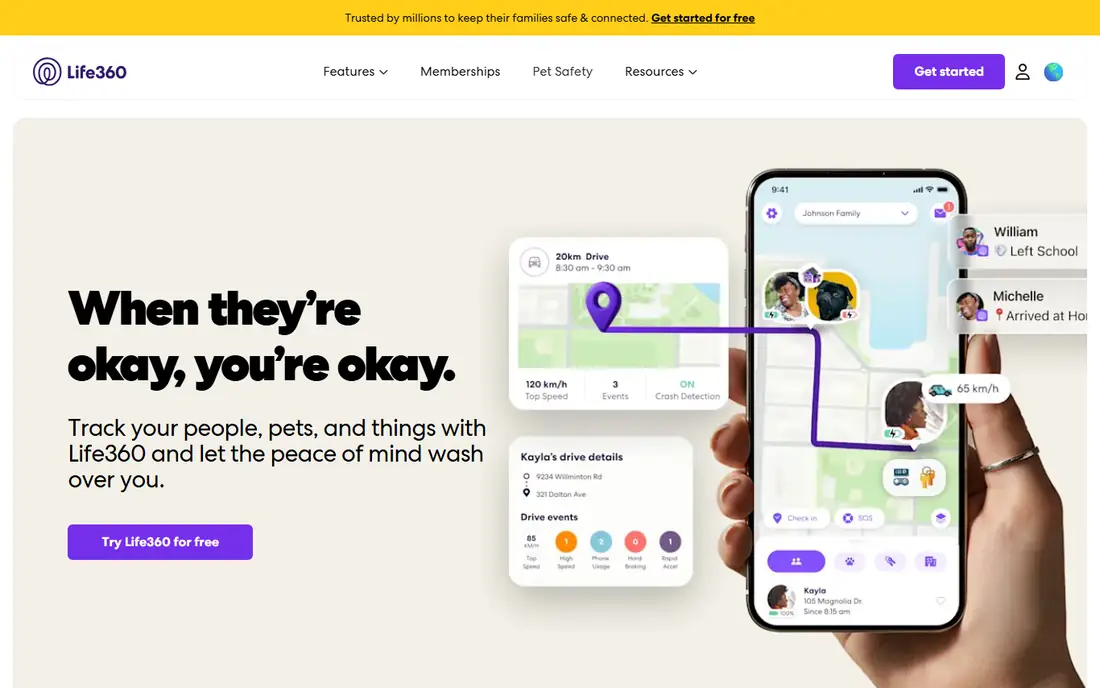
Life360 is the app most families reach for first, and for good reason: it puts every circle member on one live map, sends alerts when people arrive at or leave saved places such as home, school, or work, and keeps location history so you can check a route later. The free tier covers basic live location, two days of history, and a limited set of place alerts, which is enough for many families to test the idea. Paid plans add longer history, unlimited place alerts, individual driver reports, crash detection, emergency dispatch, and roadside help, with Silver around $7.99 per month, Gold at $14.99 per month, and Platinum at $24.99 per month, based on vendor pages checked in July and October 2026.
The honest catch is privacy. Life360 has faced criticism over how location data is shared with partners, so families who care deeply about data handling should read the current privacy policy and check the settings that limit sharing. Continuous location sharing can also feel intrusive for teenagers, so agree the rules before you require it, and let older children pause sharing in agreed situations. For mixed-device households that want the fullest feature set, Life360 remains our pick, with those caveats in mind.
- Live map for iPhone and Android
- Place alerts and history
- Crash detection on paid plans
- Best features need a paid plan
- Location data handling has drawn criticism
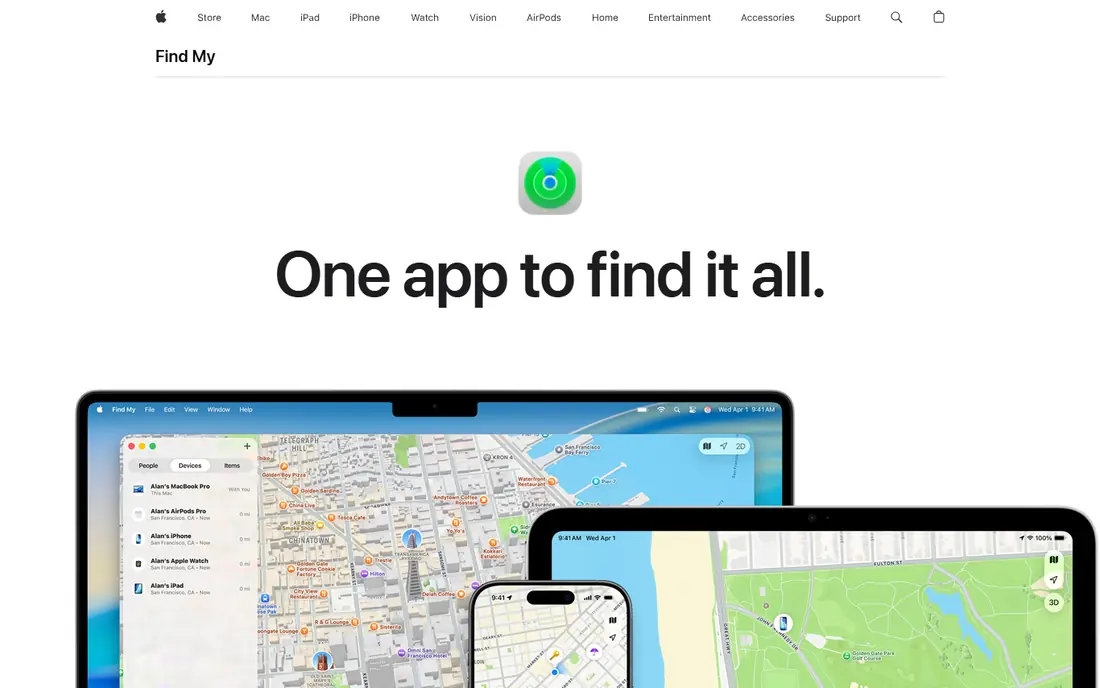
Apple Find My is the best family tracker for households where everyone uses an iPhone, iPad, or Mac, because it is free, built in, and needs no extra subscription. Family members can share live location through Family Sharing, set notifications for arrivals and departures at up to 25 places, and find lost devices, AirTags, and other items in the same app. Location sharing is consent-based and can be stopped at any time, and Apple states that it does not sell personal data, which answers the privacy concern that hangs over some rivals.
The limits are platform and depth. Find My works only within Apple's ecosystem, so an Android phone in the family breaks the setup, and it offers live location only, with no history, driving reports, or crash detection. For an all-Apple family that only needs to know where people are now and when they arrive somewhere, that is enough, and the price cannot be beaten. Families that need history or teen driving tools should pair Find My with a driving app, or pick Life360 instead.
- Free and built into iPhones
- No extra app for family sharing
- Location alerts
- IPhone only in practice
- No location history
- No driving reports
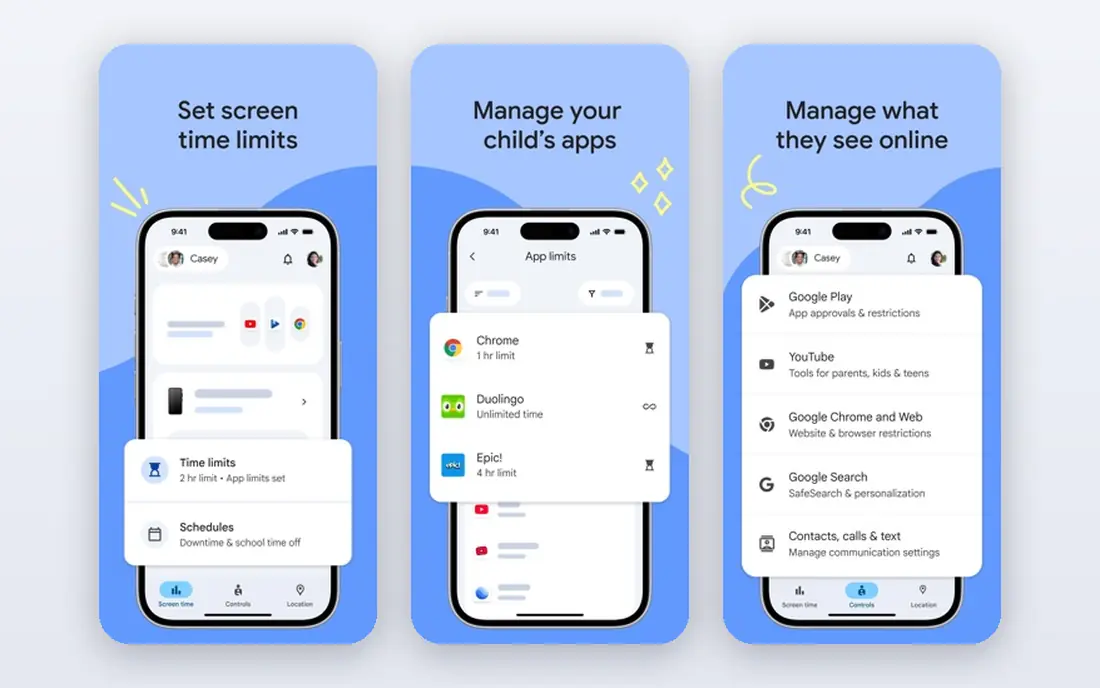
Google Family Link is a parental supervision app rather than a pure tracker, and that broader role is why it suits parents of younger children. It shows a child's Android device location, lets parents approve app downloads, set screen time limits and bedtimes, and filter content, all from the parent's phone. Location alerts cover arrivals and departures, and the whole system is free with Google accounts for parent and child, with no subscription needed for core supervision. For a first phone, Family Link gives parents oversight without paying for a separate tracker and a separate parental control app.
The limits matter as you plan ahead. The supervised child device is Android in practice, location history is not offered, and older teenagers often find Family Link too restrictive for their stage. It also does not offer crash detection or driving reports, so it is not a teen driver tool. Pick Family Link for younger children on Android, and plan to move to Life360 or a similar tracker, with agreed rules, when a child is old enough for a less supervised setup.
- Free
- Location plus screen time and app controls
- Works for parent and child accounts
- Child device is Android only in practice
- No location history
- Limited for teens
Glympse solves a narrower problem better than any full tracker: sharing your location for a set time, such as a drive home, a school run, or a trip to meet friends. Send a link, and the recipient sees your live location and estimated arrival time in a browser, with no app or account needed to view it. Sharing stops automatically when the timer ends, which is a privacy strength: there is no always-on tracking to forget about, and no history to manage.
That narrow focus is also the limit. Glympse has no place alerts, no location history, no driving reports, and no family dashboard, so it cannot replace Life360 for daily family safety. It also shows ads in the free app, and business features are paid. Use Glympse alongside a family tracker, not instead of one: the tracker covers daily life, and Glympse covers the temporary shares where permanent tracking would be overkill.
- Free
- No account needed to view a share
- Sharing expires automatically
- No history or place alerts
- Not a full family tracker
GeoZilla is a Life360-style family tracker with a strong focus on driving safety at a lower price point. It offers real-time location, geofencing with arrival and departure alerts, location history on premium plans, crash detection, and alerts for speeding, hard braking, and phone use while driving. That driving data helps parents of new drivers start a conversation about safe habits, rather than only knowing where a teen is. A physical GeoZilla GPS tracker can also be paired for a car, bag, or pet, which extends tracking beyond phones.
The free tier covers basic tracking, while premium plans are listed around $47.99 per year in some comparisons and $59.99 per three months in others, so confirm the current plan on the vendor site before paying. The interface feels less polished than Life360, and some users report upsell prompts when opening the app. GeoZilla is a solid budget pick for families who prioritise driving alerts, provided you accept a rougher interface in exchange for a lower price.
- Free tier
- Driving behaviour alerts
- Crash detection
- GPS tracker device option
- Interface feels less polished
- Premium pricing varies by plan
iSharing suits families that want a simple tracker for older relatives or for relatives who are less comfortable with technology. Setup is straightforward, the map is clear, and place alerts, location history on premium plans, and a panic button cover the main safety needs without a long feature list to learn. A walkie-talkie style voice message feature lets family members check in quickly without a phone call, which is useful for grandparents or for children who are not ready for full messaging apps. The free tier covers basic live location, so families can test it before paying.
Premium costs about $10.99 per month or $79.99 per year, based on comparison pages, which is more than GeoZilla for a similar feature set. iSharing also lacks the driving reports and crash response depth of Life360 Gold or OtoZen, so teen driver families should look elsewhere. Pick iSharing when simplicity and easy setup matter most, especially for older relatives, and accept that you pay a little more for that ease.
- Easy setup
- Live location and place alerts
- Panic alerts and walkie-talkie
- Premium needed for full history
- Monthly price higher than some rivals
Findmykids is designed for younger children, including children who do not yet have a phone, since it works with GPS watches as well as phones. Parents see live location, set safe zones with arrival and departure alerts, review location history, and receive SOS alerts when a child presses the watch or phone button.
Pricing varies by plan, platform, and region, starting around $2.99 per month in some listings, so we list it as See website and recommend checking the app store price for your country. Findmykids is less suited to teenagers, who will usually prefer a phone-based tracker with agreed rules, and its feature set is narrower than Life360 for whole-family use. For families with young children, especially with a GPS watch, it is a strong, focused pick.
- Works with GPS watches
- SOS button
- Location history and place alerts
- Pricing varies by plan and region
- Best for younger children, not teens
OtoZen goes beyond basic location by pairing GPS tracking with driving safety and a human emergency response team. It offers live location, ETA alerts, speeding and phone-use notifications, drive scores, and trip summaries, plus hands-free voice messaging for drivers. When a crash is detected, OtoZen's team can respond and contact emergency services and family, which is the feature that sets it apart from trackers that only send an automated alert. The company also states that it does not sell user data, which addresses a common privacy concern.
Pricing starts around $9.99 per month for a family, with premium at $99.99 per year in some listings, so confirm the current plan on the vendor site. OtoZen is less useful for families without teen drivers, since its best features centre on driving, and younger children need a simpler tool such as Findmykids. Pick OtoZen when teen driving safety and crash response are the priority, and when a human team on the other end of an alert is worth paying for.
- Live location and ETA alerts
- Driving scores
- Human crash response team
- Family pricing adds up
- Less useful for families without teen drivers
How we picked these
We compared official feature pages, pricing pages, and comparison guides checked in October 2026, and we kept only apps that work with consent, that are still maintained, and that cover real family needs: live location, place alerts, history, driving safety, or child-specific devices. We excluded tools marketed for secret monitoring, and we favoured apps with clear privacy statements. Prices vary by country and plan, so confirm the current price in your app store before subscribing.
How to set up family tracking with consent
Agree the rules before anyone installs an app. Decide who can see location, which places get alerts, how long history is kept, and when sharing can pause, such as during school or work hours where tracking is not needed. For teenagers, write the agreement down and revisit it every few months, since trust grows when rules are clear and reviewed. Check privacy settings together: turn off data sharing where the app allows it, review who can see the circle, and remove people who no longer need access.
A note on privacy and safety
Location data is sensitive, so treat it that way. Use a strong password and two-factor authentication on the tracker account, keep the app updated, and review the privacy policy for data selling or partner sharing before you pay. Tracking is a safety tool, not a substitute for conversation: if a child or partner feels watched rather than safe, the setup needs changing, even if the app works perfectly. For emergencies, a tracker helps responders find someone, but it does not replace calling emergency services directly.
FAQ
What is the best family location app?
Life360 is the most complete family location app for mixed iPhone and Android households, with live maps, place alerts, and driving tools. Apple Find My is best for all-iPhone families, and Google Family Link is best for parents of young Android children. The best pick depends on your devices and whether you need history or driving features.
What is the best app for tracking family members with consent?
All apps in this list require consent: each person joins a circle and agrees to share location, and can stop sharing at any time. Life360, Find My, and Glympse all work this way, with Glympse offering the most limited, time-based sharing. Avoid any app that promises to track someone secretly, since that use raises serious privacy and legal problems.
Is there a free family tracker app?
Yes. Apple Find My and Google Family Link are free, Life360 and GeoZilla have free tiers, and Glympse is free for temporary sharing. Free tiers usually limit history and place alerts, while driving reports and crash detection sit on paid plans. Start with a free tier to test whether your family actually uses the app before paying.
Can I track my family without them knowing?
No, and you should not try. The apps in this guide require each person to install the app and agree to share location, and secret tracking of an adult without consent can break the law and destroy trust. For children, use a parental tool such as Family Link or Findmykids openly, explain what it does, and agree the rules together.
Which family tracker app is best for teen drivers?
OtoZen is the strongest pick for teen drivers, with driving scores, speeding alerts, and a human crash response team. Life360 Gold also offers driver reports, crash detection, and roadside help, while GeoZilla offers driving alerts at a lower price. Agree the driving rules with your teen first, so the app supports a conversation about safety rather than replacing it.
Does Life360 sell location data?
Life360 has faced criticism over data sharing with partners, and its privacy policy has changed over time, so read the current policy and settings before you subscribe. Apple Find My and OtoZen state that they do not sell personal data, while other apps vary in what they share for advertising or analytics. If data selling is a deal-breaker, check the policy wording and the app's privacy settings carefully.