Best Document Management Software for Dental Practices for 2026: Our 5 Vetted Picks
Best document management software for Dental practices in 2026: 5 contenders with entry costs and free tiers. Limits and pricing notes included. Facts only.
- Editor's choice
 Laserfiche
Document management with process automation
Starts at$42 per user per monthVisit laserfiche.comFull review - Great alternative
 DocuWare
Document workflow automation
Starts atSee websiteVisit start.docuware.comFull review - Also consider
 Dentrix
All-in-one dental practice operations
Starts atSee websiteVisit dentrix.comFull review
Direct answer
Laserfiche leads the list, best for document management with process automation. Listed starting prices: Laserfiche from $42 per user per month and M-Files from €65 per seat a month. DocuWare is the stronger choice for document workflow automation, while Dentrix suits all-in-one dental practice operations. Details, prices and limits for the rest of the 5 tools are below.
TL;DR:
- Top of the list is Laserfiche, which targets document management with process automation.
- M-Files is the one to check for AI-powered document organization.
- None of the 5 tools, from Laserfiche to M-Files, has a free plan, so budget for a subscription or use a trial.
- Starting prices begin at $42 per user per month with Laserfiche.
- The main caution on Laserfiche: general product, not dental-specific.
Last checked November 2026. Prices and plan details were read from the vendors' own pages in November 2026; vendors change plans often, so confirm the current price on the vendor site before you buy.
Quick comparison
| Tool | Best for | Starts at | Free plan? | |
|---|---|---|---|---|
| Laserfiche | Document management with process automation | $42 per user per month | Not stated | Visit |
| DocuWare | Document workflow automation | See website | Not stated | Visit |
| Dentrix | All-in-one dental practice operations | See website | Not stated | Visit |
 Dolphin Imaging | Orthodontic and specialist imaging workflows | See website | Not stated | Visit |
 M-Files | AI-powered document organization | €65 per seat a month | Not stated | Visit |
Document Management Software for Dental Practices profiles
LinkVetted compared 5 document management software for Dental practices. The goal is a practical shortlist: published prices, free plan facts, best-fit use cases and honest limits for every entry.
Laserfiche targets document management with process automation. Laserfiche supplies AI-powered document management and process automation, with workflows, electronic forms and analytics.
The main drawbacks: General system, not dental-specific.
Laserfiche is a wide product instead of a dental system, so clinical charting and imaging come from elsewhere. Laserfiche cost at the entry level: $42 per user per month. Free options: Not stated.
- AI-powered document management
- Workflows and electronic forms
- Needs planning to fit clinical records
DocuWare makes the most sense for document workflow automation. DocuWare gives you document management software and workflow solutions targeted at improving document processing through automation.
Limits to weigh: Needs configuration for practice use.
It suits dental practices and groups that want to capture, route and approve paperwork for example invoices, forms and administrative records with less manual handling. Pricing for DocuWare is not stated here, so ask the vendor for current figures. Free options: Not stated.
- Document management focus
- Workflow automation for document processing
- Not tailored to dental clinical needs
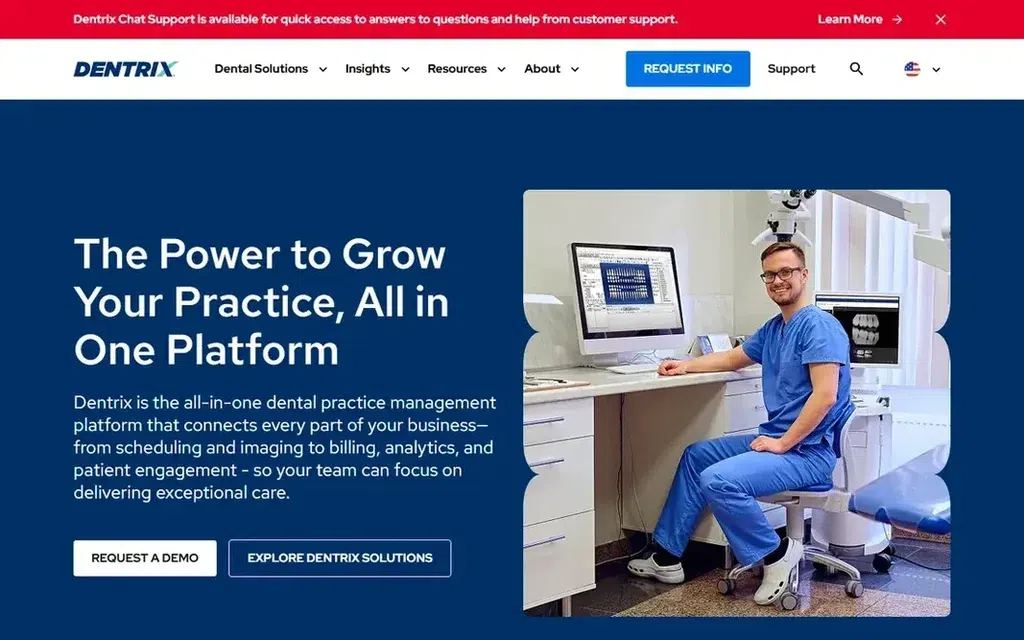
Dentrix serves all-in-one dental practice operations. Dentrix is an all-in-one dental practice management product that brings scheduling, eligibility and claims, patient forms, imaging with AI, billing and payments, marketing, analytics and IT support together.
Reasons to shortlist it: imaging and billing.
It suits established practices that want patient records and front-office documents handled inside one dental-specific system instead of a generic document tool. Dentrix shows no starting price here, so confirm the cost on the vendor site. Free options: Not stated.
Drawbacks to consider: Dental-specific focus limits general document use.
- Merges scheduling, forms
- Bundles analytics and marketing tools
- Wide product may be more than a small office needs
Dolphin Imaging is aimed squarely at Orthodontic and specialist imaging workflows. It fits specialist practices that require imaging tools and management features tuned to their clinical workflows.
Its specialist orientation means general dental offices and non-clinical document needs are not the target. No starting price is listed for Dolphin Imaging here; confirm pricing on the vendor site. As for free access: Not stated.
Points against: Narrower document scope.
- Designed for orthodontists and OMS
- Serves ortho-pedo practitioners
- Specialist focus, not general practice
M-Files is aimed squarely at AI-powered document organization. M-Files is an AI-powered document management system that helps teams organize documents in context, automate workflows and cut risk with secure access.
Limits to weigh: Requires setup for clinical use.
It suits dental groups and administrative teams that want a general-purpose repository for contracts, policies, patient paperwork and back-office records organized by what they relate to. The starting price for M-Files: €65 per seat per month. As for free access: Not stated.
- Organizes documents in context
- Automates workflows
- Not dental-specific
How we chose
We compared the tools on published pricing, free plan or trial availability, feature coverage for document management software for Dental practices, and the limits each vendor documents. Prices and plan limits come from vendor pages and can change, so confirm them on the vendor site before you buy. We ordered the tools by general fit, then by how clearly pricing is shown, then by free access. A buyer with unusual needs may reorder them.
Before you commit
- Ask DocuWare, Dentrix and Dolphin Imaging for a written quote, since no starting price is shown.
- Read the limits listed for Laserfiche first: general product, not dental-specific.
- Look at which plan of Laserfiche unlocks the features you need; entry tiers are often cut down.
- The entry price of M-Files is only the starting point; model the full cost with seats and extras.
- Pick one real project and run it in Dolphin Imaging first; a small pilot shows fit faster than a checklist.
FAQ
Can I try these tools before paying?
Not by default. None of the tools, from Laserfiche to M-Files, lists a free plan or a free trial here, so ask each vendor for a demo before committing.
What is the cheapest option for document management software for Dental practices in this list?
On published monthly entry prices, Laserfiche is the lowest here at $42 per user per month. Entry price is only part of the cost, because seats, add-ons and billing terms can change the total. Each of the 5 options in this document management software for Dental practices guide has its own card above with the price, free plan and limits.
Does any tool for document management software for Dental practices here have a free plan?
No tool in this list, Laserfiche and M-Files included, has a permanent free plan. Trials and quotes are the usual route, so plan a short evaluation period.
Do these tools publish their prices?
Not all of them. DocuWare, Dentrix and Dolphin Imaging publish no starting price, so expect a quote request for those. The rest, Laserfiche included, show a starting price, though seats and billing terms still change the final cost.
Sources
- https://www.laserfiche.com
- https://start.docuware.com
- https://www.dentrix.com
- https://www.dolphinimaging.com
- https://www.m-files.com
Related guides
- Best Digital Asset Management Software for Dental Practices for 2026: Our 5 Vetted Picks
- AI Receptionist Software for Dental Practices in 2026: The 5 Best Options Side by Side
- 5 Booking Software for Dental Practices Worth Shortlisting in 2026
- 5 Best Client Portal Software for Dental Practices for 2026, Vetted and Compared