Best Chore App in 2026: 9 Apps Compared
Find the best chore app for your family, couple, or household, with free options, points and rewards, shared lists, rotation, and honest limits in 2026.

- Editor's choice
 OurHome
Free family chores
Starts atFreeVisit ourhomeapp.comFull review - Great alternative
 Homey
Chores plus allowance
Starts atFreeVisit homeyapp.comFull review - Also consider
 Sweepy
Cleaning schedules
Starts atSee websiteVisit sweepy.appFull review
TL;DR:
- OurHome is the best free starting point for families, with chores, points, a grocery list, and a shared calendar in one app.
- Homey and similar family apps add allowance and savings features, which help when chores are tied to money lessons.
- Couples and roommates often do better with a simple shared list app than a child-focused rewards app.
- The best app is the one your household still uses after three weeks, so pick a simple setup and stick with it.
Quick comparison
| Tool | Best for | Starts at | Free plan? | |
|---|---|---|---|---|
| OurHome | Free family chores | Free | Yes | Visit |
| Homey | Chores plus allowance | Free | Yes | Visit |
| Sweepy | Cleaning schedules | See website | Free trial | Visit |
 Tody | Home cleaning routines | See website | Free trial | Visit |
 Cozi | Family calendar plus chores | Free | Yes | Visit |
 FamilyWall | All-in-one family hub | See website | Yes | Visit |
 ChoreBuster | Rotating chore charts | See website | Free trial | Visit |
 Nipto | Roommate chore rotation | See website | Yes | Visit |
 Habitica | Gamified habits and chores | Free | Yes | Visit |
The best chore apps
A chore app only works if everyone in the house opens it. The apps below cover families with kids, couples, roommates, and solo households. Some use points and rewards, others use simple rotation, and a few focus on cleaning schedules that repeat without nagging.
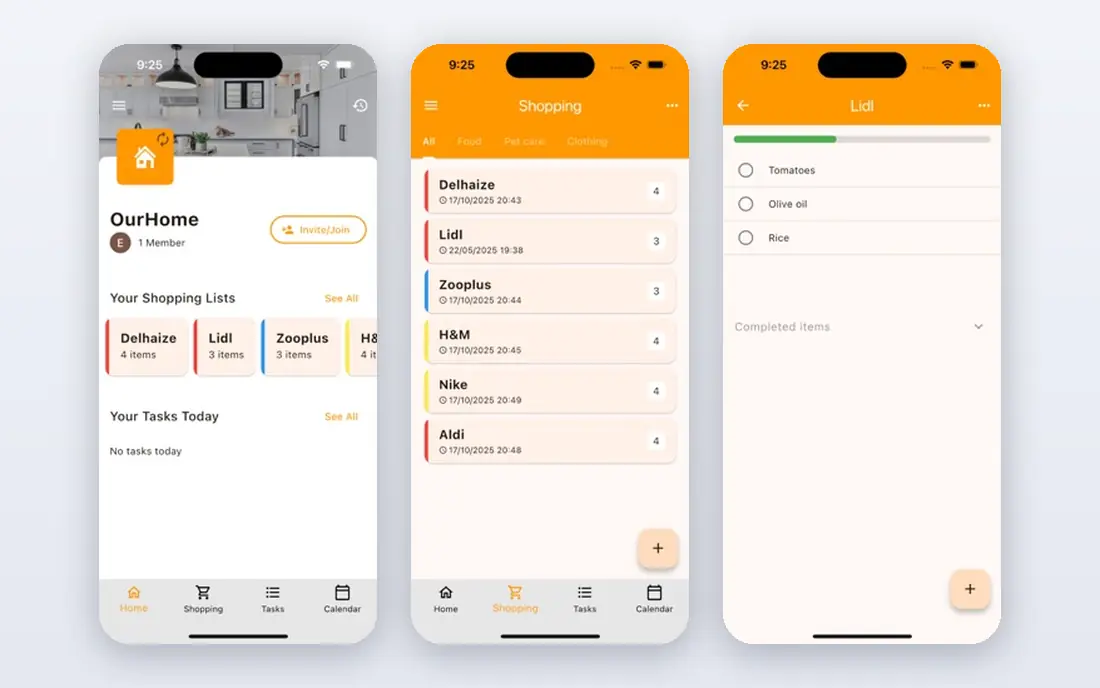
OurHome is a strong first pick because it is free and covers the basics well. Parents assign chores, set point values, and let kids redeem points for rewards the family chooses, such as screen time or a special outing. A shared grocery list and family calendar sit in the same app, so household coordination does not need three separate tools. Profiles for each family member show who did what and how many points each person has.
The design is plain, and older kids may find it less fun than a game-style app. Notifications can also be uneven, based on public reviews. Still, for a family that wants to start today without paying, OurHome is the lowest-risk choice. Set a small number of chores, agree on rewards together, and review points once a week.
- Free with no ads
- Points and rewards for kids
- Shared grocery list and calendar included
- Interface looks dated
- Limited gamification beyond points
Homey links chores to money in a way kids can understand. Parents set daily, weekly, and monthly chores, manage allowance, and help kids split money into savings jars. The basic plan is free for up to three family members, while Homey Unlimited costs $4.99 per month or $49.99 per year for unlimited members and fuller features, based on recent listings. That structure suits families that want chores to teach budgeting as well as responsibility.
The catch is that the most useful parts sit behind the paid plan, and bank account links depend on where you live. Families that only want a chore chart may find the money features extra. Families that already talk about allowance will find Homey a natural fit, since chores, pay, and savings stay in one view.
- Chores, allowance, and savings jars in one place
- Clear parent and child views
- Full features need the paid plan
- Bank transfer features vary by region

Sweepy is built around cleaning, not just chores in general. You pick rooms, set how often each task should happen, and the app shows what is due or overdue. That helps households where cleaning is the main friction point, and where tasks such as vacuuming, bathroom cleaning, and kitchen deep cleans need a schedule rather than a one-off list. The visual progress view makes it easy to see which rooms need attention.
Sweepy is less suited to families that need points, rewards, or allowance tracking. It is a cleaning planner first. Check the vendor pricing page for current plans and trial terms. If your household argues about cleaning more than other chores, Sweepy gives that work a clear rhythm.
- Room-by-room cleaning plans
- Tracks what is overdue
- Good for solo households
- Focus is cleaning, not general family chores
- Paid plan needed for full use
Tody takes a similar approach to Sweepy, with a focus on when each cleaning task is due. Tasks are grouped by room, and the app shows a simple indicator for each area of the home, from clean to overdue. Households can share the home, assign tasks, and see who did what. That shared view helps couples and roommates split cleaning fairly without a paper chart on the fridge.
Setting up a full home takes time, since each room and task needs a frequency. Once set, the routine mostly runs itself. Tody is a good pick for adults who want a calm, visual cleaning system. It is not the best pick for families that need kid rewards or allowance features.
- Smart scheduling based on how often tasks are due
- Clear home overview
- Works for shared homes
- Cleaning focus only
- Setup takes time for a large home
Cozi is a family organizer that many households already use for calendars and shopping lists. Its chore and to-do features are simpler than OurHome or Homey, but they sit beside the shared calendar, meal planner, and lists that a busy family checks every day. That placement matters. A chore list inside an app the family already opens is more likely to be used than a separate app no one remembers.
The free plan includes ads, and a paid Gold plan removes them and adds extra features. Check the vendor site for current Gold pricing. Cozi suits families that want one hub for schedules, lists, and basic chores. Families that need points, rewards, or allowance tracking should pair it with, or pick, a more focused chore app.
- Shared calendar, lists, and chores in one free app
- Easy for grandparents and caregivers to join
- Chore features are simpler than dedicated chore apps
- Ads on the free plan
FamilyWall gives each family a private space with a shared calendar, lists, chores, meal planner, photo sharing, and messaging. That breadth suits families that want to keep household life in one place, including grandparents or caregivers who need to see schedules without joining many apps. Chore assignments and reminders fit naturally beside school events and appointments.
The breadth is also the limit. A family that only needs chores may find the extra sections distracting. Some premium features need a paid plan, so check the pricing page before committing. FamilyWall is a good pick for a household that wants a single family hub, with chores as one part of a wider system.
- Calendar, lists, chores, and messaging in one private space
- Good for extended family
- Many features can feel busy
- Some extras need a paid plan
ChoreBuster is designed for fair rotation. You enter household members, chores, and schedules, and the system rotates assignments so the same person does not always get the worst jobs. It handles vacations and time off, which matters for roommates and larger families. Charts can be viewed online or printed, which helps households that still like a paper copy on the wall.
The design feels more like a web tool than a modern mobile app, and it lacks the rewards and gamification of family apps. That is fine for adults and roommates who want fairness, not fun. Check the vendor site for current pricing and trial terms. ChoreBuster suits shared homes where fairness over time is the main goal.
- Fair rotation over time
- Handles schedules and time off
- Printable charts available
- Web-focused design
- Less polished as a mobile app
Nipto keeps roommate chores simple. Housemates join a home, chores rotate on a set schedule, and everyone can see whose turn is next. That clarity solves the most common roommate problem, which is not the chore itself but the feeling that one person always does it. The app stays out of the way, with a focus on rotation rather than points or family features.
The small feature set is both a strength and a limit. There are no rewards, allowance tools, or deep cleaning schedules. For roommates, couples, and small shared homes, that simplicity is often enough. Check the vendor site for current plans. Nipto is a good pick when fairness and low effort matter more than extras.
- Simple rotation for shared homes
- Clear who is next
- Low setup effort
- Small feature set
- No rewards or allowance tools
Habitica turns habits, daily tasks, and to-dos into a game. Completing a chore earns experience and gold for a character, and missing daily tasks costs health. Solo users and older teens often find this more motivating than a plain list, and groups can form parties to hold each other to account. The core app is free, with optional paid features for extra customization.
The game layer is not for everyone. Young kids may find it confusing, and families that need a shared calendar or grocery list will need another app. Habitica also rewards consistency, so it suits chores that repeat daily, such as tidying, dishes, and laundry. If a plain list has failed before, the game layer may be the change that makes chores stick.
- Turns chores into a role-playing game
- Strong for solo users and motivated teens
- Free core app
- Game layer can distract from the chores
- Less suited to young kids or whole-family charts
How we picked these
We compared official app pages, pricing pages, and app store listings, plus public reviews, for family, couple, and roommate use. We favored apps that are still actively supported, that clearly handle chores or cleaning schedules, and that cover free and paid options. We did not claim hands-on testing. Where a price was not clearly published on the vendor site at the time of writing, we wrote See website.
How to make a chore app actually work
Start small. Pick five to ten chores that matter most, assign each one clearly, and agree on what done looks like. A vague chore such as clean the kitchen leads to arguments, while wipe counters, load the dishwasher, and take out trash are easy to check. Review the chart once a week, not every day, so the app helps rather than nags.
Match the app to the household
Families with young kids do best with points and rewards, which is why OurHome and Homey lead this list. Couples and roommates do best with rotation and a shared cleaning schedule, which is where Tody, ChoreBuster, and Nipto shine. Solo households can use Sweepy or Habitica to keep a routine without needing family features. If no one opens the app after two weeks, switch to a simpler one rather than adding more rules.
Keep rewards and money fair
If chores are tied to allowance, keep the link simple and consistent. Pay for extra work, not for basic household membership, or kids may expect payment for every small task. Agree on rewards in advance, keep point values stable, and let kids help choose rewards. That shared agreement matters more than any app feature.
FAQ
What is the best free chore app?
OurHome is the best free pick for most families, since it covers chores, points, rewards, a grocery list, and a calendar at no cost. Cozi and Habitica also offer useful free plans, with different strengths for calendars and gamified habits.
What is the best chore app for families with kids?
OurHome and Homey are the strongest family picks. OurHome is free and simple, while Homey adds allowance and savings jars for families that want money lessons tied to chores. Both let parents set chores and track progress by child.
What is the best chore app for couples?
Couples often do best with Tody or Sweepy for cleaning schedules, or Cozi for a shared calendar plus lists. The key is a shared view both partners check, rather than a child-focused rewards system.
What is the best chore chart app for roommates?
ChoreBuster and Nipto are built for rotation, which keeps chores fair over time. Both show whose turn is next and handle schedules, which removes the most common roommate friction.
How do I get kids to use a chore app?
Keep the chore list short, make rewards clear and reachable, and review progress together once a week. Let kids help pick chores and rewards, and praise consistency rather than only perfect results. If an app feels like a punishment, a simpler chart often works better.
Can a chore app replace a paper chart?
Yes, for most households, since apps add reminders, rotation, and a shared view across phones. A paper chart still works well for young kids who do not have phones, and some apps, such as ChoreBuster, offer printable charts for that reason.