Best At-Home Workout Apps for Women in 2026: 9 Apps Compared
Looking for the best at-home workout apps for women? We compare 9 apps for strength, cardio, Pilates, yoga and postnatal fitness, with prices checked.
- Editor's choice
 Peloton
Live classes and community motivation
Starts atSee websiteVisit onepeloton.comFull review - Great alternative
 Nike Training Club
Free-leaning general fitness
Starts atFreeVisit nike.comFull review - Also consider
 Obé Fitness
Fun live classes at home
Starts atSee websiteVisit obefitness.comFull review
TL;DR:
- Sweat and Nike Training Club suit strength and general fitness, while Alo Moves and Down Dog suit Pilates, yoga and low-impact work.
- FitOn is the strongest free option, with a large library of free classes and paid upgrades for extra features.
- Peloton and Apple Fitness+ suit users who want live classes, music and community, but need a subscription and, for some classes, equipment.
- Check postnatal, pregnancy and injury guidance before starting a new programme, and talk to a clinician if you have a health condition.
Quick comparison
| Tool | Best for | Starts at | Free plan? | |
|---|---|---|---|---|
| Peloton | Live classes and community motivation | See website | Free trial | Visit |
| Nike Training Club | Free-leaning general fitness | Free | Yes | Visit |
| Obé Fitness | Fun live classes at home | See website | Free trial | Visit |
 Sweat | Structured strength programmes for women | See website | Free trial | Visit |
 Alo Moves | Pilates, yoga and mindful movement | See website | Free trial | Visit |
 FitOn | Best free class library | Free | Yes | Visit |
 Down Dog | Custom yoga and Pilates sessions | See website | Free trial | Visit |
 Apple Fitness+ | Apple Watch users and family sharing | $9.99 per month | Free trial | Visit |
 Daily Burn | Varied daily workouts at home | See website | Free trial | Visit |
The best at-home workout apps for women
At-home workout apps for women cover very different goals, from strength and cardio to Pilates, yoga and postnatal recovery. The best app is the one that matches your goal, equipment and time, and that you will actually open three or four times a week. All the apps below work at home with little or no equipment, though some offer more with dumbbells or a bike.
Peloton offers live and on-demand classes for strength, cardio, yoga and Pilates, with instructors and music that suit users who stay motivated by scheduled classes and community features.
The honest catch is usually not a missing feature, but the cost of change. Budget time for setup, training and data cleanup, and check whether your team will actually use the new tool every week. A simpler tool that is used daily beats a fuller tool that is opened once a month.
In practice, this option rewards teams that plan the rollout. Give one person ownership of setup, define the core workflows in week one, and review usage after a month. That discipline matters more than any single feature, and it is where many otherwise good tools fail.
- Huge live and on-demand library
- Strong instructors and music
- Many no-equipment classes
- Subscription needed for full access
- Bike and treadmill classes need equipment
- Price is higher than rivals
Nike Training Club offers a large library of workouts for strength, cardio, yoga and mobility, with many free classes and plans that suit beginners through to advanced users at home.
On value, compare total cost over a year, not just the starting price. Include seats, add-ons, implementation and the time your team spends maintaining the tool. Ask for a written quote for your exact team size and use case before you sign.
For buyers comparing on price alone, this option is worth a closer look at the free plan or trial. Test the features you will use daily, check the limits that apply at your volume, and confirm the upgrade path before you commit to a paid plan.
- Large workout library
- Good beginner options
- No-equipment classes
- Premium features vary by region
- Less programme structure than Sweat
- No live classes in many areas
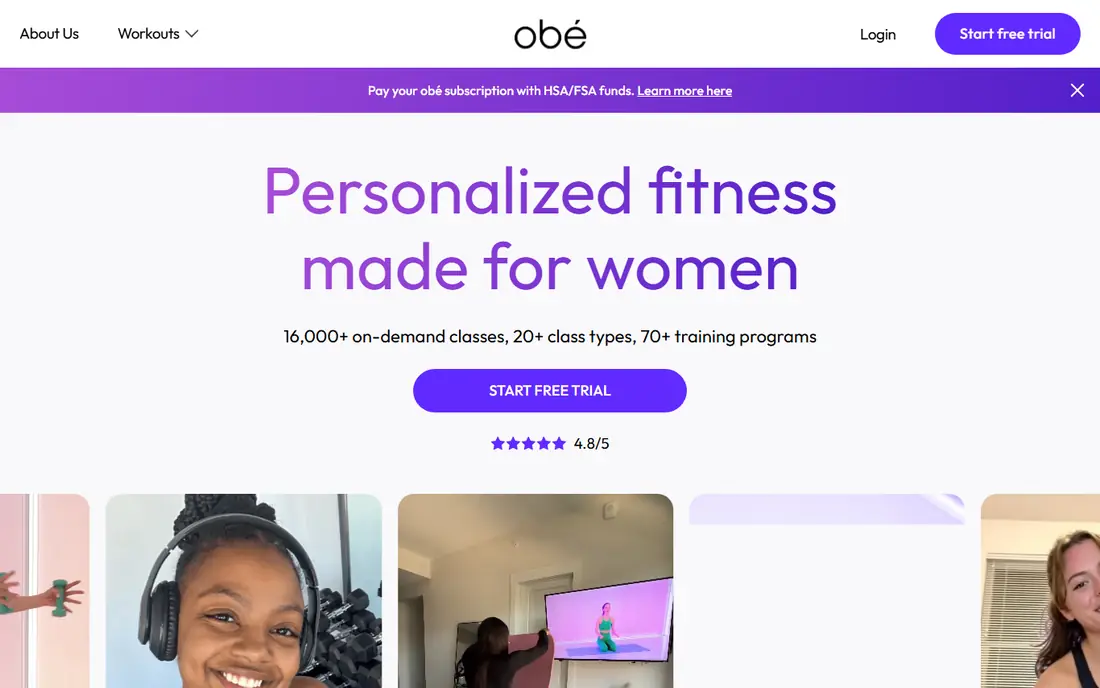
Obé Fitness offers live and on-demand classes across dance cardio, strength, Pilates, yoga and more, with a friendly tone that suits users who want varied, upbeat home workouts.
For day-to-day use, the key question is whether the tool fits your existing workflow. Check the integration list, the export options and the support terms before a trial, and test it with a real project rather than a demo dataset. That test will show gaps in permissions, reporting and onboarding that a feature list hides.
This pick stands out for a specific kind of buyer, and that focus is its strength. It does one job well, with a clear workflow and a support path you can test during a trial. The trade-off is that buyers outside that core use case may find gaps, so match the tool to your main job first.
- Live classes daily
- Wide class types
- Beginner-friendly tone
- Subscription needed
- US-focused live times
- Less strength programme depth than Sweat
Sweat, founded around trainer-led programmes, offers structured strength, cardio and postnatal plans for women, with progression and tracking that suit users who want a plan rather than random classes.
The honest catch is usually not a missing feature, but the cost of change. Budget time for setup, training and data cleanup, and check whether your team will actually use the new tool every week. A simpler tool that is used daily beats a fuller tool that is opened once a month.
In practice, this option rewards teams that plan the rollout. Give one person ownership of setup, define the core workflows in week one, and review usage after a month. That discipline matters more than any single feature, and it is where many otherwise good tools fail.
- Structured programmes by well-known trainers
- Strength and postnatal options
- Clear progression
- Subscription needed
- Some programmes need dumbbells
- App can feel busy for new users
Alo Moves offers Pilates, yoga, barre and mindful movement classes with high-quality video, which suits users who want low-impact, flexibility and core work at home.
On value, compare total cost over a year, not just the starting price. Include seats, add-ons, implementation and the time your team spends maintaining the tool. Ask for a written quote for your exact team size and use case before you sign.
For buyers comparing on price alone, this option is worth a closer look at the free plan or trial. Test the features you will use daily, check the limits that apply at your volume, and confirm the upgrade path before you commit to a paid plan.
- Strong Pilates and yoga library
- High-quality video
- Varied class lengths
- Subscription needed
- Less cardio and heavy strength
- Some series need props
FitOn offers a large library of free classes for cardio, strength, yoga and Pilates, with paid Pro upgrades for offline viewing and extra features, which makes it the strongest free starting point.
For day-to-day use, the key question is whether the tool fits your existing workflow. Check the integration list, the export options and the support terms before a trial, and test it with a real project rather than a demo dataset. That test will show gaps in permissions, reporting and onboarding that a feature list hides.
This pick stands out for a specific kind of buyer, and that focus is its strength. It does one job well, with a clear workflow and a support path you can test during a trial. The trade-off is that buyers outside that core use case may find gaps, so match the tool to your main job first.
- Large free class library
- Celebrity trainers
- Cardio, strength and yoga
- Paid Pro adds offline and extra features
- Some classes need equipment
- Ads or upsells in free tier
Down Dog lets users customise yoga, Pilates, HIIT and barre sessions by length, level, focus and music, which suits users who want a session built around their day rather than a fixed class.
The honest catch is usually not a missing feature, but the cost of change. Budget time for setup, training and data cleanup, and check whether your team will actually use the new tool every week. A simpler tool that is used daily beats a fuller tool that is opened once a month.
In practice, this option rewards teams that plan the rollout. Give one person ownership of setup, define the core workflows in week one, and review usage after a month. That discipline matters more than any single feature, and it is where many otherwise good tools fail.
- Highly customisable sessions
- Yoga, Pilates, HIIT and barre
- Offline options
- Subscription needed after trial
- Less trainer-led programme structure
- Interface takes learning
Apple Fitness+ offers strength, HIIT, yoga, Pilates, dance and mindful cooldown classes, with Apple Watch metrics on screen and family sharing, which suits households already using Apple devices.
On value, compare total cost over a year, not just the starting price. Include seats, add-ons, implementation and the time your team spends maintaining the tool. Ask for a written quote for your exact team size and use case before you sign.
For buyers comparing on price alone, this option is worth a closer look at the free plan or trial. Test the features you will use daily, check the limits that apply at your volume, and confirm the upgrade path before you commit to a paid plan.
- Good class range
- Apple Watch integration
- Family sharing included
- Needs an Apple device for full use
- Subscription needed
- Live classes are limited
Daily Burn offers daily workouts across cardio, strength, yoga and Pilates, with programmes for beginners and varied levels, which suits users who want a new class each day without choosing a niche app.
For day-to-day use, the key question is whether the tool fits your existing workflow. Check the integration list, the export options and the support terms before a trial, and test it with a real project rather than a demo dataset. That test will show gaps in permissions, reporting and onboarding that a feature list hides.
This pick stands out for a specific kind of buyer, and that focus is its strength. It does one job well, with a clear workflow and a support path you can test during a trial. The trade-off is that buyers outside that core use case may find gaps, so match the tool to your main job first.
- Wide workout variety
- Daily new classes
- Beginner programmes
- Subscription needed
- Video quality varies by programme
- Less modern app design than rivals
How we picked these
We compared official app listings, class libraries, programme types, equipment needs and subscription prices for each app. We focused on workout variety, programme structure, beginner options, postnatal and low-impact choices, and whether a free plan or trial lets you test the app before paying. Prices are as listed by each provider, and app store prices may vary by region.
How to choose an at-home workout app
Start with your goal and your week. If you want strength, look for progressive programmes with clear levels, not just random classes. If you want low-impact or postnatal work, check for dedicated programmes and qualified guidance, not just a filter tag. Count the equipment you own: bodyweight programmes suit small spaces, while dumbbell programmes need a set of weights and safe floor space. Try the free classes or trial first, and check class length, since 20-minute sessions are easier to keep up than hour-long sessions on busy days. A good app should offer rest days, modifications for beginners, and clear cues, so you can move safely without a trainer in the room. This is general fitness information, not medical advice.
FAQ
What is the best at-home workout app for women?
Sweat is a strong all-round pick for women who want structured strength and cardio programmes at home. Nike Training Club is a strong free-leaning pick, while Alo Moves suits Pilates and yoga lovers.
What is the best free at-home workout app for women?
FitOn offers a large free class library, with paid upgrades for offline downloads and extra features. Nike Training Club also offers many free workouts, with premium features varying by region.
Which app is best for Pilates at home?
Alo Moves and Down Dog offer strong Pilates and yoga options for home use, with varied class lengths and levels. Sweat also includes Pilates-inspired programmes alongside strength work.
Are there workout apps for postnatal fitness?
Yes. Sweat, FitOn and Apple Fitness+ include postnatal or new-mum programmes, but guidance varies. Check the programme description and talk to a clinician before starting postnatal exercise, especially after a caesarean or complications.
Do I need equipment for these apps?
No, most offer bodyweight classes. Dumbbells, resistance bands or a mat expand options, and Peloton bike or treadmill classes need that equipment, though Peloton also offers many no-equipment classes.