Best AI WordPress Hosting Platforms (2026): 5 Picks Checked on Vendor Pages
Weighing the best AI WordPress hosting platforms? We lined up 5 products by cost, free access and fit. Pros and cons for every tool. Read before you buy.
- Editor's choice
 SiteGround
Speed, security and expert support
Starts atSee websiteVisit siteground.comFull review - Great alternative
 Cloudways
Adaptable managed cloud hosting
Starts at$20 a monthVisit cloudways.comFull review - Also consider
 Hostinger
Wide hosting menu for new sites
Starts at$1.99 a monthVisit hostinger.comFull review
Direct answer
SiteGround is the first pick on this list for speed, security and expert support. Listed starting prices: Cloudways from $20 a month, Hostinger from $1.99 a month and WP Engine from $28.00 a month. Cloudways fits adaptable managed cloud hosting; Hostinger fits wide hosting menu for new sites. Prices, free plans and limits for all 5 tools follow.
TL;DR:
- SiteGround takes the first slot, best suited to speed, security and expert support.
- Hostinger has the lowest monthly starting price in this list: $1.99 per month.
- Check the limits for WP Engine before you commit: narrower fit for non-WordPress apps.
- Neither SiteGround nor Kinsta, nor any of the other 3 tools, has a permanent free plan; trials and quotes are the norm.
- For managed WordPress performance and support, Kinsta is worth a look.
Last checked November 2026. Prices and plan details were read from the vendors' own pages in November 2026; vendors change plans often, so confirm the current price on the vendor site before you buy.
Quick comparison
| Tool | Best for | Starts at | Free plan? | |
|---|---|---|---|---|
| SiteGround | Speed, security and expert support | See website | Not stated | Visit |
| Cloudways | Adaptable managed cloud hosting | $20 a month | Free trial | Visit |
| Hostinger | Wide hosting menu for new sites | $1.99 a month | Not stated | Visit |
 WP Engine | Established WordPress sites and agencies | $28.00 a month | Not stated | Visit |
 Kinsta | Managed WordPress performance and support | $17.50 a month | Free trial | Visit |
Our 5 AI WordPress hosting platforms
LinkVetted compared 5 AI WordPress hosting platforms. The goal is a practical shortlist: published prices, free plan facts, best-fit use cases and honest limits for every entry.
SiteGround was built for speed, security and expert support. SiteGround presents web hosting built around speed, security and expert support, serving many different WordPress sites.
Also, bigger or highly customized projects may have to review plan limits carefully. For teams adding AI-assisted content workflows, the system's performance and security focus supplies a stable foundation for plugins and integrations. Check the vendor site for SiteGround pricing; none is listed in this comparison. On free options: Not stated.
Trade-offs to know: Not positioned as an AI system.
- Emphasis on speed and security
- Fits WordPress sites of varied size
- Plan limits affect bigger sites
Cloudways makes the most sense for adaptable managed cloud hosting. Cloudways provides a simplified managed cloud hosting system geared toward small and midsize companies and developers. It sits between raw cloud infrastructure and completely managed WordPress hosting, giving users cloud adaptability without handling every server task.
Trade-offs to know: Less beginner-friendly than shared hosting.
On top of that, teams running AI-assisted WordPress sites that require room to scale may appreciate the managed cloud model and the control it offers over their environment. Beyond that, pick Cloudways when you want managed cloud adaptability and are comfortable making some configuration decisions yourself. Price to start with Cloudways: $20 per month. As for free access: Free trial.
- Fits developers and small firms
- Managed cloud approach
- Needs more technical comfort
Hostinger targets wide hosting menu for new sites. Hostinger gives you a wide menu handling shared hosting, domains, VPS and cloud plans, which makes it a practical starting point for people bringing a new idea online. More specifically, advanced AI-driven optimization features vary by plan and should be checked before committing.
Drawbacks to consider: Less WordPress-specialized.
Hostinger is not a WordPress-only host, so teams wanting deep WordPress-specific tooling and white-glove support may prefer a specialist. From a buyer's view, beginners building a first WordPress site can start straightforward and move to more feature-rich plans as traffic grows. Price to start with Hostinger: $1.99 per month. On free options: Not stated.
- Domains included in the menu
- Shared
- Feature depth varies by plan
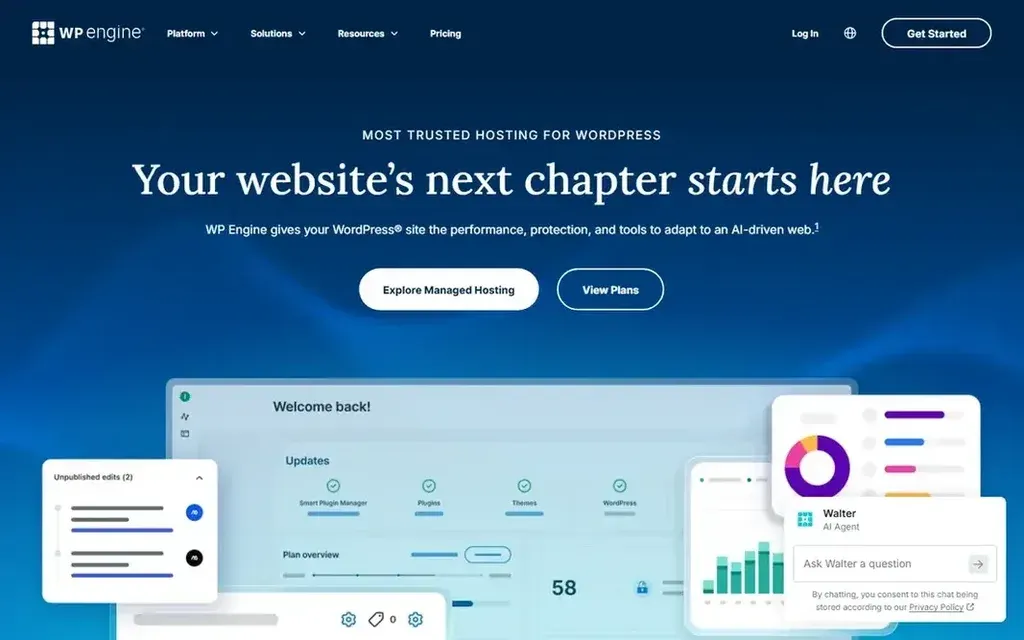
Pick WP Engine if this describes you: established WordPress sites and agencies. WP Engine describes itself as a leading website hosting system with WordPress at its core, backed by support and security options. The product's emphasis on WordPress tooling makes it a reasonable fit for teams layering AI content or optimization plugins onto a stable base.
Where it falls short: Premium positioning may not suit hobby sites.
In practice, pick WP Engine when you want a mature WordPress product with support and security built in instead of the cheapest possible choice. Since WP Engine centers on WordPress, teams hosting other application stacks should look at more general providers. On cost, WP Engine starts like this: $28.00 per month. Trial and free access: Not stated.
- Round-the-clock support
- Security options included
- Narrower fit for non-WordPress apps

Kinsta was built for managed WordPress performance and support. Kinsta positions itself as a managed WordPress host built around enterprise-grade speed, security and support.
Downsides: Restricted low-cost entry options.
Its homepage flags WordPress-specific infrastructure and a support team, which suits companies, agencies and publishers that want a hands-off system. Budget-focused beginners may also find broader shared hosting a more straightforward starting point. Kinsta cost at the entry level: $17.50 per month. As for free access: Free trial.
- Managed WordPress focus
- Emphasis on speed and security
- Less suited to non-WordPress stacks
Our selection method
The comparison looks at four things: starting price, free access, how well the feature set matches AI WordPress hosting platforms, and the main limit of each tool. Where a vendor does not publish a price, the entry says quote. Where a price depends on seats or billing term, the entry says so. The ranking is editorial: typical fit first, then clear pricing, then free access. If your needs are unusual, read the profiles rather than relying on position.
Things to verify first
- Confirm the entry price on the vendor page. For SiteGround that means a quote rather than a fixed price.
- Take the trial from Cloudways and Kinsta and push a live task through it before you pay.
- Before choosing SiteGround, weigh its main limit: not positioned as an AI product.
- Look at the renewal terms for Kinsta: auto-renewal, notice periods and price changes can matter more than the first-year price.
- Look at which plan of Hostinger unlocks the features you need; entry tiers are often cut down.
FAQ
How do managed cloud hosts differ from shared hosting?
Managed cloud systems for example Cloudways provide you more control and scalability than usual shared hosting, but they assume more technical comfort. Shared hosting is more straightforward for beginners.
Do these tools publish their prices?
Not all of them. SiteGround publishes no starting price, so expect a quote request for it. The rest, Cloudways included, show a starting price, though seats and billing terms still change the final cost.
What is the cheapest option for AI WordPress hosting platforms in this list?
On published monthly entry prices, Hostinger is the lowest here at $1.99 per month. Entry price is only part of the cost, because seats, add-ons and billing terms can change the total. Each of the 5 options in this AI WordPress hosting platforms guide has its own card above with the price, free plan and limits.
Can I try these options before paying?
Often, yes. Cloudways and Kinsta offer a free trial. Use your own data and a real task during the test, and check what the free tier or trial limits before you rely on it. All 5 picks in this AI WordPress hosting platforms comparison list a starting price, free plan details and the main limits on their cards above.
Is SiteGround the right pick for everyone comparing AI WordPress hosting platforms?
No single tool suits every team. SiteGround comes first because it fits speed, security and expert support, while Cloudways suits flexible managed cloud hosting and Hostinger suits broad hosting menu for new sites. Match the tool to your own size, budget and workflow before deciding.
Sources
- https://www.siteground.com
- https://www.cloudways.com
- https://www.hostinger.com
- https://wpengine.com
- https://kinsta.com