AI Virtual Staging Software for Enterprise in 2026: The 6 Best Options Side by Side
Need the best AI virtual staging software for enterprise? We compare 6 tools on cost, free access and who each suits. Concise write-ups of every option.
- Editor's choiceCurbio
Pre-sale home improvement coordination
Starts atSee websiteVisit curbio.comFull review - Great alternative
 REimagineHome
AI design ideas with shoppable products
Starts at$14 a monthVisit reimaginehome.aiFull review - Also consider
 BoxBrownie
Human-edited staging and photo services
Starts at$1.60 per imageVisit boxbrownie.comFull review
Direct answer
For pre-sale home improvement coordination, Curbio is where this list starts. Listed starting prices: REimagineHome from $14 a month, BoxBrownie from $1.60 per image and Apply Design from $7 per image. Alternatives: REimagineHome for AI design ideas with shoppable products, and BoxBrownie for human-edited staging and photo services. The full list of 6 tools follows, with prices and free plan facts.
TL;DR:
- Top of the list is Curbio, which targets pre-sale home improvement coordination.
- None of the 6 tools, from Curbio to Virtual Staging AI, has a free plan, so budget for a subscription or use a trial.
- REimagineHome has the lowest monthly starting price in this list: $14 per month.
- The main caution on Apply Design: AI may need adjustments for unique spaces.
- Virtual Staging AI suits quick one-click AI staging at scale.
Last checked November 2026. Prices and plan details were read from the vendors' own pages in November 2026; vendors change plans often, so confirm the current price on the vendor site before you buy.
Quick comparison
| Tool | Best for | Starts at | Free plan? | |
|---|---|---|---|---|
| Curbio | Pre-sale home improvement coordination | See website | Not stated | Visit |
| REimagineHome | AI design ideas with shoppable products | $14 a month | Free trial | Visit |
| BoxBrownie | Human-edited staging and photo services | $1.60 per image | Not stated | Visit |
| Apply Design | AI staging with large furniture library | $7 per image | Free trial | Visit |
| Virtual Staging Solutions | Designer-reviewed staging with buyer targeting | $286 | Not stated | Visit |
 Virtual Staging AI | Quick one-click AI staging at scale | $16 per month | No | Visit |
Every option for AI virtual staging software for enterprise explained
Choosing AI virtual staging software for enterprise usually comes down to price, fit and limits. This LinkVetted guide sets 6 tools side by side on those three points, with the facts kept short and checkable.
Curbio
Best for: Pre-sale home improvement coordination
Choose Curbio for pre-sale home improvement coordination. Whereas not a virtual staging tool per se, it can be relevant for enterprises that require physical improvements alongside digital marketing.
The main drawbacks: Not a dedicated virtual staging tool.
Consider Curbio when physical renovation and listing preparation services are part of the plan. Teams seeking only digital image enhancement should look at the dedicated tools above. Curbio shows no starting price here, so confirm the cost on the vendor site. Free access: Not stated.
- Concierge approach for agents
- Broader than staging alone
- Service scope may exceed staging needs
Choose REimagineHome for AI design ideas with shoppable products. The tool leans toward design inspiration, so it may not always match the precise, listing-focused output of dedicated staging services. In daily use, results rely on the quality of the uploaded photo.
Where it is weaker: Focus on design inspiration over pure staging.
REimagineHome is an AI interior design and virtual staging tool that creates personalized room designs from a photo. It curates shoppable products based on the user's space, style, and budget, making it useful for teams that want to inspire buyers or clients with concrete product links. Worth adding: consider REimagineHome when shoppable design ideas add value to your marketing mix. Entry price for REimagineHome: $14 per month. Free options: Free trial.
- Personalized design suggestions
- Shoppable product curation
- Output may vary by room photo quality
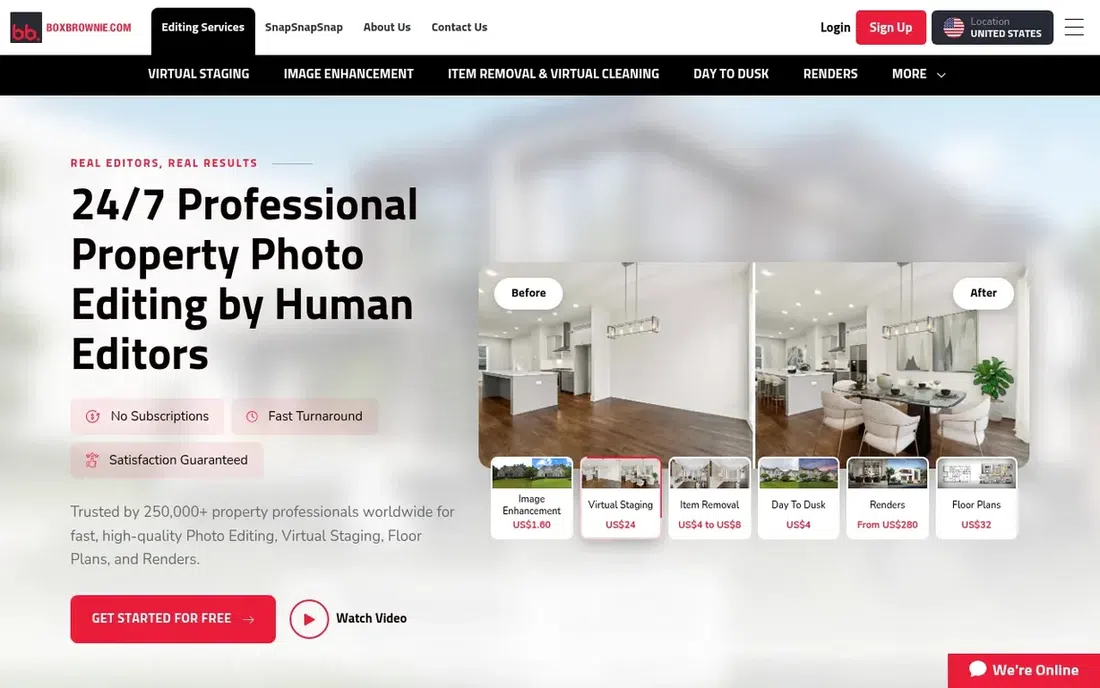
BoxBrownie serves human-edited staging and photo services. BoxBrownie offers virtual staging alongside photo editing, floor plans, clipping, CGI renders, and custom edits, all handled by digital experts.
Consider BoxBrownie when you want a wide service catalog and are comfortable with a human-in-the-loop process. On top of that, organizations needing immediate staging for high-volume uploads might find a completely automatic tool quicker. What you pay to start with BoxBrownie: $1.60 per image. Free plan details: Not stated.
What to check first: Turnaround relies on human workflow.
- Merges staging with photo editing and floor plans
- Wide service menu for listings
- Less instant than pure AI tools
Apply Design
Best for: AI staging with large furniture library
Apply Design is aimed squarely at AI staging with large furniture library. Apply Design is an AI-powered virtual staging tool that produces photorealistic renders rapidly. It features a large library of furniture pieces, giving users numerous style choices for real estate listings.
Watch-outs: Less human oversight than manual services.
Teams needing guaranteed human quality control might combine it with a manual service. Pick Apply Design when you want quick AI staging with a wide furniture selection. As an AI tool, it may produce results that require review for unusual room shapes or specific design requirements. The starting price for Apply Design: $7 per image. As for free access: Free trial.
- Fast AI renders
- Photorealistic output emphasized
- AI may need adjustments for unique spaces
Virtual Staging Solutions
Best for: Designer-reviewed staging with buyer targeting
Think of Virtual Staging Solutions for designer-reviewed staging with buyer targeting. Virtual Staging Solutions gives you designer-reviewed virtual staging for listing photos, with delivery generally within a day. The service stages rooms for the listing's likely buyer, which can help agents present properties more strategically.
It is pitched at real estate professionals who value human design judgment and a service with a long track record. On top of that, since staging is reviewed by designers, it is not instantaneous and may be less suited to very large, same-day batches. Entry price for Virtual Staging Solutions: $286. On free options: Not stated.
Limits to weigh: May be less scalable for very large batches.
- Established service history
- Designer-reviewed output
- Human workflow limits instant delivery

Choose Virtual Staging AI for quick one-click AI staging at scale. Teams with strict brand guidelines or unusual room layouts might need a manual choice.
It is pitched at real estate professionals who require to process plenty of listing images efficiently. From a buyer's view, the homepage flags highly realistic furnishings and a straightforward upload process, making it a fit for enterprise teams that prioritize speed and volume over hand-crafted staging. Virtual Staging AI pricing: $16 per month. There is no free plan with Virtual Staging AI.
Watch-outs: Restricted manual customization.
- Straightforward upload and stage workflow
- Highly realistic furnishings
- AI output may need review for complicated rooms
Selection criteria
The comparison looks at four things: starting price, free access, how well the feature set matches AI virtual staging software for enterprise, and the main limit of each tool. Seat minimums, billing terms and add-ons can move the real cost, so the starting prices here are a guide and not a quote. The ranking is editorial: typical fit first, then clear pricing, then free access. If your needs are unusual, read the profiles rather than relying on position.
Questions to settle before buying
- Confirm the entry price on the vendor page. For Curbio that means a quote rather than a fixed price.
- Run a trial of REimagineHome and Apply Design with real work before paying for a year; your own workflow is the best test.
- Read the limits listed for Curbio first: not a dedicated virtual staging tool.
- Verify that exporting from Virtual Staging AI is possible on your plan and covers all your records.
- Check whether Virtual Staging Solutions bills monthly or annually, and what cancelling early costs.
FAQ
Does any tool for AI virtual staging software for enterprise here have a free plan?
No tool in this list, Curbio and Virtual Staging AI included, has a permanent free plan. REimagineHome, Apply Design offer a trial. Trials and quotes are the usual route, so plan a short evaluation period.
Is Curbio the right pick for everyone comparing AI virtual staging software for enterprise?
No single tool suits every team. Curbio comes first because it fits pre-sale home improvement coordination, while REimagineHome suits AI design ideas with shoppable products and BoxBrownie suits human-edited staging and photo services. Match the tool to your own size, budget and workflow before deciding.
What should enterprises look for in AI virtual staging software?
Enterprises should prioritize consistent output quality, turnaround speed, and scalability for large photo volumes. Also consider revision policies, licensing terms, and whether the tool supports your brand guidelines.
Can virtual staging tools manage large volumes of listing photos?
Human-edited services may have capacity limits or longer turnaround for large orders. Confirm volume capabilities and delivery schedules with each vendor before committing.
Can I try these tools before paying?
Often, yes. REimagineHome and Apply Design offer a free trial. Use your own data and a real task during the test, and check what the free tier or trial limits before you rely on it.
Is virtual staging compliant with real estate marketing rules?
Virtual staging should be disclosed as digitally altered imagery in most markets. Enterprises should ensure vendors supply clear labeling and that outputs meet local advertising standards.
Sources
- https://www.curbio.com
- https://www.reimaginehome.ai
- https://www.boxbrownie.com
- https://www.applydesign.io
- https://www.virtualstagingsolutions.com
- https://www.virtualstagingai.app