Best AI Dubbing Tools in 2026: 8 Tools Compared
We compared the best ai dubbing tools for video translation, voice cloning and lip sync, checking languages, included minutes, quality and pricing today.
- Editor's choice
 HeyGen
Lip-synced dubbing for creators
Starts at$29 per monthVisit heygen.comFull review - Great alternative
 ElevenLabs
Voice quality and cloning
Starts at$6 per monthVisit elevenlabs.ioFull review - Also consider
 Rask AI
Large multi-speaker projects
Starts at$60 per monthVisit rask.aiFull review
TL;DR:
- HeyGen is our top pick for creators who want lip-synced dubbing and translation in one workflow.
- ElevenLabs leads on voice quality and cloning, but its dubbing is audio focused without full lip sync on entry plans.
- Rask AI suits teams with large, multi-speaker projects, though lip sync sits on higher plans.
- Perso and Dubverse offer lower entry prices, which helps small creators test dubbing before scaling.
- Always check included minutes, lip sync costs and language coverage, since those three factors decide the real price.
Quick comparison
| Tool | Best for | Starts at | Free plan? | |
|---|---|---|---|---|
| HeyGen | Lip-synced dubbing for creators | $29 per month | Yes | Visit |
| ElevenLabs | Voice quality and cloning | $6 per month | Yes | Visit |
| Rask AI | Large multi-speaker projects | $60 per month | Free trial | Visit |
 Dubverse | Low-cost dubbing for creators | $18 per month | Yes | Visit |
 Perso | Budget dubbing with glossary control | $6.99 per month | Free trial | Visit |
 VEED | Dubbing inside a full video editor | See website | Yes | Visit |
 Murf AI | Studio voices plus dubbing | See website | Yes | Visit |
 Speechify Studio | Fast dubbing with stock voices | See website | Yes | Visit |
The best ai dubbing tools
Dubbing used to mean hiring voice actors and booking a studio for each language. AI tools now translate speech, match voices and, in some cases, sync lips, which lets creators reach new audiences faster. We compared official pricing pages, language counts, minute allowances, lip sync rules and public user feedback to find tools for different budgets and project types.
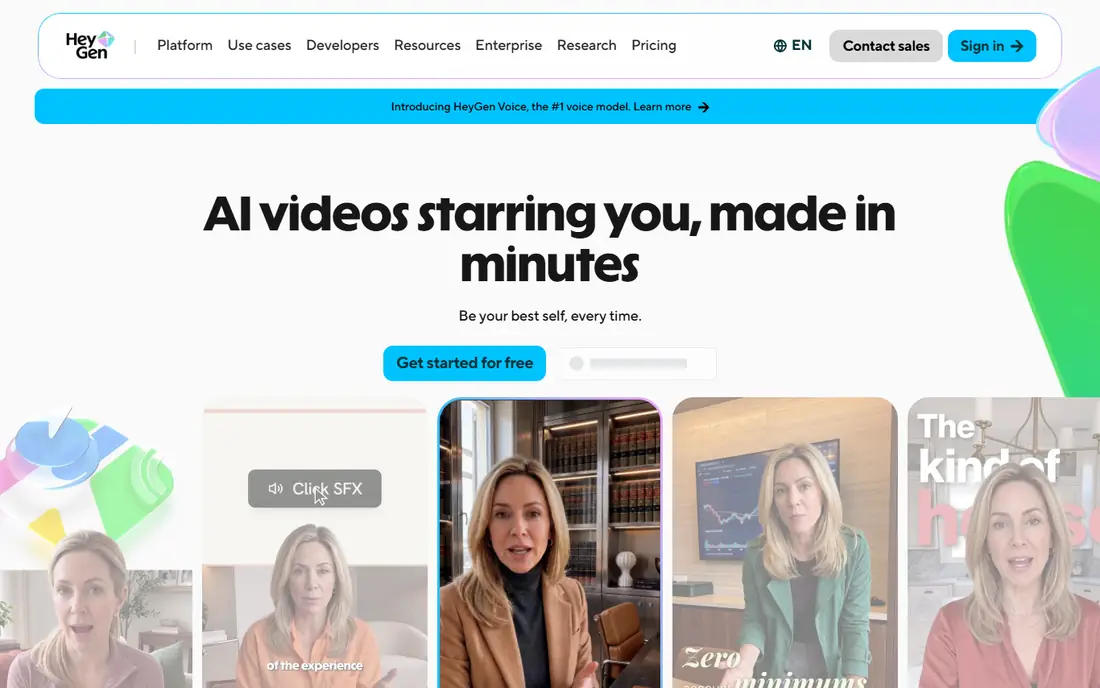
HeyGen stands out because it pairs translation with lip sync in a creator-friendly workflow. You upload a video, pick a target language, and get a dubbed version where mouth movement matches the new speech more closely than audio-only dubbing. That visual match matters for talking-head videos, courses and marketing clips, where mismatched lips distract viewers.
Credits are shared with avatar video creation, so heavy users of both features must watch their balance. The free plan covers only a few videos per month, which is enough to test quality but not to run a channel. For creators who publish translated videos regularly, HeyGen offers a strong balance of quality and ease.
- Lip sync included on creator plans
- Wide language support
- Avatar and translation tools in one place
- Credits are shared with avatar video
- Higher plans needed for advanced team features

ElevenLabs is known for natural-sounding AI voices, and its dubbing tool builds on that strength. It can clone a speaker voice and carry tone and pacing into another language, which helps podcasts, narration and documentary-style videos sound consistent. The studio and API tools also suit teams that dub at scale.
The main limit is lip sync. Entry dubbing produces translated audio, not a lip-synced video, so talking-head creators must add a lip sync step elsewhere. Credit use also varies by plan and output type, so check how many dubbed minutes your plan covers. For audio-first projects, ElevenLabs is hard to beat.
- Excellent voice quality and cloning
- Wide dubbing language support
- Flexible API and studio tools
- Entry dubbing is audio only
- Lip sync needs another tool or workflow

Rask AI suits teams dubbing longer videos with several speakers, such as courses, interviews and corporate training. It detects speakers, translates the transcript and lets you edit timing and text before export, which helps when accuracy matters more than speed. Language coverage is broad, and voice cloning is available in many languages.
Lip sync is the catch, since it requires a higher plan and consumes extra minutes on some tiers. Solo creators with short videos may find the entry price steep. For production teams that need control over a long, multi-speaker project, Rask AI offers depth that simpler tools lack.
- Strong multi-speaker handling
- Wide language coverage
- Transcript and timing editor
- Lip sync requires higher plans
- Entry price is high for solo creators
Dubverse appeals to creators who want to test dubbing without a large monthly fee. The workflow is simple: upload, translate, review and export, with a free tier for limited use. That simplicity helps YouTubers and short-form creators who dub one or two videos per week.
Minute limits are the main constraint. Entry credits cover only a modest amount of dubbed video, so longer projects will need a higher plan or extra credits. Voice cloning also sits on higher tiers. For short, regular dubbing on a budget, Dubverse is a sensible starting point.
- Low entry price
- Simple dubbing workflow
- Useful for short creator videos
- Included minutes are limited on entry plans
- Voice cloning sits on higher plans
Perso stands out for business users who need consistent terminology. Its custom glossary lets you lock product names and brand terms so they stay untranslated across languages, which matters for demos, training and sales videos. Multi-speaker support and broad language coverage add to its value for teams.
Lip sync is optional with separate plan and credit conditions, so check that cost before you assume a fully synced output. Entry minutes are also modest, though higher plans improve the per-minute rate a lot. For teams that value terminology control and a low starting price, Perso deserves a trial.
- Low entry price
- Custom glossary on all plans
- Multi-speaker support
- Lip sync has separate conditions
- Included minutes are modest on entry plans
VEED suits teams that edit and dub in the same place. You can cut a video, add subtitles, translate the audio and export for social platforms without switching apps. That all-in-one flow saves time for marketing teams and social creators who publish in several languages each week.
Dubbing is metered by credits, so costs rise with longer videos, and lip sync is more limited than in HeyGen or Rask AI. If dubbing is your main job, a specialist tool may give better sync and voice control. If editing and dubbing share one workflow, VEED is a practical choice.
- Full editing suite beside dubbing
- Subtitles and translation in one place
- Easy for social teams
- Dubbing minutes are credit based
- Lip sync is limited compared with specialist tools
Murf AI is best known for studio voiceovers, and its dubbing features extend that strength to translated video. It suits training videos, explainer clips and corporate narration, where a clear, consistent voice matters more than perfect lip movement. The voice library gives teams many options without cloning a specific speaker.
Credit-based dubbing means you must check how many minutes each plan includes, and lip sync availability varies by workflow. For voice-led content, Murf AI is a strong option. For talking-head videos where lip match is critical, test the output against HeyGen or Rask AI first.
- Large library of studio-quality voices
- Good for narration and training
- Simple project workflow
- Dubbing minutes are credit based
- Lip sync is still limited in some workflows
Speechify Studio suits creators who need fast turnaround with stock voices. You can dub a video quickly, pick a voice that fits the tone, and export without a long setup. That speed helps news, education and social teams that publish often and need many languages at low cost per minute.
The trade-off is voice identity. Stock voices will not sound like the original speaker, which matters for personal brands and interviews. Controls for timing and voice detail are also lighter than in specialist dubbing tools. For fast, voice-led dubbing, Speechify Studio is a useful, affordable option.
- Fast dubbing workflow
- Stock voices cover many languages
- Useful for quick content turnaround
- Stock voices lack a cloned speaker feel
- Advanced dubbing controls are lighter than specialists
How we picked these
We compared official pricing pages, language lists, minute allowances, lip sync terms and public user feedback on voice naturalness and translation accuracy. We favored tools available to new users in October 2026 with clear free, trial or entry terms, and we covered audio-first, lip-synced and editor-bundled options. We did not claim hands-on lab testing, and we noted where prices vary by billing period.
What to check before you dub
Start with a short test in the language your audience actually speaks. Translation quality, voice tone and lip sync all vary by language, so a tool that sounds great in Spanish may sound weaker in another language. Test the same 60 second clip in two tools and ask a native speaker to review it if you can.
Minutes, lip sync and voice rights
Check included minutes, extra minute costs and whether lip sync consumes extra credits. Also check voice cloning consent rules, since cloning a real person voice requires permission and, in many cases, a clear consent process. For brand and client work, use licensed voices or your own cloned voice with documented consent, and keep records of that consent.
Accuracy and review
AI dubbing still makes mistakes with names, numbers, idioms and technical terms. Use a glossary where available, review the transcript before export, and check timing on multi-speaker scenes. For legal, medical or safety content, a human review step is essential, since a mistranslated term can change meaning. Plan review time into your schedule, not as an afterthought.
A final quality step is to watch the dubbed video with the sound off and then with the sound on. With sound off, lip sync problems and timing errors stand out. With sound on, voice tone and translation flow stand out. That two-pass review catches issues that a single viewing misses, and it helps you decide whether a tool is ready for a public release or needs another edit pass.
FAQ
What is the best ai dubbing software for YouTube creators?
HeyGen suits YouTube creators who want lip-synced dubbing in one workflow, while Dubverse and Perso offer lower entry prices for testing. ElevenLabs suits creators who prioritize voice quality for narration. Test a short video in two tools and compare lip sync, voice tone and cost per minute.
Can AI dubbing clone my voice?
Yes, several tools offer voice cloning, including ElevenLabs, Rask AI and HeyGen, but cloning requires your consent and a voice sample. Cloning another person voice without permission raises legal and ethical issues, so only clone voices you own or have clear rights to use. Check each vendor consent policy before you start.
How many languages do AI dubbing tools support?
Language counts vary widely, from around 30 to more than 175 depending on the tool and plan. HeyGen and Rask AI cover many languages, while other tools focus on fewer major languages with better quality. Check support for your exact target languages, not just the headline count.
Is AI dubbing better than subtitles?
Dubbing and subtitles serve different audiences. Dubbing helps viewers who prefer listening, while subtitles help viewers who watch muted or want to follow the original voice. Many creators publish both, using dubbing for main languages and subtitles for others. Test both with your audience to see which drives more watch time.
How much does AI dubbing cost per minute?
Cost per minute varies by tool, plan, lip sync and whether you use included minutes or buy extras. Entry plans can range from under one dollar to several dollars per finished minute. Always calculate cost from your plan included minutes and extra minute price, not from the monthly price alone.