Best AI Drawing Apps in 2026: 8 Apps Compared
Best ai drawing apps for 2026: compare 8 ai drawing tools for art, illustration, logos, posters, and photo edits, with free plans and prices for creators.
- Editor's choice
 Midjourney
Artistic images
Starts at$10 per monthVisit midjourney.comFull review - Great alternative
 Adobe Firefly
Commercially safe art
Starts at$9.99 per monthVisit adobe.comFull review - Also consider
 Leonardo AI
Game and creator assets
Starts at$12 per monthVisit leonardo.aiFull review
TL;DR:
- Midjourney still leads on pure image look, but it has no free tier.
- Adobe Firefly suits commercial work, with models built for safer business use.
- Leonardo AI and Ideogram suit creators who need volume, game assets, or readable text in images.
- Check commercial use terms and credit limits before you publish AI art for a client.
Quick comparison
| Tool | Best for | Starts at | Free plan? | |
|---|---|---|---|---|
| Midjourney | Artistic images | $10 per month | No | Visit |
| Adobe Firefly | Commercially safe art | $9.99 per month | Yes | Visit |
| Leonardo AI | Game and creator assets | $12 per month | Yes | Visit |
 DALL-E | Chat based image edits | See website | Yes | Visit |
 Stable Diffusion | Open model control | See website | Yes | Visit |
 Ideogram | Text and logos | $20 per month | Yes | Visit |
 NightCafe | Easy hobby art | See website | Yes | Visit |
 Canva AI | Designs with AI images | See website | Yes | Visit |
The best AI drawing apps
These tools turn text prompts into images, and many also edit photos, extend scenes, or make logos. We included artistic tools, commercial tools, and free options.

Midjourney is our pick for look alone. Its images have a consistent, artistic quality that many creators can spot, and it handles mood, lighting, and style prompts well. Concept artists, illustrators, and mood board makers will get the most from it.
The catch is access and cost. There is no free plan, so you must pay to try it, and the workflow feels less like a normal app than rivals. If image quality is your top need and you plan to use it often, Midjourney is worth the subscription.
- Distinctive, polished image style
- Strong for concept art and illustration
- Active community for prompt ideas
- No free tier
- Works mainly through its own web and Discord style flow
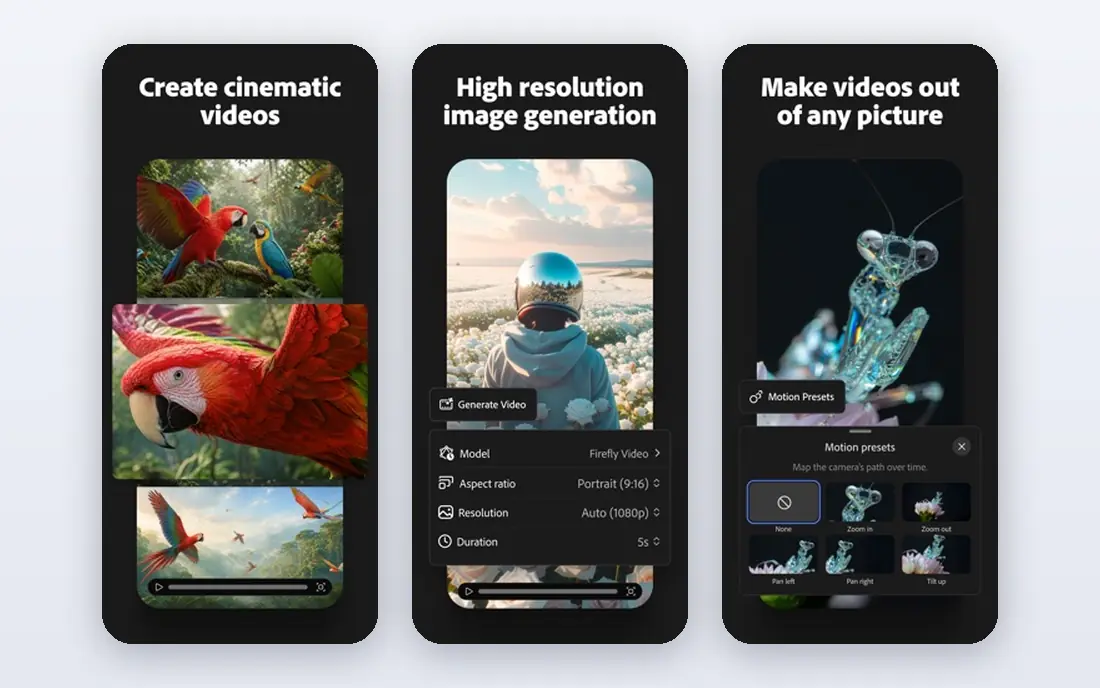
Adobe Firefly suits designers and businesses that need images they can use for clients. Adobe positions its models as commercially safe, which matters for brands that worry about training data and rights. Firefly also fits Photoshop and Express, so edits and layouts stay in one workflow.
Credit based pricing means heavy users must watch monthly allowances. The tool set is also narrower than open model platforms. For commercial design work inside Adobe apps, Firefly is the safest and most practical pick.
- Models designed for commercial use
- Works in Photoshop and Express
- Generative fill and expand tools
- Credit limits apply
- Model choice is narrower than open tools

Leonardo AI suits creators who need volume, such as game artists, product mockup makers, and social creators. The free plan gives daily tokens, and paid plans add a token bank, private generations, and custom models. The canvas editor helps refine images without leaving the app.
Token pricing can confuse new users, because different settings use different amounts. Free generations are also public by default. If you want a production workspace with a free start, Leonardo AI is a strong choice.
- Free daily tokens
- Custom model training
- Canvas editor for edits and assets
- Token math takes time to learn
- Private generations need a paid plan
DALL-E, inside ChatGPT, suits people who want to describe a change in plain words and see a revised image. You can ask for a different background, a new style, or a small edit, then iterate in the same chat. That conversational flow is easier than learning a new editor.
Limits vary by plan, and heavy use can hit caps during busy periods. DALL-E also has less of the distinctive artistic style that draws people to Midjourney. For everyday image edits inside a chat plan you may already pay for, DALL-E is a practical pick.
- Easy conversational edits in ChatGPT
- Strong prompt following
- Good for quick revisions
- Image limits vary with plan and demand
- Less stylistic control than Midjourney
Stable Diffusion suits developers and hobbyists who want control. Open weights let you run models on your own computer, fine tune them, and use community tools such as ComfyUI. That freedom is unmatched by closed apps, and local use can keep images private.
The trade off is effort. You need a capable computer or cloud GPU, and you must pick models, settings, and safety filters yourself. Beginners will find a hosted app easier. For technical users who want full control, Stable Diffusion remains the open standard.
- Open weights you can run locally
- Wide community models and tools
- Flexible for developers
- Setup needs technical skill
- Results depend on hardware and model choice
Ideogram is our pick when the image must contain readable words. Posters, logos, ads, and social graphics often fail in other tools when letters garble, but Ideogram handles typography better. The free tier gives weekly slow credits, so you can test it before paying.
Paid pricing starts higher than Midjourney or Firefly, and credits expire on a schedule, so check the plan terms. If text accuracy is your main need, Ideogram is worth the higher entry price.
- Strong readable text in posters and logos
- Free weekly credits
- Good for ads and social graphics
- Paid plan starts higher than rivals
- Credit expiry rules need care
NightCafe suits hobby artists and beginners who want to try AI art without a subscription. Daily free credits let you make images each day, and the app offers many styles and models in a simple interface. Community challenges also give prompt ideas.
Heavy users will hit credit limits fast, and paid credits add up. Commercial use terms also need a careful read before client work. For casual art and learning, NightCafe is a friendly, low cost start.
- Easy to start with free daily credits
- Many styles and models in one place
- Community challenges
- Credit system limits heavy use
- Commercial terms need checking for client work
Canva AI suits people who need a finished design, not just an image. You can generate an image, add text, place it in a template, and export a social post or flyer in one app. Brand kits and templates help small businesses stay consistent.
AI allowances are limited, especially on the free plan, and heavy AI users may need an extra AI pass. Model control is also lighter than Midjourney or Stable Diffusion. If your goal is a finished graphic, Canva AI is the most practical pick in this list.
- AI images inside a full design editor
- Templates, brand kits, and text tools
- Easy social and print layouts
- AI use limits apply on free and Pro plans
- Less model control than dedicated art tools
How we picked these
We compared official pricing pages, model pages, and app listings for AI drawing tools available in October 2026. We looked at image quality, text accuracy, commercial terms, credit limits, and ease of use. We favored tools with a clear free tier or trial, published pricing, and real use by creators and designers.
We did not claim hands-on testing. Our findings rest on vendor pages, pricing disclosures, and public reviews. Credit amounts, model versions, and commercial terms change often, so check the current vendor page before you publish client work.
How to choose an AI drawing app
Start with the job. Pick Midjourney for artistic look, Firefly for commercial safety, Ideogram for text, Leonardo for volume and assets, and Canva for finished designs. A tool that excels at one job may disappoint at another.
Next, check rights and credits. Read the commercial use terms for your plan, and check whether free generations are public. Note monthly credit limits and what happens when you run out. Those details matter more than a demo image.
Finally, test with your own prompts. Try a portrait, a product scene, a poster with text, and an edit of a real photo. The tool that handles your four test cases best is the one to keep, even if it is not the most popular.
A useful extra step is to build a small prompt library for work you repeat. Save prompts that gave good results for portraits, product scenes, and posters, and note the settings that worked, such as aspect ratio and style words. That library will save time and keep outputs more consistent across a project. Also save both the prompt and the final image in a project folder, so you can show a client how an image was made and reuse it later. Check each image at full size before delivery, because flaws that look small in a preview can stand out in print or on a large screen. A short human review pass will catch odd hands, garbled text, and background errors that AI tools still make.
FAQ
What is the best AI drawing app?
Midjourney leads on image look, Adobe Firefly leads on commercial safety, and Ideogram leads on readable text. The best app depends on your job, so test the top two for your use case before you subscribe.
What is the best free AI drawing app?
Leonardo AI, NightCafe, Adobe Firefly, and Canva AI all offer free credits or limited free generations. Leonardo gives daily tokens, NightCafe gives daily credits, and Firefly and Canva give limited monthly AI uses. Check credit limits before you rely on a free plan.
Can I use AI generated images for commercial work?
It depends on the tool and plan. Adobe Firefly is positioned for commercial use, and other tools allow commercial use on paid plans with terms that vary. Read the license for your plan, keep records of prompts and outputs, and check client rules before delivery.
What is the best AI drawing tool for logos?
Ideogram is a strong pick for logos with text, because it renders words more reliably than most rivals. Canva AI also helps, because you can pair an AI image with text and brand tools in one editor. For a final brand mark, a human designer should still review and refine the result.
Do AI drawing apps replace illustrators?
AI tools speed up drafts, mood boards, and variations, but they do not replace judgment, brand taste, and original illustration skill. The best workflow uses AI for exploration and a human for selection, editing, and final quality.