Best AI Document Collaboration Tool in 2026: 8 Tools Compared
Compare the best ai document collaboration tool options in 2026, from Google Docs and Word to Notion, Coda and ClickUp, with pricing and honest limits.

- Editor's choice
 Google Docs with Gemini
Google Workspace teams
Starts atFreeVisit google.comFull review - Great alternative
 Microsoft Word with Copilot
Microsoft 365 teams
Starts atSee websiteVisit microsoft.comFull review - Also consider
 Notion
Docs plus databases plus AI
Starts at$20 per monthVisit notion.comFull review
TL;DR:
- Google Docs with Gemini and Microsoft Word with Copilot are the easiest picks, because most teams already use one of them every day.
- Notion and Coda suit teams that want documents, databases and AI in one workspace, rather than a single document at a time.
- ClickUp Docs suits teams that already manage projects in ClickUp and want documents tied to tasks.
- Zoho Writer and Dropbox Paper are the best low-cost or free options for smaller teams that mainly need clean, shared documents.
- AI features vary a lot by plan, so check whether drafting, summarising and Q and A are included in the tier you will actually buy.
Quick comparison
| Tool | Best for | Starts at | Free plan? | |
|---|---|---|---|---|
| Google Docs with Gemini | Google Workspace teams | Free | Yes | Visit |
| Microsoft Word with Copilot | Microsoft 365 teams | See website | Free trial | Visit |
| Notion | Docs plus databases plus AI | $20 per month | Yes | Visit |
 Coda | Docs that act like apps | $10 per month | Yes | Visit |
 ClickUp Docs | Docs tied to projects | $7 per month | Yes | Visit |
 Zoho Writer | Low-cost shared documents | Free | Yes | Visit |
 Confluence | Team knowledge bases | See website | Yes | Visit |
 Dropbox Paper | Simple shared documents | Free | Yes | Visit |
The best AI document collaboration tools
AI document collaboration tools let several people write, comment, edit and review the same document, with AI help for drafting, summarising, rewriting and finding answers inside your docs. We compared official feature pages and recent pricing coverage in October 2026, and we kept tools that are actively sold and used. The best AI collaboration tool for documents depends on where your team already works, so we note that fit for each tool.

Google Docs is the default shared document for many teams, and Gemini adds AI drafting, summarising, rewriting and help with research inside that familiar document. Multiple people can edit at once, comment, suggest changes and track versions, which makes review straightforward without sending files back and forth. For a Google Workspace team, that combination is hard to beat on adoption, because no new tool needs to be learned.
The limit is plan variation. Personal Docs is free, but the depth of Gemini help depends on your Workspace edition, with Business Starter listed in recent coverage at $7 per user per month billed annually and Standard at $14, and some features needing a higher tier or add-on. Check your admin console for what your edition includes, and always review AI drafts for accuracy and tone before sharing them outside your team.
- Free for personal use
- Gemini help inside Docs, Gmail and Drive for Workspace users
- Real-time collaboration and commenting
- Full Gemini features depend on Workspace edition
- Some features need Education Plus, Business or an add-on
- AI drafting still needs human review
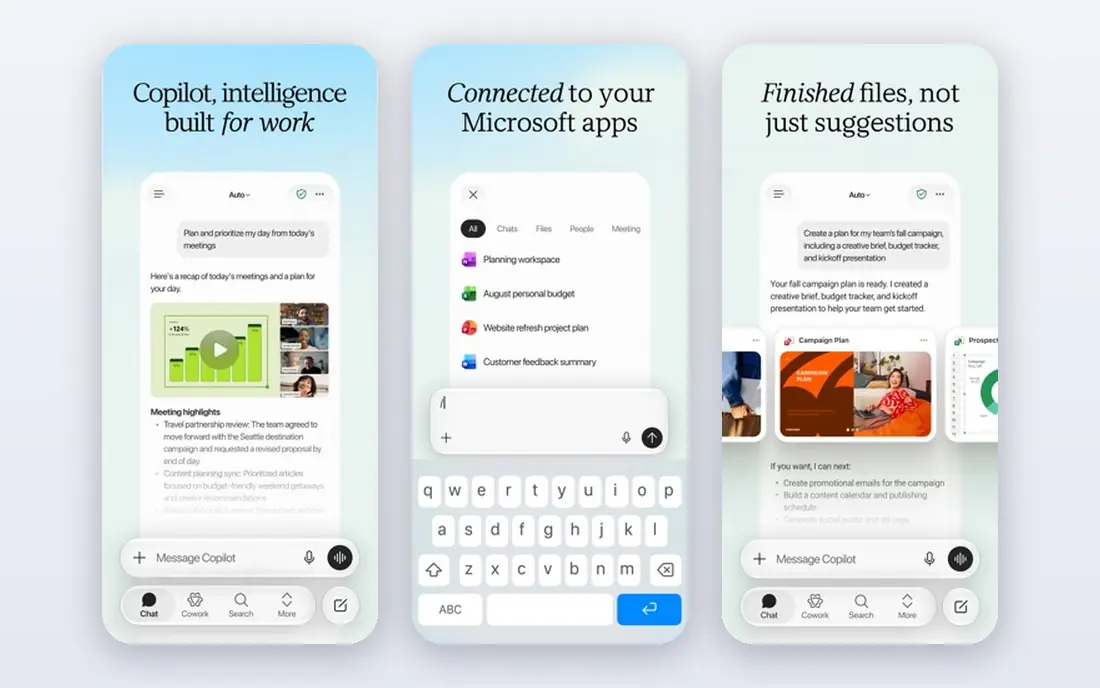
Microsoft Word with Copilot suits teams that produce formal documents, reports and proposals where Word formatting and compatibility matter. Copilot can draft from a prompt or an existing file, summarise a long document, rewrite a section in a different tone, and help with tables and structure, all inside Word. Co-authoring through OneDrive and SharePoint lets several people work on the same file, with comments and tracked changes for review.
Copilot pricing is the main complexity. Personal Microsoft 365 plans start at $9.99 per month in recent coverage, while Copilot for business is an add-on, listed at $18 per user per month billed annually in some coverage, on top of a Microsoft 365 plan. Check the exact plan and add-on for your organisation before you budget, and treat Copilot drafts as a first version to edit, not a finished document.
- Word is the standard for formal documents
- Copilot drafting, summarising and rewriting inside Word
- Co-authoring through OneDrive and SharePoint
- Copilot for work is a paid add-on for many business plans
- Personal Copilot pricing differs from business pricing
- AI output needs careful review
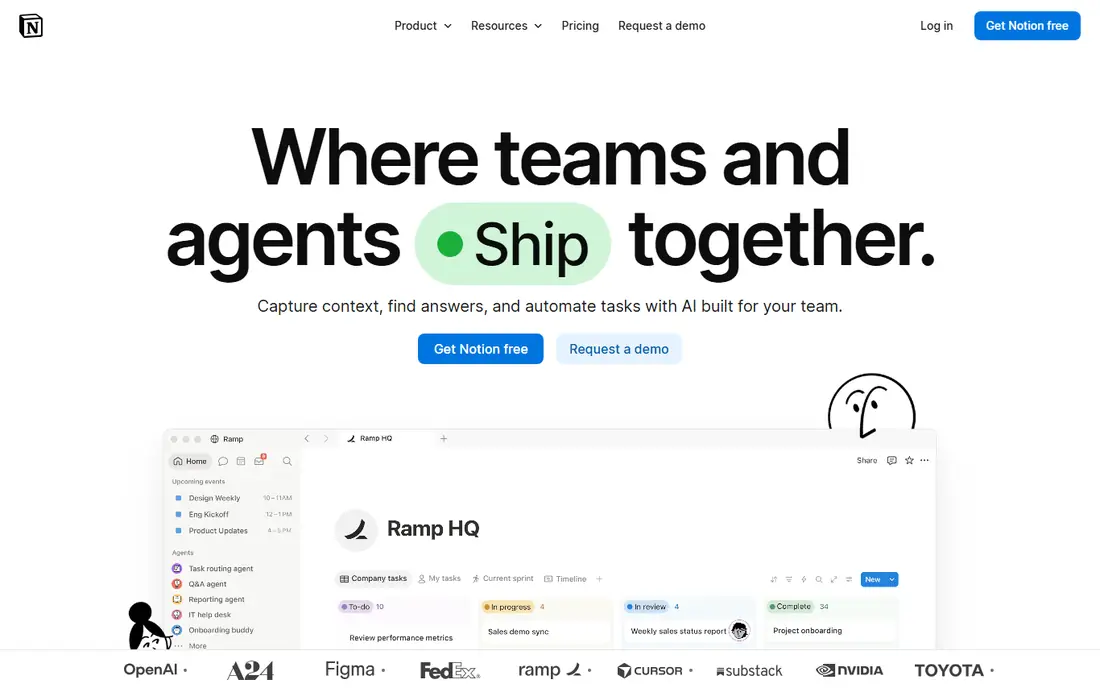
Notion is more than a document tool. It combines pages, wikis, databases, tasks and AI in one workspace, so a team can write a spec, link it to a project database, and ask Notion AI to summarise, draft or answer questions from the workspace. That flexibility suits product, marketing and operations teams that want one place for docs and light project tracking, rather than a separate doc and a separate wiki.
The catch is AI pricing. Notion retired its standalone AI add-on, and full AI now sits in the Business plan at $20 per member per month billed annually in recent coverage, with a limited AI trial on lower plans. That is a jump for a small team that only needs occasional AI help. If you already use Notion daily, the AI is a natural upgrade, but if you only need shared documents, Google Docs or Word will be cheaper.
- Free plan for individuals
- Flexible docs, wikis and databases in one workspace
- Full AI on Business at $20 per member per month billed annually
- Full AI is gated to higher tiers
- Learning curve for complex workspaces
- Offline use is more limited than a local notes app
Coda turns documents into apps, with tables that act like databases, formulas that calculate inside the doc, buttons that trigger actions, and packs that connect to other tools. Coda AI can draft, summarise, fill tables and help build those docs, which makes it strong for operations, project trackers and team hubs that need more than static text. Pricing is per Doc Maker rather than per viewer, which can save money for teams with many readers.
The learning curve is real. Building a good Coda doc takes more time than writing a Google Doc, and AI credit packaging varies by plan, so check what your plan includes. For a team that wants a living document that also tracks work, Coda is the most powerful option in this list. For simple shared writing, it may be more than you need.
- Free tier for trying it
- Pro from $10 per Doc Maker per month billed annually
- Tables, formulas and automations inside documents
- AI credits and packaging vary by plan
- Learning curve for formulas and packs
- Pricing is per Doc Maker, which needs modelling
ClickUp Docs suits teams that already run projects in ClickUp and want documents attached to tasks, projects and goals, rather than in a separate tool. You can write specs, wikis and meeting notes in Docs, link them to tasks, and use ClickUp Brain AI to summarise, draft and pull answers from your workspace. That link between docs and work is the main advantage over a standalone document app.
Brain AI pricing needs checking, since recent coverage lists it at $9 per user per month billed annually as an add-on on top of a paid ClickUp plan. Docs also feel best inside ClickUp, so a team that does not use ClickUp for projects will get less value. If ClickUp is already your project hub, Docs with Brain is a natural extension.
- Free Forever plan for trying it
- Unlimited from $7 per user per month billed annually
- Brain AI add-on for summarising and drafting
- Brain AI is an add-on on top of a paid plan in recent coverage
- Docs are strongest inside ClickUp, not as a standalone editor
- Setup takes time
Zoho Writer is a clean, low-cost shared document editor that covers the core collaboration jobs well, including real-time editing, comments, suggestions and version history. It is free for many individual and small-team uses, and it integrates with Zoho WorkDrive, Zoho Cliq and other Zoho apps, which makes it a strong choice for a team already in the Zoho suite. AI writing help through Zoho's Zia features covers drafting and editing assistance, though it is narrower than Gemini or Copilot.
The limit is ecosystem breadth. If your team lives in Google or Microsoft, Writer will feel like an extra tool rather than a natural fit, and some integrations you rely on may be missing. For a Zoho team, or a small team that wants a free, capable shared editor without a large subscription, Writer is a sensible pick.
- Free for individuals and small teams
- Real-time collaboration, comments and version history
- AI writing help through Zoho's Zia features
- AI features are narrower than Gemini or Copilot
- Fewer third-party integrations than Google or Microsoft
- Best value inside the Zoho suite
Confluence, from Atlassian, is built for team knowledge rather than single documents. Teams use it for wikis, product specs, meeting notes and runbooks, with pages linked into spaces that the whole company can search. Atlassian Intelligence adds AI summarising, drafting and Q and A across those pages, which helps new joiners find answers without asking the same questions repeatedly.
It is less suited to a quick, one-off document that you just need to share and edit, where Google Docs is faster. Paid pricing also rises with user count, so check the vendor site for your team size and for which AI features are included in your plan. For a team that already uses Jira, or that needs a lasting knowledge base, Confluence is a strong choice.
- Free tier for small teams
- Strong for wikis, specs and knowledge bases
- Atlassian Intelligence AI for summarising and drafting
- Pricing rises with users on paid plans
- Best for structured knowledge, less for quick single documents
- Setup needs admin time
Dropbox Paper is a simple shared document tool for teams that already use Dropbox and want a clean place to write together. It handles notes, meeting agendas, project briefs and lightweight docs well, with real-time editing, comments and task checklists inside the doc. Because it is free with a Dropbox account, it is an easy add-on for a team that already stores files in Dropbox.
Its AI and structure features are thinner than the leaders in this list. You will not get the same drafting, summarising and workspace Q and A as Gemini, Copilot or Notion, and it is less suited to a large knowledge base than Confluence. Pick Paper when simplicity and Dropbox fit matter most, and pair it with a stronger AI tool if AI drafting is a core need.
- Free with a Dropbox account
- Simple, clean shared documents
- Good for notes, meeting agendas and lightweight collaboration
- Fewer AI features than Gemini, Copilot or Notion
- Less structured than Confluence or Coda
- Future development is less central than Dropbox core storage
How we picked these
We compared official feature pages and recent pricing coverage, and we kept tools that are actively offered in October 2026 and truly combine document collaboration with AI help, rather than just adding a chatbot beside a document. We looked for real-time or versioned collaboration, AI drafting or summarising, and a free or trial path where offered. We did not include pure note apps with no team collaboration, or pure AI writing apps with no shared document workflow.
How to choose for your team
Start with where your team already works. Google teams should start with Docs and Gemini, Microsoft teams with Word and Copilot, Atlassian teams with Confluence, and Zoho teams with Writer. Switching document platforms is costly in habits and migration, so a good AI feature in a tool your team already uses usually beats a better AI feature in a tool they must learn.
Next, test AI on a real document. Ask each tool to draft a spec from your notes, summarise a long meeting doc, and answer a question from your own pages, then check accuracy, tone and source handling. Finally, check the plan that actually includes the AI features you used, because many tools gate AI to higher tiers or add-ons, and the entry price alone will not tell you the AI cost.
FAQ
What is the best AI document collaboration tool?
Google Docs with Gemini is best for Google teams, Microsoft Word with Copilot is best for Microsoft teams, and Notion is best for teams that want docs, databases and AI in one workspace. The best tool is usually the one your team already uses, with AI included in a plan you can afford.
What is the best AI collaboration tool for documents for small teams?
Google Docs is best for most small teams, because it is free for personal use and collaboration is built in. Zoho Writer and Dropbox Paper are also strong free options, while Notion's free plan suits a small team that wants a wiki as well as documents.
Does Notion AI cost extra?
Full Notion AI is included in the Business plan at $20 per member per month billed annually in recent coverage, with a limited AI trial on lower plans. That is higher than the entry Notion price, so check the Business tier before you budget for AI across a team.
Can AI write a whole document for my team?
AI can draft a strong first version from notes, an outline or existing pages, but it should not be treated as a finished document. Check facts, tone, confidential details and source accuracy, and have a human editor review it before sharing it outside your team or with clients.
Is Google Docs or Microsoft Word better for collaboration?
Google Docs is simpler for real-time co-editing in a browser, with comments and suggestions that most teams learn quickly. Word with OneDrive and SharePoint also supports co-authoring, and it is stronger for formal formatting and compatibility. Pick by your existing platform and document type, not by AI alone.
How do I keep AI drafts safe for confidential documents?
Check your vendor's data use terms, admin controls and retention settings before putting confidential material into an AI tool. Use workspace or enterprise editions where data is not used for training, limit AI access to the people who need it, and avoid pasting secrets, personal data or unpublished client material into a general AI chat.