Best Accounting Software for Self Employed in 2026: 8 Tools Compared
Best accounting software for self employed compared: 8 tools for invoicing, expenses, mileage and taxes, with pricing, free plans and honest trade-offs.
- Editor's choice
 QuickBooks Solopreneur
All-round sole proprietor bookkeeping
Starts atSee websiteVisit quickbooks.intuit.comFull review - Great alternative
 FreshBooks
Freelancers who invoice often
Starts atSee websiteVisit freshbooks.comFull review - Also consider
 Xero
Working with an accountant
Starts atSee websiteVisit xero.comFull review
TL;DR:
- QuickBooks Solopreneur and FreshBooks suit sole proprietors who want simple invoicing, expense tracking and tax help in one place.
- Wave and Zoho Books offer strong low-cost starting points, while Xero and FreeAgent suit self-employed people who work with an accountant.
- Hurdlr, Found and Keeper-style tools focus on mileage, deductions and separate business money, which matter most for contractors and freelancers.
- This is not financial or tax advice, and tax rules, fees and feature limits vary, so check the current terms before you choose.
Quick comparison
| Tool | Best for | Starts at | Free plan? | |
|---|---|---|---|---|
| QuickBooks Solopreneur | All-round sole proprietor bookkeeping | See website | Free trial | Visit |
| FreshBooks | Freelancers who invoice often | See website | Free trial | Visit |
| Xero | Working with an accountant | See website | Free trial | Visit |
 Wave | Low-cost invoicing and accounting | Free | Yes | Visit |
 Zoho Books | Small business on a budget | Free | Yes | Visit |
 Hurdlr | Mileage and expense tracking | See website | Yes | Visit |
 Found | Banking plus bookkeeping in one app | See website | Yes | Visit |
 FreeAgent | Sole traders and contractors | See website | Free trial | Visit |
The best accounting software for self employed
We compared official feature pages, pricing pages, app store listings and public reviews for tools built for sole proprietors, freelancers and independent contractors. The list below covers invoicing, expenses, mileage, tax estimates and accountant access.
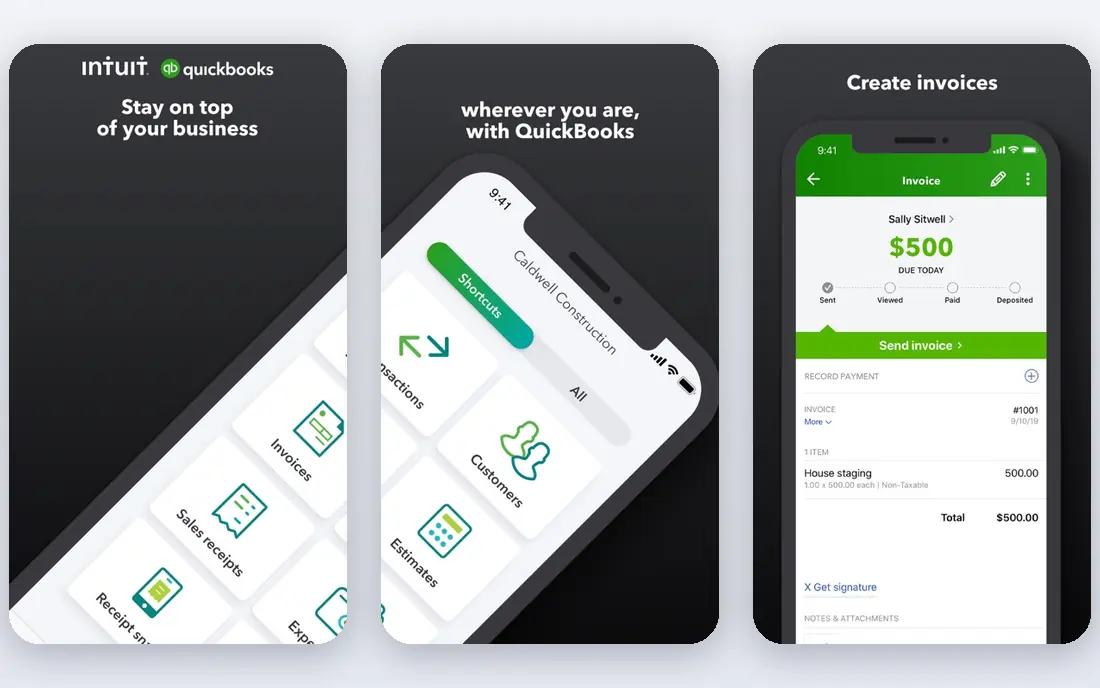
QuickBooks Solopreneur is the pick for a self-employed person who wants one familiar system for the whole money side of the work. It handles invoices, tracks expenses, separates business and personal spending, and helps with quarterly tax estimates. That breadth matters when income comes from several clients and the year-end picture gets messy.
The trade-off is cost and complexity. A freelancer with two clients and ten invoices a month may not need every feature here, and add-ons can push the monthly bill up. Still, if you plan to grow, hire help later, or hand books to an accountant, starting with a widely used system can save a switch later.
- Clear invoicing and expense tools
- Tax estimate features
- Wide accountant familiarity
- Pricing can rise with add-ons
- Some features may feel like more than a very small operation needs
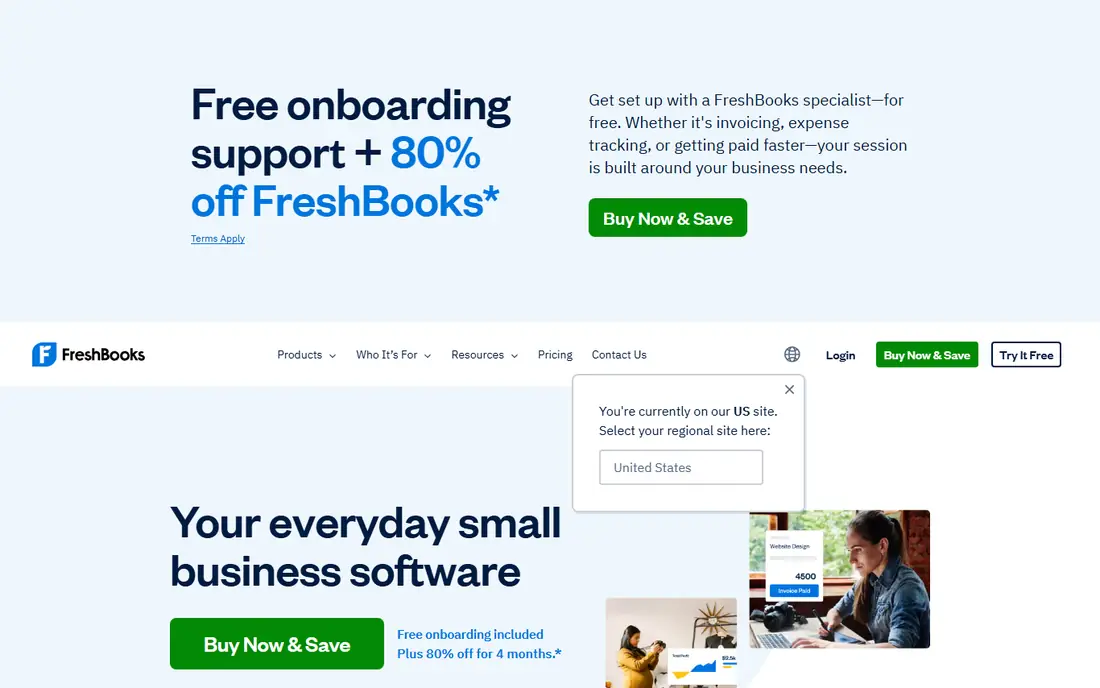
FreshBooks shines when getting paid is the main job. Invoices look clean, clients can pay online, and late-payment reminders reduce chasing. Time tracking sits close to invoicing, so hourly work turns into a bill without a separate tool.
For a sole proprietor who mainly needs income and expense records, that focus is a strength. For someone with inventory, complex payroll, or detailed reporting needs, FreshBooks may feel light. Check the plan limits on billable clients and users before signing up, since those limits shape the real price.
- Fast, clean invoicing
- Time tracking built in
- Client-friendly payment options
- Full accounting depth is less than some rivals
- Higher tiers cost more
Xero is a good fit when an accountant or bookkeeper will also work in the books. Bank feeds pull transactions in, reconciliation keeps records tidy, and your accountant can log in without emailed spreadsheets. That shared access cuts errors at tax time.
New users should expect a short learning period. Menus and reports assume some comfort with accounting terms, and the interface is less hand-holding than simpler rivals. If you want a tool you can largely run alone with minimal setup, a simpler option may suit you better.
- Strong bank feeds and reconciliation
- Good accountant collaboration
- Broad app connections
- Learning curve for first-time bookkeepers
- Invoicing design feels businesslike rather than simple
Wave stands out for price. Core accounting and invoicing are free, which makes it a sensible first step for a new sole proprietor who wants proper records without a monthly fee. Setup is quick, and the basics cover income, expenses and invoices well.
The catch is that paid services sit around the free core. Card payments, payroll and some support routes cost extra, and those fees vary, so read the current pricing page. Wave still suits a lean operation, but a growing business with payroll needs should compare total cost, not just the free starting point.
- Free core accounting and invoicing
- Simple setup
- Useful for very small operations
- Paid add-ons for payments and payroll
- Support options are more limited than paid rivals
Zoho Books gives a self-employed person a capable free tier, with invoicing, expense tracking and basic reports included. If you already use other Zoho tools, the shared login and data flow are a bonus. Even on its own, it covers the daily record-keeping most sole proprietors need.
Limits matter here. The free plan caps transactions, so a busy freelancer may outgrow it within a year. Paid plans lift those caps and add features such as workflow rules and deeper reports. Compare your monthly invoice and expense count with the plan limits before you commit.
- Free tier for small volumes
- Solid invoicing and expenses
- Part of a wider Zoho suite
- Free tier has transaction limits
- Some advanced reports sit on paid plans
Hurdlr is built around the costs that contractors and drivers often miss. It tracks mileage automatically, logs expenses, and estimates deductions and taxes from the income you record. For a rideshare driver, courier, or consultant who travels often, that focus can recover real money at tax time.
It is not meant to replace a full accounting system for every business. Some users pair Hurdlr with a separate bookkeeping tool or hand its reports to an accountant. If mileage and deductions are your biggest pain point, though, Hurdlr is one of the most direct tools for that job.
- Automatic mileage tracking
- Expense and income tracking
- Tax deduction estimates
- Not a full double-entry accounting system
- Best paired with another bookkeeping tool for some users
Found mixes a business account with bookkeeping, so income, expenses and tax savings sit in the same app. Money coming in can be set aside for taxes, and expenses are categorised as you spend. That structure helps self-employed people who struggle to keep business and personal money apart.
The trade-off is tying banking and bookkeeping together. If you prefer your current bank, or you need business lending and complex accounts, Found may feel narrow. Read the banking terms, fees and deposit insurance details on the official site before moving money across.
- Business banking and bookkeeping together
- Expense categorisation
- Tax savings tools
- Banking features depend on partner bank terms
- Not a fit if you want to keep your existing bank
FreeAgent was designed for sole traders, freelancers and small companies rather than adapted from large-business software. Invoicing, expenses, bank feeds and a tax timeline sit together, and the timeline helps you see what is due and when. That clarity is valuable for someone filing on their own.
Availability and tax detail vary by country, so United States users should check current coverage before relying on local tax features. Where it fits, FreeAgent offers a calm, focused alternative to larger platforms, with less clutter and a clearer path from invoice to tax return.
- Built for sole traders and small companies
- Tax timeline features
- Clear invoicing and expenses
- Less well known in the United States
- Pricing and tax features vary by country
How we picked these
We compared official feature pages, pricing pages, app store listings, privacy policies and public reviews for tools that serve self-employed people, sole proprietors and independent contractors. We looked for invoicing, expense tracking, bank connections, tax help, accountant access and honest pricing. We did not claim hands-on testing. We favoured tools with clear safety and privacy practices, and we used "See website" for prices we could not verify on the day of writing.
What to check before you pay
A good accounting tool should match how you actually get paid. If most income arrives by invoice, prioritise invoicing speed, payment options and reminders. If most income arrives by card or platform payout, prioritise bank feeds, categorisation and reconciliation. Count your monthly invoices, expenses and bank transactions first, then match that count to plan limits, because a cheap plan with low limits can cost more than a mid-tier plan.
Taxes, mileage and records
Self-employed taxes depend on your country, state and business type, and no app replaces professional advice. Look for tax estimate tools, mileage tracking if you drive for work, and clean year-end reports you can share with an accountant. Keep receipts and records outside the app as well, in case you switch tools later. This is not financial or tax advice, and rates and rules change, so check current guidance before filing.
Privacy and switching costs
Accounting tools hold bank and tax data, so read the privacy policy and security page before connecting a bank account. Check how to export invoices, transactions and reports, and whether a free plan keeps your data if you cancel. A tool that exports cleanly is safer long term than a tool that locks records behind a paid export.
FAQ
What is the best accounting software for self employed people?
There is no single winner, because the best choice depends on how you earn and how much help you want. QuickBooks Solopreneur suits all-round bookkeeping, FreshBooks suits frequent invoicers, and Wave suits a very small budget. Start with your invoice count, bank needs and tax help, then test a free plan or trial.
What is the best accounting software for sole proprietor businesses?
QuickBooks Solopreneur, FreshBooks and FreeAgent are strong sole proprietor options, since they focus on invoicing, expenses and tax estimates rather than large-company features. A sole proprietor with simple income may do well on Wave or Zoho Books. If you work with an accountant, Xero is worth a close look.
What is the best business software for self employed workers who drive a lot?
Hurdlr is a strong choice for mileage-heavy work, since it tracks trips automatically and estimates deductions. Pair it with a bookkeeping tool if you need full accounts and payroll. Keep a backup log of trips as well, since mileage claims need reliable records.
What is the best accounting software for independent contractor work?
FreshBooks and QuickBooks Solopreneur fit many contractors, because they handle client invoicing, expenses and tax estimates in one place. Contractors paid through platforms should check bank feed support and how platform payouts are categorised. Found can help if you also want separate business banking.
Are there good free accounting apps for self employed people?
Yes, Wave and Zoho Books both offer free tiers that cover core invoicing and accounting for small volumes. Free plans usually have limits on transactions, users or reports, and paid payment processing may still apply. Read the current free plan limits before relying on a free tier for a full year.
Do I still need an accountant if I use accounting software?
Software helps with records, invoices and estimates, but it does not replace professional advice for complex taxes, deductions or business structure. Many self-employed people use software daily and an accountant at year end. That mix keeps costs down while reducing filing errors.