Best Academic Writing Software in 2026: 9 Tools Compared
Compare the best academic writing software for theses, papers, and books in 2026, from Scrivener and Overleaf to Zotero, Grammarly, and Paperpal for 2026.
- Editor's choice
 Scrivener
Long theses, dissertations, and books
Starts at$59.99 one-timeVisit literatureandlatte.comFull review - Great alternative
 Overleaf
LaTeX papers with co-authors
Starts at$25 per monthVisit overleaf.comFull review - Also consider
 Zotero
Free reference management
Starts atFreeVisit zotero.orgFull review
TL;DR:
- Scrivener suits long manuscripts, while Overleaf suits LaTeX papers written with co-authors.
- Zotero is the best free starting point for references, and it pairs well with almost any writing tool here.
- Grammarly and ProWritingAid help with everyday language, while Paperpal is tuned for academic English and journal submission.
- QuillBot helps with paraphrasing, but it does not replace careful reading and proper citation.
- The best setup is usually a pair: one tool for drafting and one tool for references.
Quick comparison
| Tool | Best for | Starts at | Free plan? | |
|---|---|---|---|---|
| Scrivener | Long theses, dissertations, and books | $59.99 one-time | Free trial | Visit |
| Overleaf | LaTeX papers with co-authors | $25 per month | Yes | Visit |
| Zotero | Free reference management | Free | Yes | Visit |
 Grammarly | Everyday grammar and clarity | $12 per month | Yes | Visit |
 ProWritingAid | Manuscript editing and style reports | $10 per month | Yes | Visit |
 QuillBot | Paraphrasing and quick rewriting | $8.33 per month | Yes | Visit |
 Paperpal | Academic English for journal submission | $25 per month | Yes | Visit |
 Mendeley | Building a PDF library with discovery | $4.99 per month | Yes | Visit |
 EndNote | Funded labs and large reference libraries | $275 one-time | Free trial | Visit |
The best academic writing software
Academic writing involves more than typing. A good tool helps you structure a long argument, keep references straight, format citations, and polish language for a reader who will check your sources. We compared official pricing pages and recent product coverage to build a list that covers drafting, editing, and references, rather than nine versions of the same grammar checker.
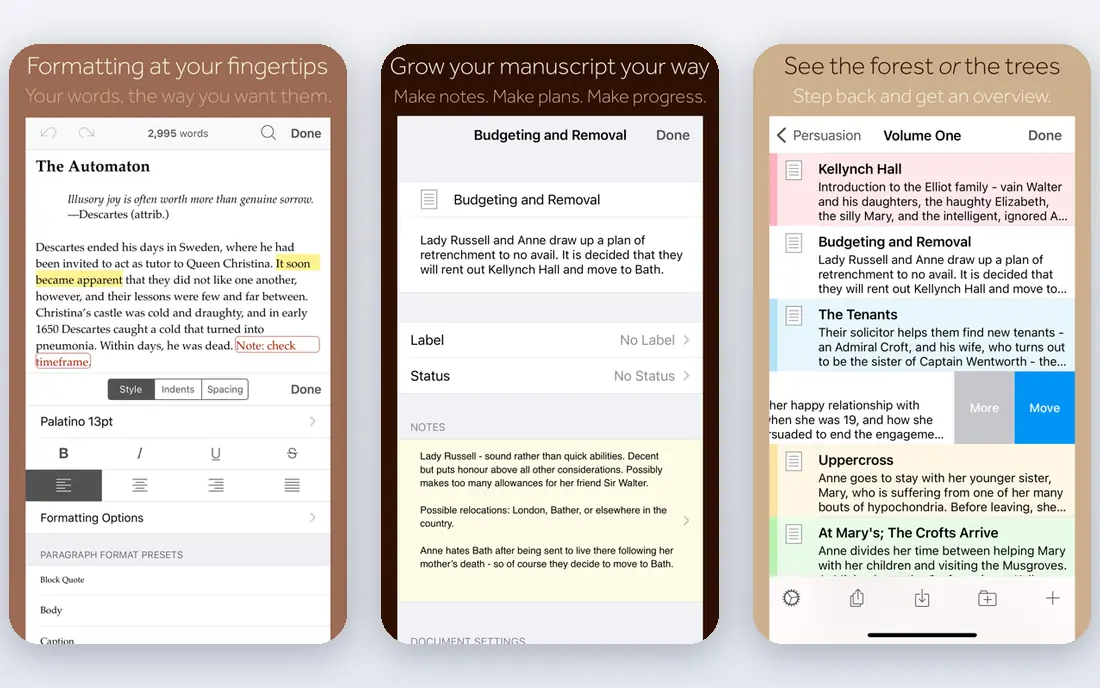
Scrivener treats a manuscript as many small pieces, not one endless document. You can draft chapters as separate sections, reorder them on a corkboard, and keep research notes beside the text. That structure helps a thesis writer who needs to move a section, test a new chapter order, or keep an argument in view while editing a single paragraph.
The trade-off is collaboration. Scrivener works best for a single author, and sharing a live draft with supervisors is clumsier than in a cloud editor. It also does not manage references on its own, so pair it with Zotero or EndNote. The one-time price, listed at $59.99 in recent coverage, makes it good value for a multi-year project.
- Strong structure for long manuscripts
- Corkboard and outline views
- One-time purchase
- Learning curve for new users
- Collaboration is weaker than cloud tools
- No built-in reference manager

Overleaf is the standard choice for LaTeX documents written by a team. Co-authors can edit the same paper in a browser, see changes, and use journal templates without installing LaTeX tools locally. For maths, physics, computer science, and many engineering fields, that workflow matches how journals expect files to arrive.
LaTeX itself is the barrier. Writers who have never used markup may find the first paper slow, and formatting a simple document can take longer than in Word or Google Docs. The free plan covers basic collaboration, while paid plans, listed from $25 per month in recent coverage, add history and extra features. If your field uses Word, Overleaf may be more tool than you need.
- Cloud LaTeX editing
- Live collaboration
- Strong templates for journals
- LaTeX learning curve
- Paid plan needed for full history and collaboration features
- Less suited to non-technical writers

Zotero is the default reference manager for many students because it is free, open, and reliable. The browser tool captures books, articles, and web pages, and the Word and Google Docs plugins insert citations and build a bibliography in your chosen style. That saves hours of manual formatting and reduces citation errors.
Free storage covers a modest library, and heavy PDF collectors may need paid storage or local storage management. The interface is functional rather than polished, but that is a small price for a tool that does the core job well. For most students, Zotero plus a drafting tool is the cheapest strong setup.
- Free and open source
- Browser capture for sources
- Word and Google Docs integration
- Free storage is limited
- Interface feels plain
- Large PDF libraries need paid storage
Grammarly checks spelling, grammar, and clarity as you type in browsers, Word, Google Docs, and mobile apps. For academic writers, the value is in catching small errors and awkward sentences before a supervisor or reviewer sees them. The free plan fixes basic errors and includes a limited number of AI prompts each month in recent coverage.
Grammarly is not an academic editor on its own. It can suggest a clearer sentence that weakens a precise claim, and it does not check if a citation supports your argument. Use it for language, not for scholarship. Pro is listed at $12 per month billed yearly, or $30 billed monthly, so annual billing is the better value if you use it weekly.
- Works across browsers, Word, and Google Docs
- Tone and clarity suggestions
- Plagiarism check on Pro
- Suggestions need human judgment
- Academic tone settings are limited
- Pro cost adds up yearly
ProWritingAid goes beyond grammar checks with reports on repetition, sentence length, pacing, dialogue, and readability. For a book or a long thesis chapter, those reports help a writer spot patterns that a single read-through misses. Integration with Word, Google Docs, and Scrivener means you can edit where you already draft.
The reports take time to learn. A new user may open ten reports at once and feel lost, so start with grammar, style, and readability, then add others as needed. The free plan checks a limited number of words at a time, while Premium is listed at $10 per month billed yearly. A lifetime plan is also sold for writers who want a one-time purchase.
- Detailed style and readability reports
- Chapter feedback features
- Works in Word, Google Docs, and Scrivener
- English only
- Free plan limits word count
- Reports can overwhelm new users
QuillBot helps a writer restate a sentence or shorten a dense passage, which is useful when a draft repeats the same phrasing too often. The paraphraser offers modes for fluency, formality, and brevity, and the grammar checker catches basic errors. The summariser can also help a reader get the shape of a long article before reading it in full.
Paraphrasing needs care in academic work. A rewritten sentence can change a claim, and paraphrasing a source does not remove the need to cite it. Always check the new wording against the original and keep the citation. Premium is listed at $8.33 per month billed yearly, while the free tier limits paraphrase length.
- Fast paraphrasing modes
- Grammar checker included
- Summariser for long articles
- Free paraphrasing is limited
- Paraphrasing can distort meaning
- Not a citation tool
Paperpal is built for researchers writing for journals, especially writers working in English as an additional language. It checks academic phrasing, consistency, and common submission issues, and it explains suggestions in terms a researcher can act on. That focus makes it more useful than a general checker for a paper near submission.
The price, listed at $25 per month in recent coverage, is higher than Grammarly or ProWritingAid entry plans. For everyday essays, that premium may not be worth it. For a paper you plan to submit, the academic checks and journal readiness features can save a round of reviewer comments on language alone. Always keep your own judgment on technical terms.
- Tuned for academic language
- Checks for journal readiness
- Word and web integration
- Higher price than general grammar tools
- Academic focus limits general writing use
- Suggestions still need review
Mendeley combines a reference manager with a PDF library and annotation tools, so a researcher can store, highlight, and cite papers in one place. Discovery features suggest related articles based on your library, which helps when you are mapping a new field. The Word plugin inserts citations and builds bibliographies in common styles.
Compared with Zotero, Mendeley is less open and its paid storage can cost more. Some long-term users also dislike past interface changes. Still, for a researcher who wants a polished PDF workflow and does not mind a commercial tool, Mendeley remains a solid choice. The free plan includes 2 GB of storage in recent coverage.
- PDF organisation and annotation
- Article discovery features
- Word citation plugin
- Paid storage costs more than Zotero upgrades
- Interface changes have frustrated some users
- Less open than Zotero
EndNote suits researchers and labs that manage thousands of references across many projects. It offers a large style library, strong search and grouping tools, and support in many universities and medical libraries. If your institution provides a licence, EndNote costs you nothing extra and integrates with your existing workflow.
For a single student, the $275 one-time licence in recent coverage is hard to justify when Zotero is free. The interface also feels older than newer tools, and setup takes longer. Choose EndNote when you need scale, institutional support, or compatibility with a lab that already uses it.
- Strong handling of large libraries
- Many citation styles
- Institutional support in many universities
- High one-time price
- Interface feels dated
- Overkill for a single essay
How we picked these
We compared official pricing pages, product documentation, and recent product coverage for tools that exist in October 2026 and serve academic writers. We kept tools that solve a distinct part of the workflow: drafting, LaTeX collaboration, language editing, paraphrasing, or reference management. We removed general AI chat tools that do not offer academic citation or manuscript features, since they do not fit the topic as directly.
We also weighed cost for students. A list of only expensive tools would ignore the reality of student budgets, so we included strong free options and one-time purchases beside subscription tools. Prices were taken from vendor pages and recent coverage, and we marked the source style in each product block so readers can verify the live price.
How to build your academic writing setup
Start with your document type. A thesis or book needs structure, so Scrivener or a cloud editor with headings and navigation matters most. A journal paper in a technical field needs LaTeX and co-author tools, so Overleaf matters most. A short essay needs only a word processor plus a reference manager, so do not overbuy.
Pair drafting with references from day one
Add sources to Zotero, Mendeley, or EndNote as you read, not at the end. Insert citations while you draft, so the bibliography builds itself and you can trace every claim. This habit prevents the common end-of-project scramble to find a source you read months earlier.
Use editing tools in passes, not all at once
Run a grammar pass first, then a clarity pass, then a final read for argument and citations. Editing tools are better in separate passes, because fixing language and fixing logic at the same time is tiring and error prone. Read the final draft aloud or in print, since screen reading hides errors.
Check your institution and journal rules
Universities and journals have rules on AI use, citation styles, and file formats. Check those rules before you rely on a paraphraser or AI editor, and keep notes on how you used each tool. When in doubt, ask a supervisor or editor, since a clear question now saves a correction later.
FAQ
What is the best free academic writing software?
Zotero is the best free starting point, because reference management is free and open source. Overleaf, Grammarly, ProWritingAid, and QuillBot also offer free plans that cover basic drafting and editing. For a full free setup, pair Zotero with Overleaf for LaTeX work or with Google Docs and Grammarly Free for Word style work.
What is the best app for writing a thesis?
Scrivener is the strongest choice for a long thesis, because it lets you structure chapters as separate sections and reorder them easily. Overleaf suits a LaTeX thesis with co-authors, while Word or Google Docs suit a thesis that needs simple collaboration. Pair any drafting tool with a reference manager from the start.
What is the best tool for writing a book?
Scrivener is built for books, with outline, corkboard, and compile features that handle long manuscripts. ProWritingAid helps with editing passes on a full manuscript, while Grammarly helps with daily language checks. Authors who need live co-author editing may prefer Google Docs, despite its weaker long manuscript tools.
Is QuillBot good for academic writing?
QuillBot is useful for paraphrasing and for getting a cleaner version of an awkward sentence, but it is not a research tool. It does not verify claims, find sources, or replace citation. Use it to improve phrasing, then check the meaning against the original and keep the citation in place.
Do I need EndNote if Zotero is free?
Most students do not need EndNote. Zotero covers capture, citation, and bibliography for typical coursework and theses at no cost. EndNote makes sense for large labs, medical researchers, or institutions that already provide it, where scale and institutional support matter more than price.
What is the best writing app for authors?
For fiction and non-fiction books, Scrivener remains the most popular drafting choice among authors in this list. ProWritingAid adds manuscript editing reports, while Grammarly covers everyday checks across apps. Authors who write in LaTeX or need journal templates should look at Overleaf instead.