Best Contact Solution Alternatives in 2026: 8 CRM Tools Compared
Looking for alternatives to contact solution software? We compare 8 CRM tools for contact management, pipelines, automation, and pricing for teams in 2026.
- Editor's choice
 HubSpot CRM
free start for small teams
Starts atFreeVisit hubspot.comFull review - Great alternative
 Salesforce
complex sales at scale
Starts at$25 per user per monthVisit salesforce.comFull review - Also consider
 Zoho CRM
value for budget teams
Starts atFreeVisit zoho.comFull review
TL;DR:
- HubSpot CRM offers the most generous free starting point for contacts, deals, and basic follow-up.
- Zoho CRM and Freshsales give strong value for budget teams, with free tiers and low paid entry prices.
- Pipedrive suits teams that live in a visual pipeline, while Salesforce suits complex, large-scale sales operations.
- Monday Sales CRM suits teams already using Monday boards, and Capsule suits small teams that want simplicity.
- Per-user pricing multiplies fast, so price each CRM at your real team size and check automation limits.
Quick comparison
| Tool | Best for | Starts at | Free plan? | |
|---|---|---|---|---|
| HubSpot CRM | free start for small teams | Free | Yes | Visit |
| Salesforce | complex sales at scale | $25 per user per month | Free trial | Visit |
| Zoho CRM | value for budget teams | Free | Yes | Visit |
 Pipedrive | visual sales pipelines | $14 per user per month | Free trial | Visit |
 Freshsales | simple setup with phone and chat | See website | Yes | Visit |
 Monday Sales CRM | teams already on Monday | $12 per user per month | Free trial | Visit |
 Capsule | simple contact management | See website | Free trial | Visit |
 Insightly | contacts plus projects | $29 per user per month | Free trial | Visit |
The best contact solution alternatives
A contact solution should remember every customer, every conversation, and every promised follow-up, without turning that job into extra work. If your current tool is too costly, too complex, or too thin on pipeline and automation, a CRM built around contacts may fit better. We compared eight CRM tools that cover contact management, deals, and follow-up for small and mid-size teams. Our pick for most small teams starting free is HubSpot CRM, while Pipedrive suits pipeline-led sales teams.
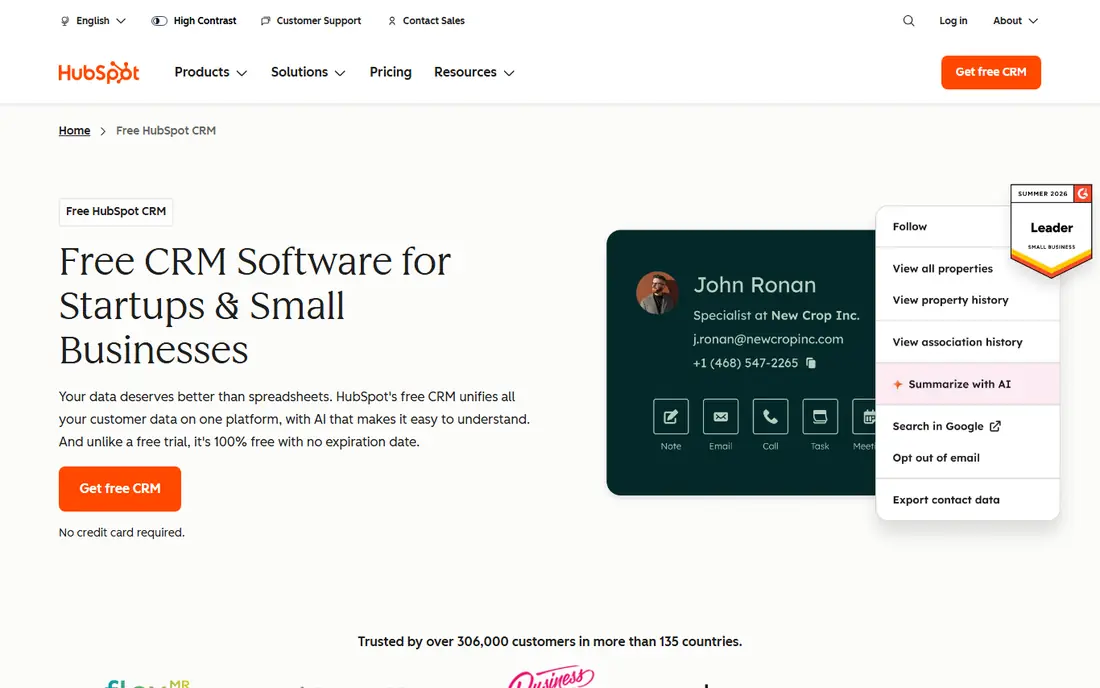
HubSpot CRM fits small teams that want to start free and grow into marketing and sales tools later. HubSpot CRM is the easiest free start on this list. Contacts, companies, deals, tasks, and email tracking sit in one clean workspace, and the path to paid marketing and sales hubs is clear when you outgrow the free tier.
Pricing starts at Free, and the free option is listed as Yes. The catch is growth cost. Paid HubSpot hubs can become expensive as seats, contacts, and features grow, so teams should model the price at their next stage, not just at launch. Check the plan limits that apply to your own use, such as users, channels, events, or storage, because a plan that looks cheap at entry level can change quickly once you pass a cap.
- Generous free plan
- Contacts, deals, and tasks in one place
- Large integration range
- Paid costs rise with growth
- Free plan has limits on users and contacts in some accounts

Salesforce fits larger teams with structured sales processes and complex reporting needs. Salesforce suits teams with complex sales work. Custom objects, workflows, reports, and a huge app ecosystem let large teams shape the CRM around their exact process, rather than bending the process to fit the tool.
Pricing starts at $25 per user per month, and the free option is listed as Free trial. The catch is effort and cost. Setup, admin, and add-ons take time and money, and small teams may pay for depth they never use, so start with a clear process map before you buy. Check the plan limits that apply to your own use, such as users, channels, events, or storage, because a plan that looks cheap at entry level can change quickly once you pass a cap.
- Deep customisation
- Huge app ecosystem
- Strong reporting and automation
- Setup takes longer
- Costs and complexity grow with customisation
- Smaller teams may find it heavy

Zoho CRM fits budget teams, especially those already using Zoho Books, Mail, or other Zoho apps. Zoho CRM gives remarkable depth for the price. Workflow rules, scoring, and customisation cover needs that cost more elsewhere, and links to other Zoho apps help small businesses keep billing and email close to contacts.
Pricing starts at Free, and the free option is listed as Yes. The catch is onboarding. New users may find the interface busy and the setup slower than Pipedrive or Freshsales, so allow time for training and a clean data import. Check the plan limits that apply to your own use, such as users, channels, events, or storage, because a plan that looks cheap at entry level can change quickly once you pass a cap.
- Free tier for up to 3 users
- Deep customisation for the price
- Strong Zoho app links
- Learning curve is steeper than simpler CRMs
- Interface feels busy to some new users
Pipedrive fits sales teams that live in deal stages and want fast adoption. Pipedrive is built around the deal board. Reps can see every deal, its stage, and its next step at a glance, and moving a card feels natural, which helps adoption stay high after launch.
Pricing starts at $14 per user per month, and the free option is listed as Free trial. The catch is breadth. Pipedrive is sales-first, so teams that also need marketing automation or service tools will need add-ons or separate products, which adds cost and complexity. Check the plan limits that apply to your own use, such as users, channels, events, or storage, because a plan that looks cheap at entry level can change quickly once you pass a cap.
- Clearest visual pipeline on this list
- Fast setup
- Reps enjoy moving deals forward
- No free plan
- Marketing and service features need add-ons or other tools
Freshsales fits small teams that want phone, chat, and CRM in one simple tool. Freshsales suits small teams that want to start fast. Contacts, deals, phone, and chat sit in one place, and the free tier lets a small team test the core workflow before paying.
Pricing starts at See website, and the free option is listed as Yes. The catch is depth at scale. Advanced automation, reporting, and integrations need higher plans, and the app ecosystem is smaller than the largest CRMs, so large teams should test those limits early. Check the plan limits that apply to your own use, such as users, channels, events, or storage, because a plan that looks cheap at entry level can change quickly once you pass a cap.
- Fast setup
- Built-in phone and chat on higher plans
- Free tier for small teams
- Advanced automation and reporting need higher plans
- Ecosystem is smaller than HubSpot or Salesforce
Monday Sales CRM fits teams already using Monday for projects who want CRM on the same boards. Monday Sales CRM suits teams that already plan work on Monday boards. Contacts, deals, and pipelines use the same board views and automations, so the team does not need to learn a second system.
Pricing starts at $12 per user per month, and the free option is listed as Free trial. The catch is CRM depth. Dedicated sales CRMs offer deeper pipeline, forecasting, and sales automation in some areas, so sales-led teams should compare those features before they choose boards over a dedicated CRM. Check the plan limits that apply to your own use, such as users, channels, events, or storage, because a plan that looks cheap at entry level can change quickly once you pass a cap.
- Familiar board layout
- Flexible views and automations
- Good team collaboration
- Per-seat pricing with a minimum seat count on some plans
- CRM depth is lighter than dedicated sales CRMs
Capsule fits small teams and freelancers who want a simple contact and deal tracker. Capsule keeps contact management simple. Contacts, deals, tasks, and history are easy to find, and new users can start without a long setup project, which suits freelancers and tiny teams.
Pricing starts at See website, and the free option is listed as Free trial. The catch is scale. Teams that need advanced automation, marketing tools, or a large integration range will outgrow Capsule sooner than a larger CRM, so check the roadmap for your growth plans. Check the plan limits that apply to your own use, such as users, channels, events, or storage, because a plan that looks cheap at entry level can change quickly once you pass a cap.
- Simple and clean contact and deal tracking
- Fast to learn
- Good for small teams
- Fewer advanced automation and marketing features
- Smaller integration range than large CRMs
Insightly fits service teams that need contacts, deals, and project delivery in one place. Insightly suits teams that sell a project and then deliver it. Contacts and deals link to project tasks and milestones, so the handoff from sales to delivery stays in one system.
Pricing starts at $29 per user per month, and the free option is listed as Free trial. The catch is price and setup. The entry price is higher than budget CRMs, and project workflows need thoughtful setup, so teams that only need contact tracking may find it more than they need. Check the plan limits that apply to your own use, such as users, channels, events, or storage, because a plan that looks cheap at entry level can change quickly once you pass a cap.
- Contacts, deals, and project tracking in one tool
- Good for service and delivery teams
- Higher entry price than budget rivals
- Setup needs care for project workflows
How we picked these
We compared official pricing pages, feature lists, and free plan details for each CRM in October 2026, and we focused on contact management, deal pipelines, follow-up automation, integrations, and total cost per user. We did not claim hands-on testing, and we noted where free plans limit users, contacts, or features.
A tool made this list only if it is available today, manages contacts and deals as a core job, and suits a small or mid-size team. We excluded generic spreadsheets and single-purpose email tools, since they do not provide pipeline, history, and follow-up in one place.
How to choose a contact solution alternative
Start with the job you need done every day. If follow-up is the pain, pick a CRM with strong tasks, reminders, and email tracking. If pipeline visibility is the pain, pick a visual pipeline tool. If delivery handoff is the pain, pick a CRM with project tracking. A tool that solves your daily pain will get used, while a tool with extra features you ignore will not.
Next, check data import and integrations before you pay. Import a sample of your contacts, test email sync, and check links to your billing, calendar, and marketing tools. A CRM that cannot import cleanly or sync email will create manual work, and that manual work is what causes teams to abandon a new system within months.
Finally, price the CRM at your team size in one year, not today. Per-user pricing, automation limits, and add-ons change the total fast. Run a trial with two or three real users, assign real deals, and set real follow-ups, then judge the tool on whether follow-ups actually happened on time.
FAQ
What are good alternatives for contact solution software?
HubSpot CRM, Zoho CRM, Pipedrive, and Freshsales are strong contact solution alternatives for small teams, while Salesforce suits larger, complex sales operations. Each covers contacts, deals, and follow-up, but they differ on price, setup effort, and depth. Start free where possible and upgrade only when automation or reporting limits bind.
Is there a free CRM for contact management?
Yes. HubSpot CRM offers a generous free plan, and Zoho CRM and Freshsales also offer free tiers for small teams. Free plans have limits on users, contacts, or features, so they suit solo users and tiny teams best. Check the current free plan limits on the vendor site before you import a large contact list.
Which CRM is best for a small business?
For most small businesses, HubSpot CRM is the safest free start, Pipedrive is best for pipeline-led sales, and Zoho CRM is best for value and depth at a low price. The right pick depends on whether you need free scale, pipeline clarity, or automation depth. Test two tools with real contacts before you commit.
Can I move contacts from another tool into a new CRM?
Yes, most CRMs import contacts from CSV files and from other CRMs through import tools or integrations. Clean duplicates, standardise fields, and import a small sample first to catch mapping errors. A careful import saves hours of cleanup later and keeps deal history linked to the right contacts.
Do I need a CRM if I only have a few contacts?
A simple contact tracker may be enough for a handful of contacts, but a CRM helps once follow-ups, deals, and conversations grow beyond memory. Even a free CRM gives reminders, history, and a shared view for a small team. Start free, and move to a paid plan only when you need automation or more users.