Switching From SurveyGizmo? 5 Alternatives for 2026
Need SurveyGizmo alternatives? We compare 5 tools on cost, free access and who each suits. Price notes and drawbacks come with each one. Reviewed this month.
- Editor's choice
 Microsoft Forms
Surveys, polls and quizzes in Microsoft 365
Starts atSee websiteVisit microsoft.comFull review - Great alternative
 SurveyMonkey
Template-driven surveys across numerous use cases
Starts at$25 per user a monthVisit surveymonkey.comFull review - Also consider
 Jotform
Quick, straightforward form and survey building
Starts at$34 a monthVisit jotform.comFull review
Direct answer
Microsoft Forms comes first here, mainly for surveys, polls and quizzes in Microsoft 365. Listed starting prices: SurveyMonkey from $25 per user a month and Jotform from $34 a month. Look at SurveyMonkey for template-driven surveys across numerous use cases, and at Jotform for quick, straightforward form and survey building. Prices, free plans and limits for all 5 tools follow.
TL;DR:
- Microsoft Forms sits first on this list: surveys, polls and quizzes in Microsoft 365.
- Qualtrics XM suits advanced experience management programs.
- SurveyMonkey, Jotform: these are the 2 tools out of 5 that offer a free plan.
- The lowest published monthly entry price here is $25 per user per month, from SurveyMonkey.
Last checked November 2026. Prices and plan details were read from the vendors' own pages in November 2026; vendors change plans often, so confirm the current price on the vendor site before you buy.
Quick comparison
| Tool | Best for | Starts at | Free plan? | |
|---|---|---|---|---|
| Microsoft Forms | Surveys, polls and quizzes in Microsoft 365 | See website | Not stated | Visit |
| SurveyMonkey | Template-driven surveys across numerous use cases | $25 per user a month | Yes | Visit |
| Jotform | Quick, straightforward form and survey building | $34 a month | Yes | Visit |
 Typeform | Conversational, AI-assisted form building | See website | Not stated | Visit |
 Qualtrics XM | Advanced experience management programs | See website | Not stated | Visit |
Tool-by-tool breakdown
If you are comparing SurveyGizmo, this page covers 5 tools in one place: what each is best for, what it costs to start, whether it has a free plan, and the main limit to know about.
Choose Microsoft Forms for surveys, polls and quizzes in Microsoft 365. For deep research design, advanced logic or experience analytics, Microsoft Forms may be too entry-level.
Best features of Microsoft Forms: Straightforward feedback collection.
Points against: Entry-level analytics for complicated needs. Microsoft Forms does not show a starting price in this comparison, so check the vendor site for current pricing. As for free access: Not stated.
- Fits Microsoft 365 workflows
- Polls and quizzes
- Limited for advanced research
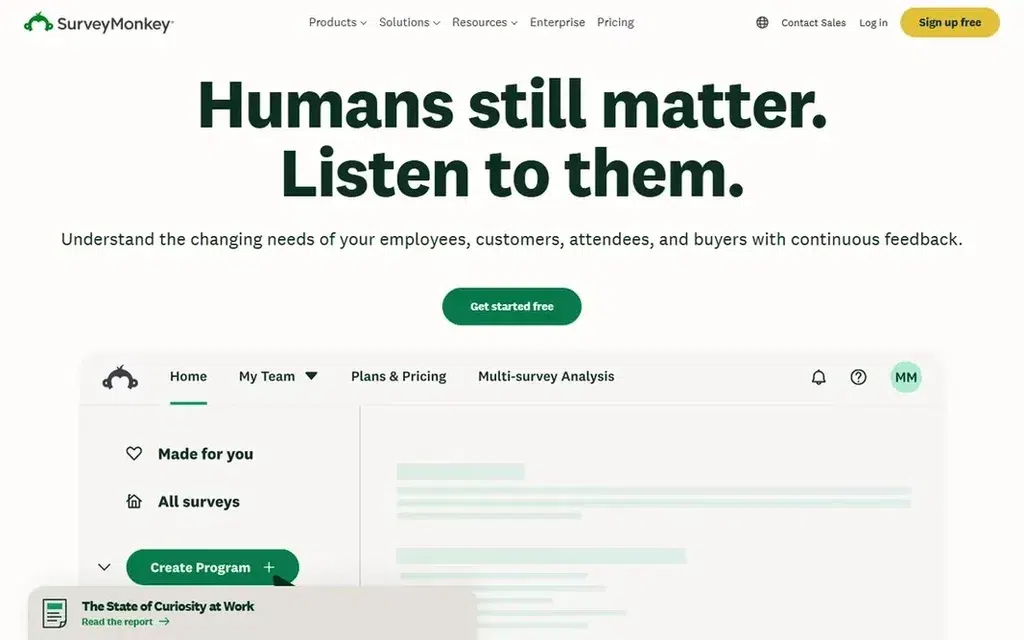
SurveyMonkey makes the most sense for template-driven surveys across plenty of use cases. If you need deep experience-management analytics or highly conversational forms, compare Qualtrics XM or Typeform instead.
Where it falls short: Advanced logic may need a closer look.
SurveyMonkey pricing: $25 per user per month. SurveyMonkey offers a free plan.
- Handles feedback and research
- Event registration support
- Wide scope can feel generic
Where Jotform fits: quick, straightforward form and survey building. It suits individuals and small teams that want to assemble a form rapidly without a steep ramp-up time, including everyday collection needs like registrations, feedback and straightforward questionnaires.
Consider SurveyMonkey or Qualtrics XM when methodology matters more than speed. On cost, Jotform starts like this: $34 per month. Free access exists with Jotform.
Where it is weaker: Fewer deep research analytics.
- Form and survey focus
- Fast form creation
- Complicated programs may outgrow it
Typeform works best for conversational, AI-assisted form building. Its homepage flags triggering actions to enrich leads, follow up and support revenue growth without code.
Since Typeform leans toward conversational experiences and automation, it may feel less structured for large research projects with complicated quotas and weighting. From a buyer's view, if your priority is advanced survey methodology rather than form design and follow-up, a research-focused system is worth a closer look. No starting price is listed for Typeform here; confirm pricing on the vendor site. Free access: Not stated.
Downsides: Workflow logic takes planning.
- No-code setup
- Automatic workflow triggers
- Less suited to deep research programs

Qualtrics XM is built with advanced experience management programs in mind. Qualtrics XM is an experience management system that its homepage describes as simulating customer and employee experiences, predicting outcomes and taking intelligent action.
Beyond that, for a fast poll or a single straightforward survey, Qualtrics XM can feel heavier than needed. Pricing for Qualtrics XM is not stated here, so ask the vendor for current figures. Trial and free access: Not stated.
Downsides: Heavier setup for straightforward surveys.
- Predictive experience insights
- Customer and employee focus
- Geared toward bigger programs
How we chose
The comparison looks at four things: starting price, free access, how well the feature set matches SurveyGizmo, and the main limit of each tool. Plan names, prices and limits change often. Treat the figures here as a starting point and verify them with the vendor. Tools are placed by general fit for SurveyGizmo, with price clarity and free access as tie-breakers. A different team can reasonably rank them differently.
What to check before you buy
- Get a written quote from Microsoft Forms, Typeform and Qualtrics XM; the list shows no starting price for them.
- Check what the free option really includes: SurveyMonkey and Jotform offer a free plan, and usage caps differ.
- Before choosing Microsoft Forms, weigh its main limit: limited for advanced research.
- Let daily users try Jotform on real work; their feedback beats any feature checklist.
- Get the contract term, renewal terms and any onboarding fees from Microsoft Forms in writing.
FAQ
Which options for SurveyGizmo have a free plan?
SurveyMonkey and Jotform offer a free plan in this list. Free plans usually cap users, projects or features, so check the limits on the vendor page. Each of the 5 options in this SurveyGizmo alternatives guide has its own card above with the price, free plan and limits.
What is the cheapest option for SurveyGizmo in this list?
On published monthly entry prices, SurveyMonkey is the lowest here at $25 per user per month. Entry price is only part of the cost, because seats, add-ons and billing terms can change the total. All 5 picks in this SurveyGizmo alternatives comparison list a starting price, free plan details and the main limits on their cards above.
How are the tools for SurveyGizmo ordered?
The order follows typical fit for SurveyGizmo, with Microsoft Forms first and Qualtrics XM last, then price clarity and free access. It is editorial judgement, not a score, so another team could rank the tools differently.
Can I try these tools before paying?
Often, yes. SurveyMonkey and Jotform have a free plan. Use your own data and a real task during the test, and check what the free tier or trial limits before you rely on it. For the full picture, the cards above cover all 5 entries of this SurveyGizmo alternatives list, including price, free plan and limits.
Sources
- https://www.microsoft.com/en-us/microsoft-365/online-surveys-polls-quizzes
- https://www.surveymonkey.com
- https://www.jotform.com
- https://www.typeform.com
- https://www.qualtrics.com