Best Property Inspection Software for Landlords for 2026: Our 5 Vetted Picks
Best property inspection software for landlords in 2026: 5 contenders with entry costs and free tiers. Each tool gets a one-line verdict. Plain facts.
- Editor's choiceSnapInspect
All-in-one app across devices
Starts atSee websiteVisit snapinspect.comFull review - Great alternativeProperty Inspect
Digitizing inspections and professional reports
Starts at$49 a monthVisit propertyinspect.comFull review - Also considerzInspector
Tenant self-inspections and connected workflows
Starts atSee websiteVisit zinspector.comFull review
Direct answer
This list puts SnapInspect first for all-in-one app across devices. Listed starting prices: Property Inspect from $49 a month and Spectora from $4 per inspection. Alternatives: Property Inspect for digitizing inspections and professional reports, and zInspector for tenant self-inspections and connected workflows. Prices, free plans and limits for all 5 tools follow.
TL;DR:
- This list starts with SnapInspect, which is built for all-in-one app across devices.
- Spectora suits inspection business automation and growth.
- A fair warning about HappyCo: may be more than needed for straightforward inspection-only use.
- A permanent free plan is missing from all 5 tools, SnapInspect and Spectora included; plan for a trial or a premium start.
Last checked November 2026. Prices and plan details were read from the vendors' own pages in November 2026; vendors change plans often, so confirm the current price on the vendor site before you buy.
Quick comparison
| Tool | Best for | Starts at | Free plan? | |
|---|---|---|---|---|
| SnapInspect | All-in-one app across devices | See website | Free trial | Visit |
| Property Inspect | Digitizing inspections and professional reports | $49 a month | Free trial | Visit |
| zInspector | Tenant self-inspections and connected workflows | See website | Free trial | Visit |
 HappyCo | Maintenance and work order management | See website | Not stated | Visit |
| Spectora | Inspection business automation and growth | $4 per inspection | Free trial | Visit |
Our 5 property inspection software for landlords
Choosing property inspection software for landlords usually comes down to price, fit and limits. This LinkVetted guide sets 5 tools side by side on those three points, with the facts kept short and checkable.
SnapInspect
Best for: All-in-one app across devices
SnapInspect is built with all-in-one app across devices in mind. SnapInspect is positioned around inspections and reporting instead of full maintenance management. As for the details, the mobile-first design is an advantage in the field but may feel less tailored for back-office workflows.
Drawbacks to consider: Reporting customization details should be confirmed with the vendor.
Landlords who require work order automation or tenant self-inspection portals may need additional tools. Worth adding: confirm reporting templates and device support against your process before committing. Pricing for SnapInspect is not stated here, so ask the vendor for current figures. Free plan details: Free trial.
- Aims to accelerate inspections and ease reporting
- All-in-one inspection app and software
- Mobile-first workflow may not suit every office process
Property Inspect
Best for: Digitizing inspections and professional reports
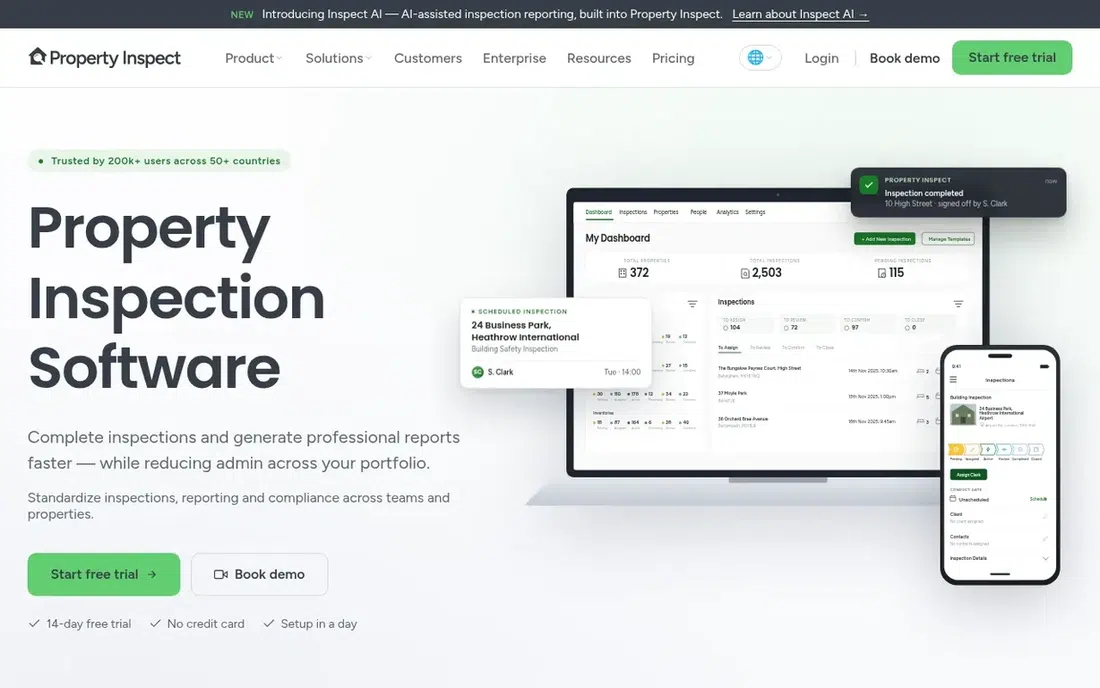
Property Inspect works best for digitizing inspections and professional reports. The product is geared toward property teams, which can mean more structure than a single landlord needs. In daily use, Property Inspect is property inspection software built to digitize property inspections, audits, and reports for property teams.
Its homepage flags creating professional reports quicker, which matters for landlords who require consistent documentation for move-in, move-out, and periodic condition checks. If your primary goal is assigning and tracking repairs instead of producing inspection reports, consider a maintenance-focused choice instead. The starting price for Property Inspect: $49 per month. Free access: Free trial.
Trade-offs to know: Less emphasis on maintenance work order automation.
- Built for property teams
- Digitizes property inspections and audits
- Report-centric approach may suit teams more than solo landlords
zInspector
Best for: Tenant self-inspections and connected workflows

zInspector serves tenant self-inspections and connected workflows. The combination of inspections, work orders, and reporting in a single product suits managers who prefer fewer disconnected tools.
What to check first: Wide system scope can be more than simple inspection needs.
It is made for modern property managers handling recurring inspection cycles. Pricing for zInspector is not stated here, so ask the vendor for current figures. Free options: Free trial.
- Supports tenant self-inspections
- One connected product for property managers
- Feature set may need onboarding for tenants and staff

HappyCo serves maintenance and work order management. HappyCo presents itself as property maintenance management software and an AI system. Its homepage emphasizes managing work orders, automating maintenance, and tracking operations with AI-powered property maintenance software.
For landlords who handle a steady flow of repair requests and want inspections tied to maintenance workflows, this focus can cut the gap between finding an issue and assigning a fix. Beyond that, if your priority is a light inspection app with minimal operational overhead, a more inspection-focused tool may be a better match. HappyCo shows no starting price here, so confirm the cost on the vendor site. Free plan details: Not stated.
Where it is weaker: May be more than needed for straightforward inspection-only use.
- Simplifies maintenance system workflows
- AI-powered system for tracking operations
- Needs setup to align with existing maintenance processes
Spectora
Best for: Inspection business automation and growth
Spectora is built with inspection business automation and growth in mind. If your priority is tenant-facing inspections and maintenance tracking instead of running an inspection company, a landlord-focused tool is likely a better fit. The product is designed around the inspection business process, so it suits users who require to handle inspection jobs and client-facing reports instead of routine landlord condition checks.
In daily use, Spectora is oriented toward home inspection firms, which means some features may not map straight to landlord inspection needs. For landlords who also operate an inspection business or work closely with professional inspectors, the automation and reporting workflow can be relevant. In practice, landlords who just have to document unit condition may find the business growth emphasis unnecessary. Spectora cost at the entry level: $4 per inspection. Free plan details: Free trial.
Drawbacks to consider: Built around home inspection companies instead of landlord portfolios.
- Supports add-on services
- Concentrates on business growth tools
- May bundle business features landlords do not need
How we built this list
LinkVetted looked at what each vendor publishes: pricing, plan limits, feature coverage for property inspection software for landlords and stated drawbacks. No hands-on testing is claimed. Where a price is missing, the vendor does not list one publicly or ties it to a quote. Always confirm before budgeting. The sequence is a judgement call: typical use case first, then pricing transparency, then free access. Use the profiles to check fit.
What to confirm before you sign up
- Confirm the entry price on the vendor page. For SnapInspect, zInspector and HappyCo that means a quote rather than a fixed price.
- Take the trial from SnapInspect, Property Inspect, zInspector and Spectora and push a live task through it before you pay.
- Before choosing SnapInspect, weigh its main limit: mobile-first workflow may not suit every office process.
- Confirm the exact Spectora plan that includes your must-have features.
- Check how data leaves zInspector: formats, limits and whether exports are available on every plan.
FAQ
Is SnapInspect the right pick for everyone comparing property inspection software for landlords?
No single tool suits every team. SnapInspect comes first because it fits all-in-one app across devices, while Property Inspect suits digitizing inspections and professional reports and zInspector suits tenant self-inspections and connected workflows. Match the tool to your own size, budget and workflow before deciding.
Do these tools publish their prices?
Not all of them. SnapInspect, zInspector and HappyCo publish no starting price, so expect a quote request for those. The rest, Property Inspect included, show a starting price, though seats and billing terms still change the final cost.
Can I try these tools before paying?
Often, yes. SnapInspect, Property Inspect, zInspector and Spectora offer a free trial. Use your own data and a real task during the test, and check what the free tier or trial limits before you rely on it.
How do I compare inspection software without practical testing?
Review vendor documentation for supported inspection types, reporting choices, device access, and integration with maintenance workflows. Check stated limits and confirm details straight with each vendor.
How are the tools for property inspection software for landlords ordered?
The order follows typical fit for property inspection software for landlords, with SnapInspect first and Spectora last, then price clarity and free access. It is editorial judgement, not a score, so another team could rank the tools differently.
Is tenant self-inspection a useful feature for landlords?
Tenant self-inspections can cut the number of full property visits and provide landlords earlier visibility into condition issues. Not every landlord needs this, so confirm the feature is included and straightforward to use.
Sources
- https://www.snapinspect.com
- https://www.propertyinspect.com
- https://www.zinspector.com
- https://happy.co
- https://spectora.com