Choosing Free Media Monitoring Tools in 2026: 6 Options Compared
A practical guide to the best free media monitoring tools in 2026, comparing free plans, limits and workflows from vendor documentation and public sources.
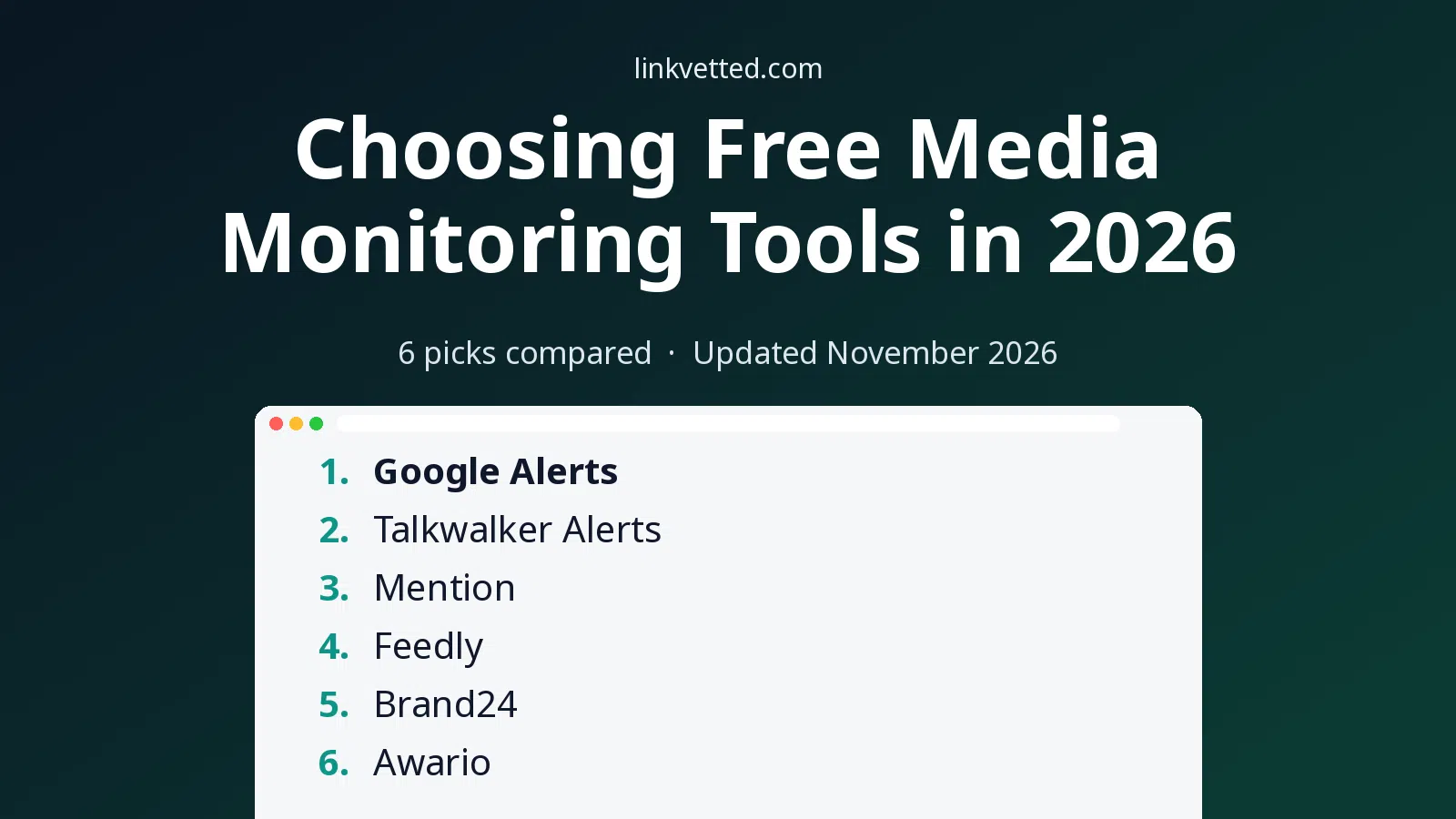
- Editor's choiceGoogle Alerts
Simple brand mention alerts
Starts atSee websiteVisit google.comFull review - Great alternativeTalkwalker Alerts
Blog and news mention alerts
Starts atSee websiteVisit talkwalker.comFull review - Also consider
 Mention
Teams wanting a monitoring dashboard
Starts atSee websiteVisit mention.comFull review
Direct answer
Google Alerts is my first pick for most small teams because it costs nothing, needs only a Google account and sends mentions to your inbox. For social listening, Talkwalker Alerts covers blogs and news, while Mention suits teams that want a dashboard with a limited free tier. Feedly works well when you want to organise feeds and keyword streams in one reading view.
TL;DR:
- Free tools usually limit the number of alerts, saved searches or historical results, so check the caps before you commit.
- Google Alerts is the simplest starting point, but it gives you email delivery rather than a dashboard with analytics.
- Social coverage varies a lot between tools, and some free plans exclude X, Instagram or LinkedIn entirely.
- A free tool is fine for brand mentions and basic coverage checks, but it rarely replaces a paid monitoring suite for reporting.
- Always confirm current plan limits on the vendor's own pricing page, because free tiers change without much notice.
Last checked November 2026. Plan prices are not quoted in this guide because they change often; see each vendor's own pricing page for current figures before you buy.
Quick comparison
| Tool | Best for | Starts at | Free plan? | |
|---|---|---|---|---|
| Google Alerts | Simple brand mention alerts | See website | Free plan | Visit |
| Talkwalker Alerts | Blog and news mention alerts | See website | Free plan | Visit |
| Mention | Teams wanting a monitoring dashboard | See website | Free trial | Visit |
 Feedly | Organising feeds and keyword streams | See website | Free plan | Visit |
 Brand24 | Social listening trials | See website | Free trial | Visit |
 Awario | Social mention discovery | See website | Free trial | Visit |
The best free media monitoring tools compared
I put this comparison together from vendor documentation and public sources, not from hands-on testing. I looked at what each free plan actually includes, where the limits sit and which workflow each tool supports. My aim is to help you pick a starting point and know what you will outgrow.
Google Alerts
Best for: Simple brand mention alerts
Google Alerts is a free service from Google that emails you when new pages matching your query appear in Google's index. It fits freelancers, small agencies and in-house marketers who want a low-effort way to watch a brand name, a competitor or a topic. Setup takes a few minutes and you can create several alerts under one Google account.
For media monitoring, the workflow is straightforward: you write a query, choose sources, language and region, then pick how often you want emails. You can route alerts to a shared inbox or a filter in your mail client so the team sees mentions together. It is useful for press mentions on news sites and blogs that Google indexes, and for catching your brand name in articles you did not pitch.
The limits matter. You get email delivery rather than a dashboard, so there is no sentiment chart or share-of-voice report. Coverage depends on what Google indexes, and social platforms are largely outside its reach. Skip it if you need social listening or client-ready reporting.
- No cost and no card needed
- delivers mentions by email
- covers web pages indexed by Google
- No dashboard or analytics
- limited control over sources and volume
Talkwalker Alerts
Best for: Blog and news mention alerts
Talkwalker Alerts is a free alert service from Talkwalker that sends email notifications when it finds new mentions of your keywords. It is aimed at people who want broader query options than a basic alert tool provides, including boolean operators and language filters. It suits PR and SEO teams that monitor coverage across news sites and blogs.
In a monitoring workflow, you set up queries for brand names, campaign terms and spokesperson names, then let the alerts arrive by email. Because it supports more complex queries, you can exclude common words that create noise and focus on the mentions that matter. Many teams run it alongside Google Alerts to catch pages the other service misses.
The free service is alert-based, so you still need somewhere to store and report on mentions. There is no analytics dashboard attached to the free alerts, and social coverage is not the same as a full listening platform. Skip it if you need sentiment analysis or a shared inbox built into the tool.
- Free email alerts for web and social mentions
- supports boolean-style queries
- covers news and blogs
- No dashboard on the free alert service
- less control over frequency than some tools
Mention is a media monitoring platform that tracks brand mentions across social networks, news sites, blogs and forums, then shows them in a dashboard. It fits small teams that want more than an inbox of alerts and are willing to move to a paid plan once the trial ends. The interface is built around alerts you configure per keyword.
For monitoring work, you create alerts for your brand, competitors and campaign hashtags, then review results in the dashboard and set up email notifications. You can assign mentions to team members and mark items for follow-up, which helps when several people handle outreach and reporting. It is a reasonable way to trial a dashboard workflow before committing to a paid tier.
The downside is that free access is a trial, not an ongoing free plan, and the trial has caps on alerts and users. If you need a permanent no-cost option, this is not it. Skip Mention if your budget is zero and you only need email alerts.
- Dashboard view of mentions
- covers social and web sources
- supports alerts and team workflows
- Free access is a trial rather than a lasting plan
- alert volume is capped
Feedly is a news and content reader that lets you follow RSS feeds, publications and keyword streams in one place. It fits marketers who already read a lot of industry news and want to add brand monitoring to the same view. The free plan covers basic reading and a limited number of feeds and boards.
For media monitoring, you add keyword feeds for your brand and topics, then scan them alongside the publications you already follow. You can save items, organise them into boards and share links with colleagues. It works well as a daily reading habit that doubles as a light monitoring routine.
The limits are in filtering and team features, which sit in paid tiers. You will not get sentiment analysis or a mention database built for PR reporting. Skip Feedly if you need social listening across platforms or automated coverage reports for clients.
- Free plan for reading feeds
- keyword monitoring across sources
- works well with RSS
- Advanced filtering and team features are paid
- not a full media monitoring suite
Brand24 is a social listening and media monitoring platform that collects mentions from social networks, news, blogs, forums and reviews. It fits teams that want to evaluate a listening tool before buying, especially agencies that need sentiment and reach filters in their reports. Setup is project-based, with keywords and sources configured per client.
In a monitoring workflow, you create a project, add keywords and exclusions, then review mentions by source and sentiment. You can set up email digests and use the dashboard to spot spikes. The trial lets you see whether the source coverage matches your market before you commit.
The trial is time-limited and capped, so it is not a permanent free option. Some sources and historical data sit behind paid plans. Skip Brand24 if you need a lasting free tool and only want basic alerts.
- Covers social and web sources
- sentiment and influence filters
- project-based setup
- Free access is a trial
- ongoing use needs a paid plan
Awario is a social listening tool that finds mentions across social networks, news, blogs and forums using boolean queries. It suits marketers who want to test a listening workflow and see how much conversation exists around a brand or topic. The query builder is the core of the product.
For monitoring, you set up alerts with keyword combinations, then review mentions in the dashboard and export what you need. You can track competitors and campaign terms in separate alerts, which helps when you compare coverage. The trial is a way to check source coverage in your language and region.
Free access is a trial, not a lasting plan, and the trial has limits on results and projects. Historical data and some exports need a paid tier. Skip Awario if you want a permanent free tool with no time limit.
- Broad social source coverage
- boolean query support
- mention dashboard
- No ongoing free plan
- trial limits on results and projects
How I chose
I selected these tools by reading vendor documentation, pricing pages and public help articles, then comparing what each free plan or trial actually allows. I did not run hands-on tests, so I am not claiming measured accuracy or speed. The comparison focuses on fit: whether a tool gives you email alerts, a dashboard, social coverage or feed reading, and where the free limits sit.
I also weighed the practical side of monitoring work. A free tool is only useful if it fits your daily routine, whether that is an inbox filter, a shared dashboard or a reading app. I noted the obvious gaps, such as missing social sources or time-limited trials, so you can see where a paid plan becomes necessary. Where a vendor's free tier was unclear, I treated it as a trial rather than a lasting free plan.
What to check before you buy
- Confirm the free plan's limits on alerts, keywords, saved searches and users, since these caps decide whether it works for a team.
- Check which sources are covered, especially social networks, forums and review sites that matter to your brand.
- Look at delivery options: email alerts, dashboard access, Slack or webhook integrations and export formats.
- Ask whether historical mentions are included, because many free tiers only show results from the day you set up the alert.
- Test query support, including boolean operators and exclusions, so you can cut noise from common words.
- Review data retention and reporting features if you need to share coverage with clients or managers.
FAQ
Are free media monitoring tools enough for a small agency?
For basic brand mention alerts, yes. A free tool like Google Alerts or Talkwalker Alerts can catch news and blog coverage without a budget. Once you need social listening, sentiment views or client reports, the free limits usually get in the way and a paid plan becomes the practical choice.
Do these tools cover social media mentions?
It varies. Google Alerts and Talkwalker Alerts focus on web pages and news, with limited social reach. Mention, Brand24 and Awario cover social sources but their free access is a trial. Feedly is built around feeds rather than social listening, so check source coverage before you rely on any tool.
What is the difference between media monitoring and social listening?
Media monitoring usually means tracking mentions in news, blogs and other published sources. Social listening adds social networks, forums and reviews, often with sentiment and reach analysis. Many tools now do both, but free plans tend to limit the social side or restrict it to a trial period.
Can I monitor competitors with a free tool?
Yes, in a basic way. You can set up alerts for competitor names in Google Alerts, Talkwalker Alerts or Feedly keyword feeds. You will not get share-of-voice charts or sentiment comparisons on free plans, so treat it as a heads-up rather than a full competitive analysis.
How often should I review mentions?
Daily is sensible for brand names and campaign terms, especially during a launch or a crisis. Weekly is enough for general industry topics. Set alert frequency to match how quickly you can respond, and route alerts to a shared inbox so nothing sits unread in one person's account.
Sources
- https://www.google.com/alerts
- https://www.talkwalker.com/alerts
- https://mention.com
- https://feedly.com
- https://brand24.com
- https://awario.com
Related guides
- Best Enterprise Media Monitoring Tool (2026): 5 Picks Checked on Vendor Pages
- 5 Best Media Monitoring System for Marketing for 2026, Vetted and Compared
- Media Monitoring Tools for Agencies in 2026: The 5 Best Options Side by Side
- 6 Best Media Monitoring Tools for Digital PR for 2026, Vetted and Compared