Best Files Apps in 2026: 8 Apps Compared
We compared the best files apps for phones and tablets, covering storage, cloud access and privacy, so you can find and move files with less friction.
- Editor's choice
 Apple Files
iPhone and iPad users
Starts atFreeVisit apple.comFull review - Great alternative
 Files by Google
Android cleanup and sharing
Starts atFreeVisit google.comFull review - Also consider
 Solid Explorer
Power users on Android
Starts atSee websiteVisit neatbytes.comFull review
TL;DR:
- Apple Files and Files by Google are the safest defaults, since they are built in, free and well supported.
- Solid Explorer and Total Commander suit power users who need dual panes, network access and archive handling.
- Documents by Readdle is the strongest pick for iPhone and iPad users who work with PDFs and cloud files.
- Open-source options such as Fossify and Amaze appeal to users who want no ads and no account.
Quick comparison
| Tool | Best for | Starts at | Free plan? | |
|---|---|---|---|---|
| Apple Files | iPhone and iPad users | Free | Yes | Visit |
| Files by Google | Android cleanup and sharing | Free | Yes | Visit |
| Solid Explorer | Power users on Android | See website | Free trial | Visit |
 Total Commander | Classic dual-pane control | Free | Yes | Visit |
 Documents by Readdle | PDFs and cloud files on iOS | Free | Yes | Visit |
 CX File Explorer | Simple Android file browsing | Free | Yes | Visit |
 FE File Explorer | Network and NAS access | See website | Free trial | Visit |
 Fossify File Manager | Private open-source browsing | Free | Yes | Visit |
The best files apps
A good files app should make a file easy to find, move, rename and share, without burying those basics under ads or paid extras. We compared built-in apps and third-party managers on that basis.

Apple Files is already on every iPhone and iPad, and for most people that is enough. It gives you local folders, iCloud Drive, and access to connected cloud services such as Dropbox and Google Drive, all in one place. Tags, favorites and search make it easy to find a document you saved months ago, and the app handles PDFs, images and downloads without extra software.
The limits show when you need desktop-style control. Batch renaming, deep archive handling and network drive access are thinner than in a dedicated manager, and some workflows still push you toward iCloud. If you live mainly in the Apple ecosystem and want a clean, supported default, Files is the right starting point.
- Built into iOS and iPadOS
- ICloud Drive and third-party cloud support
- Tags and search
- Less flexible than desktop file managers
- Some features need iCloud
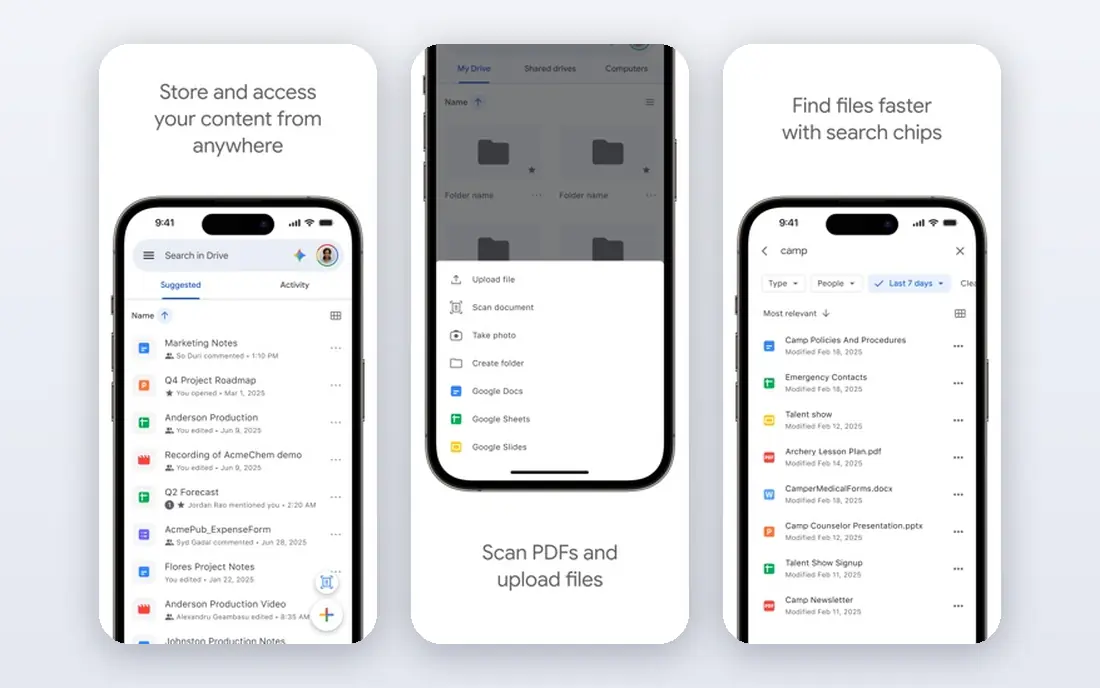
Files by Google does the unglamorous work well. It shows what is taking up space, suggests duplicate files, old screenshots and unused apps for removal, and lets you browse by category such as images, videos and downloads. For a phone that is running low on storage, that cleanup view alone can be worth installing the app.
Sharing is another strength, since Files by Google can send files to a nearby Android device without mobile data. Power users may miss dual panes, FTP access and archive tools, and iPhone owners cannot use it at all. For everyday Android file handling and storage cleanup, though, it is hard to beat a free app with no ads.
- Free with no ads
- Storage cleanup suggestions
- Fast offline sharing
- Fewer advanced features than power managers
- Android only
Solid Explorer is the app Android power users tend to settle on after trying the free options. The dual-pane layout makes copying files between folders far less fiddly, and support for cloud storage, FTP, SFTP and local network shares means one app can reach most of your storage. Archive handling, batch renaming and an encrypted vault add to the case for users who manage a lot of files.
The catch is price. A trial covers the first two weeks, after which a paid upgrade is needed, and a few plugins cost extra. The design is also busier than a simple browser, so casual users may prefer Files by Google. If you move files often and want one manager for local, cloud and network storage, Solid Explorer earns its price.
- Dual-pane layout
- Cloud and network support
- Archive and encryption tools
- Paid upgrade after the trial
- Some plugins cost extra
Total Commander has been around for decades, and its Android app keeps the same practical focus. Two panels, a built-in FTP client, file comparison and archive browsing give experienced users a fast way to manage files without paying or watching ads. Plugins extend it to cloud storage and local networks, which keeps it useful for a home server or a work drive.
The interface will not win design awards, and new users may need time to learn the button layout and gestures. That is the trade for a free, long-supported manager with no ads and no account requirement. If you value control over polish, Total Commander is still a strong choice in 2026.
- Free with no ads on Android
- Dual-pane layout
- Plugins for cloud and network access
- Dated interface
- Learning curve for new users
Documents by Readdle fills the gaps Apple Files leaves on iPhone and iPad. It reads and annotates PDFs, connects to cloud services, plays media and downloads files from the web into organized folders. For students and office workers who receive files by email and link all day, that combination turns the phone into a workable document hub.
A paid plan adds extra tools such as a VPN and more storage options, but the free version covers the core file and PDF work. The main limit is platform: Android users need a different app. On iOS, Documents is our pick for people who handle documents, not just photos and downloads.
- Strong PDF reading and annotation
- Cloud service connections
- Built-in browser downloads
- Some advanced features need a paid plan
- IOS only
CX File Explorer keeps things simple without leaving out the basics. The home screen shows local storage, SD cards, network locations and cloud services in one view, and a storage analysis chart shows where space has gone. Browsing, copying, compressing and sharing files all work as expected, with no account needed to start.
It does not match Solid Explorer for dual-pane work or Total Commander for plugins, and its design is plain rather than polished. That plainness is also a virtue for users who just want to find a file and move on. If Files by Google feels too basic but Solid Explorer feels like too much, CX File Explorer sits in the middle.
- Clean layout
- Storage analysis
- Network and cloud access
- Fewer power features than Solid Explorer
- Interface can feel plain
FE File Explorer is built for people whose files live on a home server, a NAS box or a work share, not just on the phone. It supports common network protocols and lets you browse, stream and copy files from those locations as if they were local folders. Apple device users get a consistent experience across iPhone, iPad and Mac.
Setup needs more attention than a simple file browser, since you must enter server details and credentials correctly. A trial covers the basics, but full use requires a paid upgrade, so check the current price on the vendor site before committing. For network-first users, FE File Explorer is worth that effort.
- Wide network protocol support
- NAS and server access
- Works across Apple devices
- Paid upgrade for full use
- Setup takes more care than a basic browser
Fossify File Manager is a community open-source app that focuses on local file handling with no ads and no tracking. It covers browsing, copying, renaming, compressing and storage analysis, with a clean interface that stays out of the way. Because the code is open, privacy-minded users can see what the app does and does not collect.
The trade is scope. Cloud and network features are thinner than in Solid Explorer or FE File Explorer, and support comes from the community rather than a large company. If your priority is a private, lightweight manager for files on the device itself, Fossify is an excellent free pick.
- Open source
- No ads and no tracking
- Lightweight and fast
- Fewer cloud and network features
- Smaller support team than big rivals
How we picked these
We compared official product pages, app store listings and pricing pages for file managers that are still maintained in 2026 and work on current phones and tablets. We favored apps with clear pricing, no forced account for basic browsing, and a real track record of updates. Apps that had been abandoned, or that bundled aggressive ads and cleaner-style upsells, were left out.
How to choose a files app for your phone
Start with your platform and your storage, not with the longest feature list.
If you mainly use one phone
Use the built-in app first. Apple Files on iPhone and iPad, and Files by Google on Android, cover browsing, search and sharing for most people, and they cost nothing. Only move to a third-party manager when you hit a specific limit, such as network access or batch renaming.
If you manage servers or many folders
Look for dual panes, network protocol support and archive tools. Solid Explorer, Total Commander and FE File Explorer fit that profile, with FE File Explorer leading for NAS access and Solid Explorer leading for cloud plus network in one app. Expect to pay for the best of these, and check whether the trial covers the features you need.
If privacy matters most
Pick an open-source manager with no ads and no account requirement, such as Fossify, and keep cloud access in a separate app if you need it. Check permissions before installing any file manager, and avoid apps that ask for access unrelated to browsing and moving files.
FAQ
Are files apps safe to use?
Reputable files apps are safe when downloaded from the official app store and given only the storage permissions they need. Avoid managers that promise phone boosting or battery saving alongside file browsing, since those extras often bring ads or data collection. Keep the app updated and delete files from untrusted sources with care.
Do I need a files app if my phone already has one?
Often no. Built-in apps cover most everyday needs, and a third-party manager only helps when you need network access, dual panes, archive tools or stronger PDF handling. Install a second manager only for a feature you actually use, and keep the built-in app for simple browsing.
What is the best free files app for Android?
Files by Google is the best free default for cleanup and sharing, while Total Commander and Fossify are the best free options for power users and privacy-minded users. Files by Google is simpler, Total Commander offers more control, and Fossify offers open-source privacy with no ads.
Can a files app access my cloud storage?
Many can, including Apple Files, Solid Explorer, Documents by Readdle and CX File Explorer, which connect to services such as Google Drive and Dropbox. You will need to sign in to each cloud service inside the app, and you can remove that access from the cloud account settings at any time. Check which folders the app can see before you connect a work account.
Why does a file manager need so many permissions?
A file manager needs storage access to browse and move files, and network access if it connects to cloud or local servers. It should not need contacts, location or phone access for basic file work. If an app asks for unrelated permissions, deny them or choose a different manager.