8 Best Coworking Software Tools for Operators in 2026
We compared the best coworking software for operators on bookings, billing, and member apps, so you can run your space with less admin work in 2026. now
- Editor's choice
 Nexudus
Growing and multi-location coworking operators
Starts atSee websiteVisit nexudus.comFull review - Great alternative
 OfficeRnD Flex
Operators who want ease of use plus strong billing
Starts atSee websiteVisit officernd.comFull review - Also consider
 Optix
Boutique spaces where the member app defines the brand
Starts atSee websiteVisit optixapp.comFull review
TL;DR:
- Nexudus suits growing and multi-location operators who need deep automation, CRM, and reporting.
- OfficeRnD Flex suits most operators who want a balance of ease of use, billing, and reporting.
- Optix and Spacebring win on member app experience, which matters for boutique and community-focused spaces.
- Cobot suits small spaces that want simple bookings and billing without a long setup.
- Yardi Kube, Archie, and Coworks suit larger, Microsoft-centered, or niche operators with specific stack needs.
Quick comparison
| Tool | Best for | Starts at | Free plan? | |
|---|---|---|---|---|
| Nexudus | Growing and multi-location coworking operators | See website | No | Visit |
| OfficeRnD Flex | Operators who want ease of use plus strong billing | See website | No | Visit |
| Optix | Boutique spaces where the member app defines the brand | See website | No | Visit |
 Cobot | Small spaces that want simple, reliable operations | See website | No | Visit |
 Spacebring | Operators who want a branded member app and community tools | See website | No | Visit |
 Yardi Kube | Real estate portfolios with flex space | See website | No | Visit |
 Archie | Teams that live in Microsoft tools | See website | No | Visit |
 Coworks | Community-focused spaces, incubators, and makerspaces | See website | No | Visit |
The best coworking software for operators

Nexudus is the most customizable platform in this list. Operators can automate onboarding, billing, and renewals, build custom reports, and manage many locations from one system. That depth helps as a brand grows from one space to five.
Customization is also the cost. Staff need time to set up plans, rules, and integrations, and smaller spaces may not use the full toolset. If you plan to scale, that investment pays off. If you run one small space, a simpler tool may fit better.
- Deep automation, CRM, custom reporting, multi-location support
- Setup and customization take time, price rises with members and locations

OfficeRnD Flex balances operator power with a modern interface. Staff can manage memberships, bookings, invoices, and reports without jumping between tools, and members can buy plans and book rooms online. That single flow cuts admin time for lean teams.
Total cost depends on tier and add-ons, so get a quote for your member count and locations. For most single and multi-location operators, Flex is the safest default shortlist pick, since it covers the core jobs well without a steep learning curve.
- Clean interface, billing and reporting in one system, online sales and member portal
- Quote or tier pricing needs a demo to confirm total cost, some advanced custom work needs support
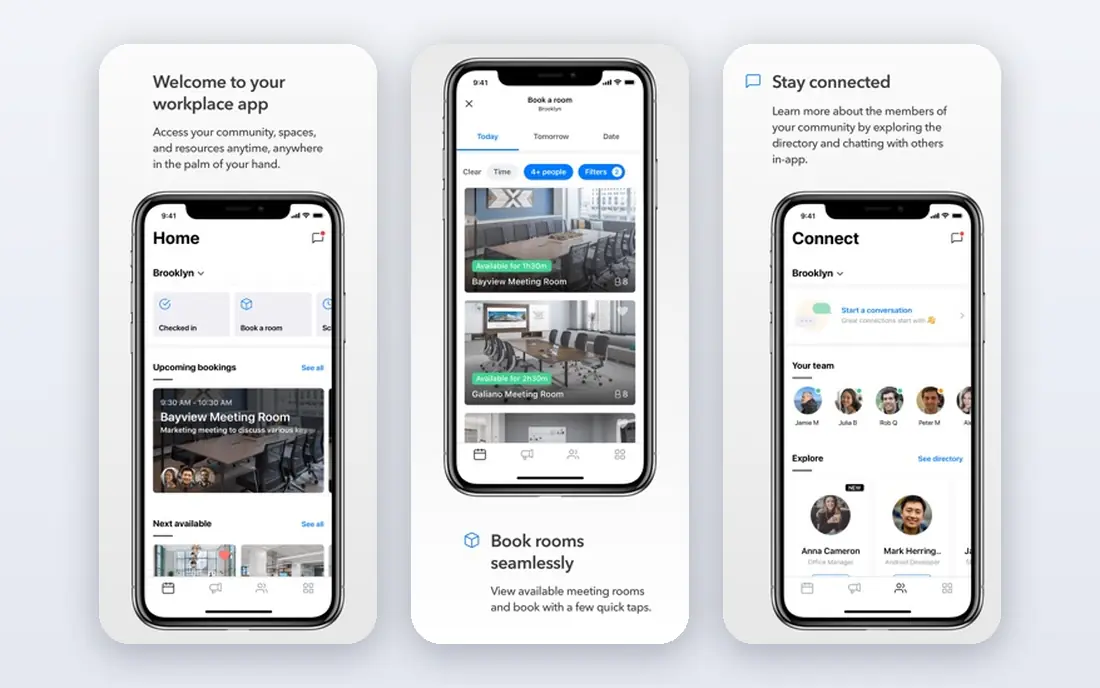
Optix puts member experience first. The app feels polished, bookings are quick, and community features help members feel part of the space. For boutique spaces that charge a premium, that app quality supports the brand.
The price reflects that polish, so small spaces on tight budgets should compare total cost with Cobot or Coworks. If your members judge the space by the app, Optix is worth the premium.
- Polished mobile-first member app, automation, booking and billing tools
- Higher starting price than Cobot, some enterprise reporting needs higher tiers
Cobot keeps the core jobs simple. Members book desks and rooms, pay invoices, and manage plans, while staff handle day-to-day work without a complex system. Setup is faster than Nexudus or OfficeRnD Flex, which helps new spaces open on time.
Larger operators may miss deeper CRM, automation, and custom reporting. For a single space with under a few dozen members, Cobot covers what matters and stays out of the way.
- Simple setup, clear bookings and billing, low admin burden
- Fewer advanced CRM and automation features, less suited to large multi-location brands
Spacebring
Best for: Operators who want a branded member app and community tools
Spacebring bundles a branded member app with bookings, billing, and community tools. Members see your brand, not a generic portal, which helps independent spaces stand out. Event and news features also support community building, a key reason members renew.
Door access and accounting links need checking for your specific hardware and tools. If those links work for your stack, Spacebring offers strong value for small to mid-size operators who care about brand and community.
- Branded app included, bookings, billing, events and community features
- Price can rise with add-ons, setup needs care for door access links
Yardi Kube suits landlords and portfolio operators who already use Yardi tools. Flex bookings, billing, and member data can sit alongside property reporting, which helps finance teams see the full picture. Enterprise controls suit larger teams with compliance needs.
Independent operators will find the setup and pricing heavy. If you are not in the Yardi ecosystem, OfficeRnD Flex or Nexudus will likely be faster to launch. For portfolio owners, Kube is the natural fit.
- Links to Yardi property systems, portfolio reporting, enterprise controls
- Quote-based pricing, heavier setup, overkill for a single independent space
Archie focuses on booking and member experience inside Microsoft Teams. Staff and members can book desks and rooms without leaving Teams, which suits corporate flex offices. The interface is clean, and multi-location support helps growing teams.
Billing and CRM depth varies by plan, so operators who sell many membership types should test those flows. For Microsoft-centered workplaces, Archie removes friction that other tools add.
- Microsoft Teams links, desk and room booking, member management
- Less coworking billing depth than Nexudus or Flex for some operators, newer brand than rivals
Coworks suits spaces where community is the product. Incubators, makerspaces, and nonprofit hubs can manage members, bookings, and events in one place, with tools that reflect shared missions. The setup stays approachable for small teams.
Larger commercial operators may want deeper reporting and automation from Nexudus or Flex. For community-led spaces, Coworks matches the culture and keeps admin light.
- Community tools, simple bookings and billing, niche space support
- Smaller integration list than larger platforms, less enterprise reporting depth
How we picked these
We compared official feature pages, pricing pages, app store listings, privacy policies, and public reviews. We kept platforms that are sold today, that handle coworking memberships, bookings, and billing, and that serve US and international operators. We favored member experience, automation, reporting, and integrations, and we left out generic booking tools with no membership billing. We did not claim hands-on testing.
How to choose coworking software
Count your real jobs first
List membership types, booking rules, billing cycles, door hardware, and accounting tools. A platform that misses one core link will create manual work every week. Bring that list to every demo, and ask vendors to show each job, not just a slide.
Test the member app as a member
Sign up, book a room, pay an invoice, and cancel a booking in the trial. If those steps feel slow or confusing, members will complain and staff will field tickets. The app is your brand after the tour, so judge it harshly.
Compare total cost over a year
Add base price, per-location fees, app fees, payment processing, and onboarding. A low headline price with paid add-ons can cost more than a higher all-in plan. Ask for a written quote for your member count before you sign.
Plan for busy hours and quiet weeks
Look at booking data by day and hour before you set membership caps. A space that feels full on Tuesday mornings may sit empty on Fridays, which changes how you price day passes and meeting rooms. Use that pattern to test off-peak offers, rather than cutting prices across the board.
Keep member feedback in the loop
Ask members each quarter what booking or billing step frustrates them most, then fix one item at a time. Small fixes, such as clearer room names or simpler invoice emails, often raise renewals more than a new feature. Share what you changed, so members see that feedback leads to action.
FAQ
What is the best coworking app for a small space?
Cobot is a strong pick for small spaces that want simple bookings and billing. Spacebring and Optix suit small spaces that want a stronger branded app. Start with your member count and budget, then trial the member signup flow.
How much does coworking software cost?
Prices vary by members, locations, and features, and many enterprise tools use quotes. Smaller tools list starting monthly prices on their sites, while larger tools price by quote. Compare total yearly cost, including add-ons and payment fees.
Do I need door access integration?
It helps, but it is not required on day one. Door links save staff time and improve security, yet they add setup cost and hardware needs. Start with bookings and billing, then add door access once membership is stable.
Can coworking software handle multiple locations?
Yes, Nexudus, OfficeRnD Flex, Yardi Kube, and Archie all support multi-location work. Check how plans, billing, and reporting split by location, since that detail varies. Test a member who uses two locations before you commit.
What is the difference between coworking software and desk booking software?
Coworking software adds memberships, billing, CRM, and community tools to booking. Desk booking software mainly handles desks and rooms for internal teams. Operators who sell memberships need the full coworking set, not just booking.
Sources
https://nexudus.com https://www.officernd.com https://www.optixapp.com https://www.cobot.me https://www.spacebring.com https://www.yardi.com https://www.archieapp.co https://www.coworks.com