Best Cloud Accounting Software in 2026: 8 Platforms Compared
Compare the best cloud accounting software for small businesses, with pricing, free plans, invoicing, payroll links, and accountant access reviewed in full.

- Editor's choice
 QuickBooks Online
Most US small businesses
Starts at$38 per monthVisit quickbooks.intuit.comFull review - Great alternative
 Xero
Teams with many users
Starts at$27 per monthVisit xero.comFull review - Also consider
 FreshBooks
Service businesses and freelancers
Starts at$23 per monthVisit freshbooks.comFull review
TL;DR:
- QuickBooks Online is the safest default for US businesses, mainly because most accountants already know it.
- Xero wins for teams, since every plan includes unlimited users and no per-seat charge.
- Wave and Zoho Books give genuinely low-cost starts, but check invoice limits and bank feed rules first.
- FreshBooks suits service businesses that live in invoices, while Sage and FreeAgent suit firms with UK tax needs.
Quick comparison
| Tool | Best for | Starts at | Free plan? | |
|---|---|---|---|---|
| QuickBooks Online | Most US small businesses | $38 per month | Free trial | Visit |
| Xero | Teams with many users | $27 per month | Free trial | Visit |
| FreshBooks | Service businesses and freelancers | $23 per month | Free trial | Visit |
 Wave | Solo owners on a tight budget | Free | Yes | Visit |
 Zoho Books | Low-cost full accounting | Free | Yes | Visit |
 Sage Accounting | Established firms and payroll | See website | Free trial | Visit |
 Kashoo | Simple books for tiny teams | $20 per month | Free trial | Visit |
 FreeAgent | UK freelancers and small firms | $27 per month | Free trial | Visit |
The best cloud accounting software
We compared official feature pages, pricing pages, app store listings, and public reviews for each platform, and we checked that each one is still offered in October 2026. Cloud accounting here means your books live online, with bank feeds, invoicing, and reports you can open from any device. This is not financial advice, and tax rules vary by state and country, so check the current rules for your business before you file.
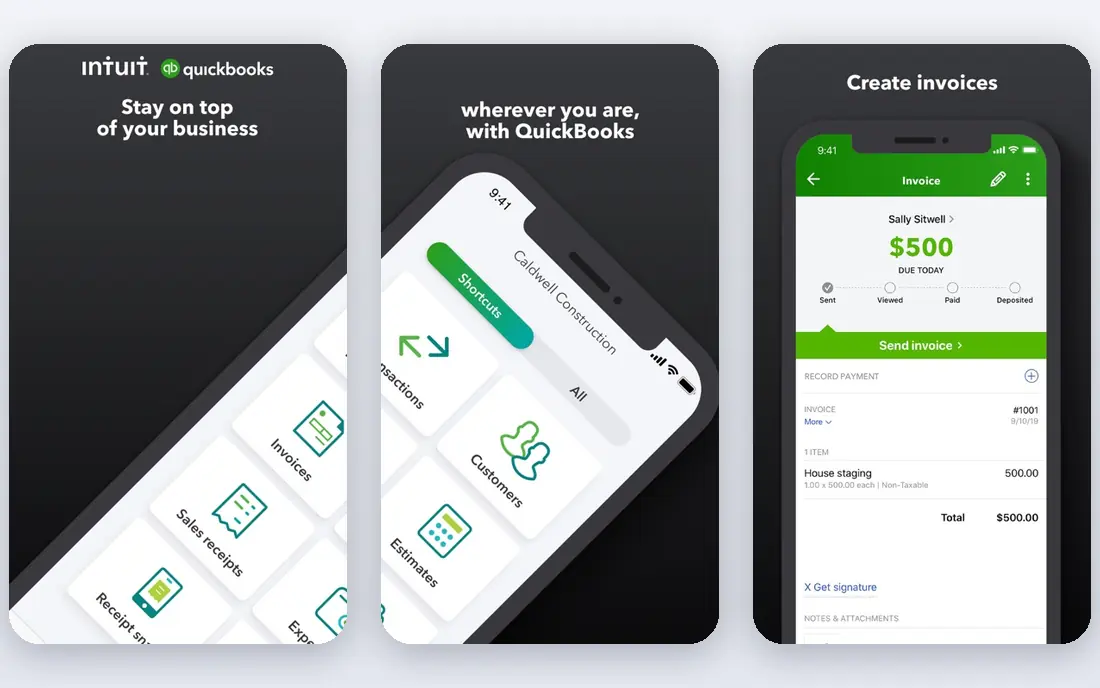
QuickBooks Online is the default pick for a reason that has little to do with design. Accountants in the US know it, bookkeepers know it, and most payroll and payment tools connect to it without fuss. The Simple Start plan covers invoicing, expense tracking, and basic reports, while higher plans add bill management, inventory, and more users. That path matters when a one-person firm grows into a team.
The cost is the catch. Only one user is included on Simple Start, and the monthly price climbs fast as you add users and features. The interface can also feel busy for a brand-new owner. Still, if you want the least friction with an accountant and a clear upgrade path, QuickBooks Online is our pick for most people.
- Widest accountant familiarity
- Strong reporting
- Large app ecosystem
- Per-user limits on lower plans
- Price rises sharply on higher tiers
Xero takes a different pricing idea: every plan includes unlimited users, so a co-owner, a bookkeeper, and an accountant can all log in without extra seat fees. Bank reconciliation is fast once feeds are connected, and the app marketplace covers payments, inventory, and time tracking. For a team of three or more, that structure often beats QuickBooks on total cost.
The entry plan is limited, with caps on invoices and bills each month, and multi-currency sits on higher plans. US payroll also comes through partners rather than as a built-in Xero product. If you have several people touching the books, or you work with an accountant who prefers Xero, it is a strong and often cheaper choice.
- Unlimited users on every plan
- Clean bank reconciliation
- Large app marketplace
- Entry plan caps invoices and bills
- Payroll is an add-on in the US
FreshBooks started as invoicing software, and that focus still shows. Invoices look clean, clients can pay online, and time tracked on a project can turn into an invoice in a few clicks. For consultants, designers, agencies, and other service firms, that daily workflow matters more than advanced inventory or job costing. Setup is quick, and the learning curve is gentle.
The trade-off is accounting depth. Lower plans limit billable clients, and firms with inventory, complex payroll, or detailed manufacturing costs will outgrow it. FreshBooks is best when getting paid on time is the main job, and the books are otherwise simple. Pair it with an accountant for year-end tax work.
- Excellent invoicing and client experience
- Time tracking
- Simple setup
- Client limits on lower plans
- Lighter on deep accounting than QuickBooks
Wave offers free invoicing and double-entry accounting, which is rare. A solo owner can send unlimited invoices, track income and expenses, and run basic reports without a monthly fee. That makes it a real option for side businesses, new freelancers, and owners who want to learn bookkeeping before they pay for software.
The free plan has limits that matter. Automatic bank feeds and receipt capture sit on the paid Pro plan, so free users enter more by hand. Payroll is also paid, and support options are lighter than on paid platforms. If your transaction volume is low and you are happy to import statements yourself, Wave is the best free start here.
- Free invoicing and double-entry books
- Simple interface
- No revenue cap on free plan
- Automatic bank import needs the paid plan
- Payroll is a paid add-on
Zoho Books gives small firms a full accounting tool at a low price, with a free plan for businesses under a set revenue threshold. Invoicing, expenses, bank reconciliation, and reports are included, and automation can chase late payments and sort recurring transactions. Firms already using Zoho CRM, Zoho Inventory, or Zoho Payroll get the most from it, since data flows between apps.
The free plan is not for every firm, because it caps annual revenue and invoice volume, and higher plans are needed for larger teams. Support and integrations outside Zoho are good but not as broad as QuickBooks or Xero. For a cost-conscious owner, especially one already in Zoho, it is excellent value.
- Free plan for smaller businesses
- Strong automation
- Deep Zoho suite links
- Free plan has a revenue limit
- Best value inside the Zoho ecosystem
Sage has served small businesses for decades, and Sage Accounting brings that history to the cloud. It covers invoicing, bank feeds, cash flow forecasting, and payroll links, and it is a familiar name for many UK accountants. Firms that already use Sage desktop products or Sage Payroll often find the move to the cloud version straightforward.
Pricing varies by country and plan, so check the Sage site for your region rather than trusting a roundup figure. The design is less modern than Xero or FreshBooks, and some features sit behind higher tiers. For an established firm that values Sage support and payroll integration, it remains a dependable pick.
- Long track record
- Payroll links
- Clear VAT and tax tools in the UK
- Pricing varies by country
- Interface feels dated in places
Kashoo aims at owners who want simple books without a long setup. You can connect a bank, send invoices, track expenses, and see profit and loss without learning accounting terms first. The entry price is low, and the interface stays out of the way, which suits very small teams and side businesses.
The limits show up as you grow. Integrations are fewer than on QuickBooks, Xero, or Zoho, and reporting is more basic. Firms with inventory, multi-currency needs, or complex payroll will need a larger tool. For a tiny team that wants clean, simple books, Kashoo does the job without overcharging.
- Simple setup
- Invoicing and expense tracking
- Low entry price
- Fewer integrations than larger rivals
- Reports are basic
FreeAgent is built around UK freelancers, contractors, and small companies, with tax timelines, invoicing, time tracking, and expense tools in one place. Some UK business bank customers can use it free for as long as they hold the account, which makes it hard to beat on price in the UK. The dashboard explains what tax is due and when, in plain terms.
For US businesses, FreeAgent is a weaker fit, since its tax and payroll tools are UK-centred. Even in the UK, larger firms with inventory or multi-entity needs may outgrow it. If you are a UK sole trader or small limited company, though, FreeAgent is one of the easiest tools to run day to day.
- Built for UK tax
- Time tracking and invoicing
- Free via some UK banks
- US features are limited
- Best value is UK-focused
How we picked these
We compared official pricing pages, feature pages, app store listings, and public reviews, and we confirmed each platform is still sold in October 2026. We favoured tools with bank feeds, invoicing, and reports, plus a clear price or free plan. We left out desktop-only software, tools that only send invoices with no double-entry books, and platforms whose pricing could not be checked.
Choosing the right cloud accounting platform
Start with who else touches your books. If you have an accountant, ask what they use, because a tool they know will save time at year end. Next, count users and invoices. A solo freelancer can start free on Wave or Zoho Books, while a team of five will often save money on Xero's unlimited users or pay more on a per-user plan.
Check the limits before you commit
Entry plans hide limits in invoice counts, user counts, and bank feed rules. Run a free trial with your real bank and a month of real transactions, not just a demo. Test invoicing, reconciliation, and one report you actually need, such as profit and loss. If payroll, inventory, or multi-currency matters, confirm it is included on the plan you would buy, not just on the top tier.
Switching later is possible, but plan for it
Most platforms export data, but moving years of history takes time and care. Keep a backup of invoices and reports before you switch, and run old and new systems side by side for one month if you can. That overlap catches missing transactions before they become tax problems.
FAQ
What is the best cloud accounting software for a small business?
QuickBooks Online is the safest general pick in the US, because accountants know it and it scales well. Xero is often better for teams, since users are unlimited. Solo owners should try Wave or Zoho Books first, since the free plans cover the basics.
Is there truly free cloud accounting software?
Yes. Wave offers free invoicing and accounting, and Zoho Books offers a free plan for businesses under a revenue limit. Both charge for payroll and some extras, and Wave's automatic bank import needs the paid plan. Check those limits before you rely on the free tier.
What is the best platform for cloud accounting with payroll?
QuickBooks Online and Sage Accounting both link closely to payroll, while Xero and Zoho Books use payroll add-ons or partners. Gusto and other payroll tools also connect to these platforms. Choose the accounting tool first, then confirm the payroll link works in your state.
Can I use cloud accounting software without an accountant?
Yes, for simple businesses with clean bank feeds and regular reconciliation. An accountant is still worth it for tax planning, year-end filings, and complex cases such as inventory or multi-state sales. Many firms do daily books themselves and use an accountant quarterly or yearly.
Is FreshBooks real accounting software?
FreshBooks covers invoicing, expenses, time, and reports, and it works well for service businesses. It is lighter on pure double-entry depth than QuickBooks, Xero, or Zoho Books. If your books are simple and invoicing is central, it is enough. If you need inventory or complex reporting, pick a fuller platform.
How do I choose between QuickBooks and Xero?
Count users first. QuickBooks charges per user on most plans, while Xero includes unlimited users. Then check your accountant's preference and whether you need inventory, payroll, or multi-currency. Trial both with real transactions before you commit to a year.