Best Cash Flow Software in 2026: 8 Tools Compared
Compare the best cash flow software for small businesses, with forecasting, bank links, scenario planning, current pricing for each tool, and 2026 picks.
- Editor's choice
 Float
Visual forecasting for small firms
Starts atSee websiteVisit floatapp.comFull review - Great alternative
 QuickBooks Online
Accounting plus cash flow views
Starts atSee websiteVisit quickbooks.intuit.comFull review - Also consider
 Xero
Accounting plus cash flow views
Starts atSee websiteVisit xero.comFull review
TL;DR:
- Float is our pick for small businesses that want clear, visual cash flow forecasting linked to accounting data.
- QuickBooks and Xero suit firms that want cash flow views inside the accounting tool they already use.
- Pulse and Dryrun suit smaller teams that want simple, focused forecasting without a full accounting suite.
- PlanGuru and Fathom suit firms that need deeper budgets, scenarios, and client reporting.
- A forecast is only useful if it updates often: link bank and accounting data, and review it weekly.
Quick comparison
| Tool | Best for | Starts at | Free plan? | |
|---|---|---|---|---|
| Float | Visual forecasting for small firms | See website | No | Visit |
| QuickBooks Online | Accounting plus cash flow views | See website | No | Visit |
| Xero | Accounting plus cash flow views | See website | No | Visit |
 Pulse | Simple cash flow forecasting | See website | No | Visit |
 Dryrun | Scenario forecasting for growing firms | See website | No | Visit |
 PlanGuru | Budgets and detailed forecasts | See website | No | Visit |
 Fathom | Reporting and forecasting for advisors | See website | No | Visit |
 Futrli | Forecasting and client reporting | See website | No | Visit |
The best cash flow software
Cash flow software answers a simple question: will you have enough cash in the bank next week, next month, and next quarter. Some tools answer it inside an accounting system, while others focus only on forecasting with scenarios and charts. The eight below cover both, so you can pick by whether you need accounting, forecasting, or both.
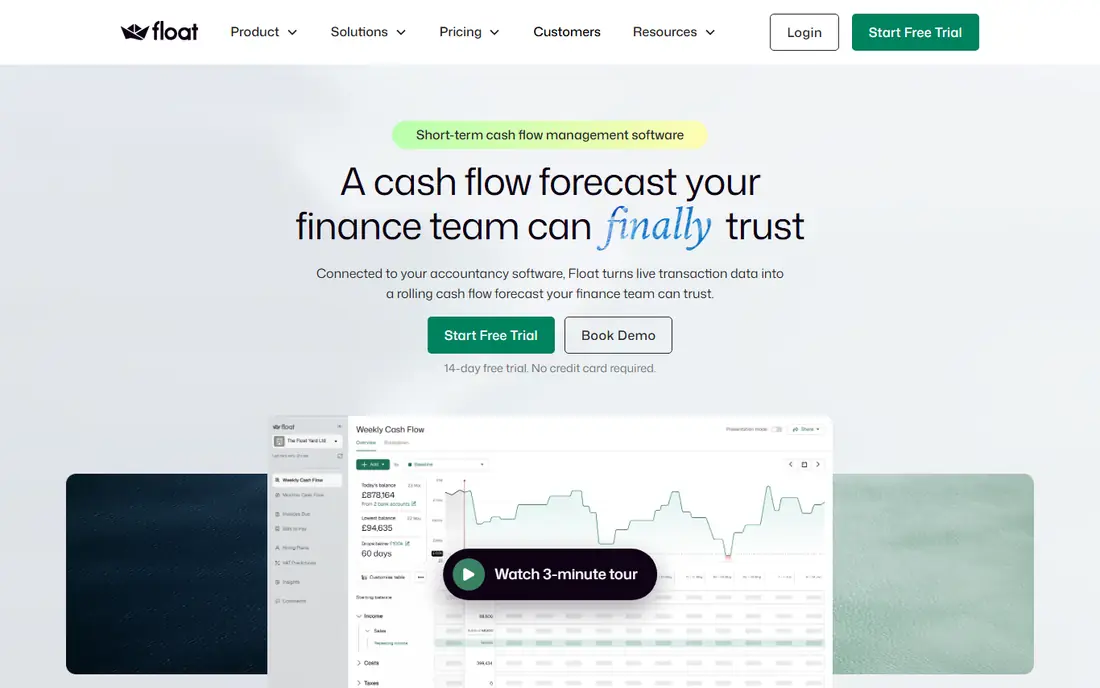
Float turns accounting data into a visual cash flow forecast, with timelines, scenarios, and cash-in and cash-out views that non-accountants can understand. You can test what happens if a large invoice pays late, if hiring moves forward, or if sales dip, and see the cash impact at once. That scenario view is what separates a forecast from a simple bank balance check.
Float works best when linked to an accounting tool like Xero or QuickBooks, since manual data entry defeats the purpose of a live forecast. Pricing varies by plan and accounting partner, so check the current site for your setup. For a small business that wants to see cash trouble before it arrives, Float is a clear and practical choice.
- Clear visual forecasts
- Links to accounting data
- Scenario planning
- Needs an accounting link for best results
- Pricing is quote-based for many firms

QuickBooks Online is the accounting system many small US businesses already use, and it includes cash flow tools such as a cash flow planner, reports, and bank connections. That means a business can track invoices, expenses, payroll, and cash in one place, without adding a separate forecast tool at first. For a firm that is already on QuickBooks, the cash flow views are a natural starting point.
Dedicated forecasting tools offer deeper scenarios and visuals than QuickBooks, so firms with tight cash, seasonal swings, or growth plans may still add Float or Dryrun. Plan tiers also affect which cash flow features you get, so check the current plan details. If you need accounting first and forecasting second, QuickBooks is a sensible all-in-one pick. This is not financial advice, and cash decisions should be reviewed with your accountant.
- Widely used accounting
- Cash flow planner and reports
- Bank links
- Cash forecasting is less deep than Float
- Costs rise with plan tier

Xero is a popular cloud accounting tool for small businesses, with invoicing, bank reconciliation, expenses, and a short-term cash flow view built in. The cash flow dashboard shows expected money in and out over the next weeks, which helps a business spot a shortfall early. Xero also connects to many forecasting apps, including Float and Futrli, so you can add deeper forecasting later without switching accounting systems.
Long-term scenario forecasting is not Xero's core strength, so firms that need quarterly or annual scenarios should plan for an add-on. Pricing varies by plan and region, so check the current Xero pricing page for your country. For a small firm that wants clean accounting with a useful cash view, Xero is a strong choice.
- Clean accounting
- Short-term cash flow view
- Strong app ecosystem
- Long-term forecasting needs an add-on
- Pricing varies by region and plan
Pulse is a focused cash flow tool: you enter expected income and expenses, and Pulse shows your projected bank balance over time in clear charts. That simplicity suits freelancers, agencies, and small firms that do not need a full accounting suite but do need to know when cash will dip. Setup is fast, and the interface stays free of accounting jargon.
Pulse does not replace accounting software, so firms that also need invoicing, payroll, and tax reports will pair it with QuickBooks, Xero, or another system. Manual entry also means you need to update Pulse regularly for the forecast to stay accurate. If you want a simple, dedicated forecast without accounting complexity, Pulse is a good fit.
- Simple, focused forecasting
- Easy cash-in and cash-out entry
- Clear charts
- Less accounting depth
- Manual entry suits smaller firms best
Dryrun focuses on cash flow forecasting with scenarios, letting you model best, expected, and worst cases and compare them side by side. That helps a growing firm answer questions like “what if our biggest client pays 30 days late” or “what if we hire two people next quarter.” Links to accounting data keep the baseline forecast current, so scenarios start from real numbers rather than guesses.
Setting up good scenarios takes thought, and new users should expect a short learning curve around assumptions and timing. Pricing is quote-based, so get a proposal for your team size and accounting setup. For a firm that makes decisions based on cash scenarios, Dryrun offers more depth than a simple chart tool.
- Strong scenario modeling
- Links to accounting data
- Clear cash timelines
- Learning curve for scenario setup
- Pricing is quote-based
PlanGuru is a budgeting and forecasting tool for businesses and accountants who need detailed, multi-year plans. It covers budgets, forecasts, financial statements, ratios, and break-even analysis, with tools for comparing actuals to plan. Accountants like PlanGuru for client work, since it can produce structured, auditable forecasts rather than only charts.
The interface feels more like traditional budgeting software than a modern visual app, and new users need time to learn its structure. Small firms that only need a short-term cash view may find PlanGuru heavy. For a firm or an accountant that needs a detailed budget and forecast pack, PlanGuru is a serious, proven option.
- Detailed budgeting
- Multi-year forecasts
- Ratio and break-even analysis
- Desktop feel and learning curve
- Less visual than Float
Fathom turns accounting data into reports, KPIs, and forecasts that managers and advisors can actually read. It links to Xero, QuickBooks, and other systems, then builds profitability, cash flow, and growth reports with clear visuals. Accountants use Fathom to give clients monthly packs that explain performance and cash, not just a set of numbers.
Fathom works best with clean accounting data, so messy books will limit its value until they are fixed. Pricing depends on the number of companies and users, so firms with many clients should model that cost. For a business that wants reporting and forecasting together, or an advisor who reports to many clients, Fathom is a polished choice.
- Strong reporting and KPIs
- Forecasting and scenarios
- Client-ready visuals
- Needs accounting data
- Pricing rises with companies and users
Futrli offers cash flow forecasting, scenario planning, and reporting for small businesses and their accountants, with links to accounting systems. Its forecasts help a firm see future cash positions, test scenarios, and share a clear plan with an advisor or a lender. Advisor features also help accountants manage forecasts across many clients in one place.
Futrli is a smaller vendor than the accounting giants, so firms should check current support, integrations, and pricing for their accounting system before committing. Pricing is quote-based. For a small firm that wants a dedicated forecast tool with advisor support, Futrli is a credible option alongside Float and Dryrun.
- Cash flow forecasting
- Scenario tools
- Accountant and advisor features
- Smaller vendor than QuickBooks or Xero
- Pricing by quote
How we picked these
We compared official feature pages, pricing pages, and accounting reviews for tools with real cash flow forecasting, bank or accounting links, and scenario or reporting features. We kept accounting tools and dedicated forecast tools in the same list but flagged the difference, so readers do not expect QuickBooks to match Dryrun on scenarios or Pulse to match QuickBooks on accounting. We did not claim hands-on testing, and we used vendor pages for pricing, since many tools price by plan, company count, or quote. This is not financial advice.
How to use cash flow software well
Link data and update weekly
Connect bank feeds and accounting data where possible, and review the forecast weekly, not only when cash feels tight. A forecast that is a month old is a guess, not a plan. Update expected invoice dates, payroll, and large expenses as soon as they change.
Build three scenarios
Keep a base case, a late-payment case, and a low-sales case, and know what action each one triggers. A scenario is only useful if it leads to a decision, such as delaying a hire, chasing an invoice, or arranging a credit line before you need it.
Separate profit from cash
A profitable business can still run out of cash if customers pay slowly, stock builds up, or tax bills land together. Watch cash timing, not just profit, and track receivables age, payables timing, and upcoming tax and loan payments in the same review.
FAQ
What is the best cash flow forecasting software for small business?
Float is the best dedicated pick for small businesses that want visual forecasting linked to accounting data, while Pulse suits smaller firms that want a simple forecast. QuickBooks and Xero suit firms that want cash views inside accounting they already use. Choose based on whether you need accounting, forecasting, or both.
What is the best cash flow app for freelancers?
Pulse or a simple Xero or QuickBooks cash view suits most freelancers, since the key need is seeing when client payments will land against rent, tax, and bills. Keep the forecast simple, update invoice dates weekly, and set aside tax money as income arrives. A complex scenario tool is usually overkill for a solo freelancer.
How often should I check my cash flow forecast?
Weekly is a good rhythm for most small businesses, with a deeper monthly review for scenarios and budgets. Check more often during growth, seasonal dips, or when a large payment is due. A weekly ten-minute review catches problems early, when you still have options to fix them.
Does cash flow software replace an accountant?
No. Software shows numbers and scenarios, but an accountant helps with tax timing, loan terms, pricing, and decisions that software cannot judge. Use the forecast to have better conversations with your accountant, and share the scenario views before major hires, loans, or investments.
Can cash flow software predict the future exactly?
No, it projects based on assumptions about payments, sales, and costs, and those assumptions will be wrong in detail. The value is in seeing the range of outcomes and the timing of risks, not in a single exact number. Update assumptions often, keep scenarios, and treat the forecast as a planning tool, not a guarantee.