Best App for EV Charging Stations in 2026: 8 Apps Compared
Best app for EV charging stations compared for 2026: we review eight apps to find, check, pay for and plan charging on road trips and daily drives today.
- Editor's choice
 PlugShare
Checking which chargers actually work
Starts atFreeVisit plugshare.comFull review - Great alternative
 ChargePoint
Workplace, retail and destination charging
Starts atFreeVisit chargepoint.comFull review - Also consider
 Electrify America
Highway DC fast charging
Starts atFreeVisit electrifyamerica.comFull review
TL;DR:
- PlugShare is our pick for most drivers because driver check-ins and photos show which chargers actually work.
- Use a network app alongside PlugShare, since only the network app can reliably start a charge and show exact pricing.
- A Better Routeplanner is best for road trips, because it plans charging stops around your car, battery and route.
- Charging prices vary by site and membership, so check the price in the app before you plug in.
Quick comparison
| Tool | Best for | Starts at | Free plan? | |
|---|---|---|---|---|
| PlugShare | Checking which chargers actually work | Free | Yes | Visit |
| ChargePoint | Workplace, retail and destination charging | Free | Yes | Visit |
| Electrify America | Highway DC fast charging | Free | Yes | Visit |
 EVgo | City and metro fast charging | Free | Yes | Visit |
 Tesla | Supercharger access and reliability | Free | Yes | Visit |
 A Better Routeplanner | Planning road trips with charging stops | Free | Yes | Visit |
 ChargeHub | One map for the US and Canada | Free | Yes | Visit |
 EV Connect | Network charging with fleet and site tools | Free | Yes | Visit |
The best apps for EV charging stations
We compared official app pages, network pricing pages and driver features for eight EV charging apps available in the United States in 2026.
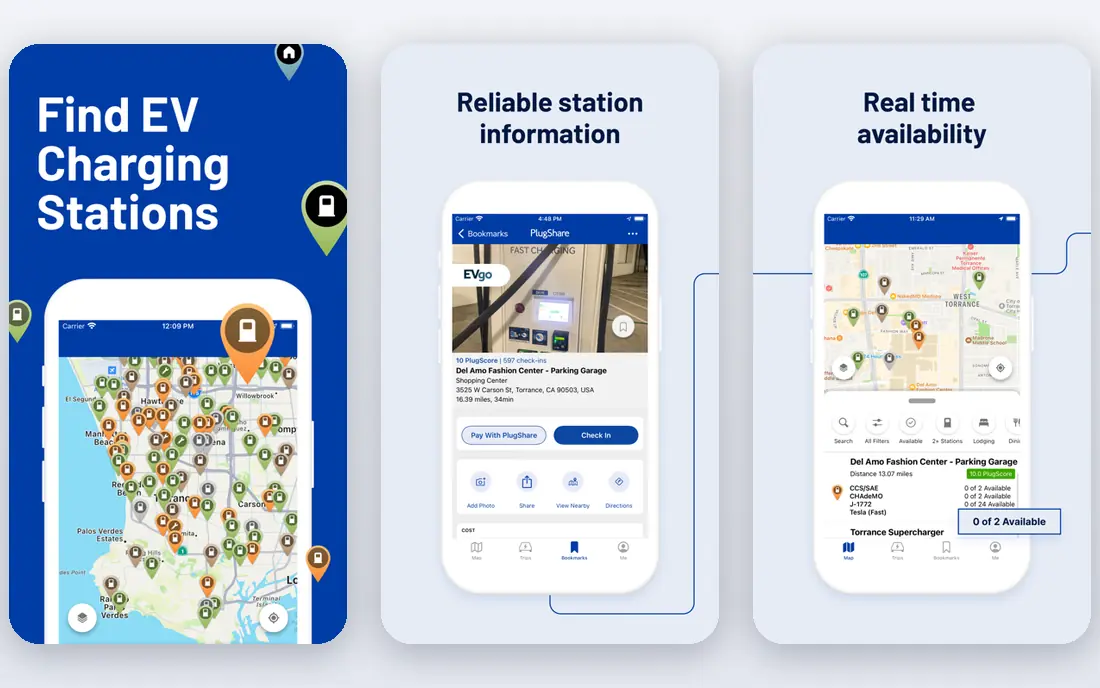
PlugShare is the closest thing to a single map for EV charging, because it lists stations from many networks and adds driver check-ins, photos and comments. That community detail matters more than the listing itself: a station with recent successful check-ins is a safer bet than a station with no recent activity, even if both look identical on a network map. Filters for plug type, charging speed, access and price help you narrow the map to chargers your car can actually use.
PlugShare can start charging at some participating sites, but it cannot start every session, so most drivers still need a network app for payment and activation. Treat PlugShare as your research tool and your backup plan, and use it to report problems after you charge. That habit helps the next driver, and it keeps the reliability data fresh.
- Covers many networks in one map
- Driver check-ins, photos and reviews
- Filters for plug type, power and price
- Cannot start every charge
- Some listings depend on driver reports
ChargePoint operates one of the largest charging networks by port count, with many Level 2 chargers at workplaces, hotels, shops and apartments, plus a growing number of DC fast sites. The app shows the price set by each site host before you start, which is essential, since the same network can be free at one site and costly at another. You can start sessions, track charging and manage payment in the app.
The main drawback is that ChargePoint does not set a national price, so you cannot budget from a single rate. Check the site price in the app, note any parking fees or time limits, and keep a backup charger in mind for busy locations. For daily Level 2 charging near work or home, ChargePoint is often the most convenient network app to carry.
- Large network of Level 2 and DC sites
- App shows host-set pricing
- Tap-to-charge and account billing
- Hosts set prices, so costs vary widely
- DC fast coverage is smaller than Tesla or Electrify America
Electrify America focuses on highway corridors and high-power DC fast charging, with many sites offering up to 350 kW for cars that can accept it. The app lets you find stations, see pricing, start sessions and track charging, and a Pass membership can lower the per-kilowatt-hour rate for frequent users. For road trips in a CCS or NACS-capable car, it is one of the main alternatives to Tesla Superchargers.
Pricing is set by site, so check the app before you arrive, and note that membership savings only pay off if you charge often enough. Some locations are busier or have fewer stalls than large Tesla sites, so check recent status in PlugShare as well. For long highway trips, Electrify America plus PlugShare is a strong pairing.
- High-power chargers up to 350 kW on many sites
- App payment and session tracking
- Pass membership for lower rates
- Prices vary by site
- Some sites have fewer stalls than Tesla locations
EVgo is built for city and metro drivers who need fast charging near grocery stores, retail centres and commuting routes. Its network includes many DC fast sites, often co-located with shops, and the app handles finding, payment and session tracking. A membership plan can lower rates for frequent users, though the saving depends on how often you charge and where.
Pricing varies by region and sometimes by pricing model, with per-kilowatt-hour rates in some areas and per-minute rates in others. That makes it important to check the app price for your specific site, especially if your car charges slowly. For urban drivers without home charging, EVgo is a practical daily option, particularly when combined with PlugShare reliability checks.
- Many metro and retail locations
- App payment and reservations at some sites
- Membership for lower rates
- Prices vary by region
- Some sites use per-minute pricing in certain areas
The Tesla app is essential for Tesla owners and increasingly useful for other EV drivers, since many Superchargers are now open to non-Tesla cars with the right adapter or native NACS port. Superchargers are known for consistent uptime, many stalls per site and clear in-app pricing, which reduces road trip stress. The app handles navigation, billing and session tracking in one place.
Non-Tesla drivers should check site compatibility in the app before routing to a Supercharger, since access varies by location and car. A monthly membership can bring non-Tesla pricing closer to member pricing, but it only pays off with frequent use. For road trips, Tesla remains the benchmark for fast charging, even as other networks grow.
- Largest fast charging network in the US
- Consistent reliability and many stalls
- App billing for Tesla and many non-Tesla cars
- Non-Tesla access varies by site and adapter
- Membership needed for member pricing for other EVs
A Better Routeplanner
Best for: Planning road trips with charging stops
A Better Routeplanner, often called ABRP, is the best trip planning tool in this list. Enter your car, starting battery, destination and preferences, and it plans charging stops, durations and arrival battery levels along the route. It accounts for speed, weather and charger power in a way that a simple map search cannot, which helps avoid arriving at a charger with too little reserve.
ABRP does not start most charges, so you still need PlugShare and network apps for activation and payment. The free plan covers core planning, while Premium adds more vehicle settings, live data and offline options. For any trip beyond your daily range, plan in ABRP first, then confirm each stop in PlugShare.
- Plans stops by car model, battery and weather
- Live charger data
- Premium adds more vehicle and route options
- Cannot start most charges
- Free plan limits some advanced settings
ChargeHub is a useful alternative to PlugShare, especially for drivers who travel between the United States and Canada. It maps chargers from many networks, offers trip planning, community reviews and payment at a large number of chargers. That cross-border coverage is a real advantage for road trips that cross into Canada, where some US-only apps have thinner data.
Payment support is not universal, so you may still need a network app for some sites. Data depth also varies by region, with stronger coverage in metro areas than in rural ones. Use ChargeHub as a second map and payment option, and cross-check busy or rural stops in PlugShare before you rely on them.
- Covers US and Canada in one app
- Payment at many chargers
- Trip planner and community reviews
- Network coverage details vary by region
- Payment support is not universal
EV Connect is a charging network and platform used by site hosts, fleets and drivers, with an app for finding stations, starting sessions and paying. It is a good option in areas where EV Connect hosts operate hotels, workplaces, apartments and fleet depots, and its platform tools help hosts manage pricing, access and maintenance. For drivers, the app covers the core job of finding and paying for a charge.
The public network is smaller than ChargePoint, Tesla or Electrify America, so EV Connect is best as an additional app rather than your only app. Check coverage in your home area and along your usual routes before relying on it. Where it is present, it adds a useful payment option without needing another account at each site.
- App payment and station finding
- Site host and fleet management tools
- Driver support in app
- Smaller public network than ChargePoint or Tesla
- Site availability varies by area
How we picked these
We compared official network pages, app store listings and pricing pages for EV charging apps available in the United States in October 2026. We required a working map or trip planner, current station data, and a free app tier. We favoured apps that can start or pay for charging, plus planning tools that improve road trips, and we noted where an app is for finding rather than paying.
How to build a charging setup that works
Carry three apps: PlugShare for reliability, ABRP for trip planning, and the network app for the chargers you use most. Before a trip, plan stops in ABRP, check recent PlugShare check-ins for each stop, and note a backup charger within range. Check plug type, power and price in the network app, and confirm that your car, adapter and payment method work at that site.
For daily driving, focus on home or workplace charging first, since public fast charging costs more per kilowatt-hour. If you cannot charge at home, compare memberships by counting your sessions per month, not by headline discounts. A membership that saves a few cents per kilowatt-hour only pays off after a set number of sessions, and prices change by site, so recheck the maths every few months.
FAQ
What is the best app for finding EV charging stations?
PlugShare is the best app for finding EV charging stations for most US drivers, because it covers many networks and adds driver check-ins, photos and reviews. ChargeHub is a good alternative, especially for US and Canada travel. Use a network app alongside either one to start and pay for charging.
What is the best EV charging station app for road trips?
A Better Routeplanner is best for road trip planning, since it plans charging stops by car, battery and route. Pair it with PlugShare to check reliability and with Tesla, Electrify America or EVgo apps to pay. Plan a backup stop for each leg, especially in rural areas.
Do I need a membership to charge an EV?
No. Most networks let you charge as a guest or with an app account and a payment card. Memberships such as Electrify America Pass, EVgo plans and Tesla membership for other EVs can lower rates, but they only save money if you charge often enough to cover the monthly fee.
How much does public EV charging cost?
Public DC fast charging often costs more than home charging, and prices vary by network, site, time and membership. Check the price in the network app before you plug in, since a national average does not reflect your site. Home charging is usually cheaper per kilowatt-hour than public fast charging.
Can non-Tesla cars use Tesla Superchargers?
Many Superchargers are open to non-Tesla cars with a native NACS port or an adapter, depending on site and car. Check compatibility in the Tesla app for the specific site before you route there. Some older sites remain Tesla only, and pricing for other EVs differs from Tesla owner pricing.
What is the best EV charging station software for site hosts?
ChargePoint, EV Connect and EVgo all offer host tools for pricing, access and management, with different network sizes and fees. Hosts should compare hardware options, software fees, payment handling and maintenance support. Drivers benefit most from hosts that keep pricing clear in the app and maintain stalls well.