Best All-in-One AI Workspace Tool in 2026: 8 Tools Compared
We compared the best all-in-one ai workspace tool options for notes, docs, tasks, and AI help, so you can pick one workspace instead of juggling many apps.

- Editor's choice
 Notion
Flexible docs and databases
Starts atFreeVisit notion.soFull review - Great alternative
 ClickUp
Project-focused workspace
Starts atFreeVisit clickup.comFull review - Also consider
 Coda
Docs that act like apps
Starts atFreeVisit coda.ioFull review
TL;DR:
- Notion is the most flexible all-in-one workspace, but full AI features now sit on its Business plan.
- ClickUp suits teams that want tasks, docs, chat, and AI in one project-focused workspace.
- Coda suits teams that want documents that behave like apps, with tables and automations built in.
- Taskade and Mem suit smaller teams and individuals who want a lighter, faster workspace.
- Obsidian and Anytype suit people who want local files and more control over their own data.
Quick comparison
| Tool | Best for | Starts at | Free plan? | |
|---|---|---|---|---|
| Notion | Flexible docs and databases | Free | Yes | Visit |
| ClickUp | Project-focused workspace | Free | Yes | Visit |
| Coda | Docs that act like apps | Free | Yes | Visit |
 Taskade | Light team workspace | Free | Yes | Visit |
 Mem | Fast AI notes | Free | Yes | Visit |
 Slite | Team documentation | See website | Free trial | Visit |
 Fibery | Connected work apps | See website | Free trial | Visit |
 Obsidian | Local linked notes | Free | Yes | Visit |
The best all-in-one AI workspace tools
An all-in-one AI workspace should hold your notes, documents, tasks, and knowledge in one place, with AI that can search, summarize, and draft across all of it. The eight tools below take different routes to that goal, from flexible databases to local files.
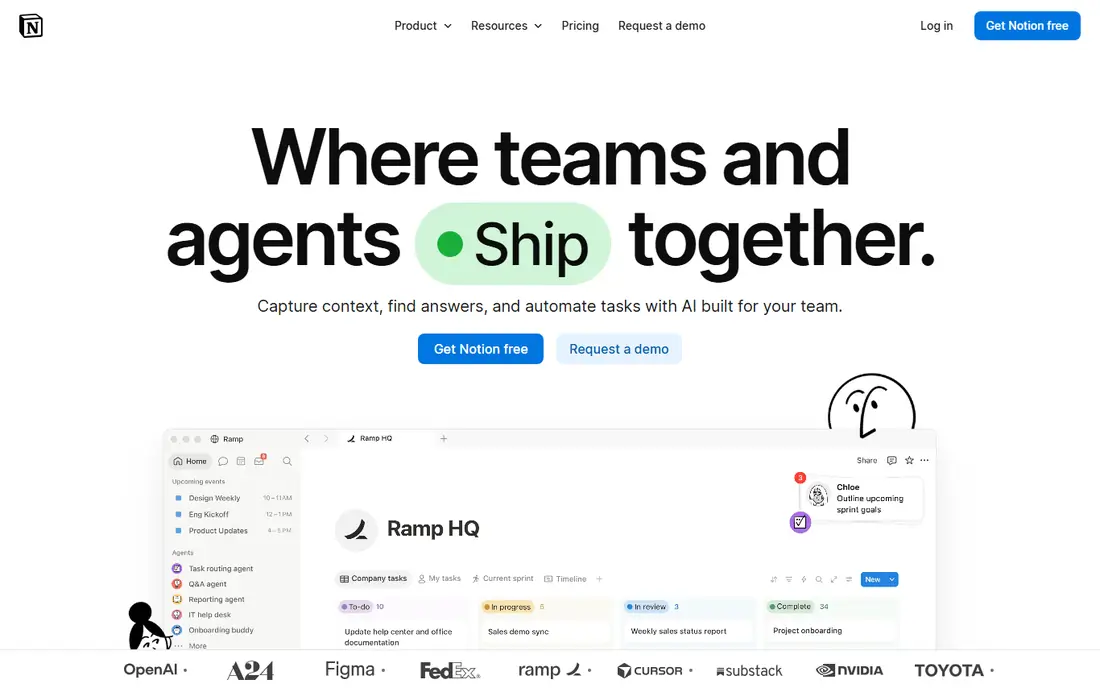
Notion remains the benchmark for all-in-one workspaces because it bends to so many uses. A team can run meeting notes, a wiki, a content calendar, and a project tracker in one place, and the AI can summarize long pages or find answers buried in your docs. The template library means most teams start from something close to what they need.
The pricing change matters. Free and Plus plans now include only a limited AI trial, while full AI, including the agent and meeting notes, sits on the Business plan. If AI is your main reason for choosing Notion, budget for that tier. For teams that mainly need a flexible workspace with occasional AI help, the lower plans still offer a lot.
- Notes, docs, wikis, and databases in one workspace
- Large template library
- AI can summarize pages and answer questions across your workspace
- Full AI features require the Business plan
- Large workspaces can feel slow
- Flexibility can turn into clutter without housekeeping

ClickUp starts from project management and grows outward, which suits teams whose work is mostly tasks with deadlines. Docs live next to the tasks they describe, dashboards show progress, and the AI can draft content, summarize threads, and break large tasks into subtasks. That combination means fewer apps to check each morning.
New users sometimes find the number of views, statuses, and automations a lot to absorb. Spend time setting up one project well before rolling it out to a whole team. For task-driven teams that want AI inside their project tool rather than in a separate app, ClickUp is a strong pick.
- Tasks, docs, dashboards, calendars, and chat in one platform
- AI writes, summarizes, and creates subtasks
- Generous free plan for small teams
- Feature depth can overwhelm new users
- Setup takes time to get right
- AI quality varies by task type
Coda treats a document as a small app. Tables can act like databases, buttons can trigger actions, and automations can move work along without manual steps. AI fits naturally into that model, drafting text, summarizing long docs, and helping build tables. Teams often use Coda for a single hub doc that tracks projects, goals, and decisions.
The tradeoff is that Coda is less casual than a notes app. Jotting a quick note feels heavier than in Mem or Obsidian, and building a complex doc takes practice. If your team wants one living document that also does work, Coda is worth the learning curve. If you mainly want fast notes, look elsewhere.
- Documents with tables, buttons, and automations
- AI can draft and summarize inside docs
- Good for trackers and team hubs
- Learning curve for building complex docs
- Less of a general note-taking app
- Pricing grows with larger teams
Taskade aims for the middle ground between a notes app and a project platform. You get task lists, mind maps, documents, and team chat in one clean workspace, with AI that can generate outlines, draft content, and run repeatable workflows through agents. Small teams often find it faster to adopt than heavier platforms.
Larger organizations may hit limits on structure and reporting that Notion or ClickUp handle better. The free plan is a fair way to test whether the simpler model fits your team. For freelancers and small teams who want one tidy workspace without a long setup, Taskade is an appealing choice.
- Combines tasks, notes, docs, and chat in a clean interface
- AI agents can automate parts of a workflow
- Easy to start and share
- Less depth than Notion or ClickUp for large projects
- AI agent pricing can add up
- Smaller template ecosystem
Mem is built around a simple idea. You capture notes quickly, and the AI organizes, connects, and surfaces them when you need them. Instead of folders and tags you must maintain, Mem tries to keep related notes linked automatically. For individuals and small teams drowning in scattered notes, that approach can feel like a relief.
It is not a project management platform, so teams that need dashboards, timelines, and workload views will want ClickUp or Notion instead. The free plan caps how many notes you can create each month, which is enough to test the workflow but not for heavy use. If notes are your main problem, Mem solves that problem directly.
- AI is built into the whole product
- Fast capture and automatic organization
- Good for personal knowledge and small teams
- Free plan limits monthly notes
- Less project management depth than ClickUp
- Smaller ecosystem than Notion
Slite deliberately does less than Notion, and for documentation-focused teams that is a feature. The editor is clean, docs stay organized, and the AI assistant helps draft pages and answer questions from your knowledge base. Remote teams often like how Slite keeps decisions and processes easy to find without a sprawling workspace.
Power users who want databases, complex project views, or a large integration library will find Slite limiting. It is best judged as a documentation tool with AI help, not as a replacement for a full project platform. For a team whose main need is a tidy, searchable handbook, Slite is a calm and capable choice.
- Clean, fast team docs
- AI assistant helps write and find answers
- Good for remote teams that value async clarity
- Less powerful than Notion for databases and complex workflows
- Smaller template library
- Fewer integrations
Fibery suits teams that outgrow generic tools and want a workspace shaped around their actual process. You can link products, features, tasks, and feedback into one connected system, so a feature request can trace through to the work that addresses it. AI helps draft and analyze inside that structure.
That flexibility demands setup. A team needs someone willing to design the workspace before everyone else uses it, and casual users may find it heavier than Notion. If your work involves many connected pieces, such as product development, Fibery rewards the effort. For simple notes and tasks, a lighter tool is a better fit.
- Connects docs, tasks, and databases into custom work apps
- Flexible relations between different kinds of work
- AI assists writing and analysis
- Setup takes thought and time
- Less suited to casual note-taking
- Pricing aimed at teams rather than individuals
Obsidian takes a different path from every other tool here. Your notes live as plain text files on your own device, so you own them outright and can read them with any editor years from now. Personal use is free, and a large plugin community adds features, including AI writing help through your own model provider key.
That independence has costs. Syncing across devices is a paid add-on, and AI is not built in the way it is in Notion or Mem. You also need to be comfortable setting up plugins. For writers, researchers, and privacy-minded users who value control and longevity, Obsidian is an excellent foundation, even if it needs more assembly than its rivals.
- Notes stored as plain Markdown files on your device
- Free for personal use
- Large plugin community for AI and other features
- AI arrives through plugins and your own API key
- Sync between devices is a paid add-on
- Setup takes more effort than cloud apps
How we picked these
We compared official feature and pricing pages for workspaces that combine notes, documents, and tasks with built-in AI, and we favored tools that are actively sold and supported in October 2026. We weighed the breadth of the workspace, how deeply AI is built in, pricing for individuals and teams, and how easy it is to get data out again. Single-purpose note apps without task or database features were left out.
How to choose without migrating twice
Switching workspaces is costly, so pick based on how your team actually works rather than a feature list. A tool that fits your daily habits will beat a more powerful tool that nobody opens. Run a small pilot with real work before moving a whole team.
Match the tool to the work
Task-driven teams usually do best with ClickUp or Fibery, while documentation-driven teams suit Slite or Notion. Individuals with heavy note loads suit Mem or Obsidian. If you need a bit of everything and have patience for setup, Notion or Coda will cover the most ground.
Check the AI pricing, not just the headline price
AI is often gated behind a higher plan or metered separately, as Notion's Business plan and agent credits show. Add up seats plus AI costs for your real team size, and test the AI on your own documents during a trial. A workspace that charges extra for the AI you actually need can quickly cost more than a pricier plan that includes it.
FAQ
What is the best all-in-one ai workspace tool for a small team?
Notion and ClickUp are the safest starting points for most small teams. Notion suits teams that live in docs and wikis, while ClickUp suits teams that live in tasks and deadlines. Taskade is worth trying if both feel too heavy, and Slite fits teams that mainly need documentation.
Is Notion AI free?
Notion offers a limited AI trial on its Free and Plus plans, but full AI features, including the agent and meeting notes, require the Business plan. Check the current pricing page before budgeting, since Notion has changed how it packages AI. Custom agents may also use credits on top of seat prices.
Can I use an AI workspace offline?
Obsidian and Anytype-style local tools work offline by design, since files live on your device. Cloud workspaces like Notion, ClickUp, and Coda need an internet connection for full use, though some offer limited offline access in their apps. If offline work matters, a local-first tool is the safer choice.
How do I move my notes into a new workspace?
Most tools on this list import from Markdown, CSV, or other popular apps, and Notion and ClickUp both offer importers for common formats. Export a sample first and check that formatting, images, and links survive. Keep your old workspace read-only for a month after moving, in case something is missing.
Are my notes used to train AI models?
Policies differ by vendor and plan, and they change, so read the current privacy terms before entering sensitive work. Local tools like Obsidian keep files on your device, and plugin-based AI sends text to the model provider you choose. For business use, prefer vendors that publish clear data processing terms.