Best AI Chatting App in 2026: 8 Apps Compared
Compare the best AI chatting app options for everyday chat, writing, and research. We reviewed 8 apps with clear safety and privacy practices. in October 2026.
- Editor's choice
 ChatGPT
Everyday chatting and tools
Starts at$20 per monthVisit chatgpt.comFull review - Great alternative
 Claude
Long writing and analysis
Starts at$20 per monthVisit claude.comFull review - Also consider
 Gemini
Google ecosystem users
Starts at$19.99 per monthVisit gemini.google.comFull review
TL;DR:
- ChatGPT is the best AI chatting app for most people, thanks to a strong free tier, broad tools, and wide app support.
- Claude suits long writing and careful analysis, Gemini suits Google app users, and Perplexity suits research with sources.
- All of the apps on this list publish safety, privacy, and moderation policies, and we left out apps without clear practices.
- Free tiers handle most everyday chats well, and paid plans mainly add higher limits, stronger models, and priority access.
- Check your data training setting on day one, and do not paste passwords, bank details, or sensitive personal data into a personal plan.
Quick comparison
| Tool | Best for | Starts at | Free plan? | |
|---|---|---|---|---|
| ChatGPT | Everyday chatting and tools | $20 per month | Yes | Visit |
| Claude | Long writing and analysis | $20 per month | Yes | Visit |
| Gemini | Google ecosystem users | $19.99 per month | Yes | Visit |
 Microsoft Copilot | Windows and Microsoft 365 users | Free | Yes | Visit |
 Perplexity | Research with sources | $20 per month | Yes | Visit |
 DeepSeek | Free advanced chatting | Free | Yes | Visit |
 Meta AI | Social and everyday chat | Free | Yes | Visit |
 Mistral Le Chat | European privacy focused chat | See website | Yes | Visit |
The best AI chatting apps
AI chatting apps now do far more than answer a question: they draft emails, explain topics, help with code, summarize documents, and create images. The differences that matter are model quality, free tier limits, privacy controls, and how well the app fits the tools you already use. The eight apps below are all active in October 2026, with published safety and moderation practices.

ChatGPT, from OpenAI, is the most versatile AI chatting app for most people. You can ask a question, draft a message, brainstorm ideas, explain a topic in plain language, or work through code, all in one chat. The free tier handles most daily tasks, and the app is polished on phone and web, with voice and image tools that make chatting feel natural rather than technical.
The main things to check are limits and privacy settings. Free users may hit limits on stronger models or image tools at busy times, and Plus, at $20 per month in recent pricing summaries, adds higher limits and priority access. On personal plans, check Settings and Data Controls for training use, and turn it off if you prefer your chats not be used to improve models. For everyday use, ChatGPT is our first recommendation.
- Strong free tier for everyday chats
- Broad tools for writing, coding, images, and voice
- Apps on iOS, Android, and web with a large ecosystem
- Free tier has usage limits at busy times
- Training use of chats depends on settings, so check data controls
- Paid Plus plan costs $20 per month

Claude, from Anthropic, is the app we point to for long, careful work. It handles long documents well, gives structured drafts for essays, reports, and emails, and explains its reasoning in a clear, measured style. Many writers and researchers prefer Claude when a task needs nuance, such as editing a draft, comparing arguments, or working through a complex document step by step.
The free tier is useful but more limited than ChatGPT or Gemini free tiers, so heavy users will likely need Pro at $20 per month. Claude also has fewer image and media features than its larger rivals, which matters if image generation is a core need. On privacy, Anthropic publishes clear data use options, and users can choose training settings in privacy controls. For writing and analysis, Claude is the strongest specialist here.
- Careful, well structured answers for writing and analysis
- Strong handling of long documents
- Clear privacy controls for training use
- Free tier is more limited than some rivals
- Fewer built in image and media tools than ChatGPT or Gemini
- Pro plan costs $20 per month
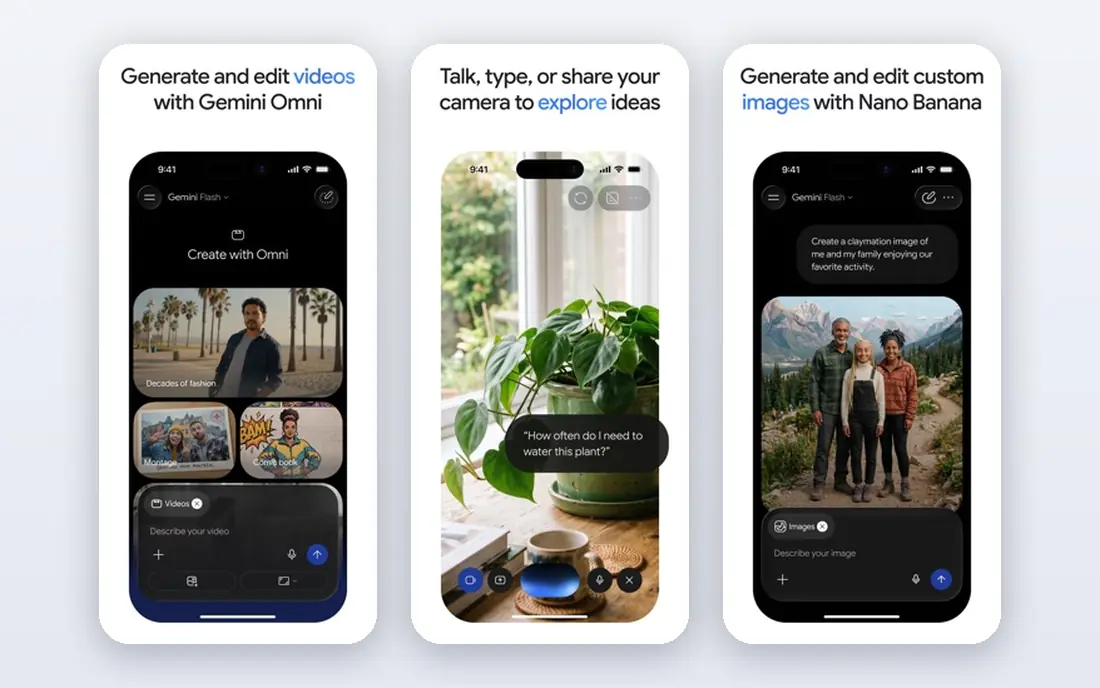
Gemini, from Google, is the natural AI chatting app if you already live in Google apps. It can draw on web search, help with Docs and Gmail workflows on eligible plans, and handle long documents and media tasks in the Gemini app. The free tier is generous compared with many rivals, with web access and image generation included in recent summaries.
Privacy needs attention on first setup. With activity settings on, chats can be used to improve Google AI and a sample may be reviewed, so check the Gemini Apps Privacy Hub and turn off activity saving if you prefer stricter handling. Business and Workspace plans offer stronger data protections, including no training use by default. If you use Google daily, Gemini is the most convenient choice, once you have set privacy controls to your liking.
- Generous free tier with web access and image tools
- Deep integration with Google Search, Gmail, Docs, and Drive on eligible plans
- Strong for research and long documents
- Free tier chats may be reviewed for quality in some cases, so check activity settings
- Paid Google AI Pro plan costs $19.99 per month
- Privacy controls need a careful first setup
Microsoft Copilot suits people who work in Windows and Microsoft 365 all day. The free Copilot app answers questions, searches the web, creates images, and helps with documents, and Copilot in Microsoft 365, on eligible plans, can work inside Word, Excel, Outlook, and Teams. That integration saves time for office work, since you do not need to copy text between apps as often.
The free version is solid for everyday chat, but the deeper Microsoft 365 features require a paid plan, and limits apply at busy times. For work with sensitive data, use a business or enterprise Copilot plan, which offers stronger data protections than a personal plan. If your work life runs on Microsoft tools, Copilot is the most convenient AI chatting app to add.
- Free chat app with web search and image tools
- Integration with Windows, Edge, and Microsoft 365 on eligible plans
- Enterprise plans offer stronger data protections
- Best features require Microsoft 365 or a paid Copilot plan
- Free tier limits apply at busy times
- Experience varies by app and device
Perplexity is different from the other apps here because it is built for research first. When you ask a question, it searches the web and answers with sources listed, so you can open the original page and verify a claim.
The free tier covers basic research, while Pro at $20 per month adds higher limits and access to stronger models. Perplexity is less of a creative writing partner than Claude or ChatGPT, so it works best as a research companion alongside a general chatting app. Use it when accuracy and sources matter more than a long, polished draft.
- Answers with cited sources you can check
- Strong for research, fact checking, and exploring unfamiliar topics
- Free tier covers basic research chats
- Less suited to long creative writing than Claude or ChatGPT
- Pro plan costs $20 per month for higher limits and stronger models
- Sources still need checking, since citations can be imperfect
DeepSeek is the best option on this list for users who want advanced chatting without paying. Its chat app offers strong reasoning for math, logic, and coding, and it has attracted attention for offering high capability at no consumer cost. For students, developers, and curious users on a budget, DeepSeek is a genuine free alternative to paid plans elsewhere.
The trade offs are ecosystem and familiarity. DeepSeek does not integrate with Google Workspace or Microsoft 365 in the same way Gemini and Copilot do, and US users should read its privacy policy carefully before pasting sensitive information. As with every app here, avoid sharing passwords, financial details, or personal data in chats. For free, capable chatting, DeepSeek is hard to beat.
- Free advanced chatting and reasoning tools with no paid consumer plan in recent summaries
- Strong for math, logic, and coding questions
- Simple app and web access
- Fewer ecosystem integrations than Google or Microsoft apps
- Privacy and data handling should be checked on the official policy page
- Support and moderation details are less familiar to US users than larger rivals
Meta AI suits people who already spend time in Meta apps. You can chat with Meta AI inside WhatsApp, Instagram, Facebook, and Messenger in many regions, or use the standalone Meta AI app, without installing a separate tool for every question.
Privacy settings deserve a careful check, since Meta AI data handling follows Meta policies and account settings. For long documents, code, or research with sources, Claude, ChatGPT, or Perplexity will serve you better. For fast, social, everyday chatting at no cost, Meta AI is a practical addition, especially if you already use Meta apps daily.
- Free chat app built into WhatsApp, Instagram, Facebook, and Messenger in many regions
- Easy for everyday questions and social planning
- Voice and image tools in the Meta AI app
- Privacy and data use depend on Meta settings, so check them carefully
- Less suited to long document analysis than Claude
- Feature availability varies by region and app
Mistral Le Chat, from Mistral AI in France, appeals to users who want a European alternative to the large US chatting apps. Le Chat offers everyday chatting, web search, and document help in a clean app, with a free tier for basic use. For users who prefer to keep data with a European provider, or who want an alternative to the biggest platforms, Mistral is a credible choice.
The ecosystem is smaller, so you will find fewer integrations with Google, Microsoft, or social apps than with Gemini, Copilot, or Meta AI. Paid pricing has also changed over time, so we list it as See website and suggest checking the current Mistral pricing page before subscribing. If privacy jurisdiction matters to you and you mainly need a solid general chatting app, Le Chat is worth trying.
- European company with a privacy focused pitch
- Le Chat app for everyday chatting, search, and document work
- Free tier for basic use
- Smaller ecosystem than ChatGPT, Gemini, or Copilot
- Paid plan pricing should be checked on the official site, since it has changed
- Fewer third party integrations than larger rivals
How we picked these
We compared official app pages, pricing pages, and privacy and safety policies for AI chatting apps active in October 2026. We required a real mobile or web chatting app, a free tier or free access, and published safety, privacy, and moderation practices. We left out apps with unclear moderation, apps built mainly for unfiltered or adult content, and apps with no clear privacy policy. We weighed everyday chat quality, writing and research strengths, free tier value, privacy controls, and ecosystem fit.
How to use an AI chatting app safely
Start with privacy settings. On every app here, open settings on day one, check whether chats are used for training, and turn that option off if you prefer stricter handling. Use a business or enterprise plan if you handle client, health, or financial data regularly, since those plans generally do not train on your data by default. Never paste passwords, bank details, ID numbers, or confidential contracts into a personal plan, even if the app feels private.
Next, treat answers as drafts to check, not facts to trust blindly. AI apps can make errors, invent sources, or give outdated advice, especially on medical, legal, or financial topics. For important decisions, verify key facts with a primary source, a clinician, a lawyer, or a financial professional as appropriate. For research, prefer Perplexity or Gemini with sources you can open, and still check the original page before you quote a claim.
Finally, set boundaries for children and vulnerable users. Keep AI chatting apps on shared devices supervised for young users, review chats where the app allows it, and teach children not to share personal details with a chatbot. If a chat ever encourages self harm, illegal activity, or sharing intimate images, stop, report it in the app where possible, and seek help from a trusted adult or professional. This article is general information, not medical, legal, or financial advice.
Choosing between free and paid plans
Start free on two apps for two weeks, and only pay if you keep hitting limits. Paid plans mainly buy higher usage, stronger models, priority access, and extra tools such as advanced image or document features. If you chat a few times a day, free tiers from ChatGPT, Gemini, and DeepSeek will usually be enough. If you chat all day for work, a $20 per month plan from ChatGPT, Claude, or Perplexity is easier to justify.
Getting better answers
Be specific in your prompt: state the goal, the audience, and the format you want, and paste only the context the app needs. Ask for sources when accuracy matters, ask for a shorter version when an answer is too long, and correct the app when it misunderstands you. Short, clear chats with one task each usually give better results than a long chat that mixes many unrelated questions.
FAQ
What is the best AI chatting app?
ChatGPT is the best AI chatting app for most people, thanks to a strong free tier and broad tools for writing, coding, images, and voice. Claude is better for long writing and analysis, Gemini is better for Google users, and Perplexity is better for research with sources. Try the free tiers of two apps for a week, then keep the one that fits your daily tasks best.
What are the best AI chatting apps for free?
ChatGPT, Gemini, DeepSeek, and Meta AI all offer strong free chatting, with different strengths. Gemini free tier is generous for research and images, DeepSeek is strong for free reasoning and coding, ChatGPT free tier covers most everyday chats, and Meta AI is convenient inside social apps. Start free, and only pay if you regularly hit usage limits or need stronger models.
Which AI chatting app is best for chatting and writing?
Claude is our pick for long writing and careful analysis, because its answers are well structured and it handles long documents well. ChatGPT is a strong all round writing partner, with more image and media tools. If you write daily for work, test both free tiers with a real draft, and pick the one whose editing style you prefer.
Is it safe to use an AI chatting app?
The apps on this list publish safety, privacy, and moderation policies, and they include controls for data training and reporting, which is why we included them. Safety still depends on how you use them: check training settings, do not share sensitive personal or financial data in a personal plan, and verify important answers before acting on them. Avoid apps that promise no moderation or no safety checks, since those apps lack the protections that matter if a chat goes wrong.
Do AI chatting apps use my chats for training?
It depends on the app and the plan. On personal plans, some apps use chats for training by default unless you opt out, while business plans generally do not train on your data. Check the privacy settings for ChatGPT, Claude, Gemini, and any other app you use, and turn off training use if you prefer. Never assume a chat is private just because it feels like a private conversation.