8 AI Sonos App Alternatives in 2026: Music and Speaker Control Compared
Discover 8 AI Sonos app alternatives for multiroom music, from Roon and Plexamp to WiiM Home and BluOS, with smart control and speaker support for your home.
- Editor's choice
 Roon
Premium library and Sonos control
Starts at$14.99 per monthVisit roonlabs.comFull review - Great alternative
 WiiM Home
WiiM multiroom speakers
Starts atFreeVisit wiimhome.comFull review - Also consider
 Plexamp
Personal library smart mixes
Starts at$4.99 per monthVisit plexamp.comFull review
TL;DR:
- Roon is the strongest premium alternative for Sonos owners, with rich library management, smart recommendations and Sonos device support.
- WiiM Home and BluOS are free companion apps for their own hardware, and they offer multiroom control, room correction and streaming service integration.
- Plexamp suits people with a personal music library, using smart mixes and sonic analysis to surface tracks they may have missed.
- Audirvana, Symfonium and Lyrion Media Server give more control over local files, formats and playback quality than a basic speaker app.
- No single app controls every speaker brand equally well, so check Sonos, AirPlay, Chromecast and Roon Ready support before committing to one system.
Quick comparison
| Tool | Best for | Starts at | Free plan? | |
|---|---|---|---|---|
| Roon | Premium library and Sonos control | $14.99 per month | Free trial | Visit |
| WiiM Home | WiiM multiroom speakers | Free | Yes | Visit |
| Plexamp | Personal library smart mixes | $4.99 per month | No | Visit |
 BluOS | Bluesound and NAD multiroom | Free | Yes | Visit |
 Audirvana | High quality local playback | See website | Free trial | Visit |
 HEOS | Denon and Marantz multiroom | Free | Yes | Visit |
 Lyrion Media Server | Self-hosted multiroom audio | Free | Yes | Visit |
 Symfonium | Android local and server playback | See website | Free trial | Visit |
The best AI Sonos app alternatives
The Sonos app controls Sonos speakers, groups rooms and streams from services, but some owners want smarter recommendations, better library tools or control across brands. The apps below cover that ground: some work directly with Sonos, others work with similar multiroom speakers and give a better music experience alongside them. We compared official feature pages, pricing and device support to sort them by system.

Roon is the closest thing to a premium brain for a home music system. It pulls together local files and streaming from TIDAL and Qobuz, adds detailed artist, album and credit information, and builds recommendations from listening history. Sonos devices can act as Roon endpoints, so a Sonos owner can keep existing speakers while getting a much richer browsing and queue experience.
The cost and setup are the honest catches. Roon costs $14.99 per month, or $12.49 per month billed annually, with a lifetime option also offered, and it needs a Roon Core running somewhere on the network. For listeners with a large library who value discovery and sound shaping, that trade is worth it. For casual streaming, a free speaker app will do.
- Rich metadata, lyrics and recommendations
- Works with Sonos and many other devices
- Strong DSP and multiroom grouping
- Subscription cost is high
- Needs a core server running on a computer or dedicated device
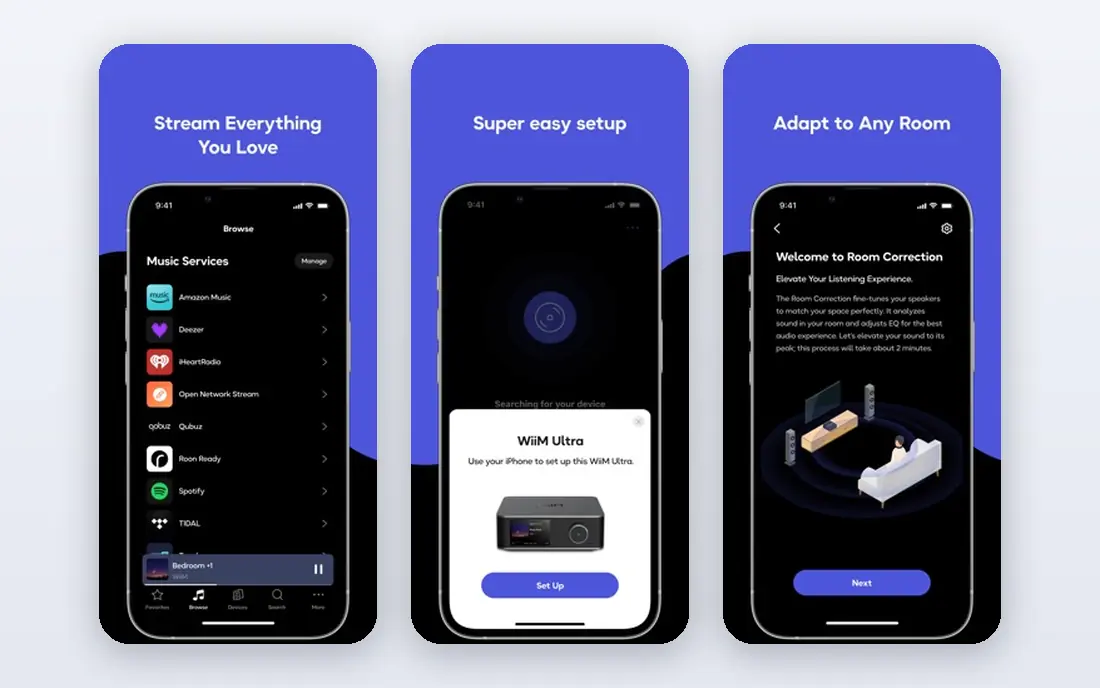
WiiM Home controls WiiM streamers, amplifiers and speakers, and it has become a strong Sonos-style alternative for people building a new system. It groups rooms, sets presets for favourite services and stations, applies EQ and room correction, and supports Spotify Connect, TIDAL Connect, Qobuz, AirPlay 2 and Chromecast. Voice control through Alexa and Google Assistant is also included.
WiiM Home does not replace the Sonos app for Sonos speakers themselves. Its value is as a parallel system: a household that adds WiiM devices, or starts fresh with WiiM, gets multiroom control without a subscription. Recent updates have also added headless Plexamp support and native Squeezelite playback, which broadens its appeal for self-hosted libraries.
- Free with WiiM hardware
- Multiroom grouping and presets
- Room correction and EQ built in
- Needs WiiM hardware for full control
- Not a direct Sonos controller

Plexamp is the music player for people who own their music. It connects to a Plex Media Server, analyses tracks for sonic similarity, and builds mixes that move from one song to a related track in a way that feels curated rather than random. Features such as sonic adventures and guest DJs give a personal library the kind of discovery that streaming apps usually reserve for their own catalogues.
The catch is the setup. Plexamp needs a server and a Plex Pass subscription, starting at $4.99 per month, and it shines only when the library behind it is well tagged. For Sonos owners, Plexamp can cast to compatible devices, and WiiM hardware now supports headless Plexamp playback. For listeners who mainly stream, a service app may be simpler.
- Smart sonic mixes and DJ-style features
- Works with a personal Plex library
- Downloads for offline listening
- Needs a Plex Media Server and Plex Pass
- Less useful without a personal library
BluOS is the control app for Bluesound speakers and streamers, plus compatible NAD amplifiers and other BluOS devices. It brings together more than 20 music services, internet radio and local libraries in one interface, and it groups rooms for whole-home playback or plays different music in each room. The app runs on phones, tablets and computers.
BluOS is not a Sonos controller, but it is a direct alternative system for buyers who want high-resolution multiroom audio. The hardware costs more than entry-level smart speakers, and the app experience is tied to that hardware. For a household building a higher-end multiroom setup, BluOS offers a polished and stable control layer.
- Free with Bluesound and NAD hardware
- Supports many streaming services
- Multiroom grouping across rooms
- Needs Bluesound, NAD or compatible hardware
- Hardware prices sit above budget speaker ranges
Audirvana targets listeners who care about playback quality. It manages local libraries, supports high-resolution formats, and can send audio to network players, USB DACs and compatible streamers. Smart playlists, metadata handling and audio processing give it more depth than a basic control app, and it suits a main listening room as well as a wider home system.
The interface and setup assume some audio knowledge, and pricing varies by product and licence type, so check the current Audirvana site before buying. Audirvana will not control Sonos speakers in the same direct way as the Sonos app, but it can sit alongside a multiroom system for serious listening from a computer or server.
- High-resolution playback and format support
- Clean library management
- Network playback to compatible devices
- Subscription or licence cost
- Setup is more technical than a speaker app
HEOS is the multiroom platform for Denon and Marantz home audio, including receivers, soundbars and wireless speakers. The HEOS app groups rooms, streams from services such as Spotify, TIDAL and Amazon Music, and plays local files from a network. It also integrates with voice assistants and smart home routines on supported devices.
Like WiiM Home and BluOS, HEOS is a system alternative rather than a Sonos controller. Households that already own Denon or Marantz gear get a free and capable control app without a subscription. Buyers starting fresh should compare HEOS speaker prices and service support with Sonos and WiiM before choosing a platform.
- Free with HEOS hardware
- Multiroom grouping for Denon and Marantz
- Supports major streaming services
- Needs HEOS hardware
- App experience varies by device generation
Lyrion Media Server, formerly Logitech Media Server, is the free, open source option for self-hosted multiroom music. It runs on a computer or small server, serves a local library to Squeezebox-style players, software players and compatible hardware, and syncs rooms for whole-home playback. Plugins add services, smart mixes and extra player support, and WiiM devices now include native Squeezelite support.
The trade is effort. Installation, plugin choices and player setup take more work than opening a commercial app, and the web interface is functional rather than polished. For hobbyists who want full control, no subscription and a system that can run for years on modest hardware, Lyrion is a strong and honest alternative.
- Free and open source
- Multiroom sync across many player types
- Large plugin library
- Setup needs technical confidence
- Interface looks dated compared with commercial apps
Symfonium is an Android music player that brings smart library tools to local files and server libraries, including Subsonic-style servers, Jellyfin and Plex-style sources. It offers smart playlists, automatic mixes, offline downloads and a modern interface that feels closer to a streaming app than to a file browser. For Android users with a personal collection, it is a clear step up from a basic player.
The limit is platform. Symfonium is Android only, so iPhone users need another option, and casting to Sonos or other speakers depends on the device and protocol in use. As a personal listening and library app that feeds a home system, though, it gives strong value for a modest licence cost.
- Smart filters, mixes and offline playback
- Supports local files and several servers
- Polished Android interface
- Android only
- Casting options depend on the target device
How we picked these
We compared official app and pricing pages for Roon, WiiM Home, Plexamp, BluOS, Audirvana, HEOS, Lyrion and Symfonium, and we checked device support for Sonos, AirPlay, Chromecast and Roon Ready hardware. We treated direct Sonos control and similar multiroom control as the core test, with smart recommendations, library tools and playback quality as the differentiators. Prices are listed from vendor pages where published, and as available on request where they vary by licence.
Choosing the right app for your speakers
Start with the speakers you already own. Sonos owners who want a richer library should test Roon first. WiiM, Bluesound and Denon owners should use the free app made for their hardware before adding another layer. Personal library owners should test Plexamp, Audirvana, Lyrion or Symfonium depending on their server setup and phone platform.
Test grouping and casting before you buy hardware
Multiroom grouping, sync and casting vary by app and device. Test how rooms group, how quickly playback starts, and how the app handles a phone call or a network drop. Also check that the streaming services you pay for are supported natively, since a missing service can force an awkward workaround.
Keep a fallback control path
Smart apps and servers can fail, so keep a simple fallback. That may be the speaker maker's own app, Spotify Connect, AirPlay or a hardware remote. A fallback keeps music playing when a server is down or an update breaks a smart feature, and it matters most in a house where not everyone wants to learn a new system.
FAQ
Can Roon control Sonos speakers?
Yes. Sonos devices can work as Roon endpoints, so Roon can play to Sonos speakers while adding richer library browsing, recommendations and DSP. A Roon Core and a subscription are required, and Sonos grouping behaviour should be tested with your specific models.
Is there a free alternative to the Sonos app?
WiiM Home, BluOS and HEOS are free, but they control their own hardware rather than Sonos speakers. Lyrion Media Server is free and open source for self-hosted multiroom playback, while Plexamp and Roon require a subscription.
What is the best AI music app for Sonos?
Roon is the strongest premium choice for Sonos owners who want smart recommendations and deep library tools. Plexamp is better for a personal library with sonic mixes, while WiiM Home is the better free system if you are building a new multiroom setup from scratch.
Do these apps work with Spotify and TIDAL?
Most do, either natively or through Connect-style casting. Roon supports TIDAL and Qobuz rather than Spotify, so Spotify-first listeners should check service support for each app before subscribing.
Can I use Plexamp without a Plex Pass?
Plexamp requires Plex Pass for full use, starting at $4.99 per month. A free Plex account covers basic server use, but Plexamp features and mobile playback need the paid tier.
Which app is best for a personal music library?
Plexamp suits a well-tagged library with smart mixes, Audirvana suits high-resolution listening, Lyrion suits self-hosted multiroom on a budget, and Symfonium suits Android users who want a polished player for local and server files.