Best Financial Calculator Apps in 2026: 9 Apps Compared
Find the best financial calculator app for loans, savings and retirement. We compare 9 finance calculator apps, free tools, features and limits in 2026.
- Editor's choice
 Omni Calculator
Broad finance questions
Starts atFreeVisit omnicalculator.comFull review - Great alternative
 10bii Financial Calculator
Classic finance calculations
Starts atFreeVisit 10bii.comFull review - Also consider
 Calculator.net Mortgage Calculator
Mortgage detail
Starts atFreeVisit calculator.netFull review
TL;DR:
- The best financial calculator app for most people is a broad tool such as Omni Calculator or a dedicated loan and mortgage app, depending on the question you need answered.
- Specialist calculators beat general apps for mortgages, compound growth and retirement, because they show amortization, totals and timelines clearly.
- Free web calculators often beat paid mobile apps for a one-time question, while mobile apps suit repeated checks on the go.
- Always check the interest rate, term, fees and tax assumptions behind a result, because small changes move totals by a large amount.
- This is not financial advice. These apps show math based on your inputs, and they do not replace advice from a qualified professional for major decisions.
Quick comparison
| Tool | Best for | Starts at | Free plan? | |
|---|---|---|---|---|
| Omni Calculator | Broad finance questions | Free | Yes | Visit |
| 10bii Financial Calculator | Classic finance calculations | Free | Yes | Visit |
| Calculator.net Mortgage Calculator | Mortgage detail | Free | Yes | Visit |
 Bankrate Loan Calculator | Loan payments and totals | Free | Yes | Visit |
 Compound Interest Calculator | Growth over time | Free | Yes | Visit |
 Financial Calculators | Many calculators in one app | Free | Yes | Visit |
 Rocket Mortgage Calculator | Home loan planning | Free | Yes | Visit |
 Retirement Calculator | Retirement savings checks | Free | Yes | Visit |
 Calculator Soup | Everyday money math | Free | Yes | Visit |
The best financial calculator apps
This is not financial advice. These tools calculate results from the numbers you enter. For mortgages, retirement or tax decisions, confirm key figures with a lender, plan provider or qualified adviser.
Omni Calculator is our pick for most people with a varied question, because it covers loans, mortgages, compound interest, savings, retirement and many everyday money problems in one place. Each calculator explains its inputs in plain language, which helps when you are unsure whether to enter an annual or monthly rate.
The trade-off is focus. Omni is a library, not a single dedicated app, so it will not track your loans or send you reminders. For a one-time check or a comparison of two options, that breadth is a strength. Use it to test scenarios, then save the inputs that matter for your decision.
- Hundreds of calculators in one site
- Clear inputs and explanations
- Free web access
- Web-first, not a single focused mobile app
- Some calculators need careful input checks
10bii mirrors the classic financial calculator used in finance courses and exams. It handles present value, future value, payments, interest rates and periods, plus amortization schedules. That structure suits students, analysts and anyone who learned finance with a physical calculator.
Beginners may find the layout technical at first, because it assumes you know terms such as N, I/YR and PMT. A short tutorial or the built-in help will bridge that gap. If you need classic time value math on your phone, 10bii is the most faithful mobile option here.
- Familiar time value of money layout
- Amortization and cash flow tools
- Useful for students and professionals
- Interface feels technical for beginners
- Some advanced features need a paid version
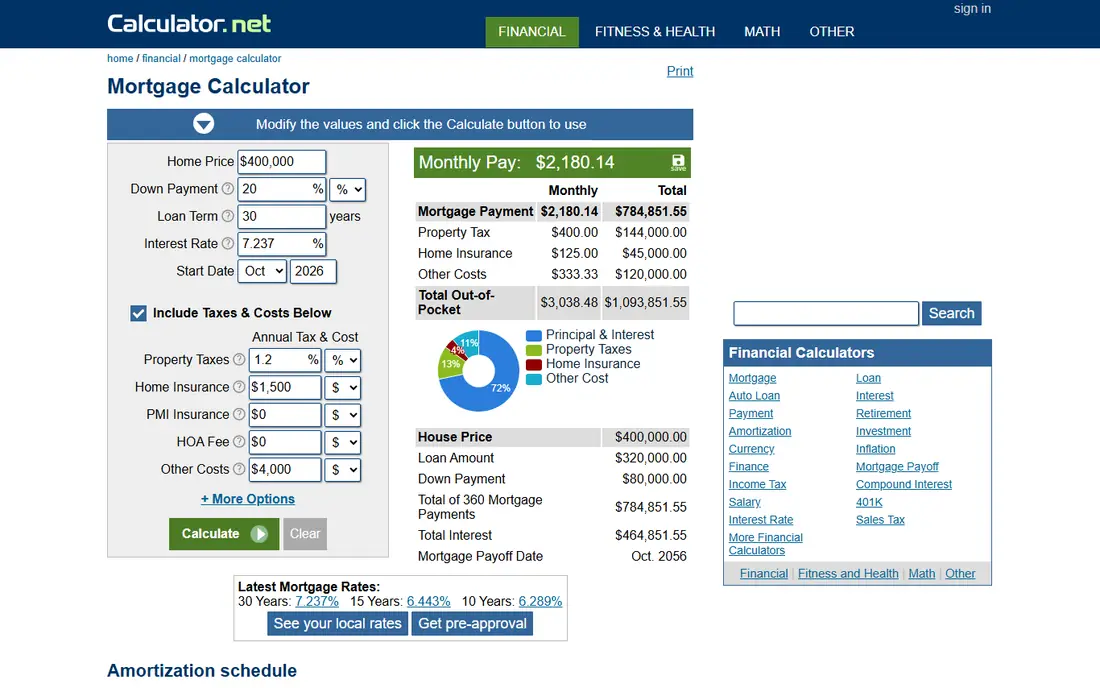
Calculator.net Mortgage Calculator is a strong pick when a home loan is the question. It shows monthly payments, amortization schedules and the effect of extra payments, which helps you see how a small extra payment changes total interest over time. That detail matters more than a single monthly figure.
It will not help much with retirement or investment questions, so use it as a specialist tool. Enter the real rate, term, taxes and insurance if the tool supports them, because a payment that ignores those costs will understate your true monthly outlay.
- Detailed mortgage amortization
- Extra payment scenarios
- Clear total interest views
- Mortgage focused, not a general finance app
- Web and app availability varies by store
Bankrate Loan Calculator suits car loans, personal loans and other fixed loans. Enter the amount, rate and term, and it shows the monthly payment, total interest and payoff timeline. Comparing two terms side by side is easy, which helps you see why a longer term lowers the payment but raises total cost.
The catch is inputs. Fees, variable rates and early payoff rules can change the real cost, and a simple calculator may not include them. Use the result as a comparison tool, then confirm the final terms with the lender before you sign.
- Simple loan payment math
- Total interest and payoff views
- Easy comparison of loan terms
- Loan focused
- Results depend on correct rate and fee inputs
Compound growth is hard to judge without a chart, and a dedicated compound interest calculator makes it visible. Enter a starting amount, regular contributions, a return assumption and a time horizon, and you can see how growth builds over years. That view helps savers understand why starting early and contributing regularly matter.
Treat the return as an assumption, not a promise. Markets vary, fees reduce returns, and taxes can change the outcome. Use the calculator to compare habits, such as saving monthly versus yearly, rather than to predict an exact future balance. The Investor.gov compound tool is a free, plain option for that purpose.
- Free
- Clear compound growth visuals
- Useful for savings and investment education
- Educational tool, not a portfolio tracker
- Returns are assumptions, not promises
Financial Calculators offers a broad library of money calculators on the web, covering loans, mortgages, savings, retirement and credit cards. That breadth suits people who face different money questions over time and want one bookmarked site rather than many apps.
The design feels older than Omni Calculator, and some tools are simpler than specialist apps. For a quick, free check, that simplicity is fine. For a major decision, pair a result here with a specialist tool and a lender or adviser check.
- Wide calculator library
- Loan, mortgage, retirement and savings tools
- Free web access
- Older web design in places
- Tools vary in depth
Rocket Mortgage Calculator is another specialist home loan tool, useful when you want a payment estimate that includes more than principal and interest. Where the tool supports taxes, insurance and association dues, the monthly figure will be closer to a real housing payment.
As with any mortgage tool, the result is only as good as the rate and costs you enter. A pre-approval or lender quote will give firmer numbers. Use this app to compare home prices, down payments and terms, then confirm the winning scenario with a lender.
- Mortgage payments with taxes and insurance in places
- Amortization views
- Extra payment options
- Mortgage only
- Inputs must be checked against a real lender quote
Retirement calculators from major providers such as Fidelity help you check whether current savings and contributions point toward your goal. They often show a savings gap, a projected income view and the effect of retiring earlier or later. That gap view is more useful than a single balance number.
Provider tools can lean toward their own products and assumptions, so read the assumptions page before you act. This is not financial advice, and a retirement plan with tax, health and pension details deserves a qualified adviser review. Use the calculator to start the conversation, not to finish it.
- Retirement planning tools from a major provider
- Savings gap views
- Free calculators on the site
- Provider tools may assume their products
- Results are estimates, not advice
Calculator Soup suits everyday questions: a loan payment, a savings total, a simple interest check. The interface is straightforward, and the tools load fast on mobile, which helps when you need a number during a conversation with a lender or seller.
Depth is the limit. For amortization detail, use Calculator.net Mortgage Calculator or 10bii. For retirement planning, use a provider tool. Calculator Soup wins when you want a fast, plain answer without learning a technical layout.
- Simple everyday calculators
- Loan, savings and interest tools
- Easy mobile use
- Less depth than specialist tools
- Check assumptions for tax and fees
How we picked these
We compared official calculator pages, app store listings and public feature descriptions for finance calculator apps and sites live in 2026. We favored tools with clear inputs, amortization or timeline views where relevant, and free access, and we included both mobile apps and web calculators because many readers use both. We did not claim hands-on testing. This is not financial advice, and we favored tools that state their assumptions plainly.
How to use a financial calculator without fooling yourself
Start with real inputs. Use the actual rate from a lender quote, not a headline rate, and include fees, taxes and insurance where the tool allows them. A calculator that ignores those costs will give a monthly figure that looks better than reality.
Next, test a range, not a single number. Try a higher rate, a longer term and a lower contribution, and see how the result moves. That range shows your risk. If a small rate rise breaks your plan, the plan needs more buffer before you commit.
Finally, separate math from advice. A calculator can show that a loan costs a certain amount, but it cannot tell you whether that loan fits your job, health, family plans or risk tolerance. For a mortgage, retirement or large investment decision, take your calculator results to a qualified adviser or lender and ask what the calculator missed.
FAQ
What is the best financial calculator app?
Omni Calculator is the best broad pick for varied questions, while 10bii suits classic time value math and Calculator.net Mortgage Calculator suits home loans. Choose based on your question, not on a single app for all money problems.
What is the best finance calculator app free?
Omni Calculator, Investor.gov compound tools and provider retirement calculators are free and strong for common questions. Mobile apps such as 10bii also offer free tiers for repeated use.
Can a financial calculator app give financial advice?
No. These apps show math based on your inputs, and this is not financial advice. For major decisions, confirm results with a lender, plan provider or qualified adviser who can consider your full situation.
How accurate are loan calculator results?
Results are accurate for the inputs you enter, but real loans add fees, variable rates, taxes and insurance that a simple tool may miss. Always compare a calculator result with a lender quote before you sign.
Which calculator should I use for retirement?
Use a retirement calculator from a major provider for a savings gap view, then test different retirement ages and contribution levels. Treat the result as an estimate, and review it with a qualified adviser for tax and pension details.
Sources
- https://www.omnicalculator.com
- https://www.10bii.com
- https://www.calculator.net/mortgage-calculator.html
- https://www.bankrate.com/calculators/loan-calculator.aspx
- https://www.investor.gov
- https://www.financialcalculators.com
- https://www.rocketmortgage.com/mortgage-calculators
- https://www.fidelity.com
- https://www.calculatorsoup.com