Best Baby Monitor With App in 2026: 8 Monitors Compared
The best baby monitor with app options compared by video, sleep data and subscriptions, so you can pick a monitor that fits your home well before buying.
- Editor's choice
 Nanit Pro
Sleep data and overhead view
Starts at$289Visit nanit.comFull review - Great alternative
 Owlet Dream Duo
Pulse and oxygen readings
Starts at$379.99Visit owletcare.comFull review - Also consider
 Miku Pro
Contact-free breathing tracking
Starts at$249Visit mikucare.comFull review
TL;DR:
- Nanit Pro suits parents who want sleep data, while Owlet Dream Duo suits parents who want pulse and oxygen readings.
- Check what still works without a subscription, since live video is usually free but history and analytics often are not.
- A monitor with a dedicated screen, such as Eufy or Harbor, suits parents who do not want to rely only on a phone.
- No consumer monitor prevents SIDS or replaces safe sleep practices, and wearable readings are not a substitute for medical advice.
Quick comparison
| Tool | Best for | Starts at | Free plan? | |
|---|---|---|---|---|
| Nanit Pro | Sleep data and overhead view | $289 | Yes | Visit |
| Owlet Dream Duo | Pulse and oxygen readings | $379.99 | Yes | Visit |
| Miku Pro | Contact-free breathing tracking | $249 | Yes | Visit |
 Cubo Ai Plus | AI safety alerts | See website | Yes | Visit |
 Eufy E21 | App plus dedicated screen | $259.99 | Yes | Visit |
 Harbor | Privacy and local backup | $499 | Yes | Visit |
 Lollipop Baby Camera | Simple app video monitoring | See website | Yes | Visit |
 Hubble Connected Nursery Pal | Budget app monitoring | See website | Yes | Visit |
The best baby monitor with app
App monitors let you check video, sound and sleep data from your phone, at home or away. The trade-offs are Wi-Fi dependence, subscription costs and privacy, so we compared official feature pages, pricing pages and subscription terms for monitors with a working app in the United States.
Nanit Pro watches from above, which gives a clear view of the crib and supports breathing motion tracking with special Breathing Wear. Live video, sound and motion alerts, two-way audio and room sensors work without a paid plan. That free core makes Nanit more usable than many subscription monitors.
The Insights plans add sleep analysis, video history and saved memories, with Memories listed at $120 per year and Milestones at $300 per year in recent roundups. If you want sleep data, budget for that cost. If you only want live video, Nanit still works well without it.
- Overhead view with breathing motion tracking
- Sleep analytics
- Temperature and humidity sensors
- Insights subscription needed for history
- Overhead mount required for sleep features
- Higher long-term cost
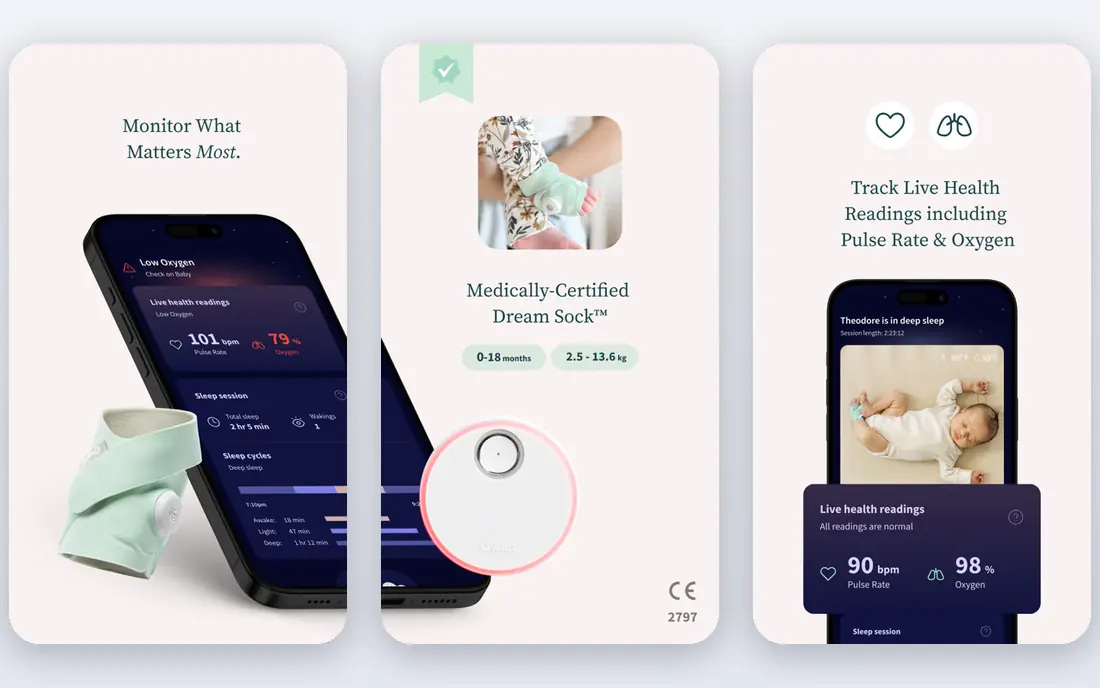
Owlet Dream Duo pairs a camera with the Dream Sock, a wearable sensor that measures pulse rate and oxygen for healthy babies aged 1 to 18 months. A base station glows green when readings sit in range and alerts when they move outside it, while the app shows live readings and sleep trends. Core monitoring does not require a subscription.
The sock needs a good fit and daily charging, and false alerts can happen if it slips. Owlet states the Dream Sock is not a SIDS prevention device and is not meant for babies with diagnosed heart or breathing conditions. For parents who want numeric readings, it is the most direct option here.
- Dream Sock measures pulse rate and oxygen
- Camera with wide view
- Base station alerts at night
- Sock needs nightly charging and correct fit
- Not for babies with diagnosed conditions
- Optional paid extras
Miku Pro tracks breathing and sleep without anything touching the baby, using a sensor in the camera unit. That contact-free approach appeals to parents who do not want a sock or band on their child. Room temperature, humidity and sound are also covered, and the app provides sleep data and alerts.
Full history and some analytics sit behind a paid Care plan, listed in roundups at around $9.99 per month or $99 per year. Check exactly what the free app keeps before buying, since the value of Miku depends on how much history you want.
- Contact-free breathing and sleep tracking
- No wearable needed
- Room sensors included
- Paid Care plan needed for full history
- App-only viewing
- Higher long-term cost
Cubo Ai Plus uses an overhead view and AI alerts for covered faces, danger zones and crying, which can reassure parents who worry about blankets or climbing. Sleep analytics and a portable design make it useful for travel as well as the nursery. The app is clear and modern, with a focus on safety alerts rather than medical readings.
A subscription adds fuller analytics and history, so confirm the free tier before buying. Set up danger zones carefully during installation, since AI alerts only help when the camera view and zones are correct.
- Overhead view
- Danger zone and covered-face alerts
- Sleep analytics
- Portable design
- Some analytics need a subscription
- App-only viewing
- AI alerts need correct setup
Eufy E21 suits parents who want an app but do not want to depend on a phone alone. You get a dedicated 5-inch parent unit alongside the app, and a hybrid mode that can switch between Wi-Fi and local viewing. There is no required subscription, which keeps the long-term cost simple.
Eufy does not track breathing or vitals, and its sleep analytics are basic compared with Nanit or Miku. For straightforward video, sound and room monitoring with a screen in hand, it is a strong, low-fuss choice.
- App plus 5-inch parent unit
- Hybrid Wi-Fi and local mode
- No subscription required
- No breathing or vitals tracking
- Sleep analytics are basic
- Camera features vary by model
Harbor targets privacy-conscious parents. It offers a 10-inch dedicated display, a hybrid system with local backup, and no required core subscription, with AI features offered as an optional paid extra. That design reduces dependence on cloud-only viewing, which some parents prefer.
The upfront price is high, and Harbor does not track vitals. It is also a newer brand than Nanit or Owlet, so long-term support history is shorter. If privacy, a large screen and local backup matter most, Harbor is worth the premium.
- Local backup option
- 10-inch dedicated display
- Strong privacy focus
- No required core subscription
- High upfront price
- No vitals tracking
- Newer brand with smaller community
Lollipop Baby Camera keeps app monitoring simple. It offers live video, crying detection, noise alerts and two-way audio, with flexible mounts for the crib, wall or stand. Setup is quick, and the app is easy to use for grandparents and caregivers who only need video and alerts.
History and extra analytics sit behind paid plans, and there is no dedicated screen. For parents who want a straightforward app monitor without sleep analytics or vitals, Lollipop is a lighter, cheaper-feeling option than the data-heavy leaders.
- Simple app setup
- Crying and noise alerts
- Flexible mounting options
- No dedicated parent unit
- Some history features need a plan
- Smaller feature set than Nanit
Hubble Connected, linked to the Motorola nursery range, offers app-based video and audio monitoring at a lower price than premium brands. Models vary, but most cover live video, two-way talk, temperature alerts and night vision. That breadth at a modest price makes Hubble a sensible budget pick.
The app feels basic next to Nanit or Cubo Ai, and some extras require a plan. Check the exact model, since features differ across the range. For families who want app viewing without sleep analytics or vitals, Hubble covers the essentials.
- App video and audio monitoring
- Wide Motorola-linked range
- Lower cost than premium monitors
- Feature depth varies by model
- Some extras need a subscription
- Interface feels basic
How we picked these
We compared official feature pages, pricing pages and subscription terms for monitors with a working smartphone app in the United States. We favoured monitors that offer live video without a required subscription, clear privacy and security notes, and a real app for iOS and Android. We excluded monitors with no app at all, and we did not claim hands-on testing.
Choosing between video, sleep data and vitals
Video alone suits most families. It shows whether the baby is awake, crying or moving, and it needs no wearable or subscription for basic use. Sleep data suits parents who want patterns and tips, but it usually costs extra. Vitals suit parents who want numeric readings, yet those readings need correct fit, charging and realistic expectations about alerts.
Wi-Fi, privacy and security
App monitors need Wi-Fi, so check your router coverage in the nursery before buying. Use a strong, unique password for the monitor account, turn on two-factor authentication where offered, and keep firmware updated. If privacy worries you, favour a monitor with a dedicated screen, local viewing or local backup, and read the privacy policy for cloud storage terms.
What to check before you buy
Confirm the mount type, since overhead monitors need wall or ceiling fitting while stand monitors sit nearby. Check whether the app works on your phone version, whether multiple caregivers can view, and what happens if Wi-Fi drops. Also confirm the return window, since a monitor that does not suit your nursery layout is hard to judge from a product page alone.
FAQ
What is the best baby monitor with app and screen?
The Eufy E21 is a strong best baby monitor with app and screen option, because it pairs a 5-inch parent unit with app viewing and no required subscription. Harbor offers a larger 10-inch display with local backup, at a higher price. Choose Eufy for value, and Harbor for privacy and screen size.
Do baby monitor apps need a subscription?
Not always. Live video, sound alerts and two-way audio usually work without a subscription on Nanit, Owlet and Eufy. History, sleep analytics and saved clips often need a paid plan, so check the free tier carefully. The best baby monitor app for your family is often the one whose free tier already covers your daily needs.
Are Wi-Fi baby monitors safe?
Wi-Fi monitors can be safe when set up well, with a strong password, two-factor authentication and updated firmware. A dedicated screen or local mode reduces cloud dependence, and a hybrid monitor such as Eufy or Harbor gives you a backup when Wi-Fi is weak. Never share login details, and review who has access to the camera.
Can a baby monitor prevent SIDS?
No. No consumer monitor prevents SIDS, and wearable readings do not replace safe sleep practices. Place the baby on their back on a firm mattress, keep the sleep area clear, and follow guidance from your paediatrician. Use a monitor as an aid, not as a medical safety guarantee.
Which monitor is best for twins?
For twins, look for split-screen viewing and multi-camera support. Nanit supports multiple cameras in one app, and some Hubble and Motorola models support several cameras on one parent unit. Confirm the camera limit and the subscription cost per camera before buying, since twin setups can double the price.